
nucleuswatch




Find nuclear transients in the alert stream, see whether ALeRCE, Fink and Lasair agree on what they are, and send them to Zooniverse.
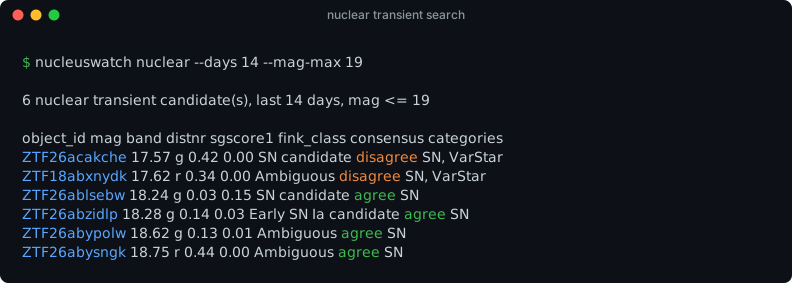
Real output from 23 Oct 2026. Two of six candidates are flagged disagree: Pan-STARRS calls the host a galaxy, but Lasair's Sherlock matches it to a star in SDSS or Gaia. A single-broker filter would let these through without comment.
Why
Rubin/LSST alerts reach astronomers only through community brokers, each with its own API, taxonomy and classifiers. If you care about what a transient actually is, you end up querying each broker by hand and reconciling the answers yourself.
nucleuswatch does that for one science case, nuclear transients (TDEs, AGN flares, nuclear supernovae):
| 🔭 Search | recent ZTF transients sitting on galaxy nuclei, using the standard positional cuts |
| ⚖️ Consensus | every candidate is looked up in ALeRCE, Fink and Lasair, and the result is agree / disagree / insufficient |
| ✅ Validated | recovers 51% of spectroscopically confirmed TDEs at mag ≤ 19 (72% at ≤ 20) and raises their share 4.9× (results) |
| 🌌 ZTF + Rubin | ZTF names and Rubin/LSST diaObjectIds both work, through the same API |
| 📅 Weekly | a scheduled job publishes a digest page and keeps the history in the repo |
| 🧑🔬 Zooniverse | one flag writes a subject set ready to upload; broker opinions stay out of the volunteers' view |
| 🔗 Alertissimo | works with results from the Alertissimo orchestration layer |
General multi-broker orchestration is Alertissimo's job. nucleuswatch is the narrow, science-first layer that sits next to it.
Quick start
git clone https://github.com/bibinthomas123/nucleuswatch.git
cd nucleuswatch
pip install -e ".[plot]"                 # ".[zooniverse]" adds direct upload
cp .env_example .env                     # optional: add your Lasair token
nucleuswatch nuclear --days 7 --mag-max 19            # this week's candidates
nucleuswatch object ZTF21abfmbix --plot lc.png        # one object, all brokers
nucleuswatch object 170587117485817955                # a Rubin/LSST object
nucleuswatch nuclear --days 7 --zooniverse week43/    # + Zooniverse subject set
nucleuswatch digest --days 7                          # weekly record + web page
Lasair needs a free token: make an account, copy it from your profile, and
put LASAIR_TOKEN=... in .env (or export it). Lasair's Rubin server has
separate accounts, so LSST objects need LASAIR_LSST_TOKEN as well. Without a
token, Lasair is skipped and the other two brokers still work.
Screenshots
One object, three brokers
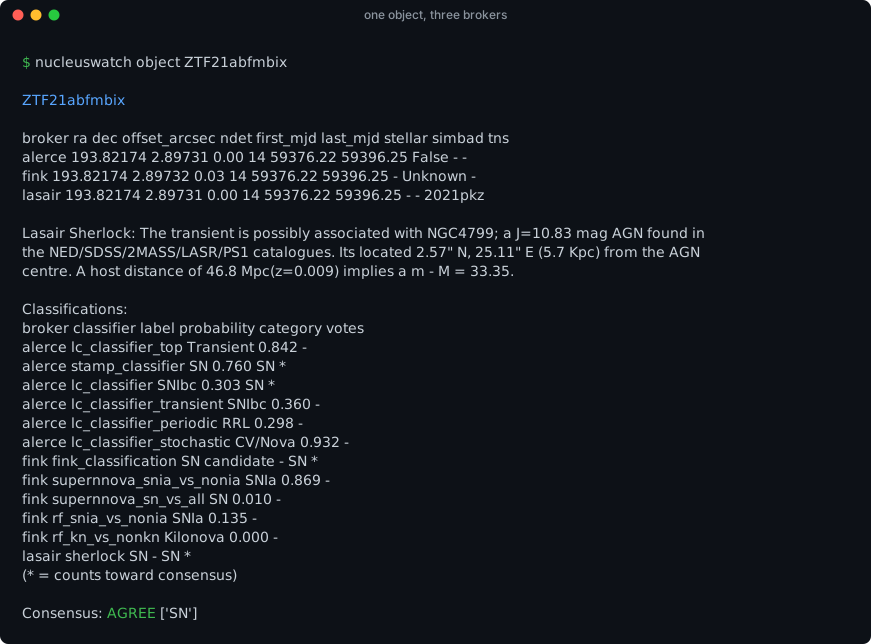
nucleuswatch object shows what each broker reports and which classifiers
vote (*). The position offsets between brokers, the TNS name and Lasair's
Sherlock context all appear on one screen.
The merged light curve
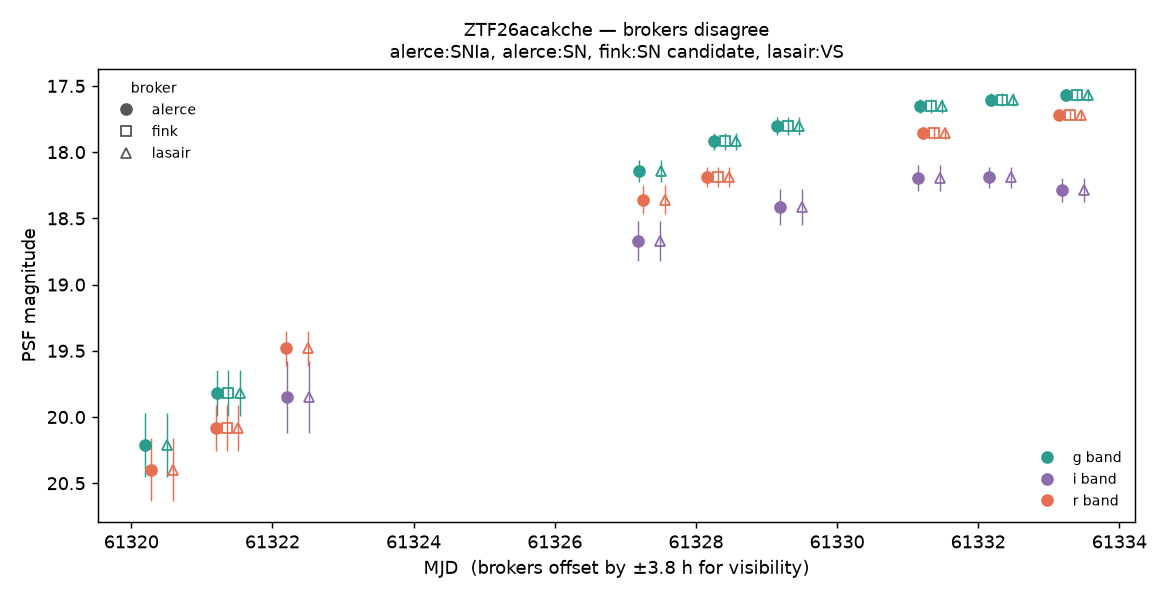
obj.plot() overlays every broker's photometry. Marker shape shows the
broker and colour shows the band, and the title records each broker's vote.
Brokers are nudged a few hours apart so points don't hide each other. Here
you can also see that Fink is missing some alerts (the first g-band point
and all i-band points) that ALeRCE and Lasair have. obj.coverage() lists
exactly which ones.
What Zooniverse volunteers see
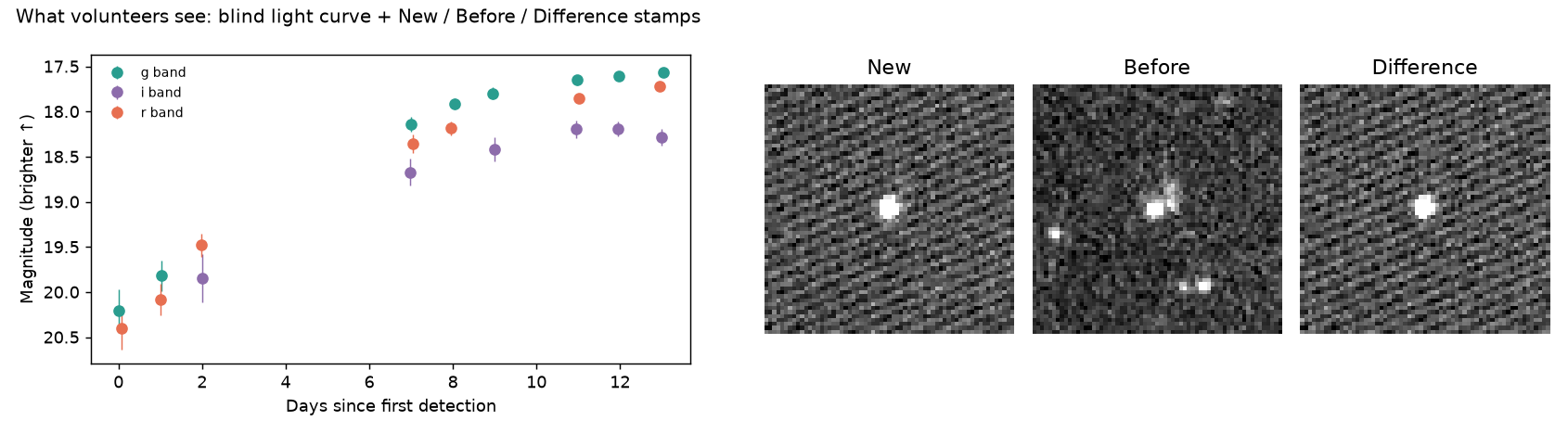
--zooniverse DIR writes two images per subject: a blind light curve
with no ID, no broker labels and time relative to first detection, and
New / Before / Difference stamps of the latest alert.
The manifest uses Zooniverse's column prefixes to control what volunteers can see:
| Manifest column | Visibility | Contents |
|---|---|---|
image1, image2 |
shown | the two images above |
!object_id, !ra, !dec, !<broker>_url |
Talk only, after classifying | for discussion and lookup |
#consensus, #categories, #<broker>_<classifier>, … |
never | broker opinions, kept to compare with volunteer votes |
Upload the folder through the Project Builder, with
panoptes subject-set upload-subjects <set_id> week43/manifest.csv, or:
export ZOONIVERSE_USERNAME=... ZOONIVERSE_PASSWORD=...
nucleuswatch zooniverse-upload week43/ --project 1234 --subject-set "Nuclear, week 43"
How it works
flowchart LR
    F[Fink class streams<br/>SN / Early Ia / SLSN / Ambiguous] --> C{nuclear cuts<br/>distnr · distpsnr1 · sgscore1}
    C --> M[look up each candidate]
    M --> A1[ALeRCE]
    M --> A2[Fink]
    M --> A3[Lasair]
    A1 & A2 & A3 --> N[normalise labels<br/>→ coarse taxonomy]
    N --> V{consensus<br/>agree · disagree · insufficient}
    V --> T[candidates table / CSV]
    V --> Z[Zooniverse subject set]
    AL[Alertissimo result] -. from_alertissimo .-> N
Python API
import nucleuswatch as nw

search = nw.nuclear_transients(days=7, cuts=nw.NuclearCuts(mag_max=19, distnr_max=0.5))
search.candidates            # one row per object: mag, distnr, sgscore1, consensus, ...
search.query                 # exact window + cuts used (store it with your results)

obj = search.objects["ZTF26acakche"]       # or nw.get_object("ZTF21abfmbix")
obj.summary()                # per broker: position, offset, ndet, time span, link
obj.classifications          # every classifier output + normalised category
obj.consensus()              # {'status': 'disagree', 'categories': ['SN', 'VarStar'], ...}
obj.coverage()               # which broker has which alert, and magnitude spread
obj.plot()                   # annotated; obj.plot(annotate=False) is the volunteer view

from nucleuswatch.zooniverse import export_subjects
export_subjects(search, "week43/")
From Alertissimo:
from alertissimo.api import execute_dsl
from nucleuswatch.alertissimo_bridge import from_alertissimo

obj = from_alertissimo(execute_dsl("objects ZTF26acakche from ztf via alerce\nwith lightcurve via fink\n"))
The nuclear cuts
Each alert is tested against these cuts, and the brightest passing alert per object is kept. Every threshold is a parameter.
| Cut | Default | Why |
|---|---|---|
magpsf <= mag_max |
19.0 | bright enough for follow-up |
distnr <= distnr_max |
0.5″ | on the source in the ZTF reference image (the nucleus) |
distpsnr1 <= distpsnr1_max |
1.0″ | a Pan-STARRS1 source is right there |
sgscore1 <= sgscore1_max |
0.5 | and it is galaxy-like (removes variable stars) |
ndethist >= ndethist_min |
2 | not a one-off detection |
isdiffpos |
positive | brightening, not fading |
Validation
How well do the cuts do on objects whose nature is known? The answer comes from
validation/run_validation.py, run against every object Fink cross-matched to a
TNS spectroscopic classification in 2024–2025
(full results):
- 24 / 47 confirmed TDEs (51%) pass the default cuts. The nucleus cuts
remove only 2; the magnitude limit removes 21. Recovery rises to 64% at
mag_max=19.5and 72% atmag_max=20. - Among all spectroscopically classified objects, the cuts raise the TDE share 4.9× (1.2% → 6.0%). Nuclear SNe Ia and SNe II remain the majority. That's expected, and it tells you how much follow-up a nuclear sample costs.
- This measures the cuts, not the selection from Fink's classifier streams.
Rubin/LSST
Pass a Rubin diaObjectId anywhere a ZTF name works, for example
nw.get_object(170587117485817955). The survey is detected from the ID.
- ALeRCE (Rubin stamp classifier; its newest model version votes), Fink
(CATS broad classes, SuperNNova) and Lasair (Sherlock; needs
LASAIR_LSST_TOKEN). - Rubin difference fluxes can be negative, so light curves keep
fluxandflux_errin nJy.magis filled only where flux > 0, and plots use flux. - The nuclear search and image stamps are ZTF-only for now.
Weekly digest
nucleuswatch digest runs a wider search than the default recipe and
publishes it. The weekly workflow
runs it every Monday and deploys the page to GitHub Pages:
https://bibinthomas123.github.io/nucleuswatch/
- Sources: Fink's SN-like, Ambiguous, TNS- and SIMBAD-labelled AGN/TDE streams, plus Lasair objects that Sherlock classes as nuclear transients.
- Depth: mag ≤ 20, where validation recovers 72% of confirmed TDEs. Each candidate is tagged bright (≤ 19) or faint.
- New vs known: objects first detected in the last year are compared across all brokers. Older nuclear sources that were active (mostly AGN) are listed separately. A typical week has ~30 new candidates and ~350 known sources.
- Page contents: headline numbers, a selection funnel, consensus and category breakdowns, a sky map, a table and a detailed card per candidate (host image from the Legacy Survey, merged light curve, stamps, broker votes, TNS name and spectroscopic type), the known-source list, a history chart, the method and validation summary, and an archive.
- Data:
digest/<date>.json,.csvand_known.csvare committed, so the history stays in the repo.
Backfill past weeks with nucleuswatch digest --until 2026-10-16. Lasair's
query API can't search the past, so backfilled weeks use Fink candidates only.
How consensus works
Details
Each broker casts one vote, from its preferred whole-object classifier
(see taxonomy.VOTE_PRIORITY):
- ALeRCE:
lc_classifier, falling back tostamp_classifier. The light-curve classifier sees the whole light curve; the stamp classifier only sees the first images. - Fink:
v:classification(ZTF) or CATS (Rubin). - Lasair: Sherlock.
Labels map to coarse categories (SN, AGN, VarStar, CV/Nova, TDE, …)
through nucleuswatch.categorize. "Unknown" and "Ambiguous" abstain, and so
does Sherlock's NT (nuclear transient). NT says where the source is, and
every candidate here is nuclear by selection, so it says nothing about what
the source is.
- agree: every broker's vote lands in one category
- disagree: votes land in more than one category
- insufficient: fewer than two brokers voted
Every classifier output, including the ones that don't vote, stays in
obj.classifications. Binary scores (e.g. Fink's SNIa-vs-non-Ia) get no
category. When a broker serves several versions of one model, the most
confident one is used. The mapping is deliberately simple; please open an
issue if a label is mapped wrongly.
Brokers
| Broker | Access | Used for |
|---|---|---|
| ALeRCE | public | light curve, stamp_classifier, lc_classifier |
| Fink | public | candidate streams, light curve, classification, cutouts |
| Lasair | free token (separate one for Rubin) | light curve, Sherlock context, TNS name |
A broker that is down, rate-limited or missing a token is reported in
obj.errors and doesn't fail the call. Responses are cached on disk (1 h
for objects, 10 min for streams) to respect rate limits.
Known limitations
- The nuclear search and Zooniverse stamps are ZTF-only; Rubin objects work for lookups, consensus and plots.
- Lasair's Rubin adapter is built against recorded responses and hasn't been run live yet (it needs an LSST token).
- Lasair-sourced candidates don't carry ZTF's alert-level cut fields; they rely on Sherlock's nuclear association and the magnitude limit.
- "New" uses Fink's first-detection date where available, otherwise the year in the ZTF name, so a new flare in an old ZTF object can land in the known list.
- Direct Zooniverse upload is tested against a mocked client, not a live project.
- The Alertissimo bridge handles single-object results. docs/alertissimo.md lists what Alertissimo can't do yet and the bugs found.
Development
python -m venv .venv && source .venv/bin/activate
pip install -e ".[dev]"
pytest                       # offline tests on recorded broker responses
pytest -m live               # also hit the real APIs
python docs/make_images.py   # regenerate the screenshots in this README
python validation/run_validation.py   # rerun the validation (~10 min, cached)
Releases: bump __version__, then publish a GitHub release tagged
v<version>. The release workflow
builds the package and uploads it to PyPI.
Roadmap
- Lasair Sherlock
NT(nuclear transient) as a second candidate source - Fink
latestsrecipe upstream in Alertissimo (notes) - Merge volunteer classifications back into the consensus table
- Weekly digest web page
- Rubin/LSST object IDs
- Validation against spectroscopically classified objects
- Nuclear search on the Rubin stream; ANTARES adapter
- Publish on PyPI
Acknowledgements
nucleuswatch only consumes data that the broker teams produce. If you use it in a paper, please cite the brokers whose results you use (ALeRCE, Fink, Lasair), and Alertissimo if you used the bridge.
License
1 maintainer

Metadata
1 maintainer
Release files for nucleuswatch 1.0.0
For a detailed explanation of source distributions (sdists) and built distributions (wheels), please see the package formats documentation.
Source distribution (sdist)
| File | Size | Uploaded | Provenance | |
|---|---|---|---|---|
| nucleuswatch-1.0.0.tar.gz | 317.1 kB | With provenance | Details |
Built distribution (wheel)
| File | Interpreter | ABI | Platform | Reset |
|---|---|---|---|---|
| nucleuswatch-1.0.0-py3-none-any.whl | Python 3 | none | any | Details |
Total release size: 367.7 kB
Release files / nucleuswatch-1.0.0.tar.gz
| Download URL | nucleuswatch-1.0.0.tar.gz |
|---|---|
| Size | 317.1 kB |
| Tags | Source |
|
SHA-256 checksum How to use checksums |
3be76fe2b11e2c35d604d6c7de24d4c701fb4a1438a6800a0ba9fcc49adf4466
|
|
BLAKE2b-256 checksum How to use checksums |
5da719b2944c5537550d9a8a8d100c78480cfc5daeb192b779deec5888892b77
|
| Upload date | |
|
Uploaded using Trusted Publishing? What is trusted publishing? |
Yes |
| Uploaded via |
twine/7.0.0 CPython/3.13.16
|
Provenance
Provenance describes where a file came from. On PyPI, provenance is shared via attestations, which provide a verifiable record of the build or publishing details. View details, limitations and caveats.


PyPI Publish Attestation
PyPI verified that this artifact, at this checksum, originated from the publisher listed below.
Signed by GitHub Actions, verified by PyPI on Oct 23, 2026.
Transparency logRelease files / nucleuswatch-1.0.0-py3-none-any.whl
| Download URL | nucleuswatch-1.0.0-py3-none-any.whl |
|---|---|
| Size | 50.7 kB |
| Tags | Python 3 |
|
SHA-256 checksum How to use checksums |
08648a138df9b6a2e16cf9cf0d8f52ec7aee97ec3aed5c2319e05f4658e51a98
|
|
BLAKE2b-256 checksum How to use checksums |
407c4bf65fdc02408838259b05949c7abf0c73346f861fb90a055e02217e216b
|
| Upload date | |
|
Uploaded using Trusted Publishing? What is trusted publishing? |
Yes |
| Uploaded via |
twine/7.0.0 CPython/3.13.16
|
Provenance
Provenance describes where a file came from. On PyPI, provenance is shared via attestations, which provide a verifiable record of the build or publishing details. View details, limitations and caveats.
PyPI Publish Attestation
PyPI verified that this artifact, at this checksum, originated from the publisher listed below.
Signed by GitHub Actions, verified by PyPI on Oct 23, 2026.
Transparency logSecurity for nucleuswatch 1.0.0
Provenance
Provenance describes where a file came from. On PyPI, provenance is shared via attestations, which provide a verifiable record of the build or publishing details. View details, limitations and caveats.
Full provenance
All 2 files in this release have been uploaded with provenance metadata.
Attestation for nucleuswatch-1.0.0.tar.gz
PyPI Publish Attestation
PyPI verified that this artifact, at this checksum, originated from the publisher listed below.
Signed by GitHub Actions, verified by PyPI on Oct 23, 2026.
Transparency logA note on package security
PyPI is a repository for distributing packages, not a service for auditing them. While third-party security researchers and our staff do their best to detect and remove malicious packages, PyPI cannot guarantee the quality, security or suitability of any given package.
To learn more about protecting yourself from malicious actors, visit our package security documentation.














