
No project description provided

Project description
Github Actions to update package on pypi
This repo is a reference code to automatically push the latest package release to pypi on creating a github release tags.
Table of Content
Step 1: Add required files
Pypi requires following files to build a package
- setup.py
- setup.cfg
- README.md
Create a new file .github\workflows\publish-to-pypi.yml and copy paste below content.
name: Upload Python Package

on:
  release:
    types: [created]

jobs:
  deploy:
    runs-on: ubuntu-20.04

    steps:
    - uses: actions/checkout@v2
    - uses: actions/setup-python@v2
    - name: Install dependencies
      run: |
        python -m pip install --upgrade pip
        pip install setuptools wheel twine
    - name: Build and publish
      env:
        TWINE_USERNAME: ${{ secrets.PYPI_USERNAME }}
        TWINE_PASSWORD: ${{ secrets.PYPI_PASSWORD }}
      run: |
        python setup.py sdist bdist_wheel
        twine upload dist/*
Step 2: Update PYPI Credentials
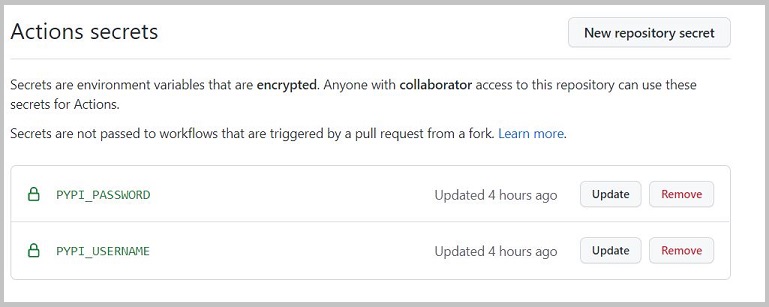
Next add pypi credentials in github secrets with following Keys under settings -> secrets.
- PYPI_USERNAME
- PYPI_PASSWORD
Step 3: Create package release
After files are inplace and pypi credentials has been updated in github repo secrets, next step is to create a release tag in the repo, which will trigger github actions to run workflow defined in .github\workflows\publish-to-pypi.yml, leading to deployment of package in pypi.
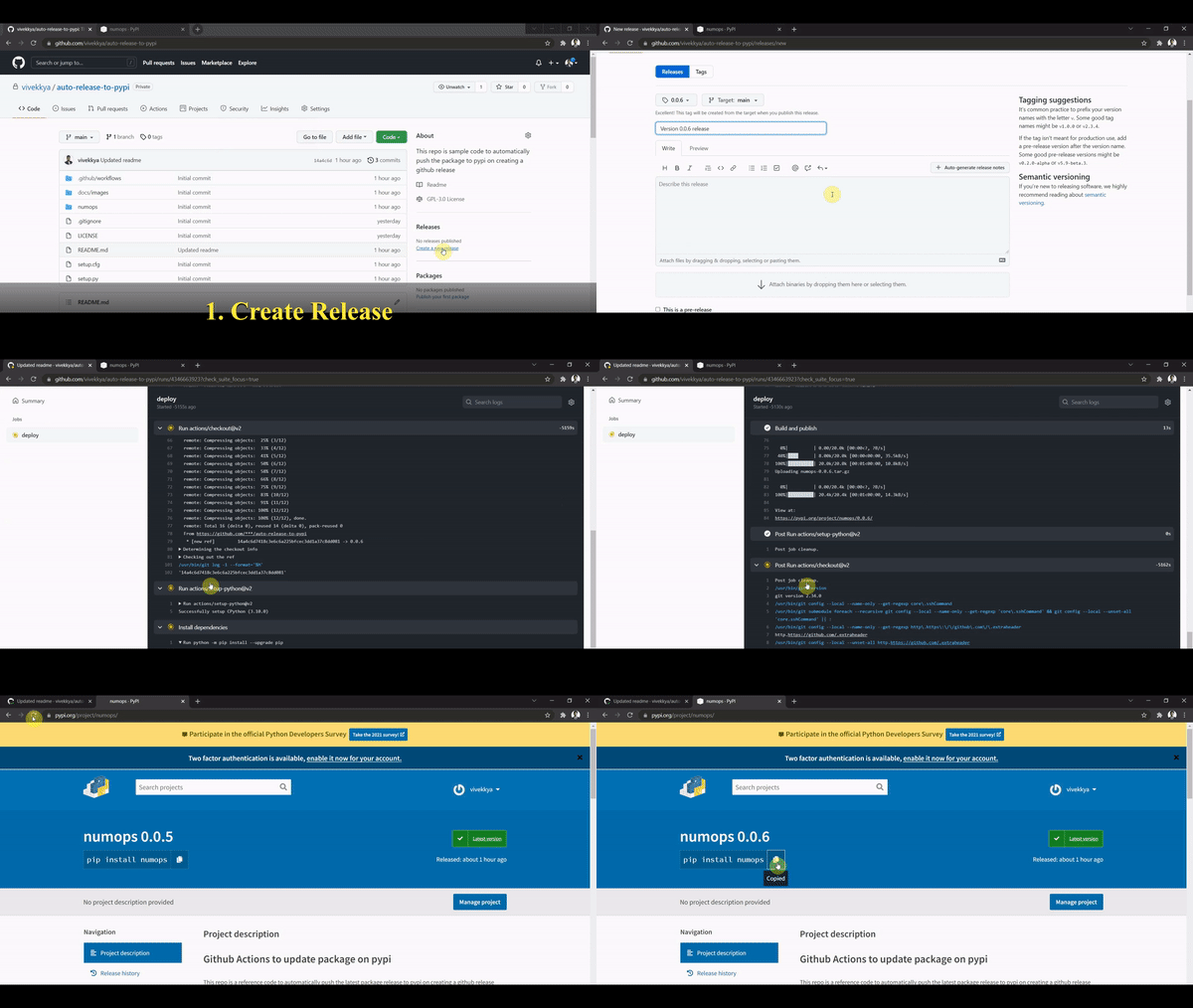
Below GIF covers all the key steps involved
-
Create a release tag : On creation of release tag, github action will automatically start building distribution files and push them to pypi
-
Check Actions : Check whether workflow actions has initiated or not.
-
Validate package updation in pypi : To validate whether package has been pushed to pypi or not. Visit pypi website and search for the package name
-
Install updated package : Run below pip command to install package.
pip install packagename==version


Download files
Download the file for your platform. If you're not sure which to choose, learn more about installing packages.
Source Distribution
Built Distribution
Filter files by name, interpreter, ABI, and platform.
If you're not sure about the file name format, learn more about wheel file names.
Copy a direct link to the current filters
File details
Details for the file numops-0.0.7.tar.gz.
File metadata
- Download URL: numops-0.0.7.tar.gz
- Upload date:
- Size: 15.6 kB
- Tags: Source
- Uploaded using Trusted Publishing? No
- Uploaded via: twine/3.6.0 importlib_metadata/4.8.2 pkginfo/1.8.1 requests/2.26.0 requests-toolbelt/0.9.1 tqdm/4.62.3 CPython/3.10.0
File hashes
| Algorithm | Hash digest | |
|---|---|---|
| SHA256 |
622a324c221d4bd73a52fd315a35e4bc34d5f85fcf516c89ac13f5d2eb5cf913
|
|
| MD5 |
940f69f274201ba146034a65faf6784d
|
|
| BLAKE2b-256 |
d072f3be7a1ad43620aa59e53fed8b3751f26776b79696984a0624f82307da58
|
File details
Details for the file numops-0.0.7-py3-none-any.whl.
File metadata
- Download URL: numops-0.0.7-py3-none-any.whl
- Upload date:
- Size: 15.2 kB
- Tags: Python 3
- Uploaded using Trusted Publishing? No
- Uploaded via: twine/3.6.0 importlib_metadata/4.8.2 pkginfo/1.8.1 requests/2.26.0 requests-toolbelt/0.9.1 tqdm/4.62.3 CPython/3.10.0
File hashes
| Algorithm | Hash digest | |
|---|---|---|
| SHA256 |
f5128206439e4eaac91b51c2a02b4b56a2763b25d1becc9d03a005d0637879cb
|
|
| MD5 |
11a40fcb8b116bbfeff0145087d60f31
|
|
| BLAKE2b-256 |
e043c2c06be7eed4efb6fbe4620f3957188fd1944999383b146b6f3d916be19f
|






