
numpy-groupies





Fast group-by aggregation on plain NumPy arrays. Give it values and a group label for each value, get back one result per group — sum, mean, std, median, min/max, argmax, cumulative sums, custom functions and more. No DataFrame required, with an optional Numba backend for speed.
import numpy as np
import numpy_groupies as npg

group_idx = np.array([3, 0, 0, 1, 0, 3, 5, 5, 0, 4])
a         = np.array([13.2, 3.5, 3.5, -8.2, 3.0, 13.4, 99.2, -7.1, 0.0, 53.7])

npg.aggregate(group_idx, a, func="sum", fill_value=0)
# array([10. , -8.2,  0. , 26.6, 53.7, 92.1])
#  group:  0     1    2     3     4     5
Group 2 never occurs in group_idx, so its slot is filled with fill_value.

Contents: Why numpy-groupies? · Installation · Quickstart · Input forms · Functions · Helper tools · Implementations · Performance · Development
Why numpy-groupies?
The idea behind aggregate is an old one: Matlab's accumarray, the pandas groupby, the MapReduce paradigm, or simply a histogram. What this package adds is a single, consistent array-in/array-out function that covers many reductions.
np.bincount |
pandas.groupby |
numpy_groupies.aggregate |
|
|---|---|---|---|
| Works on bare NumPy arrays | yes | via a Series | yes |
| Reductions beyond sum / count | no | yes | yes |
| Multi-dimensional output (N-D bins) | no | via MultiIndex | yes |
| Arbitrary labels (strings, ...) | no | yes | no — non-negative ints |
| Speed on plain arrays | fast | slower | fast (see below) |
Use it when your data already lives in NumPy arrays, your groups are (or can cheaply be turned into) integer labels, and you want group statistics without the overhead of building a DataFrame. If your labels are strings or other objects, map them to integers first:
labels = np.array(["b", "a", "b", "c", "a"])
values = np.arange(5.0)
uniques, inverse = np.unique(labels, return_inverse=True)
npg.aggregate(inverse, values)       # array([5., 2., 3.])  ->  groups "a", "b", "c"
Installation
pip install numpy_groupies            # NumPy implementation
pip install "numpy_groupies[fast]"    # + Numba for the fastest implementation
conda install -c conda-forge numpy_groupies
NumPy is the only declared dependency. Numba is optional and only the fastest implementation needs it; the pure-Python implementation runs without Numba but still imports NumPy (see Implementations).
If you only want one implementation, you can copy a single file (e.g. aggregate_numpy.py) into your project: paste the contents of utils.py at its top, replacing the from .utils import (...) line.
Quickstart
Counting, and other reductions. The default function is sum; pass a scalar to count items per group (this is what np.bincount does under the hood in the NumPy implementation).
npg.aggregate(group_idx, 1)                     # items per group
npg.aggregate(group_idx, a, func="mean")        # nan for the empty group 2
npg.aggregate(group_idx, a, func="mean", fill_value=-1)
Ignoring NaNs. Every common reduction has a nan… variant, as in NumPy.
g = np.array([0, 0, 0, 1, 1, 2])
v = np.array([1.0, 2.0, np.nan, 4.0, np.nan, np.nan])

npg.aggregate(g, v, func="nanmean")             # array([1.5, 4. , nan])
npg.aggregate(g, v, func="nanvar")              # array([0.25, 0.  , nan])
npg.aggregate(g, v, func="var")                 # array([nan, nan, nan])  (plain var propagates NaN)
Cumulative functions don't reduce; the output has the same length as the input.
npg.aggregate(np.array([0, 1, 0, 1, 0]), np.array([1, 2, 3, 4, 5]), func="cumsum")
# array([1, 2, 4, 6, 9])
Custom functions. Any callable works. Non-numeric output needs dtype=object, and since the default fill value of a custom function cannot be guessed, give one explicitly. Use the NumPy implementation for this: Numba can only compile numeric functions, so with Numba installed the plain aggregate fails on the string example below.
g = np.array([1, 0, 1, 4, 1])
v = np.array([12.0, 3.2, -15, 88, 12.9])
npg.aggregate_np(g, v, func=lambda x: " or ".join(map(str, x)), fill_value="", dtype=object)
# array(['3.2', '12.0 or -15.0 or 12.9', '', '', '88.0'], dtype=object)
Multi-dimensional output. Give group_idx one row per output dimension — here, 1000 values binned into a 15×15×15 cube:
group_idx = np.random.randint(0, 15, size=(3, 1000))
a = np.random.random(1000)
cube = npg.aggregate(group_idx, a, func="sum", size=(15, 15, 15), order="F")
cube.shape            # (15, 15, 15)
np.isfortran(cube)    # True
Aggregating along an axis of an N-D array: the groups run along axis, everything else is carried along.
a = np.array([[99,  2, 11,  14, 20],
              [33, 76, 12, 100, 71],
              [67, 10, -8,   1,  9]])
group_idx = np.array([3, 3, 7, 0, 0])             # one label per column

npg.aggregate(group_idx, a, axis=1)
# array([[ 34,   0,   0, 101,   0,   0,   0,  11],
#        [171,   0,   0, 109,   0,   0,   0,  12],
#        [ 10,   0,   0,  77,   0,   0,   0,  -8]])
Coming from pandas? These are equivalent:
npg.aggregate(group_idx, a, func="sum", fill_value=0)
pd.Series(a).groupby(group_idx).sum().reindex(range(group_idx.max() + 1), fill_value=0).to_numpy()
Input forms
aggregate(group_idx, a, func="sum", size=None, fill_value=DEFAULT, order="C", dtype=None, axis=None, ddof=0, ...) accepts five combinations of input shapes:
| Form | group_idx |
a |
axis |
Output |
|---|---|---|---|---|
| 1 | 1-D, length n | 1-D, len n | — | 1-D, one value per group |
| 2 | 1-D | scalar | — | like form 1, scalar broadcast (e.g. counting) |
| 3 | 1-D, length a.shape[axis] (or broadcastable to a.shape) |
N-D | required | a's shape with axis replaced by the groups |
| 4 | 2-D, shape (d, n) | 1-D, len n | — | d-dimensional; group_idx[:, i] is the position of a[i] |
| 5 | 2-D | scalar | — | like form 4, scalar broadcast |
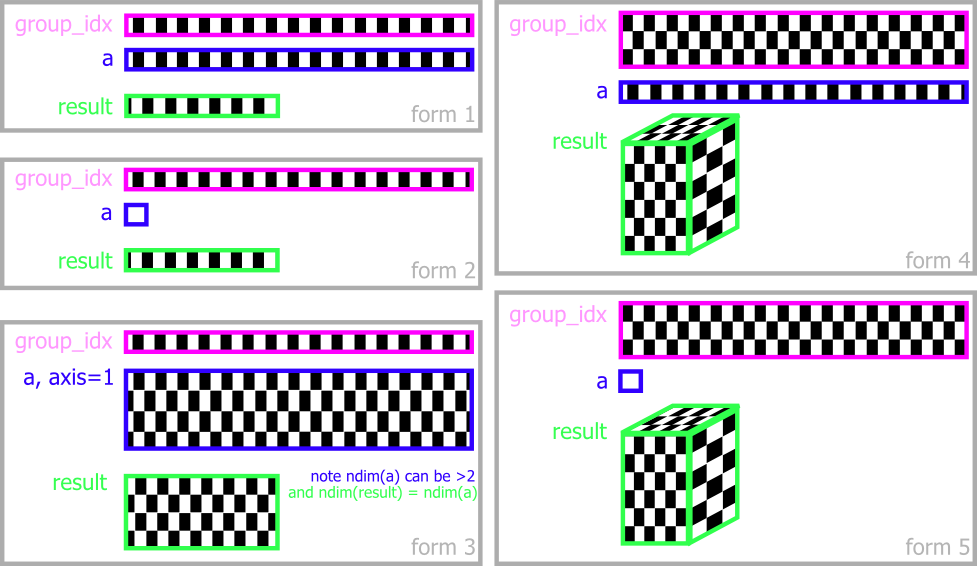
Output size defaults to max(group_idx) + 1 per dimension; pass size= to fix it. Full parameter descriptions, plus notes on memory layout and performance, are in the reference.
Functions
func can be a name, a NumPy function or builtin (np.max, max, len, …), or any callable. Optimised built-ins:
| Category | Functions |
|---|---|
| Reductions | sum prod mean median var std min max first last len sumofsquares trapezoid |
| Index of extremes | argmin argmax |
| Boolean | all any allnan anynan |
| NaN-skipping variants | nansum nanmean nanvar nanmax … — a nan prefix on every reduction above except allnan/anynan |
| Cumulative (size of input) | cumsum cumprod cummin cummax |
| Sorting (size of input) | sort (reverse=True for descending) |
| Collect group members | array |
Not every implementation supports every function — for example sort and array are not available in the Numba implementation. The function reference has the exact semantics, default fill values, complex-number behaviour and a function × implementation matrix.
Helper tools
uaggregate(group_idx, a, ...) takes the same arguments as aggregate but broadcasts the result back to the size of a, so every element carries the result of its own group — aggregate(...)[group_idx] in one call:
group_idx = np.array([3, 0, 0, 1, 0, 3, 5, 5, 0, 4])
a = np.array([13.2, 3.5, 3.5, -8.2, 3.0, 13.4, 99.2, -7.1, 0.0, 53.7])

npg.uaggregate(group_idx, a, func="mean")
# array([13.3 ,  2.5 ,  2.5 , -8.2 ,  2.5 , 13.3 , 46.05, 46.05,  2.5 , 53.7 ])

a - npg.uaggregate(group_idx, a, func="mean")     # demean within each group
The rest of the exports are small and situational: unpack and unpack_into (broadcast a per-group result back, optionally into a preallocated array), step_count and step_indices (runs of equal labels, Numba only), multi_arange, label_contiguous_1d, relabel_groups_unique and relabel_groups_masked (close gaps in sparse labels), and default_fill_value. All of them are described in the reference.
Implementations
from numpy_groupies import aggregate picks the best available implementation: numba if installed, otherwise numpy. To choose explicitly:
from numpy_groupies import aggregate_nb as aggregate      # numba
from numpy_groupies import aggregate_np as aggregate      # numpy
from numpy_groupies import aggregate_py as aggregate      # pure python
from numpy_groupies.aggregate_numpy import aggregate      # same, via the module
All implementations share the calling syntax and produce the same results up to floating-point error, but some support only a subset of functions and raise NotImplementedError otherwise.
| Implementation | Needs | Notes |
|---|---|---|
| numba | numpy, numba | Fastest. Default if numba is installed. Lacks sort and array. |
| numpy | numpy | Based on np.bincount and indexing tricks. Default without numba. Most complete. |
| pure python | numpy | Plain Python loops, no Numba. Very slow; useful as a fallback or for porting. |
| numpy ufunc | numpy | For benchmarking only: built on ufunc.at (np.add.at, …). Incomplete. |
| pandas | numpy, pandas | For reference only: wraps groupby. Skips NaN even in the plain functions (except median, cumsum). |
Gotchas: with Numba installed,
aggregate(..., func="sort")andfunc="array"raiseNotImplementedError, and custom callables must be Numba-compilable (numeric code). For those cases call the NumPy implementation:npg.aggregate_np(group_idx, a, func="sort").
Performance
Best of five timed runs, in milliseconds, for 500,000 values in 1,000 groups (lower is better), taken from the maintainers' benchmark on an Intel i7-7560U laptop CPU (Linux, Python 3.14, NumPy 2.5, Numba 0.67, pandas 3.0):
| function | numpy | numba | pandas |
|---|---|---|---|
sum |
1.24 | 0.72 | 13.76 |
mean |
1.82 | 0.99 | 13.91 |
max |
2.76 | 0.88 | 13.11 |
std |
4.18 | 1.14 | 14.98 |
nansum |
5.13 | 1.69 | 18.96 |
median |
53.34 | 11.71 | 24.28 |
cumsum |
53.28 | 1.15 | 13.43 |
| custom callable | 161.54 | 50.94 | 131.86 |
In short: the NumPy implementation is about 4–12× faster than pandas on common reductions, and Numba adds another 1.5–5× on top — and about 46× for cumsum. median and custom callables are the expensive cases everywhere. Absolute numbers depend on your machine, so treat the ratios as the takeaway.
The complete table and the benchmark setup are in docs/benchmarks.md. To run it yourself, from the repository root (add --pandas for the pandas column, --purepy for the pure-Python one):
python -m numpy_groupies.benchmarks.generic
The numpy and numba columns above are not the whole story: NumPy 1.25 brought major speed improvements to ufuncs, which narrowed the gap between the NumPy and Numba implementations considerably. The authors hope that ufunc.at or an equivalent in NumPy or SciPy will eventually become fast enough to make this package redundant.
Development
git clone https://github.com/ml31415/numpy-groupies
cd numpy-groupies
pip install -e ".[dev]"     # pytest, numba, pandas
pytest
The repository uses pre-commit (pre-commit install). Bug reports and pull requests are welcome in the issue tracker. Release notes are on the releases page.
Credits. Started by @ml31415, who wrote the Numba implementation; the pure-Python and NumPy implementations were written by @d1manson. Currently maintained by Deepak Cherian (@dcherian).
License
BSD 2-Clause — see LICENSE.txt.


Release files for numpy-groupies 0.13.2
For a detailed explanation of source distributions (sdists) and built distributions (wheels), please see the package formats documentation.
Source distribution (sdist)
| File | Size | Uploaded | |
|---|---|---|---|
| numpy_groupies-0.13.2.tar.gz | 243.6 kB | Details |
Built distribution (wheel)
| File | Interpreter | ABI | Platform | Reset |
|---|---|---|---|---|
| numpy_groupies-0.13.2-py3-none-any.whl | Python 3 | none | any | Details |
Total release size: 317.3 kB
Release files / numpy_groupies-0.13.2.tar.gz
| Download URL | numpy_groupies-0.13.2.tar.gz |
|---|---|
| Size | 243.6 kB |
| Tags | Source |
|
SHA-256 checksum How to use checksums |
97a2aab3e85cbb00bb57f452ba4c0f62ee735ba80bd20eb917d9f5ac4435c88a
|
|
BLAKE2b-256 checksum How to use checksums |
7b62c9c6db7287c7899637aced1305b4418cccbea8e36133c0a085f8dd9520c9
|
| Upload date | |
|
Uploaded using Trusted Publishing? What is trusted publishing? |
No |
| Uploaded via |
twine/7.0.0 CPython/3.13.14
|
Release files / numpy_groupies-0.13.2-py3-none-any.whl
| Download URL | numpy_groupies-0.13.2-py3-none-any.whl |
|---|---|
| Size | 73.6 kB |
| Tags | Python 3 |
|
SHA-256 checksum How to use checksums |
632d18754d53164dd699c78e0361078ea5f9e8ba643e323c9b71eece24e1f74a
|
|
BLAKE2b-256 checksum How to use checksums |
e8c1650acd5b000b1fb7d75594977032d039b6d334ef70804e1d1494493554a4
|
| Upload date | |
|
Uploaded using Trusted Publishing? What is trusted publishing? |
No |
| Uploaded via |
twine/7.0.0 CPython/3.13.14
|














