

Format numpy arrays as LaTeX arrays. This is a fork of array_to_latex by @josephcslater.
repository: https://github.com/benmaier/numpyarray_to_latex/
documentation: http://numpyarray-to-latex.readthedocs.io/
>>> import numpy as np
>>> from numpyarray_to_latex import to_ltx
>>> tex = to_ltx(np.random.randn(2,2))
>>> print(tex)
\left(
\begin{array}
  2.0156 & -0.3230\\
  0.0477 &  0.0184
\end{array}
\right)
Install
pip install numpyarray_to_latexnumpyarray_to_latex was developed and tested for
Python 3.6
Python 3.7
Python 3.8
Python 3.9
Python 3.10
So far, the package’s functionality was tested on Mac OS X and CentOS only.
Dependencies
numpyarray_to_latex directly depends on the following packages which will be installed by pip during the installation process
numpy>=1.0
Documentation
The full documentation is available at numpyarray-to-latex.readthedocs.io.
Examples
Default Python
import numpy as np
from numpyarray_to_latex.jupyter import to_jup
from numpyarray_to_latex import to_ltx

tex = to_ltx(np.random.randn(2,2))
print(tex)
\left(
\begin{array}
2.0156 & -0.3230\\
0.0477 & 0.0184
\end{array}
\right)print(to_ltx(np.random.randn(2,2),
latexarraytype='array',
is_row_vector=False,
mark_color='yellow',
mark_elements=[(1,1)],
brackets='(]',
separate_columns=[1,2],
separate_rows=[1,2],))\left(
\begin{array}{c|c}
0.3498 & 0.4393\\
\hline
-0.8521 & \colorbox{yellow}{$-0.6412$}
\end{array}
\right]In Jupyter Notebooks
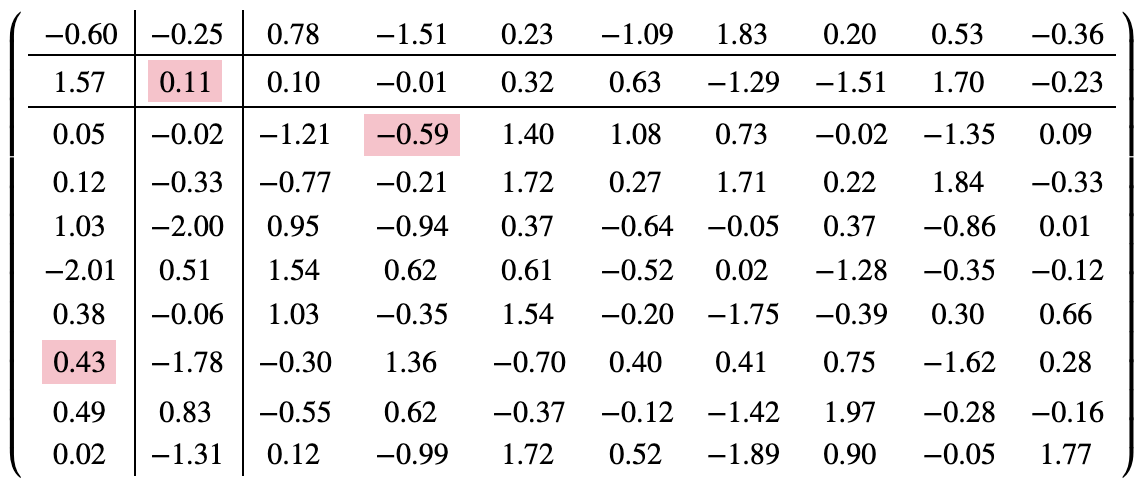
import numpy as np
from numpyarray_to_latex.jupyter import to_jup

to_jup(np.random.randn(10,10),
       mark_elements=[(1,1),(2,3),(7,0)],
       separate_columns=[1,2], # columns & rows that don't exist will be ignored
       separate_rows=[1,2],
      )
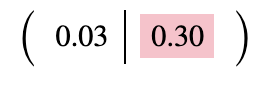
to_jup(np.random.randn(2),
       mark_elements=[1,],
       separate_columns=[1,2],
       separate_rows=[1,2],
      )
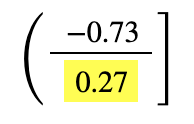
to_jup(np.random.randn(2),
       is_row_vector=False,
       mark_elements=[1,],
       separate_columns=[1,2],
       separate_rows=[1,2,3,4], # columns that don't exist will be ignored
       mark_color='yellow',
       brackets='(]',
      )
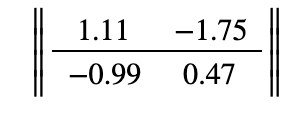
to_jup(np.random.randn(2,2),
       latexarraytype='Vmatrix',
       is_row_vector=False,
       separate_rows=[1],
      )
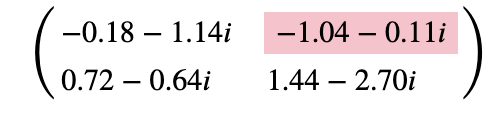
to_jup(np.random.randn(2,2)+1j*np.random.randn(2,2),
       mark_elements=[(0,1)],
      )
to_jup(np.random.randn(2,2)+1j*np.random.randn(2,2),
       mark_elements=[(0,1)],
       fmt='{:4.2e}',
      )
Changelog
Changes are logged in a separate file.
License
This project is licensed under the MIT License. Note that this excludes any images/pictures/figures shown here or in the documentation.
Contributing
If you want to contribute to this project, please make sure to read the code of conduct and the contributing guidelines. In case you’re wondering about what to contribute, we’re always collecting ideas of what we want to implement next in the outlook notes.

Dev notes
Fork this repository, clone it, and install it in dev mode.
git clone git@github.com:YOURUSERNAME/numpyarray_to_latex.git
make
If you want to upload to PyPI, first convert the new README.md to README.rst
make readmeIt will give you warnings about bad .rst-syntax. Fix those errors in README.rst. Then wrap the whole thing
make pypiIt will probably give you more warnings about .rst-syntax. Fix those until the warnings disappear. Then do
make upload1 maintainer

Metadata
1 maintainer
Release files for numpyarray-to-latex 0.1.0
For a detailed explanation of source distributions (sdists) and built distributions (wheels), please see the package formats documentation.
Source distribution (sdist)
| File | Size | Uploaded | |
|---|---|---|---|
| numpyarray_to_latex-0.1.0.tar.gz | 10.1 kB | Details |
Release files / numpyarray_to_latex-0.1.0.tar.gz
| Download URL | numpyarray_to_latex-0.1.0.tar.gz |
|---|---|
| Size | 10.1 kB |
| Tags | Source |
|
SHA-256 checksum How to use checksums |
0dbe72d6de0844e6489a1e7c5a62bd7a4bf9d209b31f60c4b0aa354abd0a9f27
|
|
BLAKE2b-256 checksum How to use checksums |
a28aaeac80d89a51ad9e82cc91103f8a9d456dcfe2ba5a012677c2c841934d8d
|
| Upload date | |
|
Uploaded using Trusted Publishing? What is trusted publishing? |
No |
| Uploaded via |
twine/3.2.0 pkginfo/1.6.1 requests/2.25.0 setuptools/54.2.0 requests-toolbelt/0.9.1 tqdm/4.54.1 CPython/3.8.9
|














