
A python jpeg viewer made to run on a Numworks

Project description
Numworks jpeg viewer
Numworks jpeg viewer is a python script that runs on the numworks and allows to display full 320x222 rgb images.
It decodes a jpeg file encoded as bytes into a python file and renders the output with the kandinsky package.
The decoder was made for lossy jpeg and does not support lossless compression.
Installation
You can use pip to install numworks jpeg viewer with utility scripts to encode images.
pip install numworks_jpeg_viewer
To send the script to your numworks you can go to https://my.numworks.com/python/martin-garel-528/jpeg_viewer
or https://my.numworks.com/python/martin-garel-528/jpeg_viewer_min to get a smaller version of the script so it takes less space on your calculator.
Usage
To use the viewer you first have to encode any image as jpeg into a python file. To do that you can run the following command and follow the instructions,
python3 -m numworks_jpeg_viewer.image_encoder
Or use the module in a python file (see documentation for more info on the parameters of encode_image)
from numworks_jpeg_viewer.image_encoder import encode_image
encode_image("path/to/your/image.png", "path/to/the/output.py")
Once the image is compressed into a python file, you have to send it to your calculator.
To do that make your own numworks script with the python image file copied into it, and send it to your calculator (see this page if you struggle).
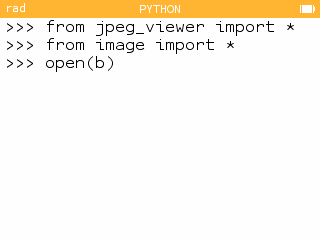
If you want to actually see the image, import the jpeg_viewer.py and your image into the numworks python shell and use the open function with the variable containing the bytes (b):
On pc, you can do the same in the interpreter or directely run the viewer.py file and follow the instructions.
python3 -m numworks_jpeg_viewer.viewer
Script Performance
Because python is pretty slow, this script takes arount 5 to 10 minutes to display an entire image to the screen. I tried my best to optimize as much the code and I think that is it a pretty good time (it was around 45 minutes at first).
Memory Limitations
While the numworks has a pretty limited RAM size, it isn't really what's limiting the images to be bigger. One issue is that the images have to be encoded directely in a text file as characters and not in binary, and the script size is what takes most of the space in a numworks calculator.
Still, even if you have a numworks with good storage, the image can be too big to load into memory and the program might crash, so you have to take this into account when choosing parameters when encoding the image.
Contributing and Support
I am opened to any contributions or any questions you might have, and I will be pleased to answer them.
License
Release history Release notifications | RSS feed


Download files
Download the file for your platform. If you're not sure which to choose, learn more about installing packages.
Source Distribution
Built Distribution
Filter files by name, interpreter, ABI, and platform.
If you're not sure about the file name format, learn more about wheel file names.
Copy a direct link to the current filters
File details
Details for the file numworks_jpeg_viewer-0.0.2.tar.gz.
File metadata
- Download URL: numworks_jpeg_viewer-0.0.2.tar.gz
- Upload date:
- Size: 9.8 kB
- Tags: Source
- Uploaded using Trusted Publishing? No
- Uploaded via: twine/6.1.0 CPython/3.12.3
File hashes
| Algorithm | Hash digest | |
|---|---|---|
| SHA256 |
8bdb9a2be2990bad80f111ffc0c1405a0b98e55d8c4d4d9437f5fba2365c9a6f
|
|
| MD5 |
4f0d892d22087d81fc1699f82e9dec5e
|
|
| BLAKE2b-256 |
ab8617fb4f87f67abe324a3b8f84e86fd4590158ab77155c20fc9648dbd71e13
|
File details
Details for the file numworks_jpeg_viewer-0.0.2-py3-none-any.whl.
File metadata
- Download URL: numworks_jpeg_viewer-0.0.2-py3-none-any.whl
- Upload date:
- Size: 9.1 kB
- Tags: Python 3
- Uploaded using Trusted Publishing? No
- Uploaded via: twine/6.1.0 CPython/3.12.3
File hashes
| Algorithm | Hash digest | |
|---|---|---|
| SHA256 |
7717bfd76b8b716d58d5c6c61e07bdf027cc130a8b1a38a2ab510c4f081aca60
|
|
| MD5 |
bd4b1598c0512fc04cf4133dc7878e15
|
|
| BLAKE2b-256 |
c1be21ca98a9bea3df4c4b5239a7d409adc051ae3acd966447684fc4783d67d3
|






