
nurb
Tell your AI what you need printed. Watch the part take shape live. Print it.
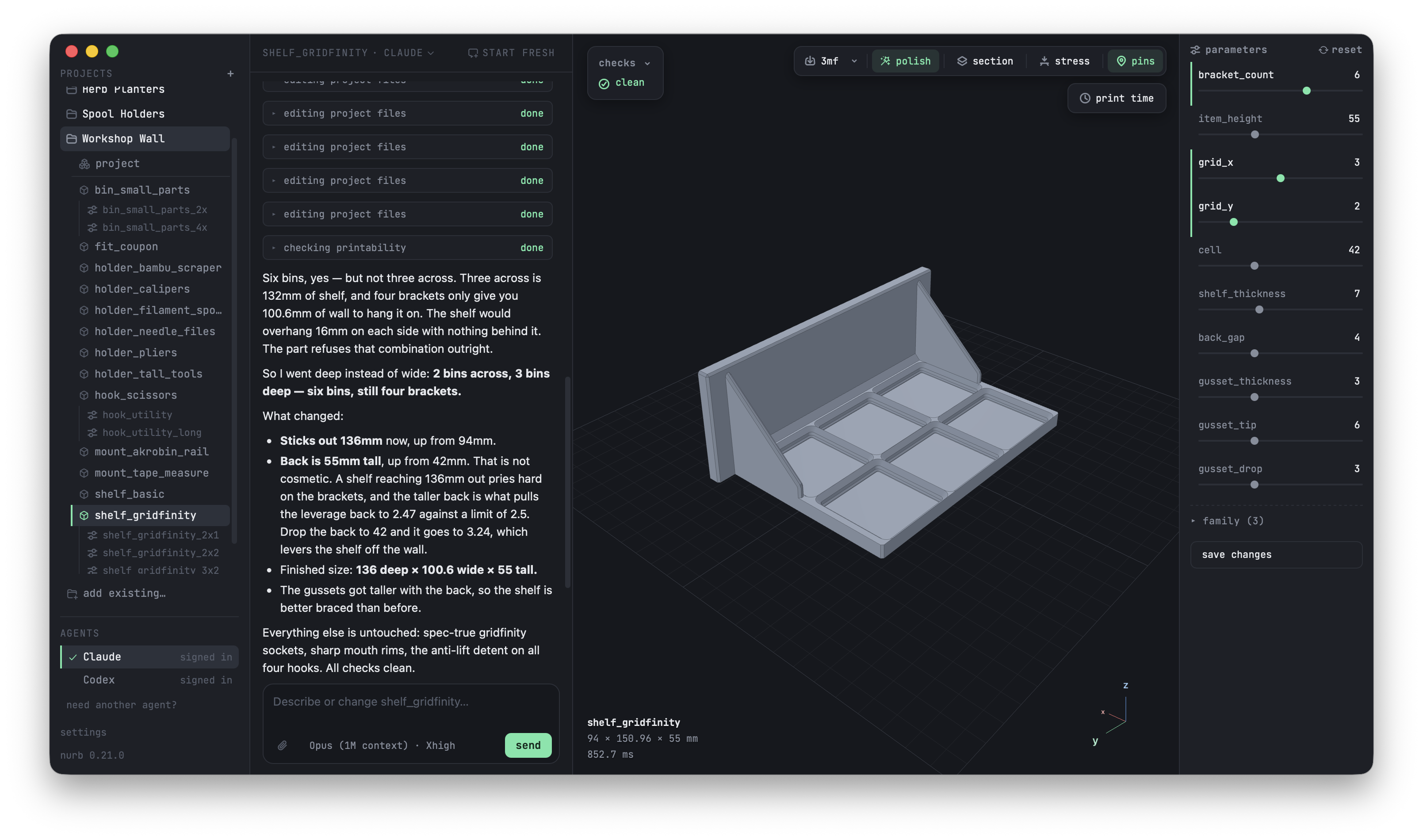
nurb turns the AI you already pay for into a CAD partner for 3D printing. You describe the part in plain words, the AI models it, and nurb checks it against print physics and shows you the result in a live viewer. You judge, drag sliders, click 3mf, print.
What you get
A live view of every change. Every edit updates the viewer without moving your camera. Cut the part open with a section plane, orbit it, watch it evolve as you talk.
Sliders for every dimension. Each parameter of the part gets a slider. Drag until it looks right, click write, and the change is saved where the AI sees it too.
Print problems caught before the printer. Thirteen printability rules run against the exact solid, not an approximation: overhangs, thin walls, floating islands, warp-prone first layers, parts that tip over. Findings pin themselves to the exact faces they fired on, so a "wall too thin" warning points at the exact spot on the model.
Print time and filament cost up front. The viewer's print time row drives the slicer you already have (OrcaSlicer or Bambu Studio) and answers with minutes and grams, so a design change that doubles the print time is caught while the design can still move.
A 3MF that opens ready to print. Exports default to 3MF with the print settings the part justifies already embedded: infill, walls, and a brim when the checks say the corners will lift. Your slicer opens it tuned. STL, STEP, and GLB are one flag away.
"Will it hold?" gets a number. Click the stress button, and a voxel simulation shows where the load concentrates, how far the part sags, and the weight it breaks at, quoted against layer adhesion because that is where FDM prints actually fail.
Parts that fit the real world. Scan a real object with your phone or measure a downloaded model, record the dimensions that matter, and nurb refuses to let the AI guess them. A card with a target mesh gets deviation reports in both directions, so added material is caught as loudly as missing material.
Real CAD underneath. Parts are true B-rep solids on the OCCT kernel, the same math as commercial CAD, not meshes. Chamfers and fillets are real operations, and STEP export means the part opens in Fusion or FreeCAD.
Works offline. Modelling, checking, the viewer, and export all run locally, with no account and no cloud, so it works on a plane or in a workshop with bad wifi.
Install
The easiest way in is the Mac app. Download it for Apple silicon or Intel Macs. Your projects, your AI, and the live viewer in one window; it sets everything up the first time you open it and updates itself.
For the command line:
curl -fsSL https://nurb.dev/install.sh | sh
One line, installs everything: uv if you don't have it, nurb, and the agent skill. Prefer your own package manager? uv tool install nurb (or pip install nurb) does the first half, and npx skills add shpigford/nurb --skill nurb teaches whatever AI harnesses you have. Later, nurb update upgrades nurb and the installed skill together.
Which model should you use?
nurb works with whatever AI subscription you already pay for, and they are not equally good at designing parts. We run the popular models through the same real part-design jobs and grade the actual geometry by machine, so you can pick based on what you subscribe to and what you are willing to spend: nurb.dev/benchmarks. The raw rows, transcripts, and grading code live in evals/, and adding a row for your model is one line on your own subscription, single runs welcome:
curl -fsSL https://nurb.dev/bench.sh | sh
Make something
Open the app (or your agent in a terminal) and talk:
Make an adapter that connects my shop vac hose to the dust port on my table saw
The AI does the rest: reads the design doctrine, creates the project, models the part, runs the printability checks, and opens the live viewer. When it looks right: drag the sliders if you want, click 3mf, print.
A project is any directory with a parts/ folder. No init step. New projects are born double-clickable: viewer.command opens the viewer from Finder.
How a part works
Under the hood, a part is a small Python function the AI writes and you never have to read:
from nurb import *

@part
def hose_adapter(vac_end=57.6, tool_end=35.0, wall=2.4):
    ...
The defaults are the parameters, and that one line is where the viewer's sliders, the tests, and the CLI all come from. The body is build123d on the OCCT kernel, plus nurb's own vocabulary for the printing-specific moves: polish for the chamfer pass, stand for a diagonal print stance, measured for real-world dimensions, assembly for multi-part builds. nurb api prints the whole list with signatures.
Because a part is a function, the same part flexes into variants: a card can declare shelf_3x2 as the shelf with grid_x = 3, and every command walks variants like parts, each with its own 3MF and baselines.
The checks
The AI cannot see, so nurb check is its eyes. Rules run against the exact solid and findings come back with coordinates:
solids            more than one body, or none: a part that came apart
overhang          downward faces past 45 degrees, bridges told from cantilevers
floating          a region whose first layer would be laid on air
hole_ceiling      a blind hole's flat ceiling, the counterbore case
min_wall          thinnest section, ray cast corrected by an inscribed sphere
sliver            faces too small to print as anything but a smear
concave_cosmetic  polish laid into an inside corner
bed_bevel         polish laid on the edges that meet the build plate
warp_risk         large first layers with corners likely to lift as they cool
pin               a free-standing pin too thin to be more than perimeters
stability         center of mass outside the footprint
projection_ratio  reach over height, for a part cantilevered off a wall
build_volume      does it fit the printer at all
nurb check reports and exits 0 by default, so findings never block iteration. --strict makes findings fail the build, and is what CI runs.
Your printer, your plastic
Name your machine once in printer.toml (profile = "bambu_a1_mini") and every check, slice, and export knows your build volume and nozzle. The viewer asks for your printer the first time it needs one and writes the answer down for you. Name your material (material = "abs") and the warp rules tighten to match how hard that plastic shrinks.
The same file carries preferences like extra export formats:
[export]
formats = ["3mf", "step"]
A machine-wide ~/.config/nurb/config.toml takes the same settings for every project. There is no .env and there are no environment variables.
Memory between sessions
AIs forget everything between sessions, so each part gets a card (parts/<name>.md): what it is, why, and what was tried and rejected. Dimensions that came from the real world go in measurements.toml with how they were obtained, and asking for one that is not there raises instead of letting the model guess. No geometry check can catch a wrong guess; that failure only shows up when the printed part meets the real object.
The commands
Everything the app and the AI drive is also a plain CLI:
nurb new <name>      create parts/<name>.py and its card
nurb dev             watch, rebuild, serve the viewer
nurb build [part]    build once and report size
nurb check [part]    run the printability rules, --strict for CI
nurb inspect [part]  faces, normals, concave edges, each finding on its face
nurb scan <file>     measure a phone scan or a downloaded model (STL/OBJ/GLB/PLY) in mm
nurb compare [part]  deviation from the card's target mesh, both directions
nurb slice [part]    print time and grams of filament, from the slicer you already have
nurb stress [part]   where a load stresses the part: peak MPa, sag, margin to breaking
nurb render [part]   write a PNG, --section cuts it open
nurb export [part]   write a print-ready 3MF, --formats for STL, STEP or GLB
nurb rules           print the design doctrine
nurb api             the vocabulary a part file gets, with signatures
nurb card [part]     regenerate a card's AUTO block
nurb diff [part]     what moved since the card was written
nurb verify [part]   the doctrine's verification list, --report bundles it with renders
nurb extract         find duplication across parts
nurb skill           print the agent skill file, --sync rewrites installed copies
nurb update          upgrade nurb, then re-sync the installed skill to match
nurb launcher        write viewer.command, a double-clickable `nurb dev`
Commands that take [part] default to every part in the project.
Troubleshooting
The first build takes about 45 seconds. That is the CAD kernel loading cold. It stays loaded, and every change after that lands in well under a second.
nurb slice finds no slicer. It drives an installed OrcaSlicer or Bambu Studio; install either and it is found automatically. Export still writes the 3MF either way.
nurb render says it needs a browser. It is the one command that does: uv sync --extra render && uv run playwright install chromium.
A check passed but the print failed on a thin wall. min_wall samples faces, so a pinch nothing lands near can be missed. A clean result means "no thin walls found", not "no thin walls".
Not built yet
- A hosted configurator.
nurb devalready is one for anybody who can reach it, but publishing without a running kernel is a different problem. - Measurement tools in the viewer.
Contributing
Architecture, dev setup, testing, and the release process live in CONTRIBUTING.md.
License
FSL-1.1-MIT. Source-available for any purpose except building a competing product, and converts to plain MIT two years after each release.
Copyright 2026 Ordinary Systems LLC.
Third-party notices
nurb uses Open CASCADE Technology (OCCT) for all B-rep geometry, reached through build123d (Apache-2.0) and the OCP bindings (Apache-2.0). OCCT is licensed under LGPL-2.1 with an additional exception. nurb does not redistribute OCCT; it is installed as a dependency and dynamically linked. Bundling nurb into a single-file distribution that embeds OCCT would require shipping the OCCT license and keeping the library replaceable, per LGPL.
nurb does redistribute three.js r169 (MIT), vendored so the viewer works offline, with its LICENSE beside it. Same for the viewer's UI font, JetBrains Mono (SIL OFL 1.1), vendored with its OFL.txt.
Other dependencies: trimesh (MIT), watchdog (Apache-2.0), websockets (BSD-3-Clause), numpy (BSD-3-Clause). Optional, for nurb render only: playwright (Apache-2.0).
npm note: nurb has no JavaScript to ship, so PyPI is the only install channel. @shpigford/nurb just points npx users here.
1 maintainer

Download files
Download the file for your platform. If you're not sure which to choose, learn more about installing packages.
Source Distribution
Built Distribution
Filter files by name, interpreter, ABI, and platform.
If you're not sure about the file name format, learn more about wheel file names.
Copy a direct link to the current filters
File details
Details for the file nurb-0.22.2.tar.gz.
File metadata
- Download URL: nurb-0.22.2.tar.gz
- Upload date:
- Size: 528.9 kB
- Tags: Source
- Uploaded using Trusted Publishing? Yes
- Uploaded via:
uv/0.12.5 {"installer":{"name":"uv","version":"0.12.5","subcommand":["publish"]},"python":null,"implementation":{"name":null,"version":null},"distro":{"name":"Ubuntu","version":"24.04","id":"noble","libc":null},"system":{"name":null,"release":null},"cpu":null,"openssl_version":null,"setuptools_version":null,"rustc_version":null,"ci":true}
File hashes
| Algorithm | Hash digest | |
|---|---|---|
| SHA256 |
5b0176b85adde1c127c7ce90614bdc9ca8036614a775872830ec9330bb0487f1
|
|
| MD5 |
3eff00b967e8c756692da796f23e1f84
|
|
| BLAKE2b-256 |
b98e113aea5ee3e37ca5b87bcdc2240168b4861c4b09228b3242c235edc88631
|
File details
Details for the file nurb-0.22.2-py3-none-any.whl.
File metadata
- Download URL: nurb-0.22.2-py3-none-any.whl
- Upload date:
- Size: 545.8 kB
- Tags: Python 3
- Uploaded using Trusted Publishing? Yes
- Uploaded via:
uv/0.12.5 {"installer":{"name":"uv","version":"0.12.5","subcommand":["publish"]},"python":null,"implementation":{"name":null,"version":null},"distro":{"name":"Ubuntu","version":"24.04","id":"noble","libc":null},"system":{"name":null,"release":null},"cpu":null,"openssl_version":null,"setuptools_version":null,"rustc_version":null,"ci":true}
File hashes
| Algorithm | Hash digest | |
|---|---|---|
| SHA256 |
6bf792dbcb8a2b231a8d6b8cf2421e086c4051ff6c7eb8cdafbe8a3a27da67c0
|
|
| MD5 |
2054e4549f23e9e7b78a0748bae6a7cc
|
|
| BLAKE2b-256 |
5c5807afa2f76e43deaac0db34f20abed44eec7e5a146693b575fb9a1fb2174d
|







