
Analyzes nutrients found in foods and user-defined meal plans.

Project description
NutriMetrics
NutriMetrics is a Python package that analyzes nutrients found in foods and user-defined meal plans. Nutrient profile data can be imported from USDA's FoodData Central or manually entered by users. The package tracks 60+ nutrients including fats, proteins, carbs, all minerals and vitamins. It comes with 100+ nutrient profiles found in common food and a few sample meal plans. User-defined meal plans consist of a set of meals, each of which consists of a set of foods with a specified amount. Analysis reports are generated in Excel workbooks.


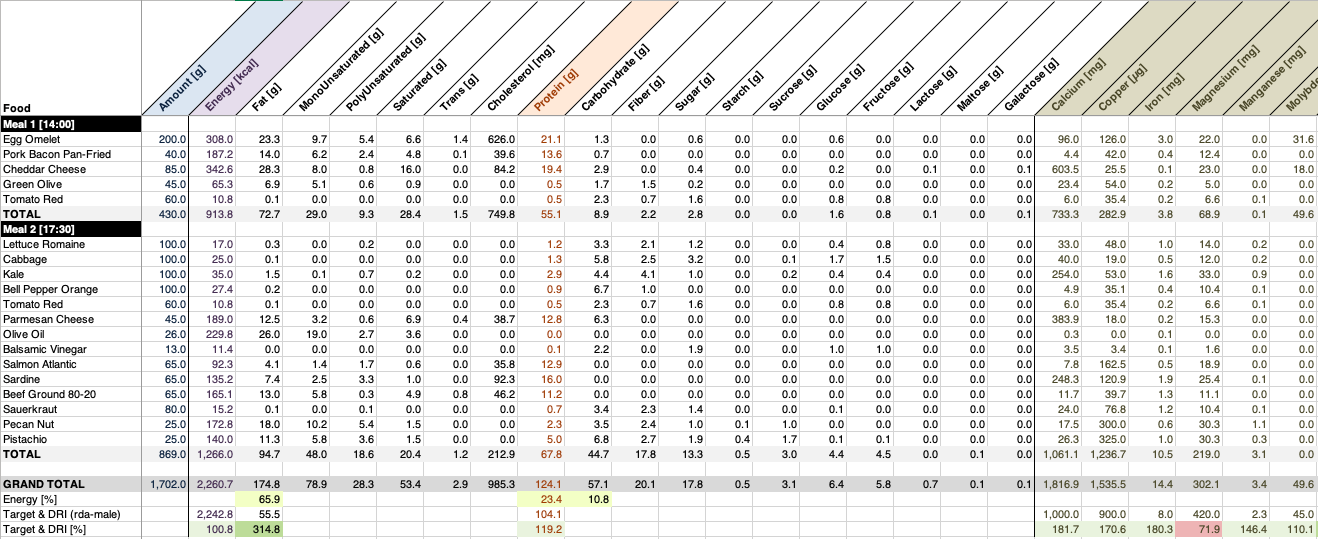
Table of Contents
Quick Start
Run the commands:
$ pip install nutrimetrics
$ nutrimetrics-init
$ nutrimetrics-analyze ~/.nutrimetrics/samples/bryan_johnson.json
Which will generate the corresponding bryan_johnson.xlsx Excel workbook in the working directory.
The package includes 3 sample meal plans:
bryan_johnson.json: a vegan meal plan estimated from Bryan Johnson's blueprint.eric_berg.json: a low-carb ketogenic meal plan estimated from Eric Berg's eating routine.michael_b_jordan.json: Michael B. Jordan's high-protein meal plan to get fit for 'Creed'.
Installation
PyPI
The easiest way to get NutriMetrics is to use pip:
$ pip install nutrimetrics
That will install the nutrimetrics package along with all the required dependencies.
Pip will also install a few commands (described below) to the package's bin directory.
From Source
Alternatively you can install the latest NutriMetrics codebase from the git repo:
$ git clone https://github.com/tomcv/nutrimetrics.git
$ cd nutrimetrics
$ hatch build
The package's pyproject.toml project file is configured for hatch.
Commands
The package includes 3 commands:
nutrimetrics-initinitializes user's configurationnutrimetrics-analyzegenerates analysis report for a specified meal plannutrimetrics-importimports nutrient profile data from USDA's FoodData Central
Configuration
All configuration parameters are set in ~/.nutrimetrics/config.json.
The default configuration is created when running the nutrimetrics-init command.
The only parameter that you may have to change is the API key used to access FoodData Central
when importing data.
Analysis Report
Reports are generated by running the nutrimetrics-analyze command:
$ nutrimetrics-analyze ~/.nutrimetrics/samples/meal_plan.json
Which will generate the corresponding meal_plan.xlsx Excel workbook in the working directory.
The report includes the amount of each nutrient as well as some statistical data,
including the energy distribution, the energy/protein/fat target, and the percentage of the
Dietary Reference Intakes (DRI) for all minerals and vitamins. The report consists of 3 spreadsheets:
- The 'Meals' spreadsheet describes each meal of the meal plan.
- The 'Target' spreadsheet displays the calculated target for the given body mass and activity.
- The 'Foods' spreadsheet describes all known foods, defined in the
~/.nutrimetrics/foods/directory.
A meal plan is defined in a JSON file like this:
{
  "name": "Simple Meal Plan",
  "unit": "g",
  "target": {
    "body_mass": 75400.0,
    "body_fat_percent": 15.0,
    "activity_factor": 1.4,  // in [1.2, 1.6] range based on activity
    "protein_factor": 1.8,  // minimum protein intake in [1.5, 2.3] range
    "fat_factor": 0.8  // minimum fat intake 0.7 or larger
  },
  "dietary_reference_intakes": "rda-male", // (ear-male, ear-female, rda-male, rda-female)
  "meals": [
    {
      "name": "Breakfast [7AM]",
      "foods": [
        {"food": "Oat Rolled", "amount": 40},
        {"food": "Blueberry", "amount": 80}
      ]
    },
    {
      "name": "Dinner [7PM]",
      "foods": [
        {"food": "Chicken Breast", "amount": 150},
        {"food": "Cauliflower", "amount": 100},
        {"food": "Olive Oil", "amount": 13}
      ]
    }
  ]
}
The food value must be one of the food's name defined in the ~/.nutrimetrics/foods/ directory.
The Dietary Reference Intakes (DRI) included in the package are the Recommended Dietary Allowance (RDA)
and the Estimated Average Requirement (EAR) for male and female. Users can add their own requirement profiles
in the ~/.nutrimetrics/dri/ directory.
Nutrient Profile Data
The package comes with 100+ nutrient profiles of common food. However, new data can be added by importing
nutrient profiles from USDA's FoodData Central (FDC). The nutrimetrics-import command reads a JSON file
that lists all foods names and FDC IDs to be imported, looking like this:
{
  "foods": [
    {"fdc_id": 170567,  "name": "Almond"},
    {"fdc_id": 170178,  "name": "Macadamia Nut"},
    {"fdc_id": 170187,  "name": "Walnut"}
  ]
}
The package provides a sample ~/.nutrimetrics/samples/foods.json file you can use.
Before running the command you must edit ~/.nutrimetrics/config.json to specify your own api_key
(that you can get it here for free).
$ nutrimetrics-import ~/.nutrimetrics/samples/foods.json
Will download and generate all JSON files in ~/.nutrimetrics/foods/ for each specified food.
Alternatively you can create your own JSON files by specifying the amount of each nutrient for a given food. All amounts are specified in grams. Nutrients that are not listed are set to zero by default.
License
nutrimetrics is distributed under the terms of the MIT license.
Release history Release notifications | RSS feed


Download files
Download the file for your platform. If you're not sure which to choose, learn more about installing packages.
Source Distribution
Built Distribution
Filter files by name, interpreter, ABI, and platform.
If you're not sure about the file name format, learn more about wheel file names.
Copy a direct link to the current filters
File details
Details for the file nutrimetrics-1.0.0.tar.gz.
File metadata
- Download URL: nutrimetrics-1.0.0.tar.gz
- Upload date:
- Size: 255.3 kB
- Tags: Source
- Uploaded using Trusted Publishing? No
- Uploaded via: twine/4.0.2 CPython/3.11.2
File hashes
| Algorithm | Hash digest | |
|---|---|---|
| SHA256 |
43643bcf09652bd30f95f933ce31094c272017c1fd5a9a10051f1cff0bdc0e22
|
|
| MD5 |
8461922588022d80a65985d96afbbd9e
|
|
| BLAKE2b-256 |
c7d590c1ac9549998638b60bc363dc6e5e5bca7f5a24827d2fb1f76ddfc9c0b5
|
File details
Details for the file nutrimetrics-1.0.0-py3-none-any.whl.
File metadata
- Download URL: nutrimetrics-1.0.0-py3-none-any.whl
- Upload date:
- Size: 139.7 kB
- Tags: Python 3
- Uploaded using Trusted Publishing? No
- Uploaded via: twine/4.0.2 CPython/3.11.2
File hashes
| Algorithm | Hash digest | |
|---|---|---|
| SHA256 |
54c5ba82a65c4a0209a42a569baaa2f32d9c23ffe7b381a425ba2f69735e0d96
|
|
| MD5 |
0b9850ca911a225112d779642ab6d88b
|
|
| BLAKE2b-256 |
dd35d93108872ba23892573548ab6c130bc60ea45a03dc7aa3e7b2e6fbf7d313
|






