
nvProbe
NVIDIA GPU & CUDA Benchmark Suite
Automate CUDA workloads • HPL & HPCG • MLPerf inference • Custom kernels • Interactive reports
nvprobe.scszero.com




pip install nvprobe && nvprobe setup && nvprobe run --local
Features
| Bandwidth | STREAM | MatMul / Attention |
|---|---|---|
| H2D / D2H / D2D across buffer sizes | COPY / SCALE / ADD / TRIAD sustainable bandwidth | fp32, fp16, int8 custom CUDA kernels |
| HPL (FP64 Linpack) | HPCG | MLPerf Inference |
| Datacenter GPUs: A100, H100, B200, L40S… | Conjugate Gradients | ONNX Runtime via cmx4mlperf |
| Memtest | Burn | AI Accelerator Score |
| VRAM integrity: solid, checkerboard, random, walking-1 patterns | Sustained clock stability, thermal/power throttling detection | Normalized performance scoring vs H100 baseline |
- Bundled CUDA runtime — CuPy
[ctk]via pip, no system toolkit required - Auto-downloaded HPC tools — NVIDIA HPC Benchmarks cached in
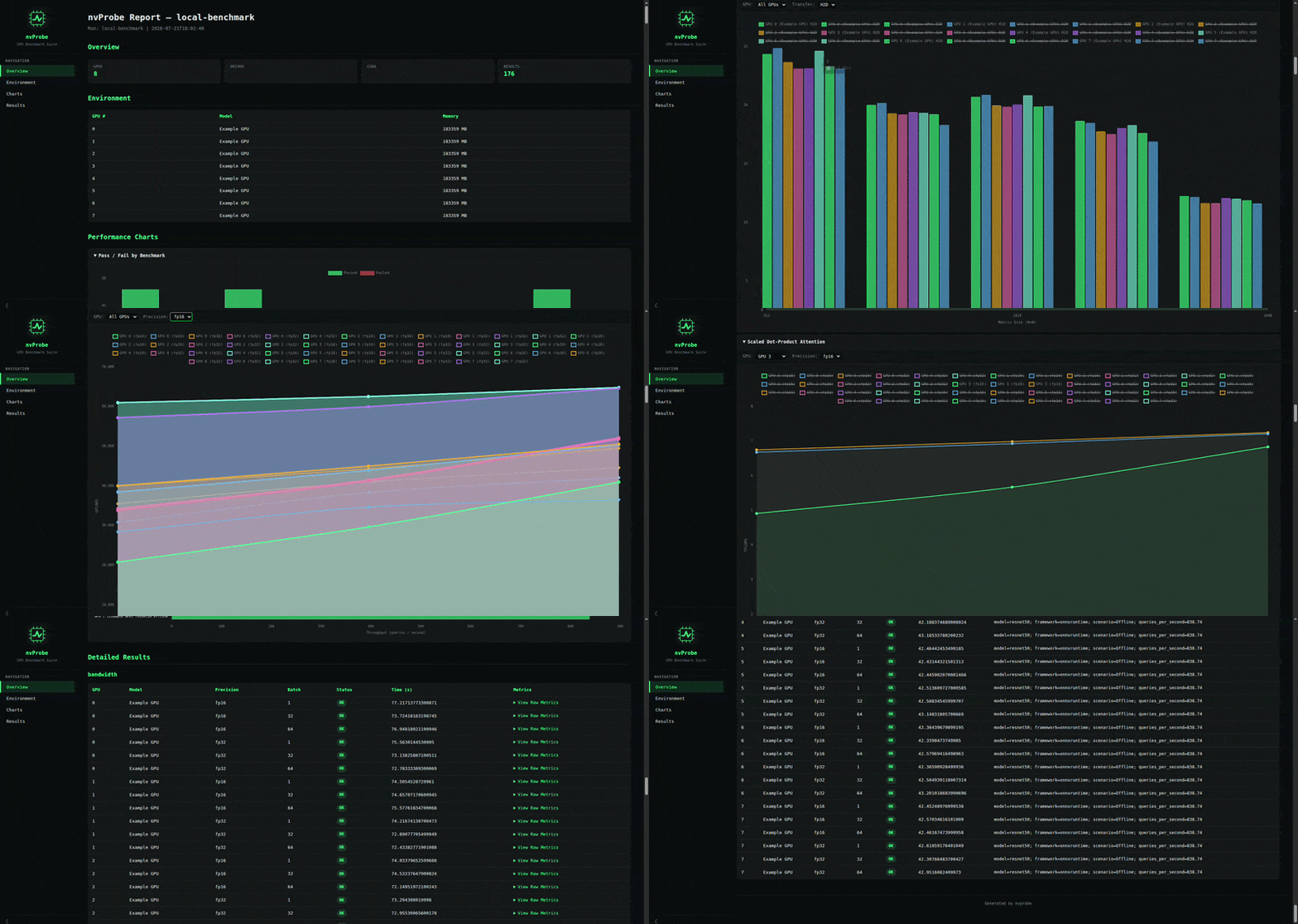
~/.nvprobe/tools/ - Interactive HTML reports — Chart.js charts with GPU / transfer / precision dropdowns and oscilloscope-style glow
- GPU diagnostics — max clocks, power limits, ECC state, PCIe link speed, NVLink active links captured per run
- Memory integrity — memtest with solid, checkerboard, random, and walking-1 patterns to detect VRAM faults
- Thermal soak — sustained burn test with time-series clock/temp/power tracking and throttling detection
- A/B comparison — compare two result sets side-by-side
- Slurm integration — generate, submit, monitor, collect from HPC clusters
- SQLite storage — all results persisted; CSV / JSON export
Quick Start
| Step | Command | What it does |
|---|---|---|
| 1 | pip install nvprobe |
Install the package |
| 2 | nvprobe setup |
Install CuPy, download HPL/HPCG, generate configs |
| 3 | nvprobe env |
Verify GPU detection, driver, CUDA version |
| 4 | nvprobe run --local |
Run all benchmarks locally |
| 5 | nvprobe report --open |
Generate & open interactive HTML report |
Or from source:
git clone https://github.com/SergioZ3R0/nvprobe.git && cd nvprobe
pip install -e . && nvprobe setup && nvprobe run --local
More commands
| Command | Description |
|---|---|
nvprobe compare --a results/run1 --b results/run2 |
Compare two runs |
nvprobe score --bandwidth 3350 --compute fp32=67,fp8=268 |
Calculate AI accelerator score |
nvprobe run --config configs/cluster.yaml |
Run with custom YAML config |
nvprobe slurm submit --config configs/cluster.yaml |
Submit Slurm job |
nvprobe slurm status |
Check Slurm job status |
nvprobe setup --cuda 13 |
Setup with specific CUDA version |
Charts
Chart.js canvas-based charts with interactive controls:
- Bandwidth — filter by GPU and transfer type (H2D / D2H / D2D)
- STREAM — filter by GPU and operation (COPY / SCALE / ADD / TRIAD)
- MatMul / Attention — filter by GPU and precision (fp32 / fp16)
- Burn — time-series line chart of SM/MEM clocks and temperature over sustained load
- Memtest — bar chart of detected VRAM errors per test pattern
- Range slider — zoom into any x-axis region
- Moving average — smoother trend lines for dense data
YAML Config
name: my-run
gpu:
  models: ["L40S", "B200"]
slurm:
  enabled: true
  partition: gpu
  gpus_per_node: 8
precisions: [fp32, fp16]
benchmarks:
  - name: bandwidth
    params:
      sizes_mb: [1, 4, 16, 64, 256, 1024]
  - name: custom
    params:
      kernels: [matmul, attention]
Project Structure
nvprobe/
├── nvprobe/
│   ├── cli.py                     # CLI entry point
│   ├── config.py                  # YAML config loader
│   ├── runner.py                  # Benchmark orchestration
│   ├── slurm.py                   # Slurm job management
│   ├── reporter.py                # Plotly HTML report generator
│   ├── db.py                      # SQLite storage + CSV/JSON export
│   └── benchmarks/
│       ├── base.py                # Base class, GPU detection, diagnostics
│       ├── bandwidth.py           # Memory bandwidth tests
│       ├── stream.py              # STREAM sustainable bandwidth
│       ├── burn.py                # Sustained burn / throttling detection
│       ├── custom.py              # Custom CUDA kernels
│       ├── hpl.py                 # HPL wrapper
│       ├── hpcg.py                # HPCG wrapper
│       ├── memtest.py             # VRAM integrity test
│       ├── mlperf.py              # MLPerf via cmx4mlperf
│       ├── score.py               # AI Accelerator Score calculator
│       └── _cuda/                 # Raw CUDA kernels
├── configs/
│   ├── default.yaml
│   └── local.yaml
├── .github/workflows/ci.yml      # GitHub Actions CI/CD
├── nvprobe.svg
├── index.html
├── README.md
└── pyproject.toml
Notes
- HPL / HPCG — NVIDIA HPC Benchmarks binaries are validated for datacenter GPUs (A100, H100, B200, L40S…). They may crash (SIGSEGV) on RTX series. Bandwidth and custom kernels work on any CUDA GPU.
- MLPerf cuDNN —
mlcrdiscovers cuDNN via system CUDA paths. If installed viapip install nvidia-cudnn-cuXX, pre-register with:mlcr get,cudnn,nvidia --input=$(python3 -c 'import nvidia.cudnn; print(nvidia.cudnn.__path__[0]'))
Requirements
Python 3.10+ • NVIDIA GPU with CUDA drivers • nvidia-smi in PATH • Slurm (optional)
License
1 maintainer

Download files
Download the file for your platform. If you're not sure which to choose, learn more about installing packages.
Source Distribution
nvprobe-0.9.0.tar.gz
(73.8 kB
view details)
Built Distribution
Filter files by name, interpreter, ABI, and platform.
If you're not sure about the file name format, learn more about wheel file names.
Copy a direct link to the current filters
nvprobe-0.9.0-py3-none-any.whl
(86.0 kB
view details)
File details
Details for the file nvprobe-0.9.0.tar.gz.
File metadata
- Download URL: nvprobe-0.9.0.tar.gz
- Upload date:
- Size: 73.8 kB
- Tags: Source
- Uploaded using Trusted Publishing? No
- Uploaded via:
twine/6.2.0 CPython/3.12.10
File hashes
| Algorithm | Hash digest | |
|---|---|---|
| SHA256 |
5befc7efcc93e4aa0a92b893dca8ea5bf6e33e82160739340e0d90ca0df1c189
|
|
| MD5 |
895ac8063a79cea1d5c575f644a01cb0
|
|
| BLAKE2b-256 |
ab6e7323ad995813c526d67d7e612328b0dba34a60adb5232cb2144dd441e29b
|
File details
Details for the file nvprobe-0.9.0-py3-none-any.whl.
File metadata
- Download URL: nvprobe-0.9.0-py3-none-any.whl
- Upload date:
- Size: 86.0 kB
- Tags: Python 3
- Uploaded using Trusted Publishing? No
- Uploaded via:
twine/6.2.0 CPython/3.12.10
File hashes
| Algorithm | Hash digest | |
|---|---|---|
| SHA256 |
d50e5ea7292c548d8647259cb3005a22ce73db3fb998a8672853b747259077b7
|
|
| MD5 |
2073266967b5e0d93e1122541372a96a
|
|
| BLAKE2b-256 |
ad38585d2b8f5cc4752d000ec5ce4e2cc64d0fb97054d08adae1f1888acc0470
|














