
nx-arangodb













https://github.com/user-attachments/assets/e5f56574-d3ef-452c-ab21-b47b3d5d5900
What is this?
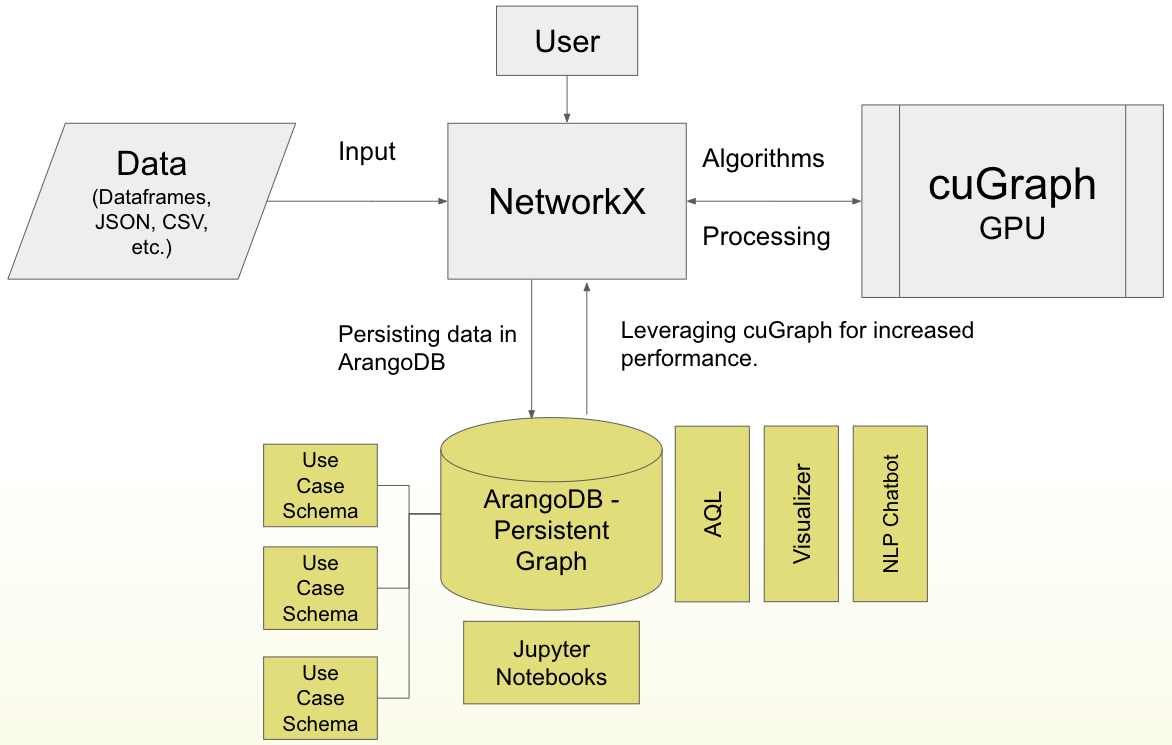
This is a backend to NetworkX that offers ArangoDB as a Persistence Layer to NetworkX Graphs:
- Persist NetworkX Graphs to ArangoDB.
- Reload NetworkX Graphs from ArangoDB.
- Perform CRUD on ArangoDB Graphs via NetworkX.
- Run algorithms (CPU & GPU) on ArangoDB Graphs via NetworkX.
Benefits of having ArangoDB as a backend to NetworkX include:
- No need to re-create the graph every time you start a new session.
- Access to GPU-accelerated graph analytics (nx-cugraph).
- Access to a database query language (Arango Query Language).
- Access to a visual interface for graph exploration (ArangoDB Web UI).
- Access to cross-collaboration on the same graph (ArangoDB Cloud).
- Access to efficient distribution of graph data (ArangoDB SmartGraphs).
Does this replace NetworkX?
Not really. This is a plugin to NetworkX, which means that you can use NetworkX as you normally would, but with the added benefit of persisting your graphs to a database.
import os
import networkx as nx
import nx_arangodb as nxadb

os.environ["DATABASE_HOST"] = "http://localhost:8529"
os.environ["DATABASE_USERNAME"] = "root"
os.environ["DATABASE_PASSWORD"] = "openSesame"
os.environ["DATABASE_NAME"] = "_system"

G = nxadb.Graph(name="MyGraph")

G.add_node(1, foo='bar')
G.add_node(2, bar='foo')
G.add_edge(1, 2, weight=2)

res = nx.pagerank(G)

for k, v in res.items():
    G.nodes[k]['pagerank'] = v
Does this mean I need to learn ArangoDB?
No. You can use nx-arangodb without knowing anything about ArangoDB. The UX of nx-arangodb is designed to be as close as possible to the UX of NetworkX. See the ReadTheDocs for a list of features that are currently unsupported/in-development.
import os
import networkx as nx
import nx_arangodb as nxadb

# os.environ ...

# Re-connect to the graph
G = nxadb.Graph(name="MyGraph")

assert G.number_of_nodes() == 2
assert G.number_of_edges() == 1
How do I install it?
pip install nx-arangodb
What if I want to use nx-cuGraph with it?
pip install nx-cugraph-cu12 --extra-index-url https://pypi.nvidia.com
pip install nx-arangodb
How can I set up ArangoDB?
1) Local Instance via Docker
Appears on localhost:8529 with the user root & password openSesame.
More info: arangodb.com/download-major.
docker run -e ARANGO_ROOT_PASSWORD=openSesame -p 8529:8529 arangodb/arangodb
2) ArangoDB Cloud Trial
ArangoGraph is ArangoDB’s Cloud offering to use ArangoDB as a managed service.
A 14-day trial is available upon sign up.
3) Temporary Cloud Instance via Python
A temporary cloud database can be provisioned using the adb-cloud-connector python package.
# !pip install adb-cloud-connector

import os
from adb_cloud_connector import get_temp_credentials

credentials = get_temp_credentials()

os.environ["DATABASE_HOST"] = credentials["url"]
os.environ["DATABASE_USERNAME"] = credentials["username"]
os.environ["DATABASE_PASSWORD"] = credentials["password"]
os.environ["DATABASE_NAME"] = credentials["dbName"]

# ...
How does algorithm dispatching work?
nx-arangodb will automatically dispatch algorithm calls to either CPU or GPU based on if nx-cugraph is installed. We rely on a rust-based library called phenolrs to retrieve ArangoDB Graphs as fast as possible.
You can also force-run algorithms on CPU even if nx-cugraph is installed:
import os
import networkx as nx
import nx_arangodb as nxadb

# os.environ ...

G = nxadb.Graph(name="MyGraph")

# Option 1: Use Global Config
nx.config.backends.arangodb.use_gpu = False
nx.pagerank(G)
nx.betweenness_centrality(G)
# ...
nx.config.backends.arangodb.use_gpu = True

# Option 2: Use Local Config
nx.pagerank(G, use_gpu=False)
nx.betweenness_centrality(G, use_gpu=False)

Can I create an ArangoDB Graph from an existing NetworkX Graph?
Yes, this is actually the recommended way to start using nx-arangodb:
import os
import networkx as nx
import nx_arangodb as nxadb

# os.environ ...

G_nx = nx.karate_club_graph()

G_nxadb = nxadb.Graph(
    incoming_graph_data=G_nx,
    name="MyKarateGraph"
)

assert G_nxadb.number_of_nodes() == G_nx.number_of_nodes()
assert G_nxadb.number_of_edges() == G_nx.number_of_edges()
1 maintainer

Metadata
1 maintainer
Release files for nx-arangodb 1.3.1
For a detailed explanation of source distributions (sdists) and built distributions (wheels), please see the package formats documentation.
Source distribution (sdist)
| File | Size | Uploaded | |
|---|---|---|---|
| nx_arangodb-1.3.1.tar.gz | 85.0 kB | Details |
Built distribution (wheel)
| File | Interpreter | ABI | Platform | Reset |
|---|---|---|---|---|
| nx_arangodb-1.3.1-py3-none-any.whl | Python 3 | none | any | Details |
Total release size: 152.8 kB
Release files / nx_arangodb-1.3.1.tar.gz
| Download URL | nx_arangodb-1.3.1.tar.gz |
|---|---|
| Size | 85.0 kB |
| Tags | Source |
|
SHA-256 checksum How to use checksums |
369fc4732e895c2e5d1680e3fe617339158c524f2ceb96c824d6fdf9b11fe7c3
|
|
BLAKE2b-256 checksum How to use checksums |
abdf0df3dd8b42b928c00f853e98405c62d6dbfc82fb5e4467abc00402dd3aa2
|
| Upload date | |
|
Uploaded using Trusted Publishing? What is trusted publishing? |
No |
| Uploaded via |
twine/6.1.0 CPython/3.10.17
|
Release files / nx_arangodb-1.3.1-py3-none-any.whl
| Download URL | nx_arangodb-1.3.1-py3-none-any.whl |
|---|---|
| Size | 67.8 kB |
| Tags | Python 3 |
|
SHA-256 checksum How to use checksums |
3a19312ec60731d09d68c347782aa73c0fadc51d5b28dcef04f439b6258de7cf
|
|
BLAKE2b-256 checksum How to use checksums |
04292a18716e2d7e60cf9feec7bf936c6fd8591d580dbe2c3929e95c7ea382ca
|
| Upload date | |
|
Uploaded using Trusted Publishing? What is trusted publishing? |
No |
| Uploaded via |
twine/6.1.0 CPython/3.10.17
|














