
A countdown to 2026 in your terminal

Project description
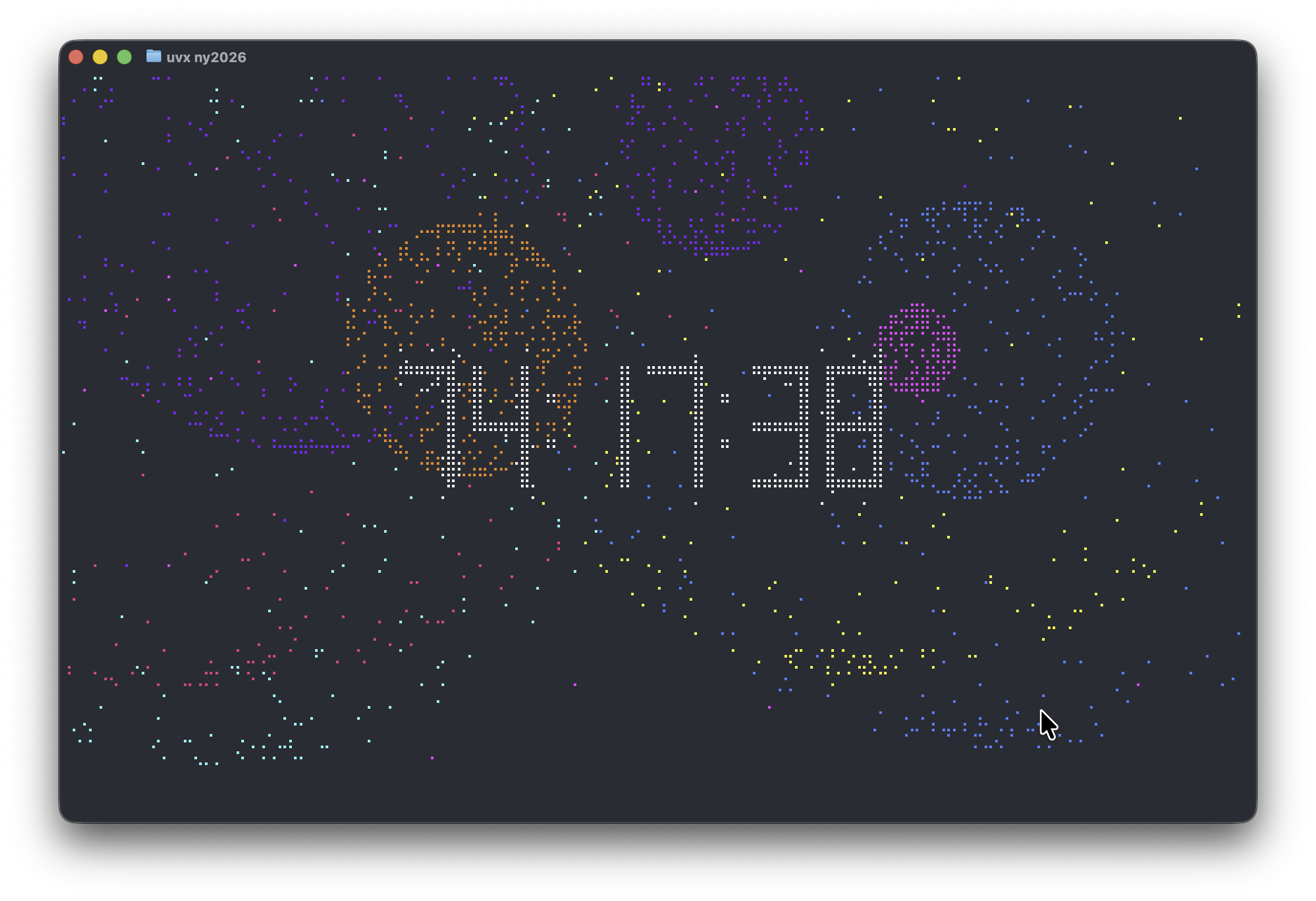
New Year's Fireworks Simulator in your Terminal
At your desk for New Years? Crack open a beer and a terminal. Run this app, and wait for the fireworks!
Pythonistas, run the following (requires uv):
uvx ny2026@latest
JS fans, run the following:
npx @manzt/uv tool run ny2026
You can also press SPACE if you are impatient for the fireworks to start...
How this was built
This project was built with Toad and Claude Code.
It was an excercise in "vibe coding". Something I hadn't done a great deal of.
Could I have done this "by hand"? Yeah, probably. I am an ex game developer and I work with terminals. Claude one-shotted much of this. But it did create bugs that it couldn't fix, and I had to use my fleshy mammalian brain to resolve. It really struggled with the audio. There were many rounds of "I see the problem! There it is fixed now", but it did eventually get there.
There was also a last minute bug reported by another mamallian brain. It was using UTC for the countdown, which would have made it wrong for anyhone outside the UK.
Of course I should have checked, but I kind of feel that a human would be less likely to make that mistake. If you actually had to type UTC in the code, that should have triggered the realization that it would break for other timezones.
Overall, the coad is not bad. Not good, but not terrible. There are some lines which I don't think are even neccesary. Reminants of failed experiments perhaps. I suspect Claude could easily tidy those up, but you do need to know to ask.
Considering there isn't a large corpus of firework simulations with braille characters in the terminal (I assume), I think Claude did OK here.
Anyhow. These videos represent a snapshot of the process.
https://github.com/user-attachments/assets/165d8aca-2f2f-4bfd-802d-5f8c33b0d0c3
https://github.com/user-attachments/assets/4a69c8ef-676d-487f-92c9-556ae907d4d9
Release history Release notifications | RSS feed


Download files
Download the file for your platform. If you're not sure which to choose, learn more about installing packages.
Source Distribution
Built Distribution
Filter files by name, interpreter, ABI, and platform.
If you're not sure about the file name format, learn more about wheel file names.
Copy a direct link to the current filters
File details
Details for the file ny2026-1.0.12.tar.gz.
File metadata
- Download URL: ny2026-1.0.12.tar.gz
- Upload date:
- Size: 25.5 kB
- Tags: Source
- Uploaded using Trusted Publishing? No
- Uploaded via: uv/0.9.18 {"installer":{"name":"uv","version":"0.9.18","subcommand":["publish"]},"python":null,"implementation":{"name":null,"version":null},"distro":{"name":"macOS","version":null,"id":null,"libc":null},"system":{"name":null,"release":null},"cpu":null,"openssl_version":null,"setuptools_version":null,"rustc_version":null,"ci":null}
File hashes
| Algorithm | Hash digest | |
|---|---|---|
| SHA256 |
aacd68050405a4d64cd2c543af56e473d57f06eaee11e31f6d4dc7dfecf9e83d
|
|
| MD5 |
75361b89151726812eeae82defa21464
|
|
| BLAKE2b-256 |
21379430ca07fb52ddc9bb316ef1b50a582215fe413d39ed2377eb4be7cee676
|
File details
Details for the file ny2026-1.0.12-py3-none-any.whl.
File metadata
- Download URL: ny2026-1.0.12-py3-none-any.whl
- Upload date:
- Size: 30.8 kB
- Tags: Python 3
- Uploaded using Trusted Publishing? No
- Uploaded via: uv/0.9.18 {"installer":{"name":"uv","version":"0.9.18","subcommand":["publish"]},"python":null,"implementation":{"name":null,"version":null},"distro":{"name":"macOS","version":null,"id":null,"libc":null},"system":{"name":null,"release":null},"cpu":null,"openssl_version":null,"setuptools_version":null,"rustc_version":null,"ci":null}
File hashes
| Algorithm | Hash digest | |
|---|---|---|
| SHA256 |
7a83b599c9fc4db77060d73fc7920430ec3998cf3b245bdd3811c02d4fd63614
|
|
| MD5 |
62f32a9a12e18b3c4b9687d55e566865
|
|
| BLAKE2b-256 |
335e25c5e09d9eab155816e1e5a229c6dff8b797c43e10e58fc890591a63ac35
|






