
nyra-forced-aligner


The most accurate word timing you can get for conversational speech: verbatim-aware, noise-robust, and fast.
Blog post · Paper · Models · PyPI · CrisperWhisper
A forced aligner answers one question: given a recording and its transcript,
when was each word said? Most aligners were built for read speech and clean
audio, and they quietly fall apart on the material people actually need to
align: conversations full of ums, laughter, restarts and half-finished words,
recorded in rooms that are not studios.
nyra-forced-aligner was built for exactly that material.
- Vocal sounds are alignable. Fillers (
[UH],[UM]), laughter, breaths, coughs and word cut-offs (th-) are units of the model like any phone, so they get timestamps of their own instead of being smeared into the neighbouring words. - Made for CrisperWhisper transcripts. Trained on the verbatim transcription convention of CrisperWhisper 2.0: feed its output straight in and every filler, repetition and event token is aligned.
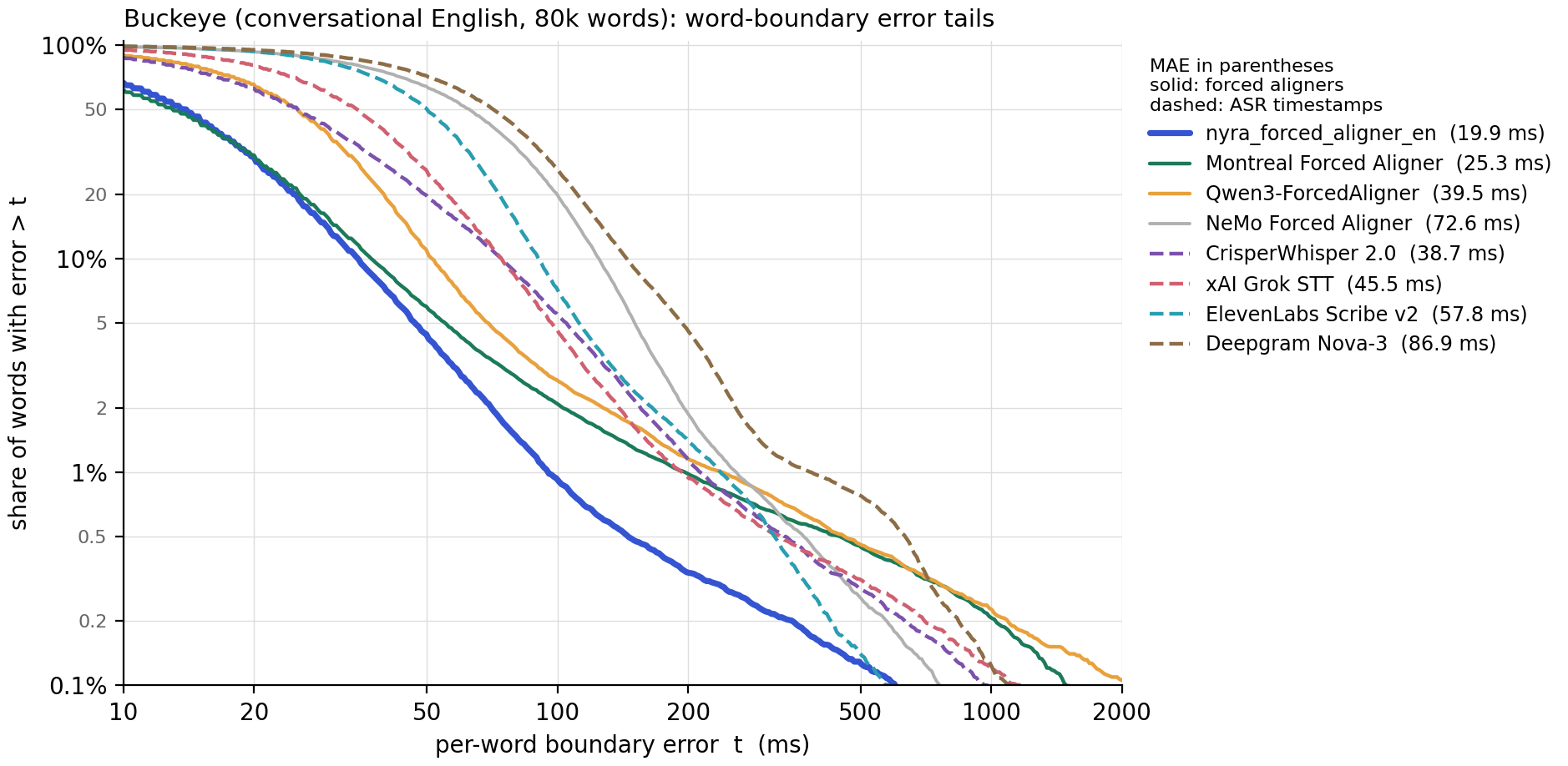
- Accurate where it matters. 19.9 ms mean word-boundary error on conversational English (Buckeye): 21% lower than the best configuration of the Montreal Forced Aligner, half the error of the best ASR-with-timestamps system, and the only system whose error tail drops below 1% of words before 100 ms.
- Noise-robust. Every utterance stays aligned down to 0 dB SNR, where classical aligners lose or mangle most of them. A Pro model goes further for difficult recordings.
- Fast and longform. Batched WavLM features, GPU emissions and a compiled beam Viterbi: eight minutes of audio align in about three seconds on one GPU.
Install
pip install nyra-forced-aligner

# espeak-ng is needed to pronounce words outside the built-in 41k-word lexicon:
#   apt install espeak-ng      (macOS: brew install espeak-ng)
Runs on CPU, but a CUDA GPU is strongly recommended (WavLM-large front-end). The model is downloaded from the Hugging Face Hub on first use.
Quickstart
from nyra_align import Aligner

aligner = Aligner()                      # nyralabs/nyra_forced_aligner_en
# aligner = Aligner(pro=True)            # noise-robust model

result = aligner.align("interview.wav",
                       "so i [UM] i went there on on thursday [laughter]")

for w in result.words:
    print(f"{w.start:7.3f} {w.end:7.3f}  {w.word:<12s} {w.type}")   # w / f(iller) / s(ound) / c(ut-off)

result.to_textgrid("interview.TextGrid")     # Praat
result.to_json("interview.json")
Any audio length works. For the best timings follow the transcript conventions below.
Command line, single file or a whole corpus of paired .wav + .txt/.lab
files (MFA-style layout):
nyra-align interview.wav --text-file interview.txt --out interview.TextGrid
nyra-align corpus_dir/ --pro --out-dir aligned/ --format textgrid
Transcript conventions
The aligner can only place what the transcript contains, so for the best timings the transcript should be verbatim: write what you hear.
- Cut-offs. Interrupted words and word fragments are marked with a
trailing hyphen:
th-,w-,resched-. - Fillers. Filled pauses are bracketed and upper-cased:
[UH],[UM]. - Vocal sound events. Non-speech sounds are bracketed:
[laughter],[cough],[breath],[sigh],[sniff],[lipsmack],[throatclearing],[yawn],[noise]. - Numbers, dates, times and emails are written out exactly as spoken
(
March third at nine thirty), not as digits or symbols. - Everything else is transcribed word for word. Normal casing and punctuation are fine (the aligner ignores both); repetitions, false starts, fillers, fragments and sounds are all left in place.
so we we need to, to reschedule the th- Thursday meeting to [UH] March third at nine thirty [laughter]
What happens when a transcript deviates: a word that was spoken but is missing
from the transcript gets absorbed into its neighbours, and a word in the
transcript that was never spoken is squeezed into a few frames, so both shift
the surrounding boundaries. Event tags are matched in any casing; a tag the
model does not know ([music]) is left out and listed in result.skipped,
as is any token that cannot be pronounced.
With CrisperWhisper 2.0
CrisperWhisper 2.0 produces transcripts in exactly this convention, so its verbatim output can be aligned as is:
from crisperwhisper import CrisperWhisperModel
from nyra_align import Aligner

audio = "interview.wav"
transcript = CrisperWhisperModel("large").transcribe(audio, language="en").text
result = Aligner().align(audio, transcript)

for w in result.words:
    print(f"{w.start:7.3f} {w.end:7.3f}  {w.word}")
result.to_textgrid("interview.TextGrid")
Models
| Shorthand | Hugging Face ID | Use it for |
|---|---|---|
Aligner() (default) |
nyralabs/nyra_forced_aligner_en |
Clean and lightly noisy audio; most accurate on clean speech |
Aligner(pro=True) |
nyralabs/nyra_forced_aligner_en_pro |
Pro: roughly the same accuracy on clean speech, meaningfully more robust to noise and adverse acoustic conditions. Not publicly released; available on request |
Only English is available at the moment; Aligner(language="de") raises
NotImplementedError.
Performance
Mean absolute word-boundary error on Buckeye (conversational English, 2,008 test recordings, 80,475 words), lower is better. Every system is scored with the same protocol: DP word matching on canonicalized forms, laughter tokens excluded, MAE = mean over words of (|onset error| + |offset error|)/2.
| # | System | Type | MAE (ms) | ≤25 ms | ≤50 ms | ≤100 ms | mIoU |
|---|---|---|---|---|---|---|---|
| 1 | nyra_forced_aligner_en | forced aligner | 19.9 | 79.5% | 93.7% | 98.3% | 0.830 |
| 2 | Montreal Forced Aligner english_us_arpa, wide beam¹ |
forced aligner | 25.3 | 76.7% | 92.2% | 97.3% | 0.826 |
| 3 | Montreal Forced Aligner english_mfa, wide beam¹ |
forced aligner | 35.6 | 71.3% | 87.5% | 95.2% | 0.790 |
| 4 | CrisperWhisper 2.0 | ASR | 38.7 | 54.2% | 78.7% | 91.7% | 0.717 |
| 5 | Qwen3-ForcedAligner-0.6B | forced aligner | 39.5 | 52.8% | 85.9% | 96.6% | 0.711 |
| 6 | xAI Grok Speech-to-Text | ASR | 45.5 | 58.3% | 82.8% | 94.0% | 0.630 |
| 7 | Montreal Forced Aligner english_us_arpa, default beam |
forced aligner | 48.0 | 75.2% | 90.4% | 95.6% | 0.810 |
| 8 | Montreal Forced Aligner english_mfa, default beam |
forced aligner | 48.9 | 70.7% | 86.7% | 94.3% | 0.782 |
| 9 | MMS-FA (torchaudio) | forced aligner | 53.0 | 57.5% | 81.3% | 92.8% | 0.620 |
| 10 | ElevenLabs Scribe v2 | ASR | 57.8 | 47.6% | 75.8% | 94.8% | 0.540 |
| 11 | Charsiu | forced aligner | 70.3 | 51.8% | 68.5% | 85.1% | 0.649 |
| 12 | NeMo Forced Aligner | forced aligner | 72.6 | 26.8% | 49.8% | 79.3% | 0.443 |
| 13 | WhisperX (wav2vec2 alignment) | forced aligner | 80.9 | 35.1% | 68.1% | 94.1% | 0.456 |
| 14 | CTC-Segmentation | forced aligner | 81.0 | 41.5% | 69.5% | 89.3% | 0.635 |
| 15 | Deepgram Nova-3 | ASR | 86.9 | 18.1% | 36.4% | 68.9% | 0.496 |
| 16 | Cartesia Ink-Whisper | ASR | 124.8 | 36.0% | 60.4% | 82.8% | 0.598 |
MAE is over the per-word error (|onset error| + |offset
error|)/2. The ≤ t ms columns follow the convention of Rousso et
al. (2024): the share of words whose end timestamp is within t of the
reference (one boundary, not the per-word mean). Forced aligners are given
the reference words and only predict their timing; every word is scored. ASR systems produce their own words, which
are text-aligned to the reference, and only matched words are scored
(88–93% of words), so their timing is judged independently of their
transcription errors. ¹ MFA's shipped default beam (10) prunes the correct
path on conversational speech; the "wide beam" rows use beam 400 / retry 4000, the best configuration we found for it.
The mean hides where the difference really is. Averaged over all words, most systems are within a few tens of milliseconds; the gap is in the tail, the words that are misaligned by 100 ms or more, which is what breaks downstream use. Each curve shows the share of words whose per-word error (mean of the onset and offset errors, the quantity behind MAE) is larger than t; note this is not the single-boundary ≤ t ms column of the table:
Under noise
The same Buckeye recordings with added noise, at signal-to-noise ratios from 20 dB down to 0 dB (MAE in ms). MUSAN is real noise recordings; Gaussian is white noise, which the model never saw in training.
| System | MUSAN 20 | 10 | 5 | 0 dB | Gauss 20 | 10 | 5 | 0 dB |
|---|---|---|---|---|---|---|---|---|
| nyra_forced_aligner_en | 20.0 | 22.2 | 26.9 | 56.3 | 20.2 | 25.3 | 38.9 | 110.9 |
| CrisperWhisper 2.0² | 38.7 | 42.4 | 48.0 | 55.7 | 40.1 | 50.9 | 67.3 | 103.4 |
| Qwen3-ForcedAligner-0.6B | 40.6 | 54.3 | 78.7 | 153.9 | 43.4 | 85.2 | 153.9 | 339.2 |
| MMS-FA (torchaudio) | 52.8 | 54.9 | 57.7 | 67.0 | 52.0 | 55.2 | 61.0 | 86.1 |
Montreal Forced Aligner english_us_arpa, wide beam |
33.3 | 65.3 | 127.2 | 281.2 | 36.2 | 74.4 | 156.3 | 416.9 |
| WhisperX (wav2vec2 alignment) | 81.7 | 90.4 | 138.1 | 468.5 | 84.2 | 126.3 | 415.2 | 2720.6 |
² CrisperWhisper 2.0 is an ASR system: at 0 dB it still recognises only 29% of the words, and only those are scored. All forced aligners above keep 100% of words at every SNR.
nyra_forced_aligner_en_pro delivers roughly the same accuracy on clean speech
and is meaningfully more robust to noise and adverse acoustic conditions.
Results on read speech (TIMIT) and stuttered speech (FluencyBank), the full set of ablations, and how the models are trained are in the paper.
What else is in the box
| Option | What it does |
|---|---|
Aligner(pro=True) |
Noise-robust model |
Aligner(device="cuda" / "cpu") |
Device selection (auto by default) |
Aligner(precision="fp32") |
WavLM in fp32 instead of fp16; bit-exact parity with the reference implementation (fp16 moves ≤30 ms on ~0.5% of word boundaries) |
Aligner(wavlm_batch=16) |
Batch size for the 30 s WavLM windows on long audio (tune to VRAM) |
aligner.align_features(feats, text) |
Re-align a transcript against cached features (decode is ~6 ms per 3.5 s utterance) |
w.confidence |
0-1 per word: how well the audio under the word fits it. Low values point at transcript errors and at words displaced by untranscribed speech next to them (see below) |
result.events |
Just the filler / laughter / cut-off tokens |
result.silences |
Silence segments between words |
Word confidence
Every word carries a confidence between 0 and 1 that says how well the audio
under the word fits the word the transcript claims is there. Per 10 ms frame,
the aligner compares the log-likelihood of the sound it placed there with that
of the best-fitting sound of the whole model; the mean gap over the word's
frames is mapped through exp(-gap / 10). A word that really is in the audio
where it was placed scores close to 1; a word that is not (a transcription
error, or a correct word pushed onto the wrong audio) scores close to 0.
How to read it. Measured on Buckeye (conversational English) with correct and deliberately corrupted transcripts:
| Confidence | Share of correct words | Share of wrong words | What it usually means |
|---|---|---|---|
| 0.8 - 1.0 | 67% | 3% | The word is there, and its timing can be trusted. |
| 0.5 - 0.8 | 24% | 3% | Almost always fine: fast, reduced or mumbled speech. |
| 0.3 - 0.5 | 5% | 8% | Worth a look if timing matters. |
| below 0.3 | 4% | 87% | Probably wrong: misheard or missing from the transcript, or displaced by speech next to it that the transcript leaves out. |
"Wrong words" are substituted words, words of an unrelated transcript, and correct words misplaced by more than 100 ms because nearby speech was not transcribed. A cut-off at 0.5 catches 99% of substituted words, 93% of the misplaced ones and 96% of an unrelated transcript's words, and flags about 10% of correct words.
What to do with it.
- Look at runs, not single words. One low word in a fluent stretch is usually a fast or reduced word. Several low words in a row point at the transcript: speech it leaves out, or a passage it gets wrong. In 10 minutes of correctly transcribed Buckeye the longest run below 0.5 was 5 words; leaving 2 minutes of speech untranscribed produced a run of 55.
- Expect lower values for some token types. Cut-offs (
th-) are fragments by definition (median 0.33 on correct transcripts), very short words under 100 ms score lower (median 0.76) than longer ones (0.88), and fillers sit a little lower (0.77) than words (0.87). Judge these against their own type, not against the 0.5 line. - Use it to rank and filter, not as a probability. It is a fit score, not the probability that the word is correct. Filter words below a threshold before training on the timestamps, or send the lowest-scoring stretches to a human. The values are calibrated on conversational speech in ordinary recording conditions, not on very noisy audio; there, compare words within a recording rather than against fixed thresholds.
- It does not change the alignment. The timestamps are the same with or without it; a low score is a warning, not a correction.
Long recordings
Any length works in one call. Since 0.2.3 the 30 s WavLM windows are stitched on the exact 20 ms grid; 0.2.2 and earlier lost 20 ms every 29 s on recordings longer than 30 s (2.3 s after an hour). Measured on an hour of Buckeye, the mean word-boundary error is the same whether it is aligned in one call or in 15 s pieces:
| Same hour of Buckeye, aligned... | 0.2.2 | 0.2.3 |
|---|---|---|
| in ~15 s pieces | 17.2 ms | 17.2 ms |
| in ~1 min pieces | 23.9 ms | 16.8 ms |
| in ~10 min pieces | 197.5 ms | 16.5 ms |
| in one call | 1154.9 ms | 16.7 ms |
How it works
The full story is in the deep-dive post:
- The nyra forced aligner: precise word timing for real conversational speech. Why classical aligners break on spontaneous and noisy speech, how frozen WavLM features, vocal-event units and a noise-pooled projection fix it, and how the model bootstraps itself from verbatim transcripts without any manual boundary labels.
In short: WavLM-large hidden states are projected by a supervised LDA onto 40 dimensions and modelled by a triphone GMM-HMM whose inventory holds 15 vocal-event units next to the 39 English phones. At inference the package builds the alignment graph for the transcript (optional silence between words, full context across word boundaries) and runs a compiled beam Viterbi over the model's likelihoods, with a beam ladder so that no utterance is ever silently dropped. Words outside the built-in lexicon are phonemized with espeak through the same mapping used at training time.
License
The model files are released under the nyra health Non-Commercial Research License: free for research and other non-commercial use. This license covers the model and the alignments it produces: any commercial use of the timestamps, and any use of them to train, fine-tune or otherwise improve models intended for commercial use, requires a commercial license. The Pro model is available under commercial license only. For commercial licensing of either, contact nyra health.
The model repositories bundle Microsoft's WavLM-large weights, redistributed unchanged under their upstream license.
1 maintainer

Metadata
1 maintainer
Release files for nyra-forced-aligner 0.2.4
For a detailed explanation of source distributions (sdists) and built distributions (wheels), please see the package formats documentation.
Source distribution (sdist)
| File | Size | Uploaded | Provenance | Actions |
|---|---|---|---|---|
| nyra_forced_aligner-0.2.4.tar.gz | 49.5 kB | Without provenance | Details for nyra_forced_aligner-0.2.4.tar.gz |
Built distribution (wheel)
| File | Interpreter | ABI | Platform | Actions Reset |
|---|---|---|---|---|
| nyra_forced_aligner-0.2.4-py3-none-any.whl | Python 3 | none | any | Details for nyra_forced_aligner-0.2.4-py3-none-any.whl |
Total release size: 94.8 kB
Release files / nyra_forced_aligner-0.2.4.tar.gz
| Download URL | nyra_forced_aligner-0.2.4.tar.gz |
|---|---|
| Size | 49.5 kB |
| Tags | Source |
|
SHA-256 checksum How to use checksums |
0b9d37dcc580839bf11565b3b1c98de5b158bfdb3769c954c88822425e6385b9
|
|
BLAKE2b-256 checksum How to use checksums |
965484f10798a92ec054d2a6b822a015fea1c533a000dc0e59c9c386ddd0d251
|
| Upload date | |
|
Uploaded using Trusted Publishing? What is trusted publishing? |
No |
| Uploaded via |
twine/7.0.0 CPython/3.13.16
|
Release files / nyra_forced_aligner-0.2.4-py3-none-any.whl
| Download URL | nyra_forced_aligner-0.2.4-py3-none-any.whl |
|---|---|
| Size | 45.3 kB |
| Tags | Python 3 |
|
SHA-256 checksum How to use checksums |
a69e76b5f91c2a25363d7a7c3c33d0aaa66fad2ca06db19cceb10760a4179bb4
|
|
BLAKE2b-256 checksum How to use checksums |
9f2c0fd7668d66b5738f89b61e4c2d5082e116283679dc51a486765a53d3f87d
|
| Upload date | |
|
Uploaded using Trusted Publishing? What is trusted publishing? |
No |
| Uploaded via |
twine/7.0.0 CPython/3.13.16
|
Security for nyra-forced-aligner 0.2.4
Provenance
Provenance describes where a file came from. On PyPI, provenance is shared via attestations, which provide a verifiable record of the build or publishing details. View details, limitations and caveats.
No provenance found
None of the files in this release were uploaded with provenance metadata.
A note on package security
PyPI is a repository for distributing packages, not a service for auditing them. While third-party security researchers and our staff do their best to detect and remove malicious packages, PyPI cannot guarantee the quality, security or suitability of any given package.
To learn more about protecting yourself from malicious actors, visit our package security documentation.














