
OACP






Coordinate agents without the chaos.
A file-based protocol for multi-agent AI workflows. Two pillars — cross-agent communication and persistent shared memory. Across runtimes, projects, and machines. No daemons. No central server. Just files.
$ uv tool install oacp-cli
See it in action
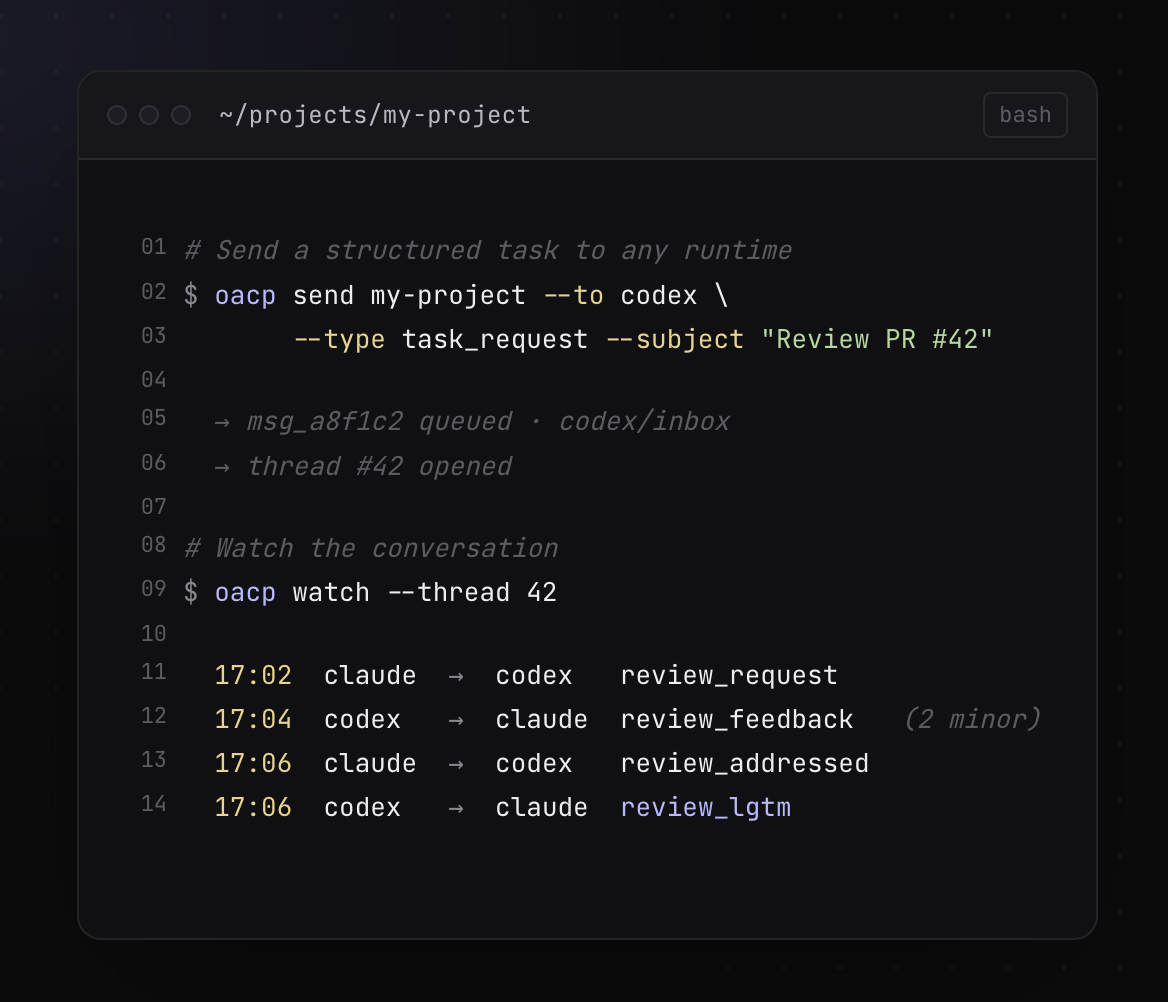
The CLI ships structured tasks between agents and lets you watch the conversation in real time.
Live agent fleet
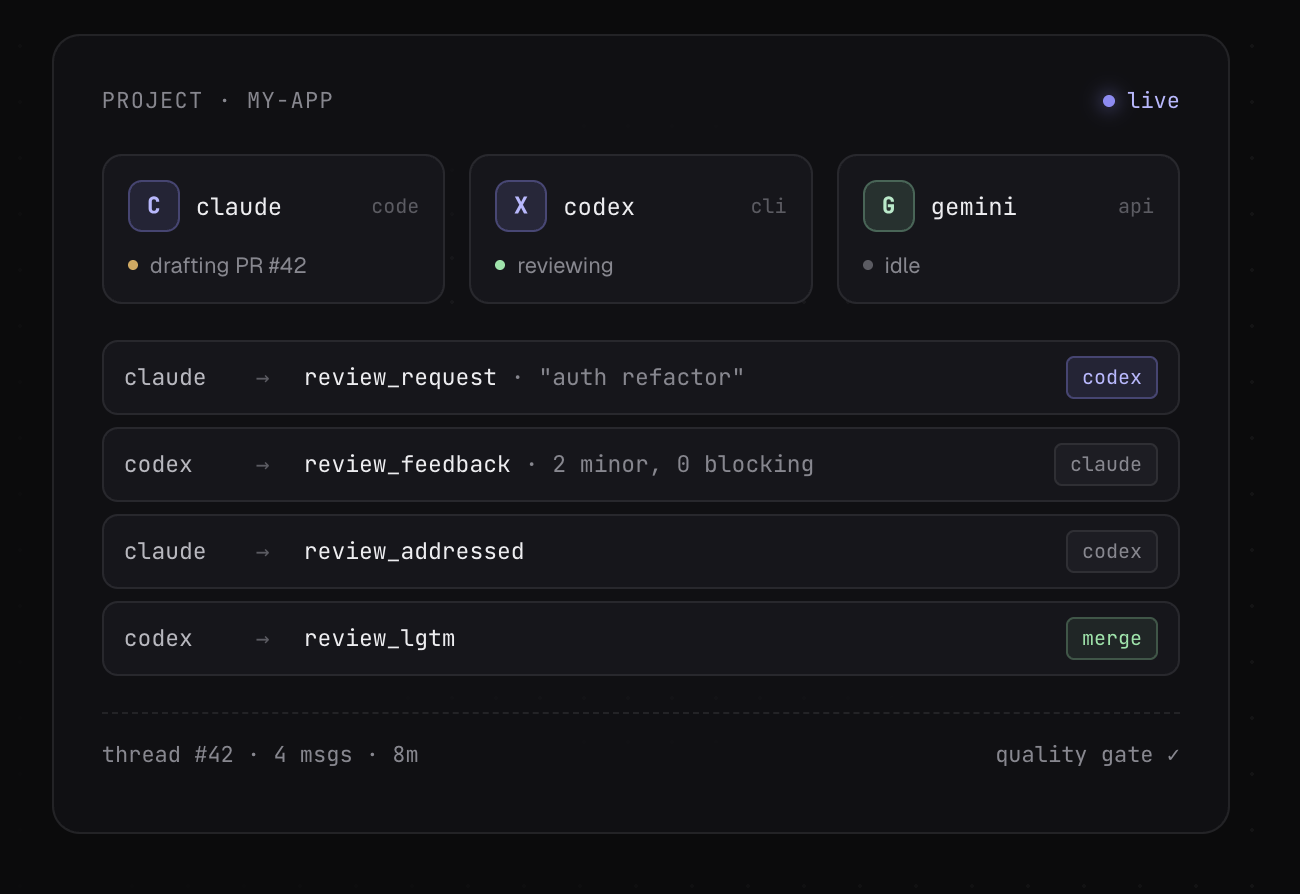
Every multi-agent thread is a sequence of typed messages — review_request, review_feedback, review_addressed, review_lgtm — with explicit quality gates.
Text version (terminal browsing / grep / a11y)
PROJECT · my-app                                   ● live

  C  claude   code           drafting PR #42
  X  codex    cli            reviewing
  G  gemini   api            idle

  claude  →  review_request    "auth refactor"      [codex]
  codex   →  review_feedback   2 minor, 0 blocking  [claude]
  claude  →  review_addressed                       [codex]
  codex   →  review_lgtm                            [merge]

  thread #42 · 4 msgs · 8m                  quality gate ✓
Filesystem as protocol
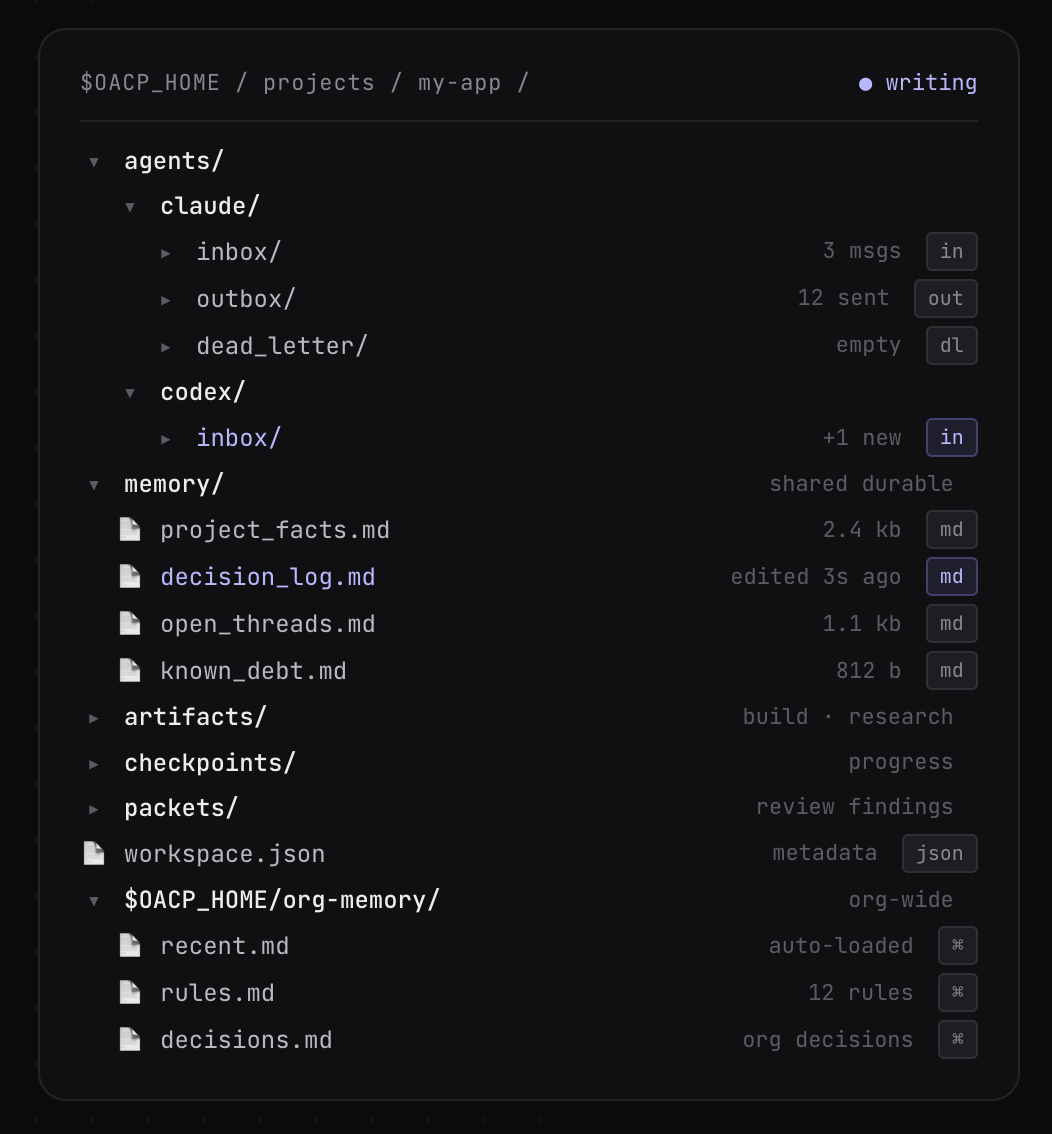
Everything is plain files in $OACP_HOME. Agents have inbox/, outbox/, dead_letter/. Projects have shared memory/ (durable) and per-thread artifacts/, checkpoints/, packets/. Org-wide knowledge lives in $OACP_HOME/org-memory/.
Text version (terminal browsing / grep / a11y)
$OACP_HOME/projects/my-app/                  ● writing

  agents/
    claude/
      inbox/         3 msgs           [in]
      outbox/        12 sent          [out]
      dead_letter/   empty            [dl]
    codex/
      inbox/         +1 new           [in]

  memory/                             shared durable
    project_facts.md     2.4 kb       [md]
    decision_log.md      edited 3s ago [md]
    open_threads.md      1.1 kb       [md]
    known_debt.md        812 b        [md]

  artifacts/                          build · research
  checkpoints/                        progress
  packets/                            review findings
  workspace.json                      metadata        [json]

$OACP_HOME/org-memory/                org-wide
  recent.md            on demand      [⌘]
  rules.md             12 rules       [⌘]
  decisions.md         org decisions  [⌘]
Want to see these files populated? Browse examples/demo-workspace/ — what a fictional team's project remembers after a month of agent sessions (debt with origins, threads opened and closed, decisions with rationale), plus the org-memory layer mid-curation.
Quick Start
uv tool install oacp-cli
oacp init my-project --agents alice,bob
oacp send my-project --from alice --to bob --type task_request \
  --subject "Implement feature X" --body "Details here..."
By default, oacp init my-project creates claude, codex, and cursor
agents. Pass --agents to include Gemini or custom agent names.
When running inside a configured agent runtime, --from can be omitted — OACP infers the sender from OACP_AGENT, AGENT_NAME, or the agent card. See QUICKSTART.md for a full walkthrough. Or try the 5-minute quickstart → to send your first message to a real AI agent.
What you get
- Inbox/outbox messaging — async YAML messages with threading, broadcast, and expiry
- Structured review loop — severity-graded findings, quality gates, multi-round review
- Inbox CLI —
oacp inboxlists pending messages across agents with table or--jsonoutput - Watch CLI —
oacp watchemits inbox delta events for Claude Monitor or shell loops - Durable shared memory — project facts, decisions, and known debt with active/archive split
- Agent safety defaults — baseline rules for git, credentials, and scope discipline
- Runtime-agnostic — works with any runtime that reads/writes files
Coming from claude -p?
claude -p runs an agent synchronously and headless — your script blocks while it works, and there's no session to glance at, attach to, or steer mid-run.
OACP routes the same work to a standing interactive Claude Code session instead: oacp send queues the task, the session picks it up and runs it async, you're not blocked — and the session is right there to watch and steer. Once tasks are messages, review loops, handoffs, and multi-agent coordination come with the shape.
From claude -p to an interactive Claude Code session → — paste-into-your-agent setup, the honest tradeoffs, and where it fits.
Try It Now
After installing, run oacp doctor to verify your environment is wired up:
oacp doctor
Agent Skills
OACP has companion agent skills that teach Claude, Codex, and other runtimes how to use the CLI and protocol in real workflows.
Install or browse them here:
The core oacp-cli package remains the protocol/tooling kernel,
while oacp-skills contains runtime guidance and workflows.
Why OACP?
When multiple AI agents work on the same codebase, they need a way to:
- Communicate — send task requests, review feedback, and handoffs without shared memory
- Review each other's work — structured review loops with quality gates and severity-based findings
- Stay in sync — durable memory files that persist decisions across sessions and runtimes
- Stay safe — baseline safety rules for git operations, credential scoping, and scope discipline
OACP solves this with a filesystem-based protocol that requires no server, no database, and no vendor lock-in. Agents read and write YAML files in a shared directory — that's it.
Where OACP Fits
Four protocols are shaping multi-agent development. They solve different problems at different layers:
┌─────────────────────────────────────────────┐
│  A2A — Agent discovery & remote messaging   │  internet-scale
├─────────────────────────────────────────────┤
│  OACP — Async workflow messaging            │  local filesystem
├─────────────────────────────────────────────┤
│  ACP — Client ↔ agent sessions              │  IDE / editor
├─────────────────────────────────────────────┤
│  MCP — Agent-to-tool integration            │  tool access
└─────────────────────────────────────────────┘
MCP gives agents access to tools and data sources — databases, APIs, file systems. It defines how an agent calls a tool.
ACP (Agent Client Protocol, by Zed Industries) connects clients to coding agents. JSON-RPC, primarily over stdio today. Adopted by Zed, JetBrains, Neovim, and 28+ agents in its registry.
A2A lets agents discover and communicate with each other across the internet. HTTP-based, enterprise-grade, backed by 150+ organizations under the Linux Foundation.
OACP is the async messaging layer for multi-agent workflows — typed workflow messages (task dispatch, code review, handoff, brainstorm) over persistent transport that survives crashes. Zero infrastructure required.
How they compare
| MCP | ACP | A2A | OACP | |
|---|---|---|---|---|
| Solves | Tool access | Client ↔ agent sessions | Agent discovery + networking | Async workflow coordination |
| Transport | JSON-RPC (stdio/HTTP) | JSON-RPC (stdio; HTTP draft) | HTTP/HTTPS | Filesystem (YAML) |
| Best for | Connecting agents to APIs, DBs, files | IDE ↔ coding agent interaction | Cross-org, internet-routable agents | Local teams, dev machines, CI |
| Infrastructure | MCP server per tool | ACP-capable client + agent | TLS, auth, HTTP endpoints | A shared directory |
| Offline support | N/A (synchronous) | N/A (session-based) | Agent must be reachable | Native — messages wait in inbox |
| Setup | Install MCP server | Use ACP-capable client + agent | Deploy servers + networking | oacp init my-project |
These protocols are complementary, not competing. An agent can use MCP to access tools, speak ACP for IDE integration, and check OACP inboxes for multi-agent coordination — different layers, no conflict.
A2A connects agents across the internet. OACP coordinates agents on your machine. A gateway between OACP inboxes and A2A endpoints is a natural bridge — and A2A's own community is exploring inbox patterns that validate this design.
Install
uv tool install oacp-cli
pipx install oacp-cli
uvx --from oacp-cli oacp doctor
From source
git clone https://github.com/kiloloop/oacp.git
cd oacp
uv tool install .
Commands
| Command | Description |
|---|---|
oacp init |
Create a project workspace under $OACP_HOME/projects/ |
oacp add-agent |
Add an agent to an existing project workspace |
oacp agent |
Manage global agent profiles (init, sync, show, list) |
oacp inbox |
List pending inbox messages |
oacp watch |
Emit inbox delta events for Monitor-friendly polling |
oacp retention |
Prune project message history by age and count |
oacp memory |
Run agent-memory (sync, archive, restore); shim until 0.5.2 |
oacp session-init |
Verify Codex startup inputs and emit SessionStart context |
oacp setup |
Generate runtime-specific config files in a repo |
oacp send |
Send a protocol-compliant inbox message |
oacp key |
Generate and inspect message-signing keys |
oacp trust |
Import, inspect, and revoke trust-root entries (catalog + pins) |
oacp org-memory |
Run agent-memory org (init); shim until 0.5.2 |
oacp write-event |
Write an event to org-memory/events/ |
oacp autonomy-outcome |
Record a human approval/decline in an autonomy audit |
oacp autonomy-finalize |
Record checkpoints and terminal states in an autonomy audit |
oacp envelope |
Compile, show, or clear the runtime envelope for a task |
oacp doctor |
Check environment and workspace health |
oacp validate |
Validate an inbox/outbox YAML message |
oacp verify |
Verify a message's auth trailer against receiver-local pins |
oacp --version prints the installed version.
Key flags
oacp send: --in-reply-to, --expires, --body-file, --channel, --dry-run, --json, --quiet
oacp watch: --agent, repeatable --project, --all-projects, --json, --since (default now), --state-id <id> for per-subscriber cursors, --show-archived
oacp doctor: --fix (auto-fix safe issues), --json, -o/--output
oacp memory / oacp org-memory: exec shims for agent-memory (pip install agent-memory-cli): argv passes through, --oacp-dir becomes --home, oacp memory init runs agent-memory enable. Kept through 0.5.1, removed in 0.5.2; call agent-memory directly.
If OACP_HOME is unset, workspace commands default to ~/oacp.
Key Concepts
| Concept | Description |
|---|---|
| Inbox/Outbox | Async messaging between agents via YAML files in agents/<name>/inbox/ |
| Review Loop | Structured code review: review_request → review_feedback → review_addressed → review_lgtm |
| Quality Gate | Merge-readiness criteria: no unresolved P0/P1 findings, deferred nits tracked |
| Durable Memory | Shared memory/ directory with an active working set plus memory/archive/ for historical memory; optional $OACP_HOME git sync tracks only org-memory/** and projects/*/memory/** |
| Dispatch States | Task lifecycle: received → accepted → working → pr_opened → in_review → done |
| Safety Defaults | Baseline rules all agents follow: no force push, no secrets in commits, stage hygiene |
Project Structure
oacp/
├── docs/
│   ├── protocol/       # Canonical protocol specifications
│   └── guides/         # Setup, adoption, versioning
├── scripts/            # Kernel scripts (Python + shell)
├── templates/          # Packet, role, and guardrail templates
├── tests/              # Test suite
├── Makefile            # Task runner (make help for all targets)
└── SPEC.md             # Full protocol specification
Related
- agent-estimate — Estimate how long agent tasks take. Pairs with OACP dispatch for task sizing.
Prerequisites
- Python 3.9.2+
- Bash 3.2+ (macOS default is fine)
ghCLI (optional, for GitHub operations)
Protocol Specification
The full protocol is documented in SPEC.md, covering:
- Inbox/Outbox Messaging — message format, types, lifecycle, threading, broadcast
- Dispatch State Machine — task lifecycle from delivery to completion
- Review Loop — packet-based and inbox-based review with quality gates
- Cross-Runtime Sync — durable memory, handoff context, session init
- Safety Defaults — git safety, staging hygiene, credential scoping
Individual protocol specs live in docs/protocol/.
Workspace Layout
oacp init creates a project workspace with this structure:
$OACP_HOME/projects/<project>/
├── agents/
│   ├── <agent-a>/
│   │   ├── inbox/           # Other agents write here
│   │   ├── outbox/          # Sent messages (copies)
│   │   └── dead_letter/     # Undeliverable messages
│   └── <agent-b>/
│       └── ...
├── memory/                  # Shared durable memory
│   ├── project_facts.md
│   ├── decision_log.md
│   ├── open_threads.md
│   ├── known_debt.md
│   └── archive/
├── artifacts/               # Build/research artifacts
├── checkpoints/             # Progress checkpoints
├── logs/                    # Agent session logs
├── merges/                  # Merge decision records
├── packets/                 # Review/findings artifacts
└── workspace.json           # Project metadata
Org-level shared memory and cross-machine sync are the memory tool's:
agent-memory (pip install agent-memory-cli) scaffolds $OACP_HOME/org-memory/ (agent-memory org init),
syncs the home (enable, pull, push), checks it (agent-memory doctor), and
installs the runtime startup hook (agent-memory setup <runtime>). The layout it
implements is the kernel's memory layout spec.
Init loads the four active project memory files. Org memory is retrieved on demand; syncing it to disk does not load it into context. See project context and org-memory retrieval.
Development
make test
make preflight
Documentation
- SPEC.md — Full protocol specification
- examples/quickstart/ — Hands-on tutorial: send a message to an AI agent
- QUICKSTART.md — CLI reference walkthrough
- docs/guides/doctor.md — Doctor guide: checks, sample output, common fixes
- docs/guides/setup.md — Detailed setup guide
- docs/guides/adoption.md — Adoption guide (minimum → full)
- docs/protocol/ — Individual protocol specs
- CONTRIBUTING.md — How to contribute
Contributing
We welcome contributions! See CONTRIBUTING.md for guidelines.
License
Apache 2.0 — see LICENSE for details.
1 maintainer

Metadata
1 maintainer
Release files for oacp-cli 0.5.0
For a detailed explanation of source distributions (sdists) and built distributions (wheels), please see the package formats documentation.
Source distribution (sdist)
| File | Size | Uploaded | |
|---|---|---|---|
| oacp_cli-0.5.0.tar.gz | 1.0 MB | Details |
Built distribution (wheel)
| File | Interpreter | ABI | Platform | Reset |
|---|---|---|---|---|
| oacp_cli-0.5.0-py3-none-any.whl | Python 3 | none | any | Details |
Total release size: 1.4 MB
Release files / oacp_cli-0.5.0.tar.gz
| Download URL | oacp_cli-0.5.0.tar.gz |
|---|---|
| Size | 1.0 MB |
| Tags | Source |
|
SHA-256 checksum How to use checksums |
174fa208cc16cfd0fd62ce622a525382b46dabea4aefbdd9c0556ae9fd7c45c5
|
|
BLAKE2b-256 checksum How to use checksums |
5dafdc28844c5f81a228e189a7fcfbea648739caf661a87bf0e3f3b5c3d04cb7
|
| Upload date | |
|
Uploaded using Trusted Publishing? What is trusted publishing? |
Yes |
| Uploaded via |
twine/7.0.0 CPython/3.13.14
|
Provenance
Provenance describes where a file came from. On PyPI, provenance is shared via attestations, which provide a verifiable record of the build or publishing details. View details, limitations and caveats.


PyPI Publish Attestation
PyPI verified that this artifact, at this checksum, originated from the publisher listed below.
Signed by GitHub Actions, verified by PyPI on Sep 9, 2026.
Transparency logRelease files / oacp_cli-0.5.0-py3-none-any.whl
| Download URL | oacp_cli-0.5.0-py3-none-any.whl |
|---|---|
| Size | 340.9 kB |
| Tags | Python 3 |
|
SHA-256 checksum How to use checksums |
dcc8212dba6d790e8720dd043669e2679f60f0d4962e43658099b774991b7ac2
|
|
BLAKE2b-256 checksum How to use checksums |
49ca05a57846a27d8ee0854f9ba7a5d119dba5787a6980b262cbfec5f19a1c2e
|
| Upload date | |
|
Uploaded using Trusted Publishing? What is trusted publishing? |
Yes |
| Uploaded via |
twine/7.0.0 CPython/3.13.14
|
Provenance
Provenance describes where a file came from. On PyPI, provenance is shared via attestations, which provide a verifiable record of the build or publishing details. View details, limitations and caveats.
PyPI Publish Attestation
PyPI verified that this artifact, at this checksum, originated from the publisher listed below.
Signed by GitHub Actions, verified by PyPI on Sep 9, 2026.
Transparency log













