
This repo (https://github.com/mimminou/oasa3/) will only serve as a base repo for maintaining the Pypi package, if you intend to contribute, please fork the official repo from gitlab.
Installation
you can obtain OASA from pip :
pip install oasa3
Depiction usage
The following code shows how to generate a 2D depiction from a 3D SDF / MOL file, other formats work too, just adapt your code accordingly.
The process is simple : follow these 4 steps :
- 1 : Import the required stuff.
from oasa.cairo_out import cairo_out
from oasa.molfile import file_to_mol   # For MOL / SDF files only, import other modules for other file formats
from oasa.coords_generator import coords_generator
- 2 : Open the file you want to depict
mFile = open("GDP_model.sdf")      #? opens a molecule file
molecule = file_to_mol(mFile)        #? parse this file into the method to create a molecule object


#? The file_to_mol method can only read .mol or .sdf files, other types can be SMILES or InChI depending on what you imported.
- 3 : Generate coordinates ( Converting 3D to 2D ), and remove unimportant hydrogens if you wish
coordGenerator = coords_generator(18)       #? init coords_generator class with bond length of 18 units
coordGenerator.calculate_coords(mol=molecule,bond_length=18,force=1)     #?Generate coordinates for depiction with bond length 18 units, 2nd argument is to force recalculating coords.
molecule.remove_unimportant_hydrogens() #? removes non essential hydrogen atoms in the depiction.
- 4 : Initialize the depiction class and write the image into a file.
#? Initialize cairo_out class with these parameters, feel free to try other ones if you do not like the depiction.
#? Further arguments can be found in the original OASA repo or in the end of file here  :  https://github.com/mimminou/PDBASER/blob/main/GUI/Build/MolHandler.py

c = cairo_out(scaling=4, margin=15, font_size=10, bond_width=2.0,
            background_color=(0, 0, 0, 0), bond_second_line_shortening=0.08,
            color_bonds=False, space_around_atom=2.0,
            line_width=1.2,
            show_hydrogens_on_hetero= True,
            wedge_width= 5)

#? Write the generated image to a file with .png format, supports also vectors in .svg, and .pdf
c.mol_to_cairo(mol=molecule,filename="GDP.png",format="png")
Bonus step
#? Get molecular weight of this molecule :
mw = molecule.weight
formated_molecule_weight = "{:.2f}".format(mw)
OASA
Introduction
OASA is a free python library for manipulating and analyzing chemical structures. Even though OASA is already some (current year - 2009) years old project, its API may be unstable. This is mainly because it was never before released outside of BKChem and Reinis Danne followed all significant API changes there. Therefore please do not expect a highly polished, well documented library. OASA is probably rather the opposite. You have been warned.
Features
- reading and writing of SMILES, InChI, Molfile
- atom coordinate generation
- molecule rendering into PNG, PDF and SVG using cairo
Missing features
- documentation
- full streochemistry support (only cis/trans double bond stereochemistry is supported)
- many more I cannot remember now
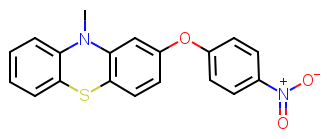
Sample export
This is an example of PNG export:
Requirements
- OASA needs python 2.6 or higher to run properly.
STATUS
bellow are summarized the limitations of the library. it does by no means mean that there are no other limitations, however, for these it has no sense to write bugreports :)
OVERALL:
- no documentation beyond the source code is available
- stereochemistry support is limited to cis/trans stereochemistry on double bonds and only in some formats
- not much effort was invested into optimalization of the code, it may be pretty slow sometimes
- the API might be unstable
SMILES:
- cis/trans stereochemistry is supported, some attempt were made to make tetrahedral stereochemistry work, but it is not very much tested
InChI:
- reading is done natively by OASA
- for writing the original InChI program is needed (cInChI, cInChI.exe)
MOLFILE
- not all data in the properties block (after the bond block) are supported (this means that molfiles containing a properties block might not be read properly)
COORDS GENERATOR:
- coords for molecules like calix[4]arene and similar do not give a very nice picture
- tetrahedral stereochemistry is not taken into account
CAIRO_OUT:
- pycairo is required to make use of cairo_out functionality, and is automatically installed when installing OASA.
- PNG, PDF and SVG export is supported
1 maintainer

Download files
Download the file for your platform. If you're not sure which to choose, learn more about installing packages.
Source Distribution
Built Distribution
Filter files by name, interpreter, ABI, and platform.
If you're not sure about the file name format, learn more about wheel file names.
Copy a direct link to the current filters
File details
Details for the file oasa3-0.14.1.tar.gz.
File metadata
- Download URL: oasa3-0.14.1.tar.gz
- Upload date:
- Size: 173.4 kB
- Tags: Source
- Uploaded using Trusted Publishing? No
- Uploaded via:
twine/4.0.0 CPython/3.8.10
File hashes
| Algorithm | Hash digest | |
|---|---|---|
| SHA256 |
5c31eef2f5558e19e8afcbcabed00b39b35703529ee080df943af25890943213
|
|
| MD5 |
ed632125e9ae5fa153795c8259426bed
|
|
| BLAKE2b-256 |
5a4f7dc33f7cb5e51da53b5435b2a9cd988728e16e247930a701037665a9af79
|
File details
Details for the file oasa3-0.14.1-py3-none-any.whl.
File metadata
- Download URL: oasa3-0.14.1-py3-none-any.whl
- Upload date:
- Size: 196.7 kB
- Tags: Python 3
- Uploaded using Trusted Publishing? No
- Uploaded via:
twine/4.0.0 CPython/3.8.10
File hashes
| Algorithm | Hash digest | |
|---|---|---|
| SHA256 |
ef583d51e7cf564b60040d8c72a31f99c374e7ff9241d520b472c2f868693327
|
|
| MD5 |
bbbed1aefdc17a446d8c986f968a6cfb
|
|
| BLAKE2b-256 |
ad65cd4a5adf2110bdc542ff8e80d2c229d58c587cd6b20d844e91fe8b6fceb2
|














