
obd-diag
See what your car's check engine light is about, on Linux.
Plug a cheap ELM327 adapter into the OBD-II port, and obd-diag reads the trouble codes, explains them in plain words and shows what the engine is doing right now. Desktop app and command line, in English and German, no account and no cloud.





English · Deutsch
Why obd-diag
- Read-only by design. obd-diag only asks, it never changes anything in the car. Every command passes an allowlist taken from the ELM327 datasheet and SAE J1979; anything else is refused before it reaches the adapter. No coding, no flashing, no service functions.
- Answers, not hex. Trouble codes come with an offline description and a rough urgency (from "keep an eye on it" to "avoid driving").
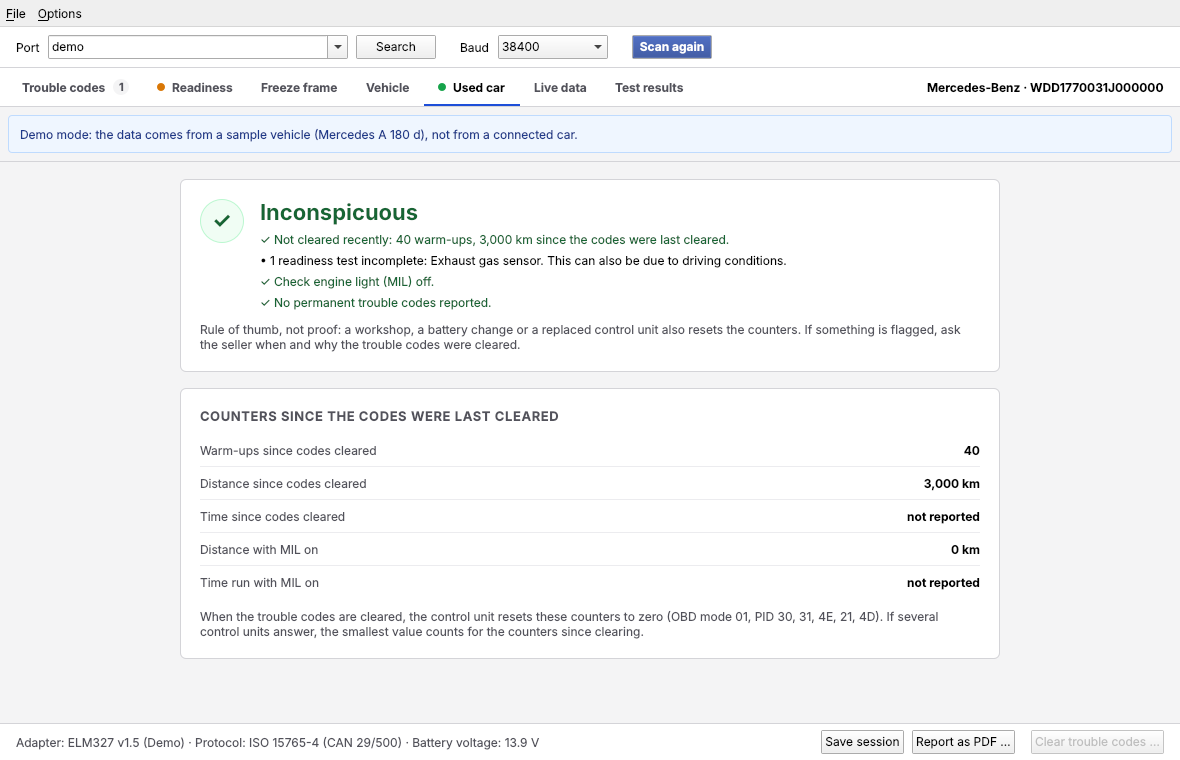
- Buying a used car? The used-car check shows whether someone cleared the trouble codes shortly before the viewing, using the counters that clearing resets.
- Tested on a real car (Mercedes A 180 d) and, without hardware, against the datasheet, third-party adapter logs and python-OBD, with around 2000 automated tests.
What it shows
| Trouble codes | stored, pending and permanent, with description and urgency |
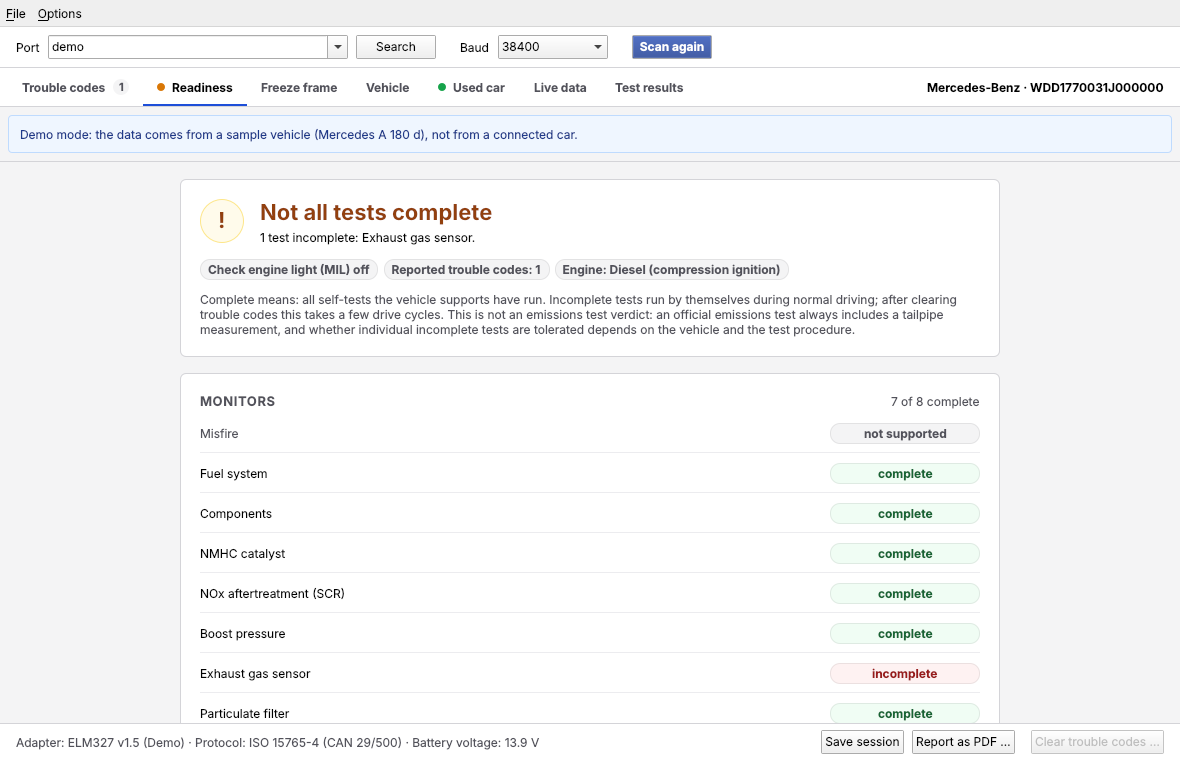
| Readiness | which self-tests have run, and which drive completes the missing ones |
| Used-car check | were the codes cleared recently? warm-ups and distance since then |
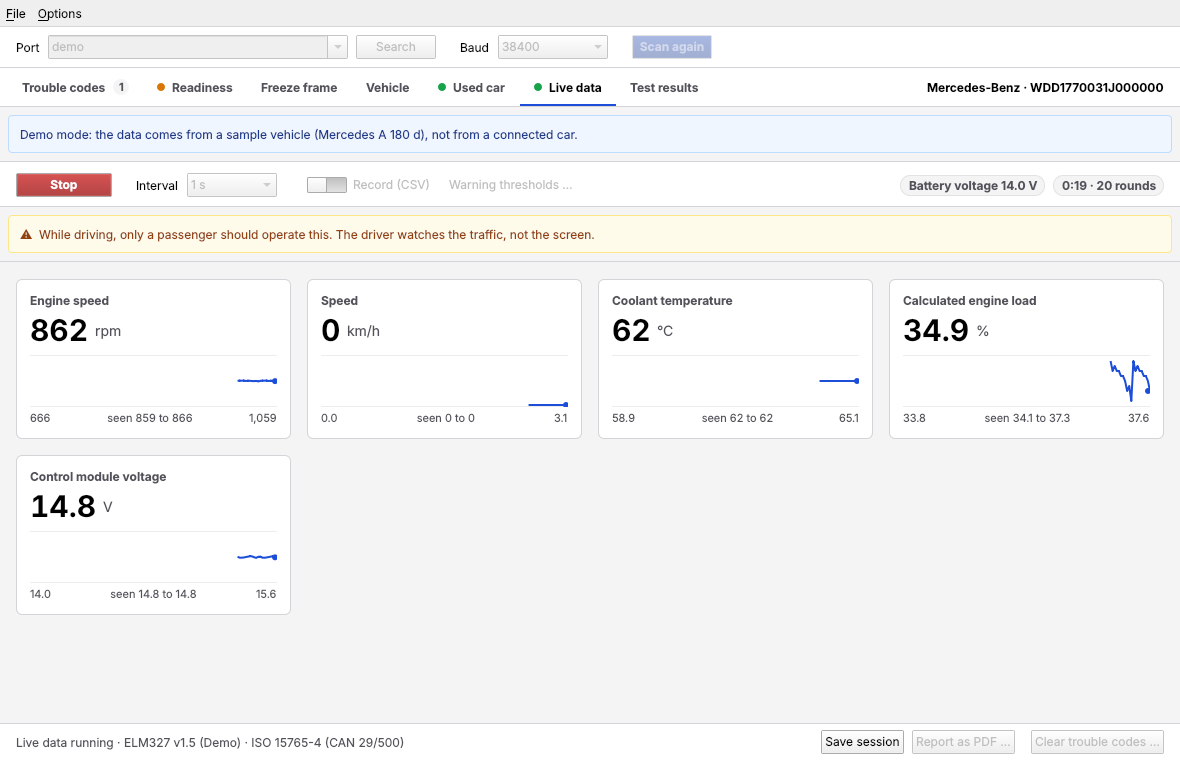
| Live data | 140 values (speed, temperatures, boost, rail pressure, AdBlue …) as tiles with curves, recorded to CSV, with warning thresholds |
| Freeze frame | engine conditions at the moment a code was set |
| Vehicle | VIN decoded offline, control units, calibration IDs, self-test results |
| Battery test | resting voltage, dip while cranking, charging voltage |
| Reports | PDF report, CSV, saved sessions you can compare later |
|
|
Try it without a car
The demo mode plays back a recorded Mercedes A 180 d, no adapter needed:
pipx install 'obd-diag[gui]'
obd-diag-gui --demo
Install
pipx install 'obd-diag[gui]'              # any distribution (PyPI); without [gui]: command line only
yay -S obd-diag                           # Arch Linux (AUR)
flatpak install --user obd-diag.flatpak   # bundle from the GitHub release
Needs Linux and Python 3.12 or newer. Details, udev rule and serial port permissions: Installation.
At the car
You need an ELM327-compatible adapter (USB or Bluetooth serial) and a car with OBD-II (petrol from 2001, diesel from 2004 in the EU; 1996 in the US).
obd-diag setup-check                      # finds the adapter, checks permissions and baud rate
obd-diag diagnose --port /dev/ttyUSB0     # ignition on, engine off
obd-diag live --port /dev/ttyUSB0         # live data, Ctrl+C to stop
obd-diag-gui                              # or all of it in the desktop app
Before the first drive with a laptop on the passenger seat, read First test at the car.
What it does not do
obd-diag talks to the standardised emissions diagnosis (OBD-II). It does not reach airbag, ABS or comfort modules, and it does not code, flash or reset service intervals. Clearing trouble codes is built in, with checks and a backup, but stays locked for now. Next on the roadmap: Bluetooth LE adapters and reading the fault memory of all control units via UDS, still read-only.
Documentation
Everything else is on the website, in English and German: every command and option, the user interface, common problems, how the tool talks to the adapter (with a real trace explained line by line) and the safety concept.
Contributing
Bug reports and traces from other cars are very welcome, especially from makes other
than Mercedes. --trace records the adapter communication; it contains the VIN, so
please remove it before sharing.
uv sync && uv run python tools/build_dtc_db.py
uv run pytest
Rules, tests and translations: Contributing, changes: CHANGELOG.md (German).
License
1 maintainer

Metadata
1 maintainer
Release files for obd-diag 0.2.2
For a detailed explanation of source distributions (sdists) and built distributions (wheels), please see the package formats documentation.
Source distribution (sdist)
| File | Size | Uploaded | |
|---|---|---|---|
| obd_diag-0.2.2.tar.gz | 6.3 MB | Details |
Built distribution (wheel)
| File | Interpreter | ABI | Platform | Reset |
|---|---|---|---|---|
| obd_diag-0.2.2-py3-none-any.whl | Python 3 | none | any | Details |
Total release size: 8.4 MB
Release files / obd_diag-0.2.2.tar.gz
| Download URL | obd_diag-0.2.2.tar.gz |
|---|---|
| Size | 6.3 MB |
| Tags | Source |
|
SHA-256 checksum How to use checksums |
4532f0eba5f4ab399bde8392d6ccbaf4ad0fd5f27c40cf13e130ea32d17931a2
|
|
BLAKE2b-256 checksum How to use checksums |
1c294723d192624e11feb3d7c33e92baffba3125e10e6b8e8e9e6b4c8b04808d
|
| Upload date | |
|
Uploaded using Trusted Publishing? What is trusted publishing? |
Yes |
| Uploaded via |
twine/7.0.0 CPython/3.13.14
|
Provenance
Provenance describes where a file came from. On PyPI, provenance is shared via attestations, which provide a verifiable record of the build or publishing details. View details, limitations and caveats.


PyPI Publish Attestation
PyPI verified that this artifact, at this checksum, originated from the publisher listed below.
Signed by GitHub Actions, verified by PyPI on Oct 12, 2026.
Transparency logRelease files / obd_diag-0.2.2-py3-none-any.whl
| Download URL | obd_diag-0.2.2-py3-none-any.whl |
|---|---|
| Size | 2.1 MB |
| Tags | Python 3 |
|
SHA-256 checksum How to use checksums |
e3e37a96b883ff45a6224f7c8ef39c74a81e3cea34638ecdaf69ed8798d74def
|
|
BLAKE2b-256 checksum How to use checksums |
3e8771c4b0682ccfeda62e712745307e37e823d55bba1b959e8a46aa61718c6f
|
| Upload date | |
|
Uploaded using Trusted Publishing? What is trusted publishing? |
Yes |
| Uploaded via |
twine/7.0.0 CPython/3.13.14
|
Provenance
Provenance describes where a file came from. On PyPI, provenance is shared via attestations, which provide a verifiable record of the build or publishing details. View details, limitations and caveats.
PyPI Publish Attestation
PyPI verified that this artifact, at this checksum, originated from the publisher listed below.
Signed by GitHub Actions, verified by PyPI on Oct 12, 2026.
Transparency log













