
Create an html with three.js that contains the given .obj file.

Project description
You can use that lib to create html file from a .obj path:
from obj2html import obj2html
obj2html('model.obj', 'index.html')
# firefox index.html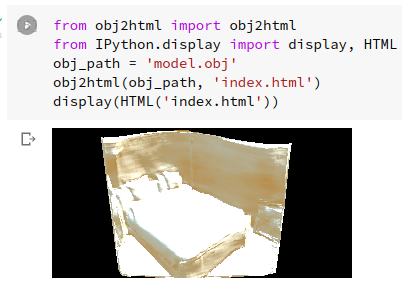
Use in a Jupyter notebook to display a .obj 3D file:
! pip install obj2html
! wget https://gitlab.com/nicolalandro/obj2html/-/raw/main/test/assets/model.obj
from obj2html import obj2html
from IPython.display import display, HTML
obj2html('model.obj', 'index.html')
display(HTML('index.html'))
It is also possible to set the scale factor, light and camera options:
camera={
  "fov": 45,
  "aspect": 2,
  "near": 0.1,
  "far": 100,
  "pos_x": 0,
  "pos_y": 10,
  "pos_z": 20,
  "orbit_x": 0,
  "orbit_y": 5,
  "orbit_z": 0,
},
light={
  "color": "0xFFFFFF",
  "intensity": 1,
  "pos_x": 0,
  "pos_y": 10,
  "pos_z": 0,
  "target_x": -5,
  "target_y": 0,
  "target_z": 0,
},
obj_options={
  "scale_x": 30,
  "scale_y": 30,
  "scale_z": 30,
}
obj2html('model.obj', 'index.html', camera, light, obj_options)Release history Release notifications | RSS feed


Download files
Download the file for your platform. If you're not sure which to choose, learn more about installing packages.
Source Distribution
obj2html-0.11.tar.gz
(3.3 kB
view details)
File details
Details for the file obj2html-0.11.tar.gz.
File metadata
- Download URL: obj2html-0.11.tar.gz
- Upload date:
- Size: 3.3 kB
- Tags: Source
- Uploaded using Trusted Publishing? No
- Uploaded via: twine/3.6.0 importlib_metadata/4.8.2 pkginfo/1.7.1 requests/2.26.0 requests-toolbelt/0.9.1 tqdm/4.62.3 CPython/3.8.12
File hashes
| Algorithm | Hash digest | |
|---|---|---|
| SHA256 |
3f4af722f6604db3465de57797ef7b557d1bcf7aef77170f8f6746a5eff1e3df
|
|
| MD5 |
7fbea580c1f900b7c4790bfdfe7d067e
|
|
| BLAKE2b-256 |
2e9f10aa444703610cd3af05236a8830254bf55e8abdbce41ef01422a311079b
|






