
ObjectDetection
Some experiments with object detection in PyTorch and FastAi. This repo is created for educational reasons and to get a deeper understanding of RetinaNet and object detection general. If you like it, please let me know, if you find any bugs or tips for improvements also.
Install
pip install object-detection-fastai
Test: Coco Colab
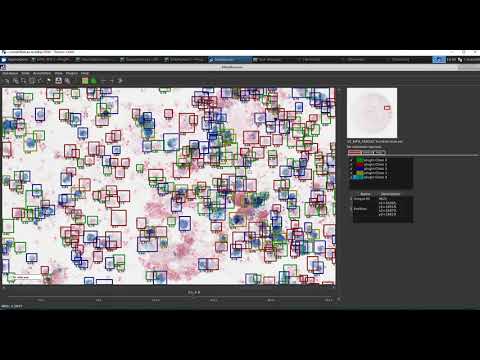
Image annotation
This paper describes the EXACT-Server in-depth, EXACT enables you to annotate your data and train an object detection model with this repository. Please cite if you use this tool in your research:
Marzahl et al. EXACT: A collaboration toolset for algorithm-aided annotation of almost everything
@misc{marzahl2020exact,
    title={EXACT: A collaboration toolset for algorithm-aided annotation of almost everything},
    author={Christian Marzahl and Marc Aubreville and Christof A. Bertram and Jennifer Maier and Christian Bergler and Christine Kröger and Jörn Voigt and Robert Klopfleisch and Andreas Maier},
    year={2020},
    eprint={2004.14595},
    archivePrefix={arXiv},
    primaryClass={cs.HC}
}
Update old code
# Old imports:
from helper.object_detection_helper import *
from loss.RetinaNetFocalLoss import RetinaNetFocalLoss
from models.RetinaNet import RetinaNet
from callbacks.callbacks import BBLossMetrics, BBMetrics, PascalVOCMetric

# New imports
from object_detection_fastai.helper.object_detection_helper import *
from object_detection_fastai.loss.RetinaNetFocalLoss import RetinaNetFocalLoss
from object_detection_fastai.models.RetinaNet import RetinaNet
from object_detection_fastai.callbacks.callbacks import BBLossMetrics, BBMetrics, PascalVOCMetric
The basline for this notebook was created by Sylvain Gugger from FastAi DevNotebook. Thank you very much, it was a great starting point and I'm a big fan off your work.
Publications using this code:
[x] Deep Learning-Based Quantification of Pulmonary Hemosiderophages in Cytology Slides
Examples:
Results:


Features:
[x] Coco Metric at train time via callback

# use the feature map sizes 32,18,8,4 with 32 channels and two conv layers for detection and classification
RetinaNet(encoder, n_classes=data.train_ds.c, n_anchors=18, sizes=[32,16,8,4], chs=32, final_bias=-4., n_conv=2)
'''
  (classifier): Sequential(
    (0): Sequential(
      (0): Conv2d(32, 32, kernel_size=(3, 3), stride=(1, 1), padding=(1, 1))
      (1): ReLU()
    )
    (1): Sequential(
      (0): Conv2d(32, 32, kernel_size=(3, 3), stride=(1, 1), padding=(1, 1))
      (1): ReLU()
    )
    (2): Conv2d(32, 18, kernel_size=(3, 3), stride=(1, 1), padding=(1, 1))
  )
# use the feature map sizes 32 with 8 channels and three conv layers for detection and classification
RetinaNet(encoder, n_classes=data.train_ds.c, n_anchors=3, sizes=[32], chs=8, final_bias=-4., n_conv=3)
[x] Debug anchor matches for training.
On the left image we see objects that are represented by anchors.
On the right objects with no corresponding anchors for training.

1 maintainer

Metadata
1 maintainer
Release files for object-detection-fastai 0.0.10
For a detailed explanation of source distributions (sdists) and built distributions (wheels), please see the package formats documentation.
Source distribution (sdist)
| File | Size | Uploaded | Provenance | Actions |
|---|---|---|---|---|
| object-detection-fastai-0.0.10.tar.gz | 26.1 kB | Without provenance | Details for object-detection-fastai-0.0.10.tar.gz |
Built distribution (wheel)
| File | Interpreter | ABI | Platform | Actions Reset |
|---|---|---|---|---|
| object_detection_fastai-0.0.10-py3-none-any.whl | Python 3 | none | any | Details for object_detection_fastai-0.0.10-py3-none-any.whl |
Total release size: 58.5 kB
Release files / object-detection-fastai-0.0.10.tar.gz
| Download URL | object-detection-fastai-0.0.10.tar.gz |
|---|---|
| Size | 26.1 kB |
| Tags | Source |
|
SHA-256 checksum How to use checksums |
ba9766ba62f90ee68f75d5d7d49aa810ac65b4eeba7aa2c10add88dbaf89bb14
|
|
BLAKE2b-256 checksum How to use checksums |
0a9860e5560211214eb84b7254e480a0ecada5f7cf2156870e227736e579d949
|
| Upload date | |
|
Uploaded using Trusted Publishing? What is trusted publishing? |
No |
| Uploaded via |
twine/3.4.1 importlib_metadata/3.9.0 pkginfo/1.5.0.1 requests/2.25.1 requests-toolbelt/0.9.1 tqdm/4.58.0 CPython/3.6.13
|
Release files / object_detection_fastai-0.0.10-py3-none-any.whl
| Download URL | object_detection_fastai-0.0.10-py3-none-any.whl |
|---|---|
| Size | 32.3 kB |
| Tags | Python 3 |
|
SHA-256 checksum How to use checksums |
be2c17788899c89599e4da7a86b1056bc47f2297fe7c6564107b1c0f1a007528
|
|
BLAKE2b-256 checksum How to use checksums |
bc9a2490fff259807d718e47404ab036a6bacb59aecb4d6cf09c99081cb89249
|
| Upload date | |
|
Uploaded using Trusted Publishing? What is trusted publishing? |
No |
| Uploaded via |
twine/3.4.1 importlib_metadata/3.9.0 pkginfo/1.5.0.1 requests/2.25.1 requests-toolbelt/0.9.1 tqdm/4.58.0 CPython/3.6.13
|
Security for object-detection-fastai 0.0.10
Provenance
Provenance describes where a file came from. On PyPI, provenance is shared via attestations, which provide a verifiable record of the build or publishing details. View details, limitations and caveats.
No provenance found
None of the files in this release were uploaded with provenance metadata.
A note on package security
PyPI is a repository for distributing packages, not a service for auditing them. While third-party security researchers and our staff do their best to detect and remove malicious packages, PyPI cannot guarantee the quality, security or suitability of any given package.
To learn more about protecting yourself from malicious actors, visit our package security documentation.














