
objectmsh

Object oriented Gmsh modeling.
Project description
This tool provides some utilities for the gmsh python API that are especially helpful when you're working on complex geometries using the Open CASCADE kernel.
The project is developed and maintained by the Model experiments group at the Leibniz Institute for Crystal Growth (IKZ).
Referencing
If you use this code in your research, please cite our article:
TODO
Installation
The latest release can be installed using pip:
pip install objectgmsh
Basic principle
objectgmsh bases on a Model class implementing an interface to the main Gmsh functionality, and a Shape class used to access information about the geometry, e.g., the IDs of the interface between two bodies. Furthermore, several classes for simplified control of mesh sizes are provided.
objectgmsh is just a wrapper for the gmsh python API, and all gmsh commands are still working "as usual". However, in complex geometries, it highly reduces the modelling effort.
Example
2D modeling & meshing
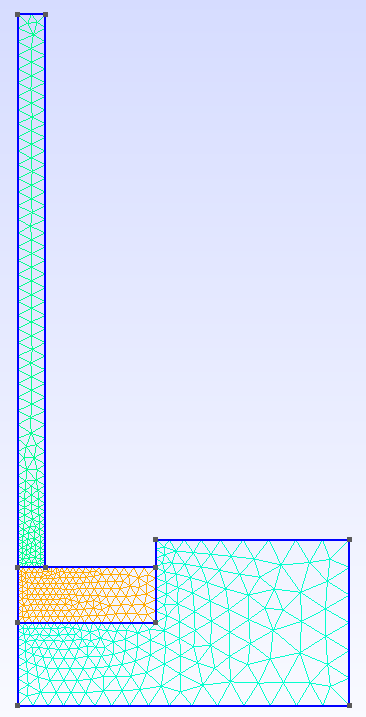
Mesh of a simple 2D axisymmetric Czochralski crystal growth model:
import gmsh
from objectgmsh import Model, Shape, MeshControlConstant, MeshControlExponential, cut


# dimensions
cruc_r = 0.06  # crucible radius
cruc_h = 0.03  # crucible height
cruc_hi = 0.015  # crucible height inside
melt_r = 0.025  # melt radius
melt_h = 0.01  # melt height
crys_r = 0.005  # crystal radius
crys_h = 0.1  # crystal height


occ = gmsh.model.occ
model = Model()

# main bodies
crystal = Shape(model, 2, "crystal", [occ.addRectangle(0, 0, 0, crys_r, crys_h)])
melt = Shape(model, 2, "melt", [occ.addRectangle(0, -melt_h, 0, melt_r, melt_h)])

crucible = occ.addRectangle(0, -melt_h - (cruc_h - cruc_hi), 0, cruc_r, cruc_h)
crucible_hole = occ.addRectangle(0, -melt_h, 0, melt_r, cruc_hi)
cut([(2, crucible)], [(2, crucible_hole)])
crucible = Shape(model, 2, "crucible", [crucible])

# create connection between the shapes
crystal.set_interface(melt)
melt.set_interface(crucible)

# detect boundaries
bnd_crystal_out = Shape(
    model, 1, "bnd_crystal_out", [crystal.top_boundary, crystal.right_boundary]
)
bnd_melt = Shape(
    model, 1, "bnd_melt_surf", melt.get_boundaries_in_box([crys_r, melt_r], [0, 0])
)
surfs = [
    crucible.get_boundaries_in_box(
        [melt_r, melt_r], [0, cruc_hi - melt_h], one_only=True
    ),
    crucible.top_boundary,
    crucible.right_boundary,
]
bnd_crucible_outside = Shape(model, 1, "bnd_crucible_outside", surfs)
bnd_crucible_bottom = Shape(model, 1, "bnd_crucible_bottom", [crucible.bottom_boundary])

if_crystal_melt = Shape(model, 1, "if_crystal_melt", crystal.get_interface(melt))

# add physical groups
model.make_physical()

# set mesh constraints
model.deactivate_characteristic_length()
MeshControlConstant(model, 0.005, [crucible, melt])
MeshControlConstant(model, 0.0025, [crystal])
MeshControlExponential(
    model, if_crystal_melt, 0.001, exp=1.7, shapes=[crystal, melt, crucible]
)

# create mesh, show, export
model.generate_mesh()
model.show()
model.write_msh("crystal-growth-2D.msh")
A similar but more complex example can be found here.
3D modeling & meshing
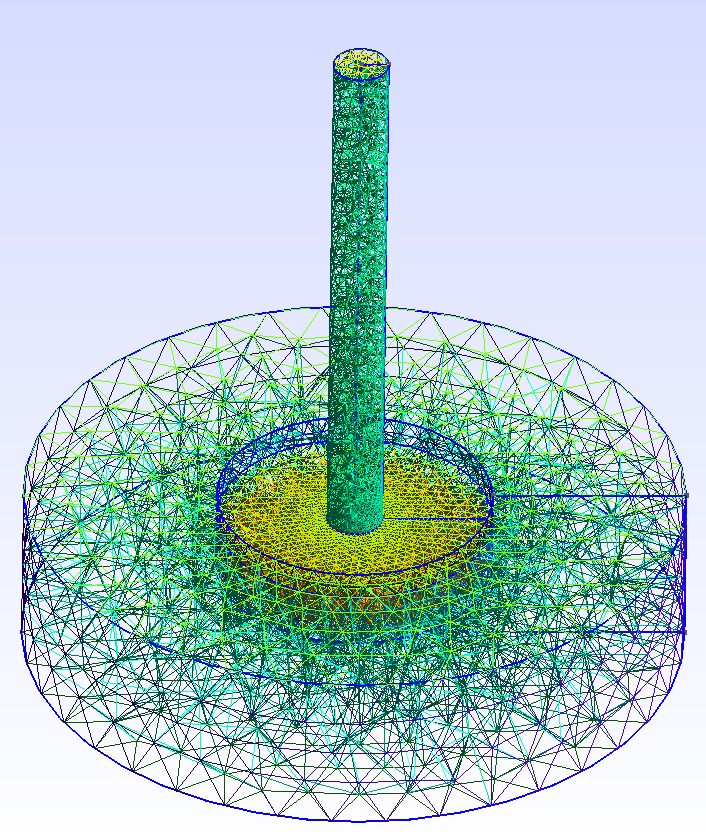
Mesh of a simple 3D Czochralski crystal growth model:
import gmsh
from objectgmsh import (
    Model,
    Shape,
    MeshControlConstant,
    MeshControlExponential,
    cut,
    rotate,
)
from objectgmsh.objects import MeshControlLinear


# dimensions
cruc_r = 0.06  # crucible radius
cruc_h = 0.03  # crucible height
cruc_hi = 0.015  # crucible height inside
melt_r = 0.025  # melt radius
melt_h = 0.01  # melt height
crys_r = 0.005  # crystal radius
crys_h = 0.1  # crystal height


occ = gmsh.model.occ
model = Model()

# main bodies
crystal = Shape(
    model, 3, "crystal", [rotate(occ.addRectangle(0, 0, 0, crys_r, crys_h))]
)
melt = Shape(
    model, 3, "melt", [rotate(occ.addRectangle(0, -melt_h, 0, melt_r, melt_h))]
)

crucible = occ.addRectangle(0, -melt_h - (cruc_h - cruc_hi), 0, cruc_r, cruc_h)
crucible_hole = occ.addRectangle(0, -melt_h, 0, melt_r, cruc_hi)
cut([(2, crucible)], [(2, crucible_hole)])
crucible = Shape(model, 3, "crucible", [rotate(crucible)])

# create connection between the shapes
crystal.set_interface(melt)
melt.set_interface(crucible)

# set mesh sizes
crystal.mesh_size = 0.0025
melt.mesh_size = 0.005
crucible.mesh_size = 0.01

# detect boundaries
bnd_crystal_out = Shape(
    model,
    2,
    "bnd_crystal_out",
    [x for x in crystal.boundaries if x not in crystal.get_interface(melt)],
)
bnd_melt = Shape(
    model,
    2,
    "bnd_melt_surf",
    [
        x
        for x in melt.boundaries
        if x not in melt.get_interface(crystal) + melt.get_interface(crucible)
    ],
)
bnd_crucible_bottom = Shape(model, 2, "bnd_crucible_bottom", [crucible.bottom_boundary])
bnd_crucible_outside = Shape(
    model,
    2,
    "bnd_crucible_outside",
    [
        x
        for x in crucible.boundaries
        if x not in crucible.get_interface(melt) + bnd_crucible_bottom.geo_ids
    ],
)
if_crystal_melt = Shape(model, 2, "if_crystal_melt", crystal.get_interface(melt))
if_crucible_melt = Shape(model, 2, "if_crucible_melt", crucible.get_interface(melt))

# add physical groups
model.make_physical()

# set mesh constraints
model.deactivate_characteristic_length()
model.set_const_mesh_sizes()

MeshControlExponential(
    model, if_crystal_melt, 0.001, exp=1.7, fact=2
)  # refinement at crystallization front
MeshControlLinear(model, if_crucible_melt, melt.mesh_size, crucible.mesh_size)

# create mesh, show, export
model.generate_mesh(3)
model.show()
model.write_msh("crystal-growth-3D.msh")
Documentation
The code is documented using docstrings. A more extensive documentation using sphinx is under construction.
Support
In case of questions just open an issue or contact Arved Enders-Seidlitz.
Acknowledgements
This project has received funding from the European Research Council (ERC) under the European Union's Horizon 2020 research and innovation programme (grant agreement No 851768).
Contribution
Any help to improve this package is very welcome!
1 maintainer

Download files
Download the file for your platform. If you're not sure which to choose, learn more about installing packages.
Source Distribution
Built Distribution
Filter files by name, interpreter, ABI, and platform.
If you're not sure about the file name format, learn more about wheel file names.
Copy a direct link to the current filters
File details
Details for the file objectgmsh-0.12.tar.gz.
File metadata
- Download URL: objectgmsh-0.12.tar.gz
- Upload date:
- Size: 44.0 kB
- Tags: Source
- Uploaded using Trusted Publishing? No
- Uploaded via:
twine/4.0.2 CPython/3.11.4
File hashes
| Algorithm | Hash digest | |
|---|---|---|
| SHA256 |
f2301e56d74447777e4b8fdf2a4b16069650a49cf4a2219cd48c8129e3636c92
|
|
| MD5 |
fe9a39a2c5d51b9fe0899cfe684e1995
|
|
| BLAKE2b-256 |
1eecece1e3215c4b029fb51207bd54e513bebd3829afa40fe92e8c5ab27d29ad
|
File details
Details for the file objectgmsh-0.12-py3-none-any.whl.
File metadata
- Download URL: objectgmsh-0.12-py3-none-any.whl
- Upload date:
- Size: 26.1 kB
- Tags: Python 3
- Uploaded using Trusted Publishing? No
- Uploaded via:
twine/4.0.2 CPython/3.11.4
File hashes
| Algorithm | Hash digest | |
|---|---|---|
| SHA256 |
9b9969712216b0fe5e8bb43c11130b4840a39c5ef0ad2241bc50a14f551a5135
|
|
| MD5 |
f3433c327b7316707ed18e53bace188b
|
|
| BLAKE2b-256 |
3184a74378d433ce03de92ab86106599e9f5e341765514c366543f27e1303b5a
|







