
Observal MCP Server Registry & Agent Registry CLI
Verified details
These details have been verified by PyPIProject links
GitHub Statistics
Maintainers

Project description

Discover, share, and monitor AI coding agents with full observability built in.




If you find Observal useful, please consider giving it a star. It helps others discover the project and keeps development going.
Observal is a self-hosted AI agent registry with built-in observability. Think Docker Hub, but for AI coding agents.
Browse agents created by others, publish your own, and pull complete agent configurations, all defined in a portable YAML format that templates out to Claude Code, Codex CLI, Gemini CLI, and more. Every agent bundles its MCP servers, skills, hooks, prompts, and sandboxes into a single installable package. One command to install, zero manual config.
Every interaction generates traces, spans, and sessions that flow into a telemetry pipeline, giving you full observability, traceability, and real-time metrics for your agents in production. The built-in eval engine (WIP) scores agent sessions so you can measure performance and make your agents better over time.
Supported tools:
| IDE / Tool | Support Level |
|---|---|
| Claude Code | Fully supported |
| Kiro CLI | Supported (next most tested). See setup guide. |
| Codex CLI, Gemini CLI, Cursor, VS Code | Untested |
See the Changelog for recent updates.
Quick Start
Everything works out of the box with defaults. No configuration needed for local development.
git clone https://github.com/BlazeUp-AI/Observal.git
cd Observal
cp .env.example .env

cd docker && docker compose up --build -d && cd ..
uv tool install --editable .
observal auth login            # auto-creates admin on fresh server
That's it. The .env.example ships with working defaults for every setting. The server starts 8 services (API, web UI, PostgreSQL, ClickHouse, Redis, background worker, OpenTelemetry collector, Grafana) and creates all database tables on first boot.
Port conflicts? If
docker compose upfails withport is already allocated, another service is using the default ports. Check and resolve before starting:# Check for occupied default ports (macOS/Linux) lsof -nP -iTCP:5432 -sTCP:LISTEN # PostgreSQL lsof -nP -iTCP:6379 -sTCP:LISTEN # Redis # Windows (PowerShell) netstat -ano | findstr :5432 netstat -ano | findstr :6379Either stop the conflicting services, or remap Observal's host ports:
POSTGRES_HOST_PORT=5433 REDIS_HOST_PORT=6380 docker compose up --build -dIf you already started with a port conflict, fully recreate the stack:
docker compose down && docker compose up -dSee
.env.examplefor all configurable port variables.
Already have MCP servers in your IDE? Instrument them in one command:
observal scan                  # auto-detect, register, and instrument everything
observal pull <agent> --ide cursor  # install a complete agent
This detects MCP servers from your IDE config files, registers them with Observal, and wraps them with observal-shim for telemetry without breaking your existing setup. A timestamped backup is created automatically.
The Problem
AI coding agents today are hard to share and impossible to measure. Components (MCP servers, skills, hooks, prompts) are scattered across repos with no standard way to package them together. There's no visibility into what's actually working, and no way to compare one version of an agent against another on real workflows.
Observal solves this by giving you a registry to package and distribute complete agents, and a telemetry pipeline to measure them.
How It Works
Agents in the registry are defined in YAML. Each agent bundles its components (MCP servers, skills, hooks, prompts, sandboxes) into a single configuration. When you run observal pull <agent>, it installs everything and generates the right config files for your tool.
A transparent shim (observal-shim for stdio, observal-proxy for HTTP) sits between your tool and the MCP server. It never modifies traffic, it only observes. Every request/response pair becomes a span, spans group into traces, and traces form sessions. All of this streams into ClickHouse for analysis.
Tool  <-->  observal-shim  <-->  MCP Server / Sandbox
                |
                v (fire-and-forget)
          Observal API  -->  ClickHouse (traces, spans, scores)
                |
                v
          Eval Engine (SLM-as-a-Judge / Deductive Penalty Scoring)  -->  Scorecards
The eval engine runs on collected traces after the fact. It scores agent sessions across five dimensions: Goal Completion, Tool Call Efficiency, Tool Call Failures, Factual Grounding, and Thought Process. Scorecards let you compare agent versions, identify bottlenecks, and track improvements over time.
The Registry
Observal manages 6 component types that agents bundle together:
| Component | Description |
|---|---|
| Agents | Complete configurations that bundle all the components below |
| MCP Servers | Model Context Protocol servers that expose tools to agents |
| Skills | Portable instruction packages that agents load on demand |
| Hooks | Lifecycle callbacks that fire during agent sessions |
| Prompts | Managed templates with variable substitution |
| Sandboxes | Docker execution environments for code running and testing |
Anyone can publish components to the registry. Admin review controls visibility in the public listing, but your own items are usable immediately without approval. Browse the web UI or CLI to discover agents and components shared by others.
CLI Reference
The CLI is organized into command groups. Run observal --help or observal <group> --help for full details. See docs/cli.md for the complete command reference.
Primary Workflows
observal pull <agent> --ide <ide>    # install a complete agent with all dependencies
observal scan [--ide <ide>]          # detect and instrument existing IDE configs
observal use <git-url|path>          # swap IDE configs to a git-hosted profile
observal profile                     # show active profile and backup info
Authentication - observal auth
observal auth login            # auto-creates admin on fresh server, or login with key/password
observal auth register         # self-register a new account with email + password
observal auth logout           # clear saved credentials
observal auth whoami           # show current user
observal auth status           # check server connectivity and health
observal auth reset-password   # reset a forgotten password (uses server-logged code)
Forgot your password? If you've lost access to an account (e.g. an admin account created before passwords were set up), use the reset flow:
observal auth reset-password --email admin@localhost
This requests a 6-character reset code that gets logged to the server console. Check the server logs (make logs or docker logs <container>) for a line like:
WARNING - PASSWORD RESET CODE for admin@localhost: A7X9B2 (expires in 15 minutes)
Enter the code and your new password to regain access. The same flow is available from the web UI via the "Forgot password?" link on the login page.
For CI/scripts, use environment variables:
export OBSERVAL_SERVER_URL=http://localhost:8000
export OBSERVAL_API_KEY=<your-key>
Component Registry - observal registry <type>
All 5 component types (mcp, skill, hook, prompt, sandbox) support the same core commands:
observal registry <type> submit [<git-url> | --from-file <path>]
observal registry <type> list [--search <term>]
observal registry <type> show <id-or-name>
observal registry <type> install <id-or-name> --ide <ide>
observal registry <type> delete <id-or-name>
Prompts also have observal registry prompt render <id> --var key=value.
Agent Authoring - observal agent
# Browse and manage
observal agent create              # interactive agent creation
observal agent list [--search <term>]
observal agent show <id>
observal agent install <id> --ide <ide>
observal agent delete <id>

# Local YAML workflow
observal agent init                # scaffold observal-agent.yaml
observal agent add <type> <id>     # add component (mcp, skill, hook, prompt, sandbox)
observal agent build               # validate against server (dry-run)
observal agent publish             # submit to registry
Observability - observal ops
observal ops overview              # dashboard stats
observal ops metrics <id> [--type mcp|agent] [--watch]
observal ops top [--type mcp|agent]
observal ops traces [--type <type>] [--mcp <id>] [--agent <id>]
observal ops spans <trace-id>
observal ops rate <id> --stars 5 [--type mcp|agent] [--comment "..."]
observal ops feedback <id> [--type mcp|agent]
observal ops telemetry status
observal ops telemetry test
Admin - observal admin
# Settings and users
observal admin settings
observal admin set <key> <value>
observal admin users

# Review workflow
observal admin review list
observal admin review show <id>
observal admin review approve <id>
observal admin review reject <id> --reason "..."

# Evaluation engine
observal admin eval run <agent-id> [--trace <trace-id>]
observal admin eval scorecards <agent-id> [--version "1.0.0"]
observal admin eval show <scorecard-id>
observal admin eval compare <agent-id> --a "1.0.0" --b "2.0.0"
observal admin eval aggregate <agent-id> [--window 50]

# Penalty and weight tuning
observal admin penalties
observal admin penalty-set <name> [--amount 10] [--active]
observal admin weights
observal admin weight-set <dimension> <weight>
Configuration - observal config
observal config show               # show current config
observal config set <key> <value>  # set a config value
observal config path               # show config file path
observal config alias <name> <id>  # create @alias for an ID
observal config aliases            # list all aliases
Self-Management & Diagnostics
observal self upgrade              # upgrade CLI to latest version
observal self downgrade            # downgrade to previous version
observal doctor [--ide <ide>] [--fix]  # diagnose IDE settings compatibility
Tech Stack
| Component | Technology |
|---|---|
| Frontend | Next.js 16, React 19, Tailwind CSS 4, shadcn/ui, Recharts |
| Backend API | Python, FastAPI, Uvicorn |
| Database | PostgreSQL 16 (primary), ClickHouse (telemetry) |
| ORM | SQLAlchemy (async) + AsyncPG |
| CLI | Python, Typer, Rich |
| Eval Engine | AWS Bedrock / OpenAI-compatible LLMs |
| Background Jobs | arq + Redis |
| Real-time | GraphQL subscriptions (Strawberry + WebSocket) |
| Dependency Management | uv |
| Telemetry Pipeline | OpenTelemetry Collector |
| Monitoring | Grafana + ClickHouse dashboards |
| Deployment | Docker Compose (8 services) |
Setup & Configuration
See SETUP.md for local development setup, eval engine configuration, and troubleshooting. For the web UI reference (pages, auth flows, RBAC), see web/README.md. For enterprise deployment (SSO, SCIM, audit logging), see ee/docs/cli.md.
API Endpoints
Auth
| Method | Endpoint | Description |
|---|---|---|
POST |
/api/v1/auth/bootstrap |
Auto-create admin on fresh server (localhost only) |
POST |
/api/v1/auth/register |
Self-registration with email + password |
POST |
/api/v1/auth/login |
Login with API key or email+password |
POST |
/api/v1/auth/exchange |
Exchange one-time OAuth code for credentials |
GET |
/api/v1/auth/whoami |
Current user info |
POST |
/api/v1/auth/token |
Exchange credentials for JWT access + refresh tokens |
POST |
/api/v1/auth/token/refresh |
Rotate refresh token for new access token |
POST |
/api/v1/auth/token/revoke |
Revoke a refresh token |
POST |
/api/v1/auth/request-reset |
Request password reset (code logged to server console) |
POST |
/api/v1/auth/reset-password |
Reset password with code + new password |
GET |
/api/v1/auth/oauth/login |
Initiate OAuth SSO flow |
GET |
/api/v1/auth/oauth/callback |
OAuth callback handler |
Registry (per type: mcps, agents, skills, hooks, prompts, sandboxes)
All {id} parameters accept either a UUID or a name.
| Method | Endpoint | Description |
|---|---|---|
POST |
/api/v1/{type} |
Submit / create |
GET |
/api/v1/{type} |
List approved items |
GET |
/api/v1/{type}/{id} |
Get details |
POST |
/api/v1/{type}/{id}/install |
Get IDE config snippet |
DELETE |
/api/v1/{type}/{id} |
Delete |
GET |
/api/v1/{type}/{id}/metrics |
Metrics |
POST |
/api/v1/agents/{id}/pull |
Pull agent (installs all components) |
Scan
| Method | Endpoint | Description |
|---|---|---|
POST |
/api/v1/scan |
Bulk register items from IDE config scan |
Review
| Method | Endpoint | Description |
|---|---|---|
GET |
/api/v1/review |
List pending submissions |
GET |
/api/v1/review/{id} |
Submission details |
POST |
/api/v1/review/{id}/approve |
Approve |
POST |
/api/v1/review/{id}/reject |
Reject |
Telemetry
| Method | Endpoint | Description |
|---|---|---|
POST |
/api/v1/telemetry/ingest |
Batch ingest traces, spans, scores |
POST |
/api/v1/telemetry/events |
Legacy event ingestion |
GET |
/api/v1/telemetry/status |
Data flow status |
GET |
/api/v1/otel/crypto/public-key |
Server public key for payload encryption |
Alerts
| Method | Endpoint | Description |
|---|---|---|
GET |
/api/v1/alerts |
List alert rules |
POST |
/api/v1/alerts |
Create alert rule |
PATCH |
/api/v1/alerts/{id} |
Update alert rule |
DELETE |
/api/v1/alerts/{id} |
Delete alert rule |
GET |
/api/v1/alerts/{id}/history |
Alert firing history |
Evaluation
| Method | Endpoint | Description |
|---|---|---|
POST |
/api/v1/eval/agents/{id} |
Run evaluation |
GET |
/api/v1/eval/agents/{id}/scorecards |
List scorecards |
GET |
/api/v1/eval/scorecards/{id} |
Scorecard details |
GET |
/api/v1/eval/agents/{id}/compare |
Compare versions |
GET |
/api/v1/eval/agents/{id}/aggregate |
Aggregate scoring stats |
Feedback
| Method | Endpoint | Description |
|---|---|---|
POST |
/api/v1/feedback |
Submit rating |
GET |
/api/v1/feedback/{type}/{id} |
Get feedback |
GET |
/api/v1/feedback/summary/{id} |
Rating summary |
Admin
| Method | Endpoint | Description |
|---|---|---|
GET |
/api/v1/admin/settings |
List settings |
PUT |
/api/v1/admin/settings/{key} |
Set a value |
GET |
/api/v1/admin/users |
List users |
POST |
/api/v1/admin/users |
Create user |
PUT |
/api/v1/admin/users/{id}/role |
Change role |
PUT |
/api/v1/admin/users/{id}/password |
Reset user password (admin) |
GET |
/api/v1/admin/penalties |
List penalty catalog |
PUT |
/api/v1/admin/penalties/{id} |
Modify penalty |
GET |
/api/v1/admin/weights |
Get dimension weights |
PUT |
/api/v1/admin/weights |
Set dimension weights |
GET |
/api/v1/admin/canaries/{agent_id} |
List canary configs |
POST |
/api/v1/admin/canaries |
Create canary config |
DELETE |
/api/v1/admin/canaries/{id} |
Delete canary config |
GET |
/api/v1/admin/canaries/{agent_id}/reports |
Canary detection reports |
GraphQL
| Endpoint | Description |
|---|---|
/api/v1/graphql |
Traces, spans, scores, metrics (query + subscription) |
Health
| Method | Endpoint | Description |
|---|---|---|
GET |
/health |
Health check |
Environment Variables
All settings have sensible defaults that work for local development. Just cp .env.example .env and you are good to go. Override what you need for production.
| Variable | Default | Description |
|---|---|---|
DATABASE_URL |
postgresql+asyncpg://postgres:postgres@localhost:5432/observal |
PostgreSQL connection string |
CLICKHOUSE_URL |
clickhouse://localhost:8123/observal |
ClickHouse connection string |
REDIS_URL |
redis://localhost:6379 |
Redis connection string |
SECRET_KEY |
change-me-to-a-random-string |
Session signing key. Generate a real one for production: python3 -c "import secrets; print(secrets.token_urlsafe(32))" |
POSTGRES_USER |
postgres |
PostgreSQL container user |
POSTGRES_PASSWORD |
postgres |
PostgreSQL container password |
FRONTEND_URL |
http://localhost:3000 |
Frontend URL (used for OAuth redirects and CORS) |
CORS_ALLOWED_ORIGINS |
http://localhost:3000 |
Comma-separated allowed CORS origins |
OAUTH_CLIENT_ID |
disabled | OAuth/OIDC client ID (SSO is disabled when unset) |
OAUTH_CLIENT_SECRET |
disabled | OAuth/OIDC client secret |
OAUTH_SERVER_METADATA_URL |
disabled | OIDC discovery URL |
EVAL_MODEL_URL |
OpenAI-compatible endpoint for the eval engine | |
EVAL_MODEL_API_KEY |
API key for the eval model | |
EVAL_MODEL_NAME |
Model name (e.g. us.anthropic.claude-3-5-haiku-20241022-v1:0) |
|
EVAL_MODEL_PROVIDER |
bedrock, openai, or empty for auto-detect |
|
AWS_REGION |
us-east-1 |
AWS region for Bedrock |
DEPLOYMENT_MODE |
local |
local (self-registration, bootstrap) or enterprise (SSO-only, SCIM) |
DATA_RETENTION_DAYS |
90 |
ClickHouse data retention TTL in days (0 to disable) |
RATE_LIMIT_AUTH |
10/minute |
Rate limit for auth endpoints |
Running Tests
make test      # quick (526 tests)
make test-v    # verbose
All tests mock external services. No Docker needed.
Community
Have a question, idea, or want to share what you've built? Head to GitHub Discussions. Please use Discussions for questions instead of opening issues. Issues are reserved for bug reports and feature requests.
Join the Observal Discord to chat directly with the maintainers and other community members.
Security
To report a vulnerability, please use GitHub Private Vulnerability Reporting or email contact@blazeup.app. Do not open a public issue. See SECURITY.md for full details.
Contributing
See CONTRIBUTING.md for the full guide. The short version:
- Fork and clone
make hooksto install pre-commit hooks- Create a feature branch
- Make changes, run
make lintandmake test - Open a PR
See AGENTS.md for internal codebase context useful when working with AI coding agents.
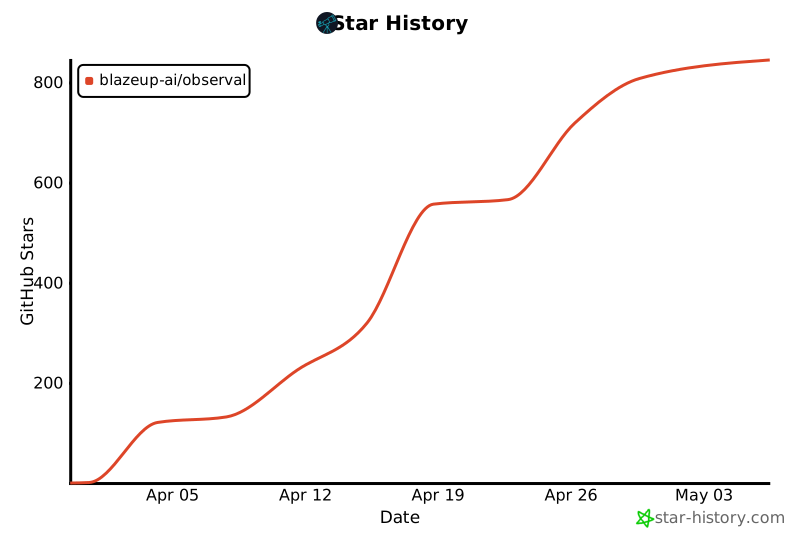
Star History
If you find Observal useful, please star the repo. It helps others discover the project and motivates continued development.
License
Apache License 2.0. See LICENSE.
Project details
Verified details
These details have been verified by PyPIProject links
GitHub Statistics
Maintainers


Download files
Download the file for your platform. If you're not sure which to choose, learn more about installing packages.
Source Distribution
Built Distribution
Filter files by name, interpreter, ABI, and platform.
If you're not sure about the file name format, learn more about wheel file names.
Copy a direct link to the current filters
File details
Details for the file observal_cli-0.2.0.tar.gz.
File metadata
- Download URL: observal_cli-0.2.0.tar.gz
- Upload date:
- Size: 2.1 MB
- Tags: Source
- Uploaded using Trusted Publishing? Yes
- Uploaded via: twine/6.1.0 CPython/3.13.12
File hashes
| Algorithm | Hash digest | |
|---|---|---|
| SHA256 |
09a461695f1a31ecd6832dcd745f4bb3527a44a33e1cbef1df3ad5718da9b095
|
|
| MD5 |
1c52fc282d59a642602aa76b71faf722
|
|
| BLAKE2b-256 |
58d7ab383a34048816a4beeffac1a5a702cd26e0e85a512d8cf6c5dadbb8145e
|
Provenance
The following attestation bundles were made for observal_cli-0.2.0.tar.gz:
Publisher:
publish.yml on BlazeUp-AI/Observal
-
Statement:
-
Statement type:
https://in-toto.io/Statement/v1 -
Predicate type:
https://docs.pypi.org/attestations/publish/v1 -
Subject name:
observal_cli-0.2.0.tar.gz -
Subject digest:
09a461695f1a31ecd6832dcd745f4bb3527a44a33e1cbef1df3ad5718da9b095 - Sigstore transparency entry: 1347260183
- Sigstore integration time:
-
Permalink:
BlazeUp-AI/Observal@b7582e4cbf4f125d8aa027513f4e3e6cdccd15d3 -
Branch / Tag:
refs/tags/v0.2.0 - Owner: https://github.com/BlazeUp-AI
-
Access:
public
-
Token Issuer:
https://token.actions.githubusercontent.com -
Runner Environment:
github-hosted -
Publication workflow:
publish.yml@b7582e4cbf4f125d8aa027513f4e3e6cdccd15d3 -
Trigger Event:
push
-
Statement type:
File details
Details for the file observal_cli-0.2.0-py3-none-any.whl.
File metadata
- Download URL: observal_cli-0.2.0-py3-none-any.whl
- Upload date:
- Size: 141.6 kB
- Tags: Python 3
- Uploaded using Trusted Publishing? Yes
- Uploaded via: twine/6.1.0 CPython/3.13.12
File hashes
| Algorithm | Hash digest | |
|---|---|---|
| SHA256 |
55a308b873a9a10990cd35d9ab89c9ff4ab217da6c3f6db1029f5f2f74925f5f
|
|
| MD5 |
b02a9e75a5cde88fd74e187ab8f2eb9d
|
|
| BLAKE2b-256 |
54d5b9adb11eefdc074651672c3c5c66c15aad1628c0416ce56e32f17445f8f6
|
Provenance
The following attestation bundles were made for observal_cli-0.2.0-py3-none-any.whl:
Publisher:
publish.yml on BlazeUp-AI/Observal
-
Statement:
-
Statement type:
https://in-toto.io/Statement/v1 -
Predicate type:
https://docs.pypi.org/attestations/publish/v1 -
Subject name:
observal_cli-0.2.0-py3-none-any.whl -
Subject digest:
55a308b873a9a10990cd35d9ab89c9ff4ab217da6c3f6db1029f5f2f74925f5f - Sigstore transparency entry: 1347260304
- Sigstore integration time:
-
Permalink:
BlazeUp-AI/Observal@b7582e4cbf4f125d8aa027513f4e3e6cdccd15d3 -
Branch / Tag:
refs/tags/v0.2.0 - Owner: https://github.com/BlazeUp-AI
-
Access:
public
-
Token Issuer:
https://token.actions.githubusercontent.com -
Runner Environment:
github-hosted -
Publication workflow:
publish.yml@b7582e4cbf4f125d8aa027513f4e3e6cdccd15d3 -
Trigger Event:
push
-
Statement type:






