
Observicia SDK
Observicia is a Cloud Native observability and policy control SDK for LLM applications. It provides seamless integration with CNCF native observability stack while offering comprehensive token tracking, policy enforcement, and PII protection capabilities.






Features
-
Token Tracking and Management
- Real-time token usage monitoring across providers
- Stream-aware token counting
- Token usage retention and cleanup
- Per-session token tracking
- Configurable data retention policies
-
LLM Backend Support
- OpenAI
- Chat completions (sync/async)
- Text completions (sync/async)
- Embeddings
- Image generation
- File operations
- Streaming support
- Ollama
- Local model deployment
- Chat completions
- Text generation
- Embeddings
- Streaming support
- WatsonX
- Foundation models integration
- Text generation
- Chat completions
- Parameter controls
- Basic scaffolding for:
- Anthropic
- LiteLLM
- OpenAI
-
Transaction Tracking
- Multi-round conversation tracking
- Transaction lifecycle management
- Metadata and state tracking
- Parent-child transaction relationships
- Transaction performance metrics
-
Chat Logging and Analytics
- Structured chat history logging
- Conversation flow analysis
- Interaction metrics
- Policy compliance logging
- Chat completion tracking
-
Telemetry Storage and Export
- SQLite exporter for persistent telemetry storage
- Structured schema for token usage and metrics
- Transaction and trace correlation
- Query-friendly format for analytics
- Redis exporter with configurable retention
- Time-based data retention policies
- Real-time metrics access
- Distributed telemetry storage
- OpenTelemetry integration
- Standard OTLP export support
- Custom attribute mapping
- Span context preservation
- SQLite exporter for persistent telemetry storage
-
Policy Enforcement
- Integration with Open Policy Agent (OPA)
- Support for multiple policy evaluation levels
- Risk level assessment (low, medium, high, critical)
- Custom policy definition support
- Synchronous and asynchronous policy evaluation
-
Framework Integration
- LangChain support
- Conversation chain monitoring
- Chain metrics
- Token usage across abstractions
- LangChain support
-
Observability Features
- OpenTelemetry integration
- Span-based tracing for all LLM operations
- Configurable logging (console, file, OTLP)
- Mermaid diagram generation from telemetry data
- Detailed request/response tracing
- Custom attribute tracking
Quick Start
- Install the SDK:
pip install observicia
- Create a configuration file (
observicia_config.yaml):
service_name: my-service
otel_endpoint: http://localhost:4317
opa_endpoint: http://localhost:8181/
policies:
  - name: pii_check
    path: policies/pii
    description: Check for PII in responses
    required_trace_level: enhanced
    risk_level: high
logging:
  file: "app.json"
  telemetry:
    enabled: true
    format: "json"
    redis:
      enabled: true
      host: "localhost"
      port: 6379
      db: 0
      key_prefix: "observicia:telemetry:"
      retention_hours: 24
  messages:
    enabled: true
    level: "INFO"
  chat:
    enabled: true
    level: "both"
    file: "chat.log"
- Initialize in your code:
from observicia import init
from observicia.core.context_manager import ObservabilityContext

# Required - Initialize Observicia
init()

# Optional - Set user ID for tracking
ObservabilityContext.set_user_id("user123")

# Optional - Start a conversation transaction
transaction_id = ObservabilityContext.start_transaction(
    metadata={"conversation_type": "chat"}
)

# Use with OpenAI
from openai import OpenAI
client = OpenAI()
response = client.chat.completions.create(
    model="gpt-4",
    messages=[{"role": "user", "content": "Hello!"}]
)

# Or use with Ollama
import ollama
response = ollama.chat(
    model="llama2",
    messages=[{"role": "user", "content": "Hello!"}]
)

# Optional - End the transaction
ObservabilityContext.end_transaction(
    transaction_id,
    metadata={"resolution": "completed"}
)
Architecture
flowchart TB
    App[Application] --> SDK[Observicia SDK]
    subgraph LLM Backends
        OpenAI[OpenAI API]
        Ollama[Ollama Local]
        Anthropic[Anthropic API]
        LiteLLM[LiteLLM]
        WatsonX[WatsonX]
    end

    SDK --> OpenAI
    SDK --> Ollama
    SDK --> Anthropic
    SDK --> LiteLLM
    SDK --> WatsonX

    SDK --> OPA[Open Policy Agent]
    SDK --> OTEL[OpenTelemetry Collector]
    SDK --> SQLite[(SQLite)]
    SDK --> Redis[(Redis)]

    OTEL --> Jaeger[Jaeger]
    OTEL --> Prom[Prometheus]

    OPA --> PII[PII Detection Service]
    OPA --> Compliance[Prompt Compliance Service]

    subgraph Telemetry Storage
        SQLite
        Redis
    end

    style OpenAI fill:#85e,color:#fff
    style Ollama fill:#85e,color:#fff
    style WatsonX fill:#85e,color:#fff
    style Anthropic fill:#ccc,color:#666
    style LiteLLM fill:#ccc,color:#666
Example Applications
The SDK includes three example applications demonstrating different use cases:
Example Applications
The SDK includes the following example applications demonstrating different use cases:
-
Simple Chat Application (examples/simple-chat)
- Basic chat interface using OpenAI
- Demonstrates token tracking and tracing
- Shows streaming response handling
- Includes transaction management
-
RAG Application (examples/rag-app)
- Retrieval-Augmented Generation example
- Shows policy enforcement for PII protection
- Demonstrates context tracking
- Includes secure document retrieval
-
LangChain Chat (examples/langchain-chat)
- Integration with LangChain framework
- Shows conversation chain tracking
- Token tracking across abstractions
-
WatsonX Generation (examples/watsonx-generate)
- Integration with IBM WatsonX.ai Foundation Models
- Demonstrates model inference with parameters
- Shows token tracking for WatsonX models
- Includes chat and generation examples
- Policy enforcement for enterprise use cases
-
Ollama Generation (examples/ollama-generate)
- Integration with local Ollama models
- Shows local model deployment monitoring
- Demonstrates both chat and generation modes
- Includes embedding tracking
- Token usage tracking for local models
- Support for multiple model formats
Deployment
Prerequisites
- Kubernetes cluster with:
- OpenTelemetry Collector
- Open Policy Agent
- Jaeger (optional)
- Prometheus (optional)
Example Kubernetes Deployment
See the deploy/k8s directory for complete deployment manifests.
Core Components
- Context Manager: Manages trace context, transactions and session tracking
- Policy Engine: Handles policy evaluation and enforcement
- Token Tracker: Monitors token usage across providers
- Patch Manager: Manages LLM provider SDK instrumentation
- Tracing Manager: Handles OpenTelemetry integration
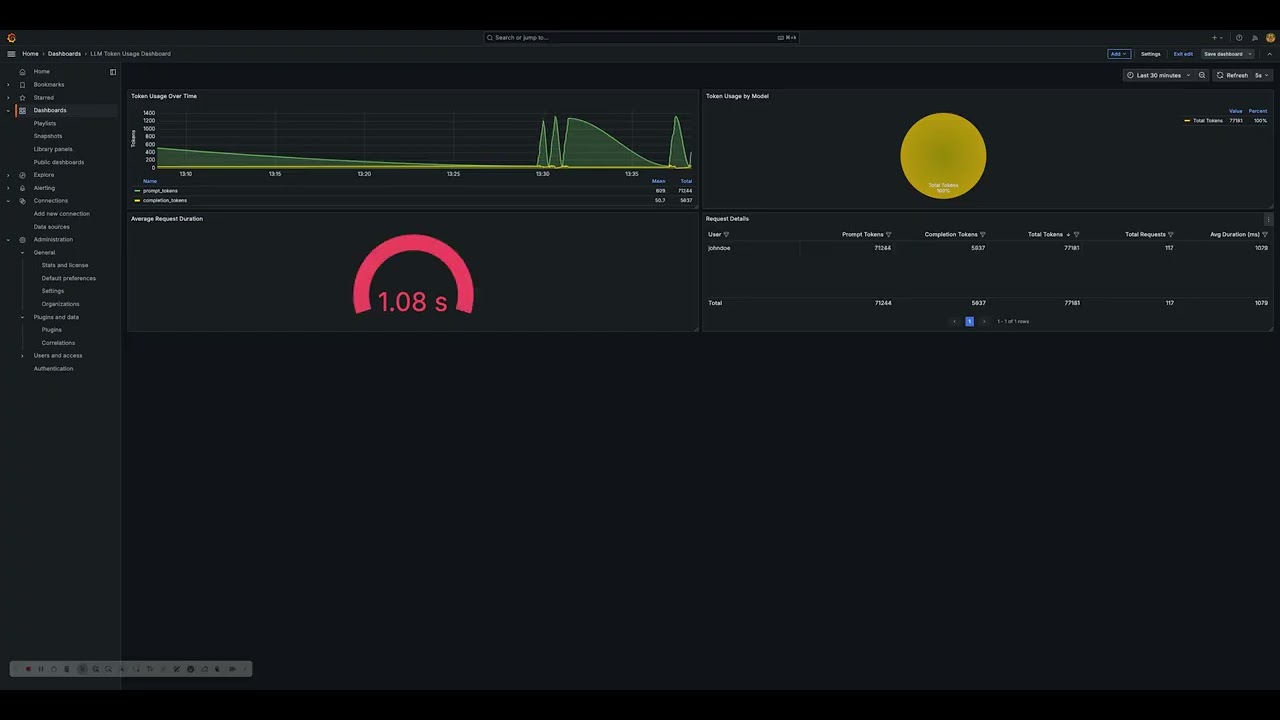
Token Usage Visualization
The SDK includes sample tools to visualize token usage metrics through Grafana dashboards.
Development Status
- ✅ Core Framework
- ✅ OpenAI Integration
- ✅ Basic Policy Engine
- ✅ Token Tracking
- ✅ OpenTelemetry Integration
- ✅ Transaction Management
- ✅ Chat Logging
- ✅ LangChain Support
- 🚧 Additional Provider Support
- 🚧 Advanced Policy Features
- 🚧 UI Components
License
This project is licensed under the Apache License 2.0 - see the LICENSE file for details.
1 maintainer

Metadata
1 maintainer
Release files for observicia 0.1.13
For a detailed explanation of source distributions (sdists) and built distributions (wheels), please see the package formats documentation.
Source distribution (sdist)
| File | Size | Uploaded | |
|---|---|---|---|
| observicia-0.1.13.tar.gz | 43.6 kB | Details |
Built distribution (wheel)
| File | Interpreter | ABI | Platform | Reset |
|---|---|---|---|---|
| observicia-0.1.13-py3-none-any.whl | Python 3 | none | any | Details |
Total release size: 96.2 kB
Release files / observicia-0.1.13.tar.gz
| Download URL | observicia-0.1.13.tar.gz |
|---|---|
| Size | 43.6 kB |
| Tags | Source |
|
SHA-256 checksum How to use checksums |
5747a2a42fa76962ef0fee35e38826d3bc693acc37d4dc7644553ffa3a0f8b92
|
|
BLAKE2b-256 checksum How to use checksums |
f38c3294c4d5f1695850df41a04321393b19eda10ce4d41779c12de4eedfd1bc
|
| Upload date | |
|
Uploaded using Trusted Publishing? What is trusted publishing? |
No |
| Uploaded via |
twine/6.0.1 CPython/3.11.11
|
Release files / observicia-0.1.13-py3-none-any.whl
| Download URL | observicia-0.1.13-py3-none-any.whl |
|---|---|
| Size | 52.6 kB |
| Tags | Python 3 |
|
SHA-256 checksum How to use checksums |
1a0cccb7c5ed242c9ba4a7bbdb7c496eeabd1e9ec794602fa7e1a788ae54eb84
|
|
BLAKE2b-256 checksum How to use checksums |
07b24b3417838b988f01a0454e92abf6b1dfa6a6655eab5ab43f794368edbc22
|
| Upload date | |
|
Uploaded using Trusted Publishing? What is trusted publishing? |
No |
| Uploaded via |
twine/6.0.1 CPython/3.11.11
|














