
Converts Daylio app .csv file into markdown files for use in Obsidian.

Project description
Obsidian Daylio Parser
Convert your Daylio journal backup (.csv) into Markdown files for Obsidian.
What it does
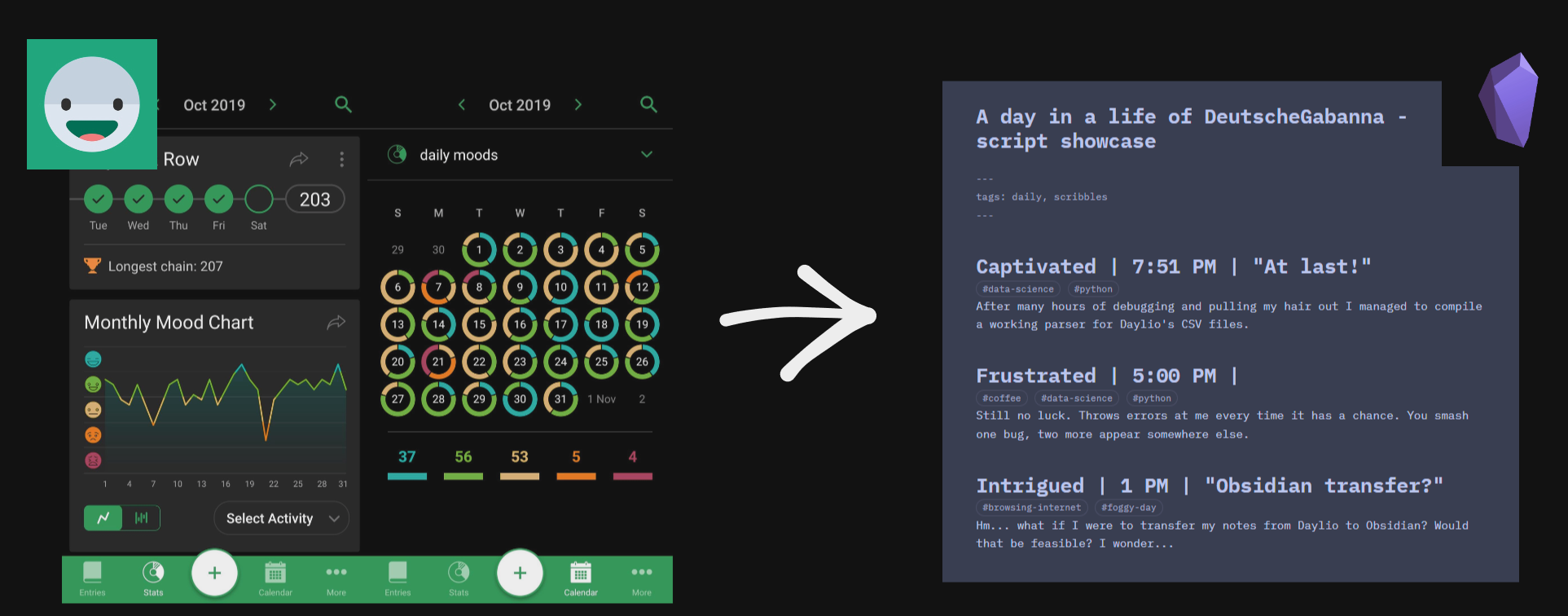
Daylio lets you export your journal as a .csv file. This tool reads that export and produces one .md file per day, organised into year/month/ sub-directories — ready to drop into an Obsidian vault.
Each output file contains YAML front matter and one or more journal entries:
---
tags: daylio
---

## captivated | 22:00
#at-the-office #board-game #colleague-interaction
Sed ut est interdum

## tired | 20:00 | An optional title
#allegro #at-the-office #board-game
Quisque dictum odio quis augue consectetur.
Features
- Groups multiple entries from the same day into a single
.mdfile - Converts activities into Obsidian-compatible
#tags(slugified, lowercased, special characters stripped) - Supports custom mood sets via a
.jsonfile for mood-group colour coding - Supports non-Latin characters in notes and activities (Polish, Cyrillic, etc.)
- Configurable YAML front-matter tags, heading levels, and entry prefixes/suffixes
Installation
pip (recommended)
pip install obsidian-daylio-parser
There was a previous package called daylio-obsidian-parser (https://pypi.org/project/daylio-obsidian-parser/) that has been deprecated in favour of this one for consistency. If you have the old package installed, please uninstall it to avoid confusion.
From source
git clone https://github.com/DeutscheGabanna/Obsidian-Daylio-Parser.git
cd Obsidian-Daylio-Parser
pip install .
Docker
docker build -t obsidian-daylio-parser .
docker run -v /path/to/your/files:/data obsidian-daylio-parser /data/export.csv /data/output
Usage
obsidian-daylio-parser <filepath> <destination> [options]
Arguments
| Argument | Description |
|---|---|
filepath |
Path to the Daylio .csv export file |
destination |
Output folder. Files are organised into destination/year/month/YYYY-MM-DD.md |
Options
| Option | Default | Description |
|---|---|---|
--version |
Show the installed version and exit | |
--force accept|refuse |
(prompt) | Accept or refuse all overwrite confirmations without asking |
--front_matter_tags TAG [TAG ...] |
daylio |
Tags for the YAML front matter of each .md file |
--prefix TEXT |
(empty) | Prepend a string to each entry's header |
--suffix TEXT |
(empty) | Append a string to each entry's header |
--tag_activities, -a |
True |
Convert activities into #tag format |
--color |
(unused) | Intended for mood colour coding — not yet implemented |
--header N |
2 |
Heading level for entries (e.g. 2 → ##, 3 → ###) |
--csv-delimiter CHAR |
| |
Delimiter separating activities within a single CSV cell |
Examples
Basic conversion:
obsidian-daylio-parser ~/Downloads/daylio_export.csv ~/ObsidianVault/Journal
Custom front-matter tags with ### headings:
obsidian-daylio-parser export.csv ./vault --front_matter_tags journal mood-tracking --header 3
Activities as plain text (no # prefix):
obsidian-daylio-parser export.csv ./vault --tag_activities False
For example, if you have an activity in Daylio named 69 it wouldn't work correctly as a tag in Obsidian.
With --tag_activities=False they won't break when the note is displayed in Obsidian.
Custom moods
Daylio supports exactly five predefined mood groups: rad, good, neutral, bad, and awful. Each group in Daylio initially maps to exactly one mood of the same name, but user is free to expand this list with their own moods.
To use your own expanded mood vocabulary, create a .json file with the five mood groups as keys, each containing an array of mood names:
{
    "rad": ["rad", "blissful", "excited"],
    "good": ["vaguely good", "grateful", "captivated"],
    "neutral": ["vaguely ok", "focused", "bored"],
    "bad": ["frustrated", "anxious", "drained"],
    "awful": ["awful", "lifeless", "miserable"]
}
Only the five standard group keys (rad, good, neutral, bad, awful) are recognised. Unknown keys are silently ignored. Duplicate and empty mood names are skipped.
Note: Custom moods can be passed via
path_to_moodswhen using the library programmatically. There is currently no CLI flag for this.
Expected CSV format
The converter expects the standard Daylio CSV export format:
full_date,date,weekday,time,mood,activities,note_title,note
2022-10-26,October 26,Wednesday,10:00 PM,captivated,at the office | board game,,"Sed ut est interdum"
All columns must be present. activities, note_title, and note may be empty.
Note: Newer versions of Daylio may include a
scalescolumn in the export. Scales are not yet supported and may cause issues since the parser currently expects exactly 8 columns.
Known limitations
--forceis not yet implemented. The flag is accepted by the parser but has no effect — files are always silently overwritten.--coloris not yet implemented. The flag is accepted but mood colour coding is not applied.- No CLI flag for custom moods. Custom mood sets can only be used through the Python API, not from the command line.
- Scales are not supported. The
scalescolumn introduced in newer Daylio exports is not parsed. - Entries at the same time on the same day are overwritten. If two entries share the exact same date and time, only the last one in the CSV is kept.
Exit codes
Contributors are encouraged to use custom exit codes when raising critical exceptions. You can define new exit codes as necessary. Integration tests that only have access to the stdout and stderr of the CLI can then assess the cause of failure with the edit code.
| Code | Meaning |
|---|---|
0 |
Success |
2 |
Invalid command-line arguments (argparse) |
150 |
Keyboard interruption |
151 |
Cannot access or parse the .csv file |
152 |
The .csv produced no valid journal entries |
Project structure
src/obsidian_daylio_parser/
├── __main__.py        # CLI entry point
├── config.py          # Argument parsing and defaults
├── errors.py          # Logging setup and base error classes
├── group.py           # EntriesFrom — groups entries by date, outputs .md
├── journal_entry.py   # Entry — a single journal entry
├── librarian.py       # Librarian — orchestrates CSV parsing and file output
├── utils.py           # Date/time parsing, slugify, file loaders
└── entry/
    └── mood.py        # Moodverse — mood group management
Development
git clone https://github.com/DeutscheGabanna/Obsidian-Daylio-Parser.git
cd Obsidian-Daylio-Parser
pip install pipenv
pipenv install --dev
Running tests
pipenv run coverage run -m unittest discover -s . -t .
Publishing
Pushes to the dev-stage branch trigger a test publish to TestPyPI. To publish to the official PyPI repository, merge into main and create a new release.
Linting
pip install flake8
flake8 src/
Requirements
- Python ≥ 3.10
License
Release history Release notifications | RSS feed


Download files
Download the file for your platform. If you're not sure which to choose, learn more about installing packages.
Source Distribution
Built Distribution
Filter files by name, interpreter, ABI, and platform.
If you're not sure about the file name format, learn more about wheel file names.
Copy a direct link to the current filters
File details
Details for the file obsidian_daylio_parser-0.4.2.tar.gz.
File metadata
- Download URL: obsidian_daylio_parser-0.4.2.tar.gz
- Upload date:
- Size: 70.2 kB
- Tags: Source
- Uploaded using Trusted Publishing? Yes
- Uploaded via: twine/6.1.0 CPython/3.13.7
File hashes
| Algorithm | Hash digest | |
|---|---|---|
| SHA256 |
9a69275af87c4088e7a793accb7d4ff26b29f6631c686a49364956207d8f46ac
|
|
| MD5 |
e6047878a4883a186714ad8bd254f5af
|
|
| BLAKE2b-256 |
7bec1c735456579ef0e4d3d4d4d7eb5a132b9ec3956eb5fb466b8fc77e0d3c24
|
Provenance
The following attestation bundles were made for obsidian_daylio_parser-0.4.2.tar.gz:
Publisher:
publish.yaml on DeutscheGabanna/Obsidian-Daylio-Parser
-
Statement:
-
Statement type:
https://in-toto.io/Statement/v1 -
Predicate type:
https://docs.pypi.org/attestations/publish/v1 -
Subject name:
obsidian_daylio_parser-0.4.2.tar.gz -
Subject digest:
9a69275af87c4088e7a793accb7d4ff26b29f6631c686a49364956207d8f46ac - Sigstore transparency entry: 1435051215
- Sigstore integration time:
-
Permalink:
DeutscheGabanna/Obsidian-Daylio-Parser@097c66cf1f04baee4427365f5f8e02e5e2c263d4 -
Branch / Tag:
refs/tags/v.0.4.2 - Owner: https://github.com/DeutscheGabanna
-
Access:
public
-
Token Issuer:
https://token.actions.githubusercontent.com -
Runner Environment:
github-hosted -
Publication workflow:
publish.yaml@097c66cf1f04baee4427365f5f8e02e5e2c263d4 -
Trigger Event:
release
-
Statement type:
File details
Details for the file obsidian_daylio_parser-0.4.2-py3-none-any.whl.
File metadata
- Download URL: obsidian_daylio_parser-0.4.2-py3-none-any.whl
- Upload date:
- Size: 54.7 kB
- Tags: Python 3
- Uploaded using Trusted Publishing? Yes
- Uploaded via: twine/6.1.0 CPython/3.13.7
File hashes
| Algorithm | Hash digest | |
|---|---|---|
| SHA256 |
3a6a2b54f261ca48809f000e488eff156bf6a9b5edcc98e862cd60cc0ec17fde
|
|
| MD5 |
0dbb773782bec9aff4df70e93cf27677
|
|
| BLAKE2b-256 |
1d8f3116d7977b3e02773b93f8b60184fdd9562876616c0709868b1bd813ed61
|
Provenance
The following attestation bundles were made for obsidian_daylio_parser-0.4.2-py3-none-any.whl:
Publisher:
publish.yaml on DeutscheGabanna/Obsidian-Daylio-Parser
-
Statement:
-
Statement type:
https://in-toto.io/Statement/v1 -
Predicate type:
https://docs.pypi.org/attestations/publish/v1 -
Subject name:
obsidian_daylio_parser-0.4.2-py3-none-any.whl -
Subject digest:
3a6a2b54f261ca48809f000e488eff156bf6a9b5edcc98e862cd60cc0ec17fde - Sigstore transparency entry: 1435051226
- Sigstore integration time:
-
Permalink:
DeutscheGabanna/Obsidian-Daylio-Parser@097c66cf1f04baee4427365f5f8e02e5e2c263d4 -
Branch / Tag:
refs/tags/v.0.4.2 - Owner: https://github.com/DeutscheGabanna
-
Access:
public
-
Token Issuer:
https://token.actions.githubusercontent.com -
Runner Environment:
github-hosted -
Publication workflow:
publish.yaml@097c66cf1f04baee4427365f5f8e02e5e2c263d4 -
Trigger Event:
release
-
Statement type:






