
Turn a folder of Obsidian notes into one polished PDF, with wiki links, embeds, callouts, Mermaid and community plugins. Make redline PDFs of the changes between two versions. Runs locally or in CI.




Documentation: https://spenhouet.com/obsidian-pdf-exporter/
ope turns a folder of an Obsidian vault into one PDF. Every folder becomes a numbered section with a table of contents, a running header and footer, and the Obsidian syntax in the notes is rendered: wiki links, embeds of notes, headings, blocks and images, callouts, highlights, tasks, footnotes, math, Mermaid and Bases. Community plugin syntax from Dataview, Meta Bind, Folder Notes, Block Link Plus, Excalidraw, draw.io and pandoc citations is rendered too. Templates control the look with CSS. It runs on the command line, without Obsidian, so it works in CI.
ope export ./MyVault/Handbook --title "Team handbook" --version 1.2.0
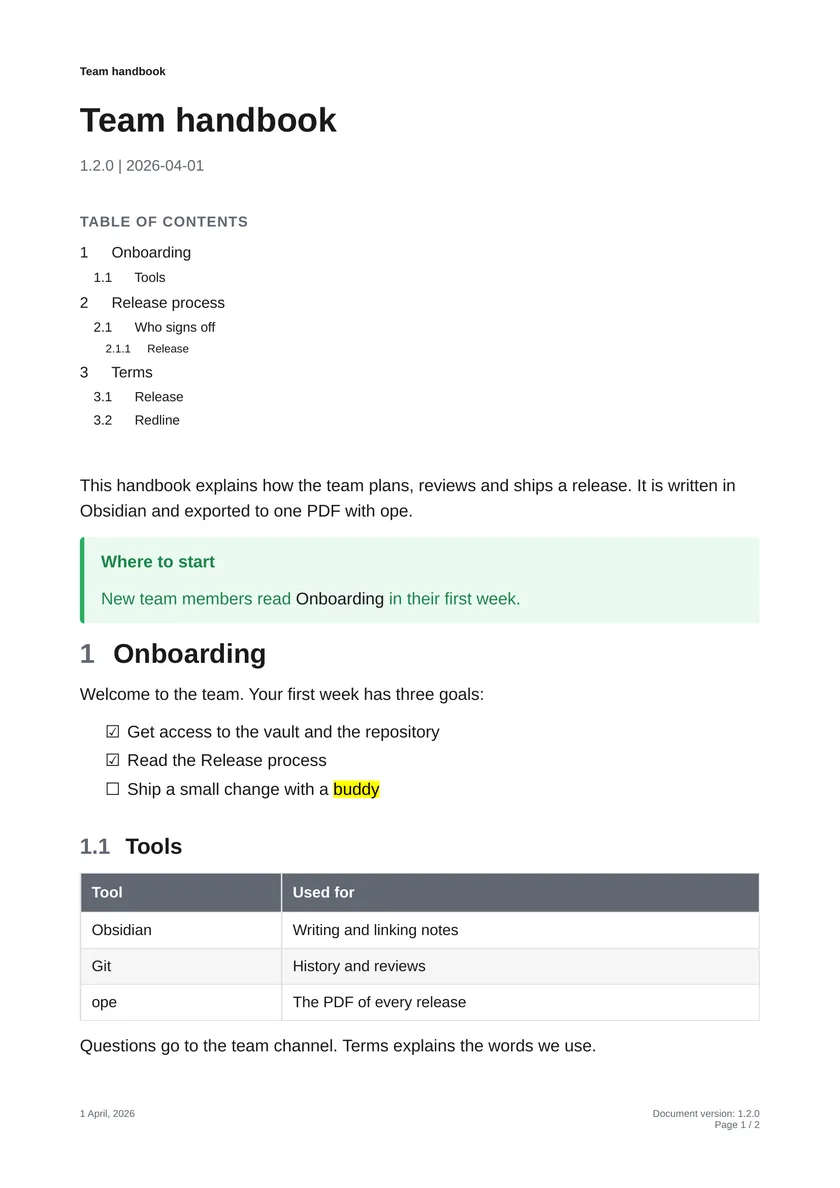
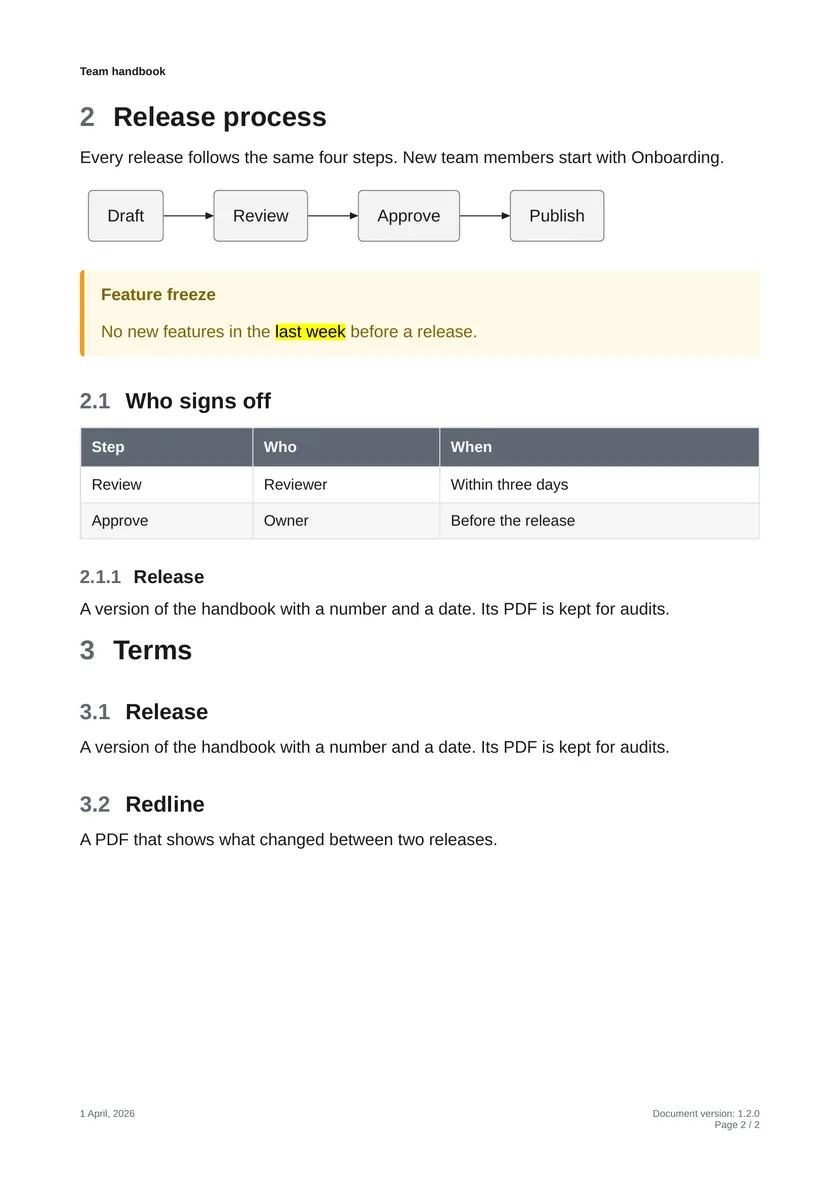
Each feature page of the docs shows the Markdown next to the rendered PDF.
Install
macOS / Linux
curl -LsSf uvx.sh/obsidian-pdf-exporter/install.sh | sh && ope setup --yes
Windows
powershell -ExecutionPolicy ByPass -c "irm https://uvx.sh/obsidian-pdf-exporter/install.ps1 | iex; ope setup --yes"
ope setup installs the native libraries WeasyPrint needs and pandoc. Mermaid diagrams are drawn inside ope, so Node.js and a browser are not needed. See Installation for every OS, uv, pip and CI.
Quick start
ope export ./MyVault/Handbook --title "Team handbook" --version 1.2.0
ope export ./MyVault/Handbook --template ./my-template/
ope redline ./MyVault/Handbook --from-commit v1.1.0 --to-commit HEAD
ope --help
Redline: see every change in the PDF
ope redline turns two git commits of a folder into a tracked-changes PDF: inserted text underlined in blue, removed text struck through in red, moved text in purple and a change bar in the margin, in the layout of the real document. A change summary lists every changed section. The side-by-side style shows the old and the new document in two aligned columns, -O redline.collapse=on shows only the changes, and --blame adds the author, date and commit message of every changed block next to the page. It is made for reviews, approvals, audits and release notes of documents kept in git.
ope redline ./Policy --from-commit v1.0.0 --to-commit v1.1.0
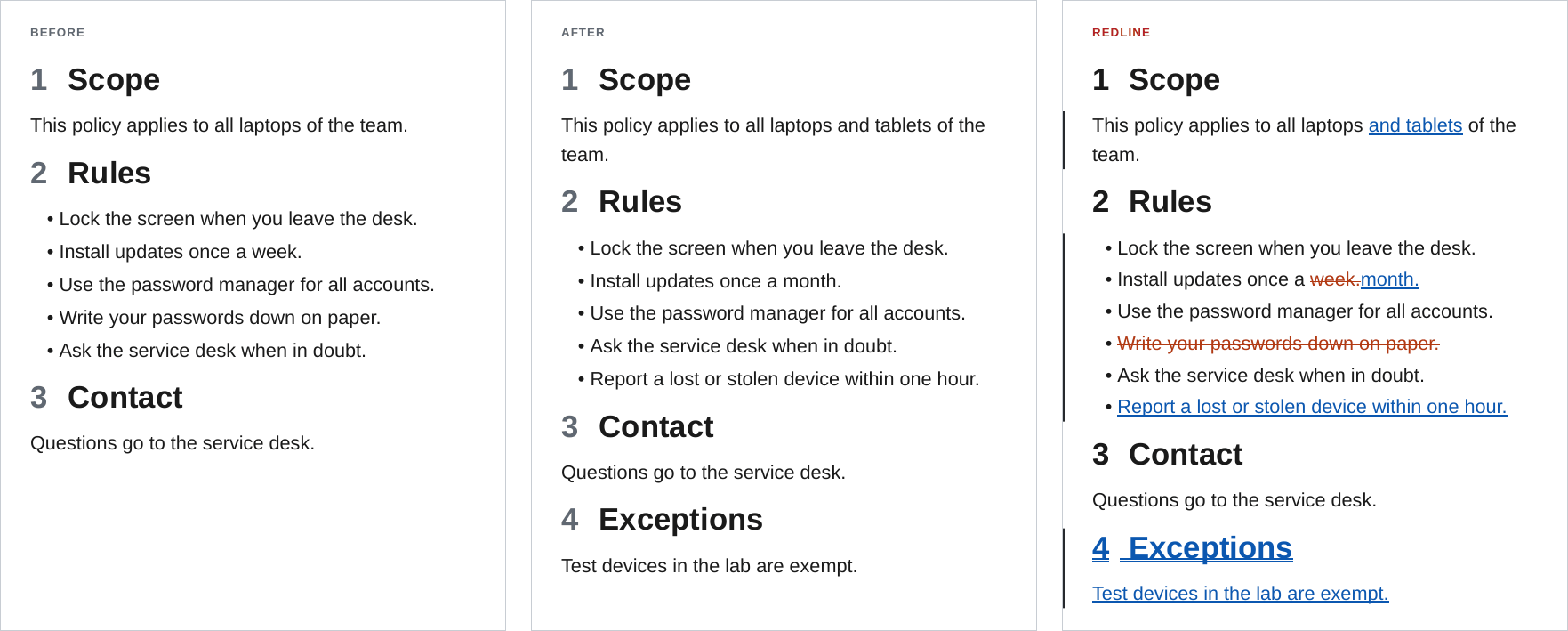
Tags, branches, commit hashes and HEAD~n work as versions, two folders or notes on disk can be compared without git (--from-path), and the docs have GitHub Actions workflows that attach a redline to every pull request or release. See Redline.
Documentation
| Topic | Link |
|---|---|
| Install on every OS, quick start | Getting started |
Every command, flag, -O option, env var and exit code |
CLI reference |
| Markdown: tables, code, footnotes, math | Markdown |
| Obsidian syntax: wiki links, embeds, callouts, Mermaid | Obsidian |
| Dataview, Meta Bind, Excalidraw, draw.io, writing a plugin | Plugins |
| Tracked-changes PDFs: usage, comparing versions, CI, what changes look like | Redline |
| Templates, header and footer, CSS classes, recipes | Templates and styling |
| Claude Code plugin, skill, llms.txt | Use with AI agents |
| Development setup, architecture, tests | Contributing |
Use with AI agents
The repository is a Claude Code plugin marketplace with a skill for ope:
/plugin install obsidian-pdf-exporter --marketplace Spenhouet/obsidian-pdf-exporter
On older Claude Code versions, run /plugin marketplace add Spenhouet/obsidian-pdf-exporter and then /plugin install obsidian-pdf-exporter@obsidian-pdf-exporter. Other agents can read llms.txt.
License
1 maintainer

Metadata
1 maintainer
Release files for obsidian-pdf-exporter 0.14.4
For a detailed explanation of source distributions (sdists) and built distributions (wheels), please see the package formats documentation.
Source distribution (sdist)
| File | Size | Uploaded | |
|---|---|---|---|
| obsidian_pdf_exporter-0.14.4.tar.gz | 542.3 kB | Details |
Built distribution (wheel)
| File | Interpreter | ABI | Platform | Reset |
|---|---|---|---|---|
| obsidian_pdf_exporter-0.14.4-py3-none-any.whl | Python 3 | none | any | Details |
Total release size: 1.1 MB
Release files / obsidian_pdf_exporter-0.14.4.tar.gz
| Download URL | obsidian_pdf_exporter-0.14.4.tar.gz |
|---|---|
| Size | 542.3 kB |
| Tags | Source |
|
SHA-256 checksum How to use checksums |
cbea9788be231fc939989b8e53798e937da370efd78c6314e50882d0308252ba
|
|
BLAKE2b-256 checksum How to use checksums |
f17c637b7a22464924f5948d6d20d1933e4ca386325123843c4b2a48717bd5d2
|
| Upload date | |
|
Uploaded using Trusted Publishing? What is trusted publishing? |
Yes |
| Uploaded via |
uv/0.13.1 {"installer":{"name":"uv","version":"0.13.1","subcommand":["publish"]},"python":null,"implementation":{"name":null,"version":null},"distro":{"name":"Ubuntu","version":"24.04","id":"noble","libc":null},"system":{"name":null,"release":null},"cpu":null,"openssl_version":null,"setuptools_version":null,"rustc_version":null,"ci":true}
|
Release files / obsidian_pdf_exporter-0.14.4-py3-none-any.whl
| Download URL | obsidian_pdf_exporter-0.14.4-py3-none-any.whl |
|---|---|
| Size | 605.0 kB |
| Tags | Python 3 |
|
SHA-256 checksum How to use checksums |
55d937bf294e940c65d22d3fec589facfd76cdd067e8f0b25dc0726ffc5289c4
|
|
BLAKE2b-256 checksum How to use checksums |
b40a3524ab28c5f4f44f57f8b277647c002e115e4fd32806ced3aad0d4081551
|
| Upload date | |
|
Uploaded using Trusted Publishing? What is trusted publishing? |
Yes |
| Uploaded via |
uv/0.13.1 {"installer":{"name":"uv","version":"0.13.1","subcommand":["publish"]},"python":null,"implementation":{"name":null,"version":null},"distro":{"name":"Ubuntu","version":"24.04","id":"noble","libc":null},"system":{"name":null,"release":null},"cpu":null,"openssl_version":null,"setuptools_version":null,"rustc_version":null,"ci":true}
|














