
A Python package to convert Obsidian Markdown files and folders into structured LaTeX documents.

Project description
ObsiTex: Convert Obsidian Notes to LaTeX
ObsiTex is a Python package that automates the conversion of Obsidian Markdown files and folders into structured LaTeX documents. Designed for researchers, students, and technical writers, it ensures a seamless transition from Markdown to a fully formatted LaTeX file, preserving document structure and references.
Why Use ObsiTex?
- Eliminates manual LaTeX formatting for Markdown-based notes.
- Preserves headings, lists, equations, figures, citations, and more.
- Supports entire folders, making it ideal for research papers and dissertations.
- Uses Jinja2 templates, allowing full customization of the LaTeX output.
Quick Start
To install ObsiTex, use pip:
pip install obsitex
Convert an Obsidian folder into a LaTeX document:
obsitex --input "My Obsidian Folder" --main-tex output.tex
Convert a single Markdown file:
obsitex --input "My Note.md" --main-tex output.tex
Use ObsiTex as a Python library:
from obsitex import ObsidianParser

parser = ObsidianParser()
parser.add_dir("My Obsidian Folder")

latex_content: str = parser.to_latex()
Supported Elements
Most of the standard Markdown elements are supported, including:
- Equations (inline and block)
- Figures (with captions and metadata)
- Tables (with captions and metadata)
- Citations (using BibTeX references)
- Headings (up to level 6, but can be customized)
- Lists (enumerated and bulleted)
- Blockquotes
- Standard text formatting (bold, italics, code blocks, etc.)
Citations
This system works best if used with the Obsidian plugin obsidian-citation-plugin, which allows for the easy insertion of citations in markdown files. The citations must be in the format [[@citekey]], where citekey is the key of the reference in the BibTeX file.
Callouts
Figure
Use the following syntax to create a figure in Obsidian:
> [!figure] Caption for the figure
> ![[example-image.png]]
> %%
> width: 0.5
> label: example-image
> position: H
> %%
Which may be broken down as follows:
Caption for the figure: The caption for the figure.![[example-image.png]]: The path to the image, if a figure is present, then the graphics folder must be provided.%%: This is a Obsidian comment, which allows for additional metadata to be added to the figure, without affecting the markdown rendering in Obsidian. If not present, default values will be used. This content must be YAML formatted.
Table
Use the following syntax to create a table in Obsidian:
> [!table] Random Table
> | Name  | Age | City     |
> |-------|-----|----------|
> | Alice | 25  | New York |
> | Bob   | 30  | London   |
> | Eve   | 28  | Tokyo    |
> %%
> prop: value
> %%
This allows for the creation of tables in markdown, thus easily rendered in Obsidian, and then converted to LaTeX.
Similarly to figures, metadata can be added to the table, in order to customize the rendering of the table in LaTeX. This content must be YAML formatted.
Styling
These are custom blocks, thus won't have styling in Obsidian unless explictly defined in a CSS snippet. You can define the styling by following the instructions in the Obsidian documentation.
Samples
- Motivation Letter: Single file motivation letter with no citations or figures, one of the simplest use cases.
- Sock Research Paper: Single file research paper on socks with authors, affilitions, abstract, and content defined entirely in markdown.
- MSc Dissertation on Ducks: Folder containing a MSc thesis on ducks, with multiple markdown files under a common folder, and an
Index.mdfile defining the hierarchy of the thesis.
These samples were all converted to PDF using XeLaTeX, and the output files are available in the output folder of each sample.
Single File - Motivation Letter for Willy Wonka's Chocolate Factory
Charlie Beckett is applying for a position at Willy Wonka's Chocolate Factory, and has written a motivation letter in markdown. Of course this isn't the only factory he's applying to, so he wants the letter to be easily customizable for other applications.
Unlike the other examples, this example doesn't require a BibTex file or graphics folder, as it doesn't contain any citations or figures. The LaTeX file can be generated by:
cd samples/motivation-letter;

obsitex --input "Motivation Letter.md" \
    --template template.tex \
    --main-tex output/main.tex ;
Output Files
Single File - Research Paper on Socks
Made up authors from the International Sock Research Institute, Textile Innovation Center, and Academy of Footwear Sciences have written a research paper on socks that was entirely developed in markdown. The authors now want to convert this document to pdf in order to submit it to a conference.
The LaTeX file and correspondings Bib file can be generated by:
cd samples/sock-research-paper;

obsitex --input "The Evolution of Socks.md" \
    --graphics ../images \
    --bibtex ../shared-references.bib \
    --template template.tex \
    --main-tex output/main.tex \
    --main-bibtex output/main.bib ;
Output Files
Folder - MSc Thesis on Ducks
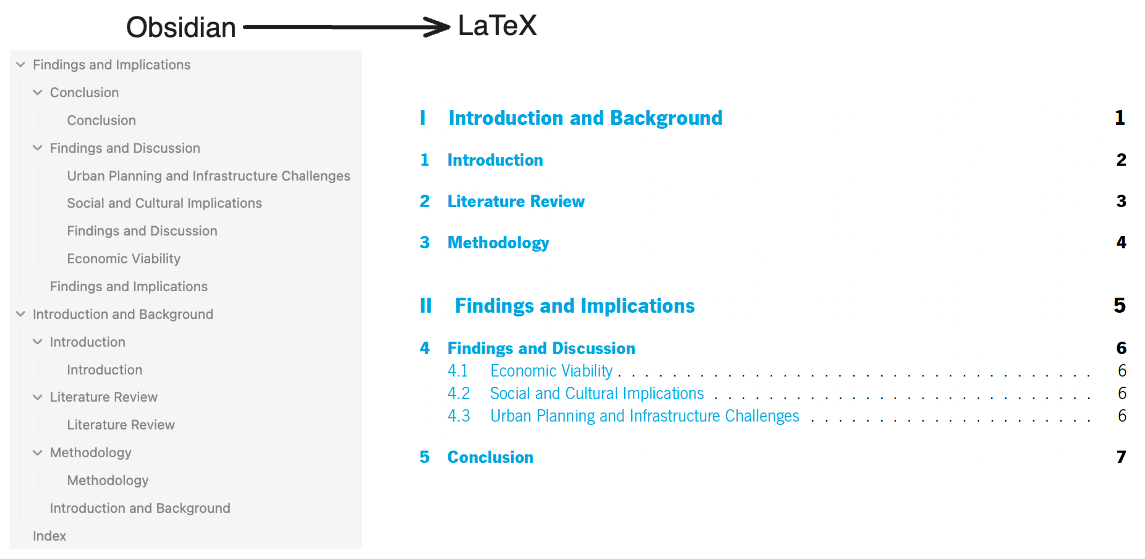
An unknown author has written a MSc thesis on ducks, and has organized the thesis in multiple markdown files under a common folder. The author now wants to convert this thesis to a single LaTeX file.
The folder structure is as follows:
obsidian-folder
├── Findings and Implications
│   ├── Conclusion
│   │   └── Conclusion.md
│   ├── Findings and Discussion
│   │   ├── Economic Viability.md
│   │   ├── Findings and Discussion.md
│   │   ├── Social and Cultural Implications.md
│   │   └── Urban Planning and Infrastructure Challenges.md
│   └── Findings and Implications.md
├── Index.md
└── Introduction and Background
    ├── Introduction
    │   └── Introduction.md
    ├── Introduction and Background.md
    ├── Literature Review
    │   └── Literature Review.md
    └── Methodology
        └── Methodology.md

8 directories, 11 files
Index.md defines the entry point for obsitex, by creating links between the different sections of the thesis, in the target order. In this example, the Index.md file is as follows:
[[Introduction and Background]]

[[Findings and Implications]]
Thus, the first part will be the Introduction and Background part, followed by the Findings and Implications part. The LaTeX file and correspondings Bib file can be generated by:
cd samples/msc-dissertation;

obsitex --input obsidian-folder \
    --graphics ../images \
    --bibtex ../shared-references.bib \
    --template template.tex \
    --main-tex output/main.tex \
    --main-bibtex output/main.bib ;
Output Files
Acknowledgments
This work was inspired by:
- Obsidian Citation Plugin – For enabling seamless reference management within Obsidian.
- Alejandro Daniel Noel – His work served as an initial and valuable basis for this project.
- dbt – For giving me the idea of using Jinja2 templates for LaTeX conversion.
License
This project is licensed under the MIT License.


Download files
Download the file for your platform. If you're not sure which to choose, learn more about installing packages.
Source Distribution
Built Distribution
Filter files by name, interpreter, ABI, and platform.
If you're not sure about the file name format, learn more about wheel file names.
Copy a direct link to the current filters
File details
Details for the file obsitex-0.0.5.tar.gz.
File metadata
- Download URL: obsitex-0.0.5.tar.gz
- Upload date:
- Size: 19.0 kB
- Tags: Source
- Uploaded using Trusted Publishing? Yes
- Uploaded via: twine/6.1.0 CPython/3.12.8
File hashes
| Algorithm | Hash digest | |
|---|---|---|
| SHA256 |
53168f00d64b3d29b8ec0041b848e2352cc58de09196158c1b1a2bc40fcf0827
|
|
| MD5 |
53ceb4619bdd258e8c2dd4f31901c36e
|
|
| BLAKE2b-256 |
797a5d6525fbc3105d095010d525fc891118ff4e9801948bf98bf2b5e673e97f
|
Provenance
The following attestation bundles were made for obsitex-0.0.5.tar.gz:
Publisher:
python-publish.yml on ruipreis/obsitex
-
Statement:
-
Statement type:
https://in-toto.io/Statement/v1 -
Predicate type:
https://docs.pypi.org/attestations/publish/v1 -
Subject name:
obsitex-0.0.5.tar.gz -
Subject digest:
53168f00d64b3d29b8ec0041b848e2352cc58de09196158c1b1a2bc40fcf0827 - Sigstore transparency entry: 169903098
- Sigstore integration time:
-
Permalink:
ruipreis/obsitex@4caf48121315e6bd573706540530d0953a2e52f9 -
Branch / Tag:
refs/tags/0.0.5 - Owner: https://github.com/ruipreis
-
Access:
public
-
Token Issuer:
https://token.actions.githubusercontent.com -
Runner Environment:
github-hosted -
Publication workflow:
python-publish.yml@4caf48121315e6bd573706540530d0953a2e52f9 -
Trigger Event:
release
-
Statement type:
File details
Details for the file obsitex-0.0.5-py3-none-any.whl.
File metadata
- Download URL: obsitex-0.0.5-py3-none-any.whl
- Upload date:
- Size: 18.2 kB
- Tags: Python 3
- Uploaded using Trusted Publishing? Yes
- Uploaded via: twine/6.1.0 CPython/3.12.8
File hashes
| Algorithm | Hash digest | |
|---|---|---|
| SHA256 |
c525c240ba22e5b64bc308c674ce05c376043cbbaef58036cbcfdbb5c9790f40
|
|
| MD5 |
71e62fe0506b41daf003c78da117003c
|
|
| BLAKE2b-256 |
6d82a16ea80e890c61d6043408f457c4a8e82c1320539ffd92d13ac63cd05ec6
|
Provenance
The following attestation bundles were made for obsitex-0.0.5-py3-none-any.whl:
Publisher:
python-publish.yml on ruipreis/obsitex
-
Statement:
-
Statement type:
https://in-toto.io/Statement/v1 -
Predicate type:
https://docs.pypi.org/attestations/publish/v1 -
Subject name:
obsitex-0.0.5-py3-none-any.whl -
Subject digest:
c525c240ba22e5b64bc308c674ce05c376043cbbaef58036cbcfdbb5c9790f40 - Sigstore transparency entry: 169903100
- Sigstore integration time:
-
Permalink:
ruipreis/obsitex@4caf48121315e6bd573706540530d0953a2e52f9 -
Branch / Tag:
refs/tags/0.0.5 - Owner: https://github.com/ruipreis
-
Access:
public
-
Token Issuer:
https://token.actions.githubusercontent.com -
Runner Environment:
github-hosted -
Publication workflow:
python-publish.yml@4caf48121315e6bd573706540530d0953a2e52f9 -
Trigger Event:
release
-
Statement type:






