
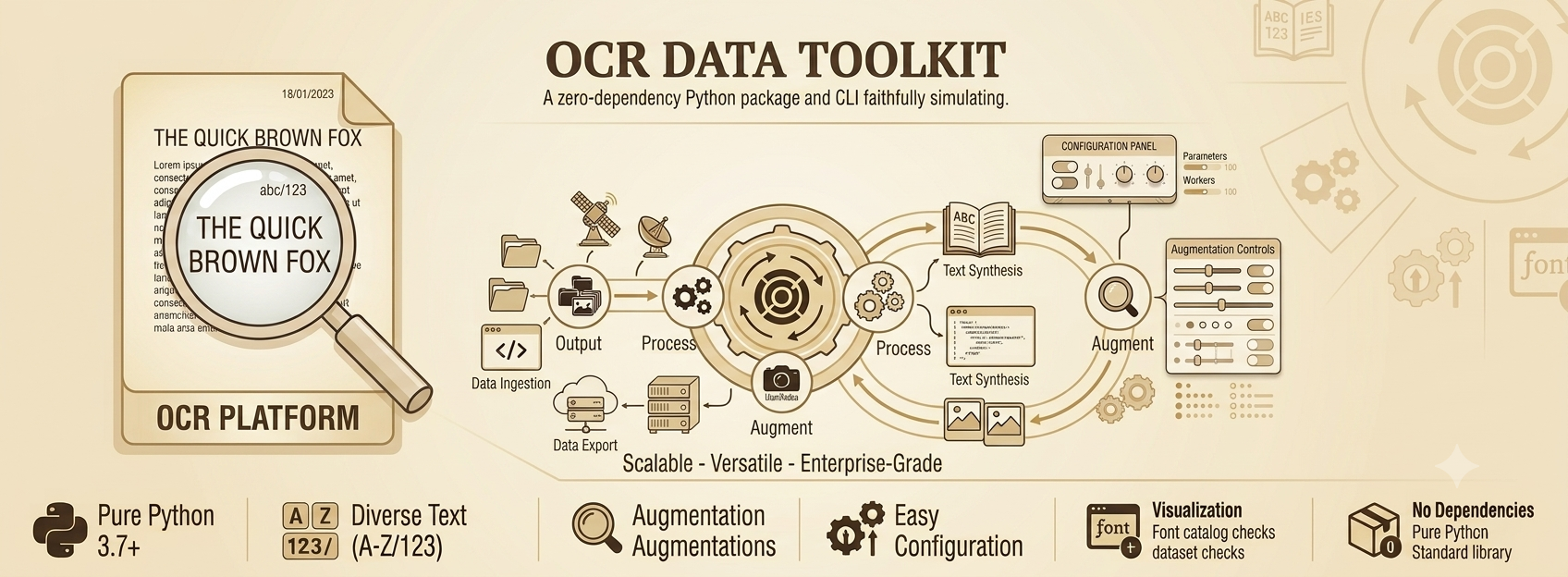
A powerful Python toolkit for generating synthetic datasets for Optical Character Recognition (OCR) model training and evaluation. This toolkit enables generating realistic text images with configurable backgrounds, fonts, augmentations, and ground-truth labels, supporting research and production needs for OCR systems.
Table of Contents
- Overview
- Features
- Installation
- Quick Start
- Configuration
- Output Images and Padding Strategy
- Output Format of Training and Testing Datasets
- Usage Examples
- Module Structure
- Extending and Customization
- Contributing
- License
- Acknowledgements
Overview
The OCR Data Toolkit (ocr_data_toolkit) is designed to generate high-quality synthetic data for OCR applications. It provides:
- Flexible control over text, fonts, backgrounds, and augmentations.
- Efficient multiprocessing for large-scale dataset creation.
- Ready-to-use utilities for font catalog visualization and dataset management.
- Modular design for easy extension and integration.
Synthetic data is essential for training robust OCR models, especially when annotated real-world data is scarce or expensive to collect. This toolkit helps you simulate diverse real-world scenarios, improving model generalization.
Features
- Text Generation: Random words, numbers, and dates with customizable probabilities.
- Font & Background Selection: Use your own font and background image collections.
- Rich Augmentations: Noise, blur, moire patterns, elastic distortions, ink bleed, perspective transforms, brightness, opacity, and more.
- Multiprocessing: Fast dataset generation using multiple CPU cores.
- Train/Test Splitting: Automatic splitting and ground-truth file creation.
- Visualization: Font catalog visualization for dataset quality checks.
- Easy Configuration: All options controlled via Python config dictionaries or dataclasses.
Installation
Requirements
- Python 3.8+
- Dependencies:
Pillow,numpy,opencv-python,matplotlib,atpbar
Pip Installation
pip install ocr-data-toolkit
Or clone and install locally:
git clone https://github.com/NaumanHSA/ocr-data-toolkit.git
cd ocr-data-toolkit
pip install .
Quick Start
from ocr_data_toolkit import ODT

# Simple example: generate a single image
odt = ODT(language="en")
text, image = odt.generate_single_image()
image.save("sample.png")
print("Ground truth:", text)
Configuration
Input Config
Configuration is managed via the Config dataclass (see ocr_data_toolkit/common/config.py).
Parameter Reference:
| Parameter | Type | Description |
|---|---|---|
language |
str | Language code (required). Currently en is supported; more languages are planned. |
bag_of_words |
List[str] | List of words for random text. If not provided, loads built-in vocabulary for the selected language. |
backgrounds_path |
str | Path to background images. If not set, uses built-in backgrounds shipped with the package. |
fonts_path |
str | Path to font files (.ttf and .otf, searched recursively). If not set, uses built-in fonts for the selected language. |
text_probs |
Dict[str, float] | Probabilities for generating text, date, or number. Defaults to {text: 0.7, date: 0.1, number: 0.2}. |
output_image_size |
Tuple[int, int] | Output image size (width, height). If None, uses the natural size of generated images. |
train_test_ratio |
float | Ratio for splitting train/test sets. Default is 0.2 (20% test). |
output_save_path |
str | Where to save generated data. Defaults to an export folder in the current working directory. |
augmentation_config |
Dict | Augmentation settings (see below). If not provided, uses sensible defaults. |
num_workers |
int | Number of parallel worker processes for data generation. Default is 4. |
Defaults and Auto-loading:
- If you do not specify
backgrounds_pathorfonts_path, the toolkit will automatically use built-in backgrounds and fonts for the selected language (seedata/directory). - If you do not provide
bag_of_words, the toolkit loads a built-in vocabulary file for the selected language. - All other parameters have robust defaults to ensure out-of-the-box functionality.
Example:
from ocr_data_toolkit import ODT
config = {
    "language": "en",
    "output_image_size": (128, 32),
    "augmentation_config": {"max_num_words": 5, "num_lines": 2},
}
odt = ODT(**config)
Augmentation Config
Augmentations are controlled by the AugmentationConfig class (see ocr_data_toolkit/common/config.py). You can override any default by passing a dictionary to augmentation_config.
Detailed Augmentation Parameters:
| Parameter | Type | Default | Description |
|---|---|---|---|
max_num_words |
int | 5 | Maximum number of words per line of generated text. |
num_lines |
int or Tuple[int, int] | 1 | Number of lines per image. A tuple (min, max) picks a random count per sample. |
font_size |
int | 36 | Font size for rendered text. |
text_colors |
List[str] | ["#2f2f2f", "black", "#404040"] |
List of possible text colors (hex or names). |
letter_spacing_prob |
float | 0.4 | Probability of applying random letter spacing. |
margin_x, margin_y |
Tuple[float, float] | (0.5, 1.5) | Padding factors for horizontal/vertical margins, as a multiple of character width/height. |
blur_probs |
Dict[str, float] | {gaussian: 0.3, custom_blurs: 0.6} |
Probabilities for applying Gaussian blur and custom blurs (motion, bokeh). |
moire_prob |
float | 0.3 | Probability of overlaying a moire pattern. |
opacity_prob |
float | 0.3 | Probability of applying random opacity to the image. |
opacity_range |
Tuple[int, int] | (150, 210) | Range of alpha values for random opacity. |
brightness_range |
Tuple[float, float] | (0.7, 1.2) | Range for random brightness adjustment. |
perspective_transform_prob |
float | 0.3 | Probability of applying a random perspective transformation. |
random_crop_width_range |
Tuple[float, float] | (0.008, 0.01) | Range for random cropping width as a fraction of image width. |
random_crop_height_range |
Tuple[float, float] | (0.01, 0.1) | Range for random cropping height as a fraction of image height. |
random_resize_factor_range |
Tuple[float, float] | (0.9, 1.0) | Range for random resizing factor. |
random_stretch_factor_range |
Tuple[float, float] | (0.1, 0.3) | Range for random vertical stretch/compression. |
Parameter Explanations:
- max_num_words: Controls the upper limit of words per line (total words per sample is at most
max_num_words × num_lines). - num_lines: Generates multi-line text images for more realistic OCR scenarios.
- font_size: Sets the base font size; actual rendered size may vary depending on padding and image size.
- text_colors: Randomly selects from this list for each sample.
- letter_spacing_prob: With this probability, random spacing is added between letters to simulate varied printing.
- margin_x/margin_y: Determines the amount of padding around text. For example,
margin_x=(0.5, 1.5)means horizontal margins are randomly chosen between 0.5x–1.5x the character width. - blur_probs: Controls how often Gaussian or custom (motion, bokeh) blurs are applied.
- moire_prob: Adds moire patterns to mimic scanning artifacts.
- opacity_prob/opacity_range: Simulates faded or transparent text by randomly adjusting alpha.
- brightness_range: Randomly brightens or darkens the image.
- perspective_transform_prob: Applies perspective warping to simulate camera angles or skewed scans.
- random_crop_width/height_range: Randomly crops the image edges to simulate imperfect scans.
- random_resize_factor_range: Randomly resizes the image for scale variation.
- random_stretch_factor_range: Randomly stretches or compresses the image vertically.
Example:
augmentation = {
    "max_num_words": 8,
    "num_lines": 2,
    "font_size": 40,
    "blur_probs": {"gaussian": 0.5, "custom_blurs": 0.7},
    "moire_prob": 0.4,
}
odt = ODT(augmentation_config=augmentation)
Output Images and Padding Strategy
All generated images are created with the specified output_image_size (width, height). If this parameter is set to None, the image will use its natural size based on the rendered text and font. When resizing is needed, the toolkit uses a resize and pad strategy:
- The image is resized to fit within the target size while preserving the aspect ratio.
- Any remaining space is padded with zeros (black) to reach the exact output size.
- Padding is applied either at the bottom or right, depending on the aspect ratio.
This ensures that all images in your dataset have a consistent size, suitable for training deep learning models.
Output Format of Training and Testing Datasets
When you generate a dataset using generate_training_data, the toolkit creates a timestamped run directory under output_save_path:
export/en_2026-07-22_10-47-26/
├── train/
│   ├── images/               # e.g. 0_1_Synthetic_En.jpg
│   └── gt.txt
└── test/
    ├── images/
    └── gt.txt
Example gt.txt entries:
0_1_Synthetic_En.jpg	The quick brown fox
0_2_Synthetic_En.jpg	13/01/2023
- The format is:
<image_filename>\t<text_label>(tab-separated). Newlines in multi-line labels are escaped as\n. - Images are saved as JPEG inside each split's
images/directory. - Both
train/andtest/splits are filled according to thetrain_test_ratio(exact proportional split).
Usage Examples
Generate a Single Image
odt = ODT(language="en")
text, img = odt.generate_single_image()
img.save("test.png")
Generate a Full Dataset
odt = ODT(language="en", output_image_size=(128, 32), num_workers=4)
odt.generate_training_data(num_samples=1000)
Visualize Font Catalog
odt.visualize_font_catalog(save_dir="font_catalog", chunk_size=10)
Take a look at example.py for example usage.
Module Structure
ocr_data_toolkit/
├── odt.py                  # Main toolkit interface (ODT class)
├── generators/
│   ├── en.py               # English text-image generator (ENGenerator)
│   └── ...                 # Other language generators
├── helper/
│   ├── augmentation.py     # Augmentation operations (Augmentation class)
│   └── utils.py            # Utility functions (image, fonts, backgrounds)
├── common/
│   └── config.py           # Config and AugmentationConfig classes
├── data/                   # Sample data (backgrounds, fonts, vocabularies)
└── ...
ODTclass: Main entry point for data generation, configuration, and utilities.Augmentationclass: Implements all augmentation methods (noise, blur, moire, distortion, etc).generators/: Contains text-image synthesis logic for different languages.utils.py: Helper functions for resizing, font selection, backgrounds, etc.config.py: Centralizes default and user configuration.
Extending and Customization
- Add More Languages: Implement a new generator class in
generators/and update config. - Add New Augmentations: Extend the
Augmentationclass with your custom method. - Customize Pipelines: Modify or subclass
ODTorENGeneratorfor advanced use cases.
Contributing
We welcome and encourage contributions of all kinds!
- Add Multilingual Support: If you want to support a new language, simply add a new generator class in
generators/and update the config with the appropriate fonts and vocabulary. - New Augmentations: Propose or implement new augmentation methods in
helper/augmentation.py. - Bugfixes & Improvements: If you spot a bug or have an idea for improvement, open an issue or a pull request.
- Documentation: Help us improve the docs and examples for new users.
Please:
- Fork the repo and create a branch for your feature or bugfix.
- Add tests and documentation for new features.
- Open a pull request describing your changes.
Running the Tests
pip install pytest
pytest tests/ -v
License
This project is licensed under the MIT License. See the LICENSE file for details.
Acknowledgements
- Developed by Muhammad Nouman Ahsan - LinkedIn
- Inspired by real-world OCR data challenges and research needs
For questions, suggestions, or support, please open an issue or contact the author at naumanhsa965@gmail.com.
1 maintainer

Download files
Download the file for your platform. If you're not sure which to choose, learn more about installing packages.
Source Distribution
Built Distribution
Filter files by name, interpreter, ABI, and platform.
If you're not sure about the file name format, learn more about wheel file names.
Copy a direct link to the current filters
File details
Details for the file ocr_data_toolkit-0.2.0.tar.gz.
File metadata
- Download URL: ocr_data_toolkit-0.2.0.tar.gz
- Upload date:
- Size: 27.8 MB
- Tags: Source
- Uploaded using Trusted Publishing? No
- Uploaded via:
twine/6.2.0 CPython/3.11.13
File hashes
| Algorithm | Hash digest | |
|---|---|---|
| SHA256 |
6e27f86754aaf37bcea265caa336852ffe05b30a80b7e5071a245feab0c9e819
|
|
| MD5 |
763e44991274031b084af7109f25010f
|
|
| BLAKE2b-256 |
b1627616a86a4866d2bef83a28959725b8a9231c7d71ca2443e126558aecc73d
|
File details
Details for the file ocr_data_toolkit-0.2.0-py3-none-any.whl.
File metadata
- Download URL: ocr_data_toolkit-0.2.0-py3-none-any.whl
- Upload date:
- Size: 27.9 MB
- Tags: Python 3
- Uploaded using Trusted Publishing? No
- Uploaded via:
twine/6.2.0 CPython/3.11.13
File hashes
| Algorithm | Hash digest | |
|---|---|---|
| SHA256 |
3ecba34be84fb9fd5c9c327683e99e90a8619130f53e11d9683ebfbbd407bcec
|
|
| MD5 |
150e0050d34b0ccdbd7fabacb236c0d7
|
|
| BLAKE2b-256 |
0f2fe196afecfc6a90782bf431a9f8cc1bab104fa0f4bdeb144147fec2a32189
|














