
LLM OCR
Turn PDFs and images into clean Markdown with vision LLMs:
Gemini, OpenAI, Claude, or a local model through Ollama.





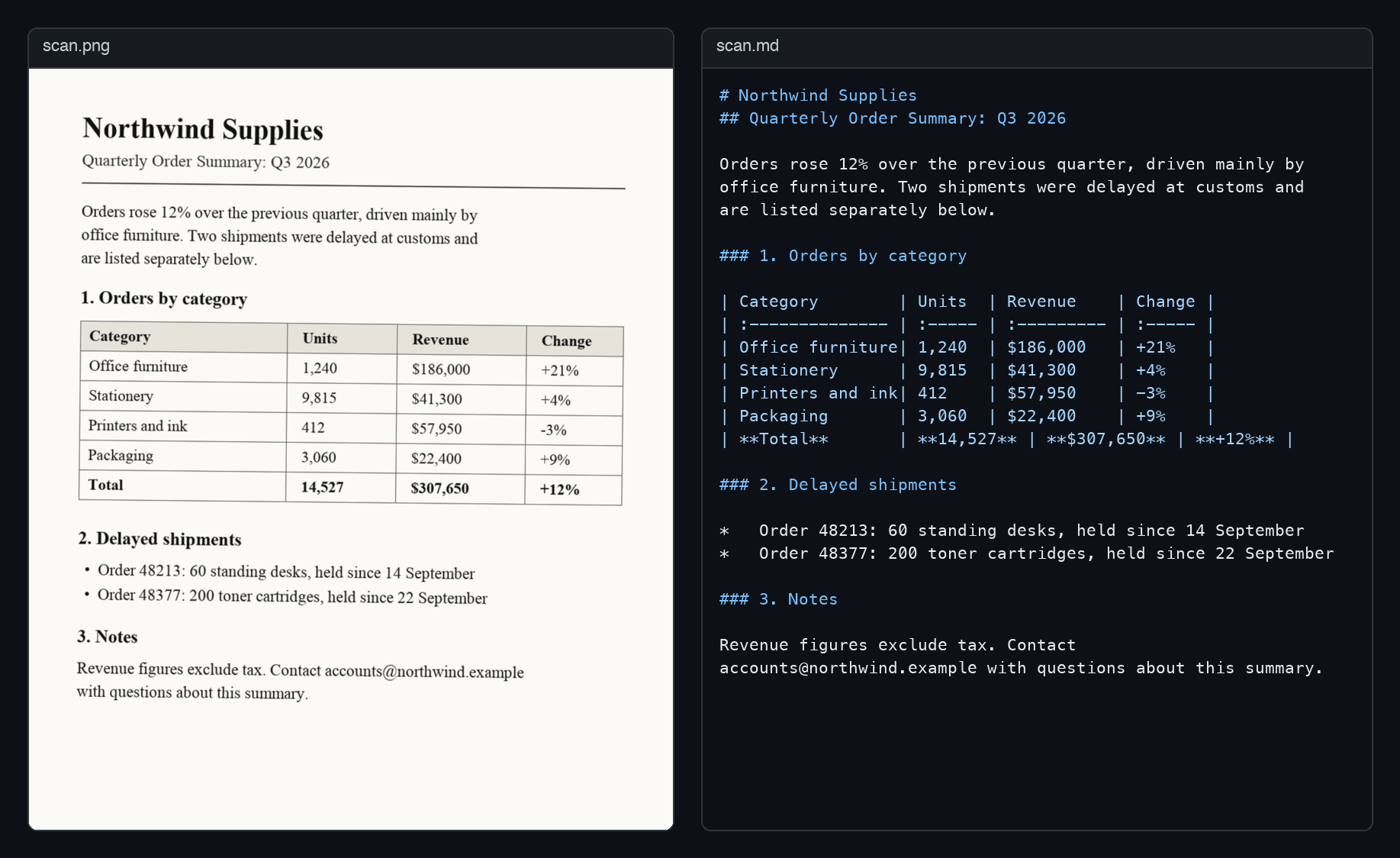
pip install ocr-llm
export GEMINI_API_KEY="..."   # or OPENAI_API_KEY / ANTHROPIC_API_KEY
ocr-llm document.pdf -o document.md
Or from Python:
from llm_ocr import LLMOCR, Gemini

markdown = LLMOCR(Gemini()).convert_sync("document.pdf")
It handles multi-page PDFs concurrently, keeps pages in order, retries failed requests, and works with any OpenAI-compatible server.
Installation
pip install ocr-llm
Gemini and OpenAI work out of the box. Claude needs an extra:
pip install "ocr-llm[anthropic]"
PDF input needs poppler: brew install poppler
on macOS, sudo apt-get install poppler-utils on Debian/Ubuntu. Images work
without it.
Providers
| Provider | Class | API key | Default model |
|---|---|---|---|
| Gemini | Gemini |
GEMINI_API_KEY |
gemini-2.5-flash |
| OpenAI | OpenAI |
OPENAI_API_KEY |
gpt-4o-mini |
| Claude | Anthropic |
ANTHROPIC_API_KEY |
claude-sonnet-5-5 |
Keys are read from the environment, or passed as api_key=. Choose a model
with model=: either a constant such as Gemini.PRO_2_5 or any model name as
a string, so new models work without a library update.
from llm_ocr import Anthropic, Gemini, OpenAI

Gemini(model=Gemini.PRO_2_5)
Anthropic(model="claude-haiku-5-5")

# Ollama, vLLM, LM Studio, OpenRouter: anything that speaks the OpenAI API
OpenAI(base_url="http://localhost:11434/v1", model="llava")
Local models with Ollama
Two Ollama server settings matter:
- Context length. At the default 200 DPI a page takes about 4,300 tokens
with
qwen2.5vl, more than the 4,096-token context Ollama picks on machines with little memory, so every page fails. Start the server withOLLAMA_CONTEXT_LENGTH=8192, or lowerdpi. - Parallel requests. Ollama works on
OLLAMA_NUM_PARALLELrequests at a time (often 1) and queues the rest, so amax_concurrencyabove that does not make it faster. Set them to the same value. Servers built for batching, such as vLLM, do benefit from higher concurrency.
OLLAMA_CONTEXT_LENGTH=8192 ollama serve
ollama pull qwen2.5vl:3b
ocr-llm document.pdf --base-url http://localhost:11434/v1 --model qwen2.5vl:3b --concurrency 1
For a server on this machine (localhost), requests time out after 30 minutes
instead of the OpenAI SDK's 10, so pages waiting in the queue are not cancelled
and sent again. Pass timeout= (in seconds) to OpenAI(...) to change it.
Usage
convert_sync is the simplest entry point and also works in notebooks:
from llm_ocr import LLMOCR, OpenAI

ocr = LLMOCR(OpenAI())
markdown = ocr.convert_sync("document.pdf", output_path="document.md")
In async code, use convert and its siblings:
import asyncio

from llm_ocr import LLMOCR, Gemini


async def main():
    async with LLMOCR(Gemini()) as ocr:
        report = await ocr.convert("report.pdf")
        receipt = await ocr.convert("receipt.png")  # images work too

        # bytes from an upload or object store; PDF or image is detected
        with open("report.pdf", "rb") as f:
            from_bytes = await ocr.convert_bytes(f.read())


asyncio.run(main())
convert_image also accepts raw bytes or a PIL.Image.Image.
Command line
# Uses whichever of GEMINI_API_KEY / OPENAI_API_KEY / ANTHROPIC_API_KEY is set
ocr-llm document.pdf -o document.md

ocr-llm scan.png --provider anthropic --instructions "Tables only"

ocr-llm document.pdf --base-url http://localhost:11434/v1 --model llava
Without -o, the Markdown goes to stdout. ocr-llm --help lists every option.
Configuration
from llm_ocr import LLMOCR, OCRConfig, OpenAI

config = OCRConfig(
    dpi=300,
    max_concurrency=8,
    additional_instructions="Write formulas in LaTeX.",
)
ocr = LLMOCR(OpenAI(), config=config)
| Option | Default | Description |
|---|---|---|
dpi |
200 | Resolution for rendering PDF pages (72 to 600) |
max_pages |
None | Stop after this many pages |
llm_batch_size |
1 | Pages sent to the model per request |
max_concurrency |
4 | Concurrent requests; use 1 on low rate limits |
max_retries |
3 | Attempts per request (not for permanent 4xx errors) |
retry_delay |
1.0 | Seconds between attempts, multiplied by the attempt |
include_page_markers |
False | Insert <!-- Page N --> between pages |
custom_prompt |
None | Replace the built-in prompt |
additional_instructions |
None | Text appended to the prompt |
convert_to_grayscale |
False | Send grayscale images |
optimize_png |
True | Smaller PNGs at the cost of slower encoding |
use_cropbox |
True | Render the PDF crop box instead of the media box |
batch_size |
5 | Pages rendered per poppler call |
thread_count |
4 | Poppler rendering threads |
Logging
Progress is reported through the standard logging module (it was print()
before 1.1.0). To see it:
import logging

logging.basicConfig(level=logging.INFO)
Warnings, such as a page the model returned no text for, appear on stderr even without this. Such pages are left out of the output, so check for them.
Project
1 maintainer

Metadata
1 maintainer
Release files for ocr-llm 1.2.1
For a detailed explanation of source distributions (sdists) and built distributions (wheels), please see the package formats documentation.
Source distribution (sdist)
| File | Size | Uploaded | Provenance | Actions |
|---|---|---|---|---|
| ocr_llm-1.2.1.tar.gz | 21.9 kB | With provenance | Details for ocr_llm-1.2.1.tar.gz |
Built distribution (wheel)
| File | Interpreter | ABI | Platform | Actions Reset |
|---|---|---|---|---|
| ocr_llm-1.2.1-py3-none-any.whl | Python 3 | none | any | Details for ocr_llm-1.2.1-py3-none-any.whl |
Total release size: 43.4 kB
Release files / ocr_llm-1.2.1.tar.gz
| Download URL | ocr_llm-1.2.1.tar.gz |
|---|---|
| Size | 21.9 kB |
| Tags | Source |
|
SHA-256 checksum How to use checksums |
f30809d21e793e5c10157fb3077bafdfd50d0792c27f765154981e06378fb76e
|
|
BLAKE2b-256 checksum How to use checksums |
2eea85bc0d471d239ddf38475eb697d33155dc5227b21ce3d6b18aa41fa12c6a
|
| Upload date | |
|
Uploaded using Trusted Publishing? What is trusted publishing? |
Yes |
| Uploaded via |
twine/7.0.0 CPython/3.13.16
|
Provenance
Provenance describes where a file came from. On PyPI, provenance is shared via attestations, which provide a verifiable record of the build or publishing details. View details, limitations and caveats.


PyPI Publish Attestation
PyPI verified that this artifact, at this checksum, originated from the publisher listed below.
Signed by GitHub Actions, verified by PyPI on Oct 25, 2026.
Transparency logRelease files / ocr_llm-1.2.1-py3-none-any.whl
| Download URL | ocr_llm-1.2.1-py3-none-any.whl |
|---|---|
| Size | 21.4 kB |
| Tags | Python 3 |
|
SHA-256 checksum How to use checksums |
7564c3daa590ad703627b0a747ed5a6c13715da2c6579029ce22388a6b4da034
|
|
BLAKE2b-256 checksum How to use checksums |
c6f3c13eca0e33525d5d5964b2be68c2f9b93fb604c33d43cb50ef35c065a3b0
|
| Upload date | |
|
Uploaded using Trusted Publishing? What is trusted publishing? |
Yes |
| Uploaded via |
twine/7.0.0 CPython/3.13.16
|
Provenance
Provenance describes where a file came from. On PyPI, provenance is shared via attestations, which provide a verifiable record of the build or publishing details. View details, limitations and caveats.
PyPI Publish Attestation
PyPI verified that this artifact, at this checksum, originated from the publisher listed below.
Signed by GitHub Actions, verified by PyPI on Oct 25, 2026.
Transparency logSecurity for ocr-llm 1.2.1
Provenance
Provenance describes where a file came from. On PyPI, provenance is shared via attestations, which provide a verifiable record of the build or publishing details. View details, limitations and caveats.
Full provenance
All 2 files in this release have been uploaded with provenance metadata.
Attestation for ocr_llm-1.2.1.tar.gz
PyPI Publish Attestation
PyPI verified that this artifact, at this checksum, originated from the publisher listed below.
Signed by GitHub Actions, verified by PyPI on Oct 25, 2026.
Transparency logA note on package security
PyPI is a repository for distributing packages, not a service for auditing them. While third-party security researchers and our staff do their best to detect and remove malicious packages, PyPI cannot guarantee the quality, security or suitability of any given package.
To learn more about protecting yourself from malicious actors, visit our package security documentation.














