
LLM OCR
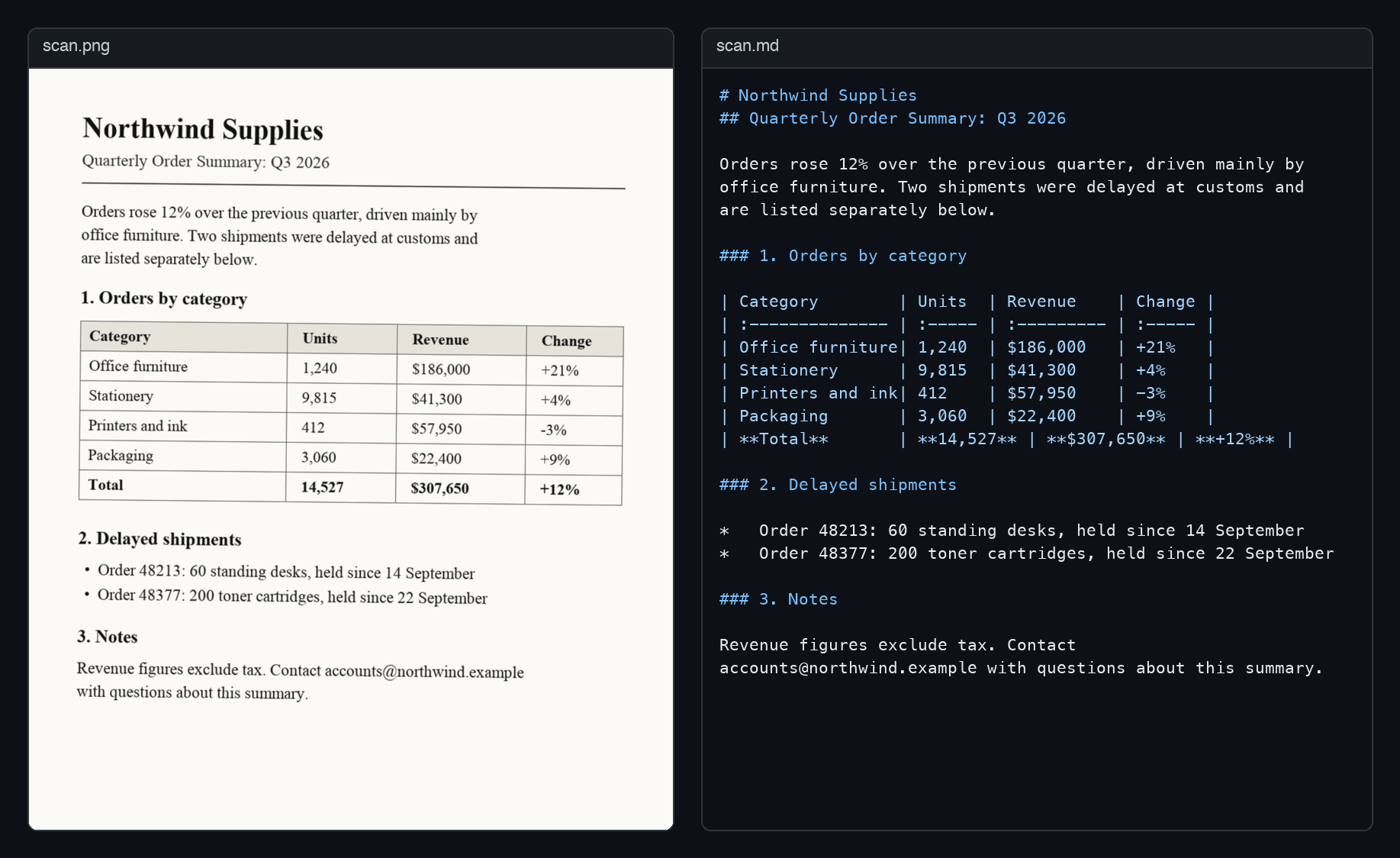
Turn PDFs and images into clean Markdown with vision LLMs:
Gemini, OpenAI, Claude, or a local model through Ollama.





pip install ocr-llm
export GEMINI_API_KEY="..."   # or OPENAI_API_KEY / ANTHROPIC_API_KEY
ocr-llm document.pdf -o document.md
Or from Python:
from llm_ocr import LLMOCR, Gemini

markdown = LLMOCR(Gemini()).convert_sync("document.pdf")
It handles multi-page PDFs concurrently, keeps pages in order, retries failed requests, and works with any OpenAI-compatible server.
Installation
pip install ocr-llm
Gemini and OpenAI work out of the box. Claude needs an extra:
pip install "ocr-llm[anthropic]"
PDF input needs poppler: brew install poppler
on macOS, sudo apt-get install poppler-utils on Debian/Ubuntu. Images work
without it.
Providers
| Provider | Class | API key | Default model |
|---|---|---|---|
| Gemini | Gemini |
GEMINI_API_KEY |
gemini-2.5-flash |
| OpenAI | OpenAI |
OPENAI_API_KEY |
gpt-4o-mini |
| Claude | Anthropic |
ANTHROPIC_API_KEY |
claude-sonnet-5-5 |
Keys are read from the environment, or passed as api_key=. Choose a model
with model=: either a constant such as Gemini.PRO_2_5 or any model name as
a string, so new models work without a library update.
from llm_ocr import Anthropic, Gemini, OpenAI

Gemini(model=Gemini.PRO_2_5)
Anthropic(model="claude-haiku-5-5")

# Ollama, vLLM, LM Studio, OpenRouter: anything that speaks the OpenAI API
OpenAI(base_url="http://localhost:11434/v1", model="llava")
Usage
convert_sync is the simplest entry point and also works in notebooks:
from llm_ocr import LLMOCR, OpenAI

ocr = LLMOCR(OpenAI())
markdown = ocr.convert_sync("document.pdf", output_path="document.md")
In async code, use convert and its siblings:
import asyncio

from llm_ocr import LLMOCR, Gemini


async def main():
    async with LLMOCR(Gemini()) as ocr:
        report = await ocr.convert("report.pdf")
        receipt = await ocr.convert("receipt.png")  # images work too

        # bytes from an upload or object store; PDF or image is detected
        with open("report.pdf", "rb") as f:
            from_bytes = await ocr.convert_bytes(f.read())


asyncio.run(main())
convert_image also accepts raw bytes or a PIL.Image.Image.
Command line
# Uses whichever of GEMINI_API_KEY / OPENAI_API_KEY / ANTHROPIC_API_KEY is set
ocr-llm document.pdf -o document.md

ocr-llm scan.png --provider anthropic --instructions "Tables only"

ocr-llm document.pdf --base-url http://localhost:11434/v1 --model llava
Without -o, the Markdown goes to stdout. ocr-llm --help lists every option.
Configuration
from llm_ocr import LLMOCR, OCRConfig, OpenAI

config = OCRConfig(
    dpi=300,
    max_concurrency=8,
    additional_instructions="Write formulas in LaTeX.",
)
ocr = LLMOCR(OpenAI(), config=config)
| Option | Default | Description |
|---|---|---|
dpi |
200 | Resolution for rendering PDF pages (72 to 600) |
max_pages |
None | Stop after this many pages |
llm_batch_size |
1 | Pages sent to the model per request |
max_concurrency |
4 | Concurrent requests; use 1 on low rate limits |
max_retries |
3 | Attempts per request |
retry_delay |
1.0 | Seconds between attempts, multiplied by the attempt |
include_page_markers |
False | Insert <!-- Page N --> between pages |
custom_prompt |
None | Replace the built-in prompt |
additional_instructions |
None | Text appended to the prompt |
convert_to_grayscale |
False | Send grayscale images |
optimize_png |
True | Smaller PNGs at the cost of slower encoding |
use_cropbox |
True | Render the PDF crop box instead of the media box |
batch_size |
5 | Pages rendered per poppler call |
thread_count |
4 | Poppler rendering threads |
Logging
Progress is reported through the standard logging module (it was print()
before 1.1.0). To see it:
import logging

logging.basicConfig(level=logging.INFO)
Project
1 maintainer

Metadata
1 maintainer
Release files for ocr-llm 1.1.0
For a detailed explanation of source distributions (sdists) and built distributions (wheels), please see the package formats documentation.
Source distribution (sdist)
| File | Size | Uploaded | |
|---|---|---|---|
| ocr_llm-1.1.0.tar.gz | 19.5 kB | Details |
Built distribution (wheel)
| File | Interpreter | ABI | Platform | Reset |
|---|---|---|---|---|
| ocr_llm-1.1.0-py3-none-any.whl | Python 3 | none | any | Details |
Total release size: 39.2 kB
Release files / ocr_llm-1.1.0.tar.gz
| Download URL | ocr_llm-1.1.0.tar.gz |
|---|---|
| Size | 19.5 kB |
| Tags | Source |
|
SHA-256 checksum How to use checksums |
75663d32934abae0440a5feadd3f1042dd7ac6621940006652a3de5f8a26e755
|
|
BLAKE2b-256 checksum How to use checksums |
bdbfe89cc2a7d60fe03fa346b9ef85aa48df5a3e74b934c09c36845dfe381147
|
| Upload date | |
|
Uploaded using Trusted Publishing? What is trusted publishing? |
No |
| Uploaded via |
twine/7.0.0 CPython/3.11.16
|
Release files / ocr_llm-1.1.0-py3-none-any.whl
| Download URL | ocr_llm-1.1.0-py3-none-any.whl |
|---|---|
| Size | 19.6 kB |
| Tags | Python 3 |
|
SHA-256 checksum How to use checksums |
71b4d640512e971d6eeaf188eb5b96bccc4961889ec98d94c69cd503199ee7f1
|
|
BLAKE2b-256 checksum How to use checksums |
ffd57ad339bb0525df9e9a16f80ec1da2a84488627698c5ecc6ea3bf410cedbf
|
| Upload date | |
|
Uploaded using Trusted Publishing? What is trusted publishing? |
No |
| Uploaded via |
twine/7.0.0 CPython/3.11.16
|














