
Add your description here

Project description

OCRAgent 厘晰




丝帛简牍数码书,千金半厘辨分殊。
何须一模破万卷,自能调度在慧枢。
OCR-first, agent-guided.
Document parsing should be tiered, routed, and reviewed. Use cheap local extraction when it is enough. Escalate only when the AI agent finds the page needs it.
- Tesseract OCR 搞不定艺术字形和生僻字符; 顶级多模态 LLM 解析出版小说轻轻松松却浪费算力时间, 所以, 你需要分级。 Tesseract OCR can't handle artistic fonts and rare characters; top-tier multimodal LLMs can easily parse published novels but waste computing power and time, so you need a tiered approach.
- 同样是多模态大模型, 模型甲更擅长手写识别, 模型乙更胜任公式识别, 所以, 你需要 Agent 帮你分配调度。 Even among multimodal large models, Model A is better at handwriting recognition, while Model B excels at formula recognition, so you need an Agent to handle allocation and scheduling.
- Agentic Loop 用于文档识别, 好处在于有校对, 即使校对选用了不带视觉功能的 LLM, 也可以从 读着是否通顺、 排版是否错位、 表格是否漂移 等方面校对。 The benefit of an Agentic Loop for document recognition is proofreading; even if the proofreading uses an LLM without vision capabilities, it can still check from angles like whether the text reads smoothly or whether the layout is misaligned.
- 你搭了 12 种 OCR 模型, 要录入 34 份不同品种的档案? 交给 Agent 吧, OCRAgent 帮你搞定。 You've collected 12 OCR APIs and want to digitize 34 different varieties of documents? Leave it to the AI Agent, OCRAgent will handle it for you.
English
English | 简体中文
Why OCRAgent
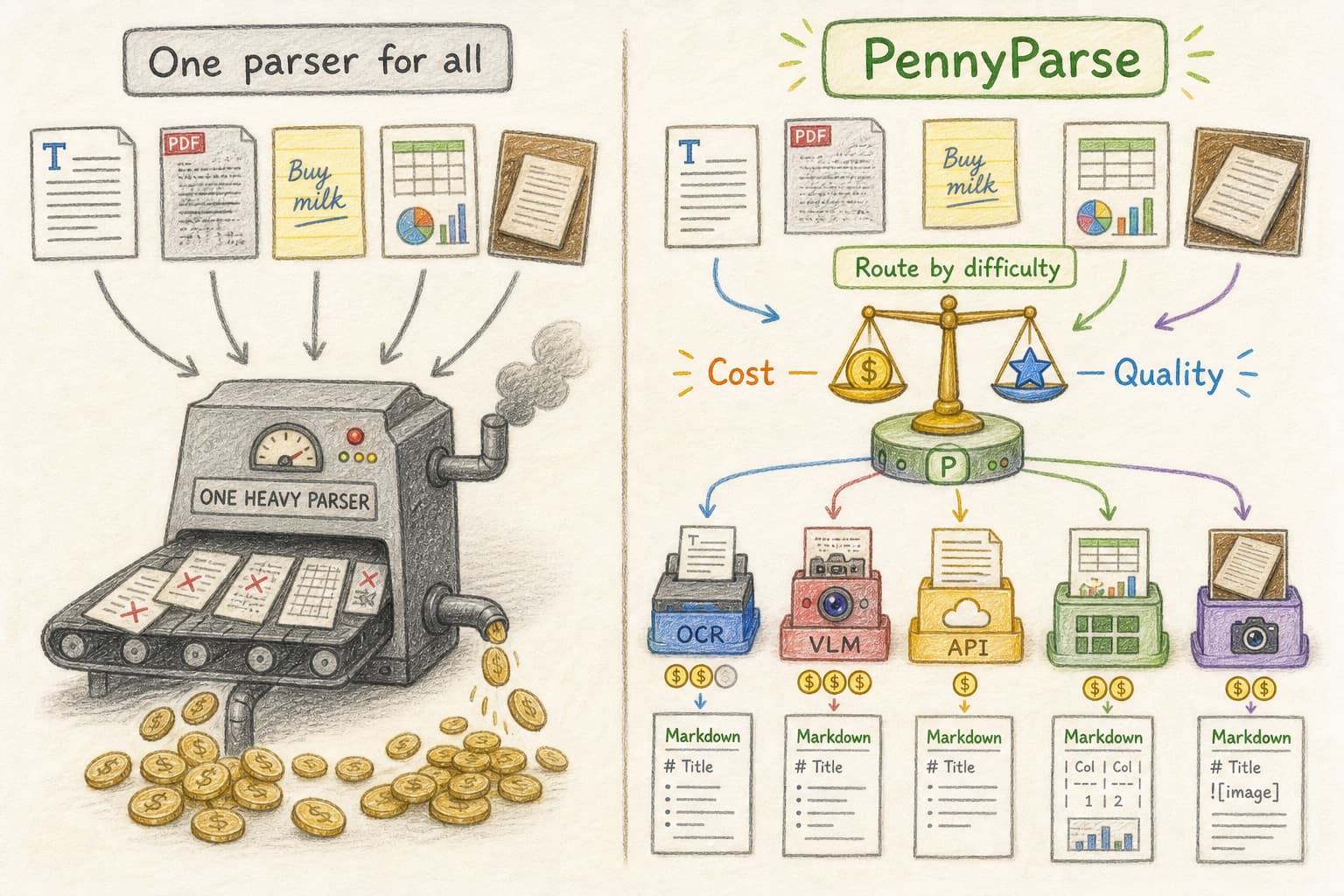
Instead of "yet another doc parser", OCRAgent is an Agentic Workflow that orchestrates multiple parsing tools for graded document parsing and judgment-based resource allocation.
A cheap parser gets the first try when the document looks easy. Costlier OCR, VLMs, and cloud APIs enter when the content needs them.
OCRAgent gives its agent enough context to assign work by page character instead of treating every model as interchangeable.
First Run
Install OCRAgent from PyPI with the common document backends:
python -m pip install "ocragent[full]"
ocragent --help
Prefer uv?
uv tool install "ocragent[full]"
ocragent --help
For LLM-backed commands, configure an OpenAI-compatible chat-completions endpoint:
export OCRAGENT_CHAT_BASE=http://localhost:8080/v1
export OCRAGENT_CHAT_MODEL=your-model
export OCRAGENT_CHAT_AUTHKEY=your-key
OPENAI_API_KEY is also accepted as the auth key. The same values can live in ~/.ocragent/ocragent.settings.toml, ./ocragent.settings.toml, or .env. Use src/ocragent/ocragent.settings.default.toml as the configuration reference.
List builtin tools:
ocragent tool --list
If you want OCRAgent to call your own OCR, VLM, shell command, or API, describe it in plain text first:
$HOME/ocragent.toolbox_user.txt
The toolbox description format can follow src/ocragent/ocragent.toolbox_user.example.txt. Tool descriptions can be copied from the vendor's official docs, trimmed to name, scope, cost, flags, limits, and call shape. Put secrets such as API keys in environment variables, then name those variables in the toolbox prose.
Then generate the tool runtime:
ocragent init tools
OCRAgent writes executable Python to $HOME/.ocragent/user_toolbox.py. Review that file before using it with real credentials.
Then parse a folder:
cd /path/to/documents
ocragent init docs
ocragent run --out-dir ocragent_results
CLI Example
$ ocragent tool --list --scope=parser
pdf2txt	scope: parser cost: low	Extract PDF text with PyMuPDF.
	--path /path/to/file.pdf

pdf_pages_to_images	scope: parser cost: medium	Render each PDF page to a PNG image with PyMuPDF.
	--path /path/to/file.pdf
	--out-dir /path/to/page-images

pandoc2txt	scope: parser cost: low	Convert office documents to plain text with Pandoc.
	--path /path/to/file

$ cd ~/cases/mixed_docs
$ ocragent init tools --from ./ocragent.toolbox_user.txt
{
  "ok": true,
  "usertools_valid": [
    "siliconflow_deepseekocr"
  ],
  "usertools_failed": [],
  "agent_turns": 1,
  "result_file": "/home/me/.ocragent/user_toolbox.py"
}

$ ocragent init docs
{
  "ok": true,
  "result_file": "/home/me/cases/mixed_docs/.ocragent_memory.txt",
  "groups": [
    {
      "name": "pdf_text",
      "...": "..."
    }
  ],
  "file_count": 18,
  "unmatched_count": 0
}

$ ocragent run invoice.pdf scans/ --out-dir ocragent_results
{
  "ok": true,
  "out_dir": "/home/me/cases/mixed_docs/ocragent_results",
  "parsed_count": 18,
  "failed_count": 0,
  "skipped_count": 0,
  "results": [
    {
      "source": "invoice.pdf",
      "output_file": "/home/me/cases/mixed_docs/ocragent_results/invoice.pdf.txt",
      "...": "..."
    }
  ],
  "failures": [],
  "skipped": [],
  "output_stats": {
    "file_count": 18,
    "...": "..."
  }
}
The JSON examples above keep the real field names and shorten long arrays with "...".
What You Get
OCRAgent preserves relative paths in the output directory:
docs/report.pdf -> ocragent_results/docs/report.pdf.txt
scans/page-01.jpg -> ocragent_results/scans/page-01.jpg.md
It also maintains a folder memory file:
.ocragent_memory.txt
That memory is plain prose. It helps later parser runs choose a sensible starting cost without forcing the project into a rigid database schema.
Architecture
CLI  (ocragent init / run / tool)
 │
AI Agents  (init_tools / parser / reviewer)
 │
Tool chain  (builtin tools + user_toolbox.py)
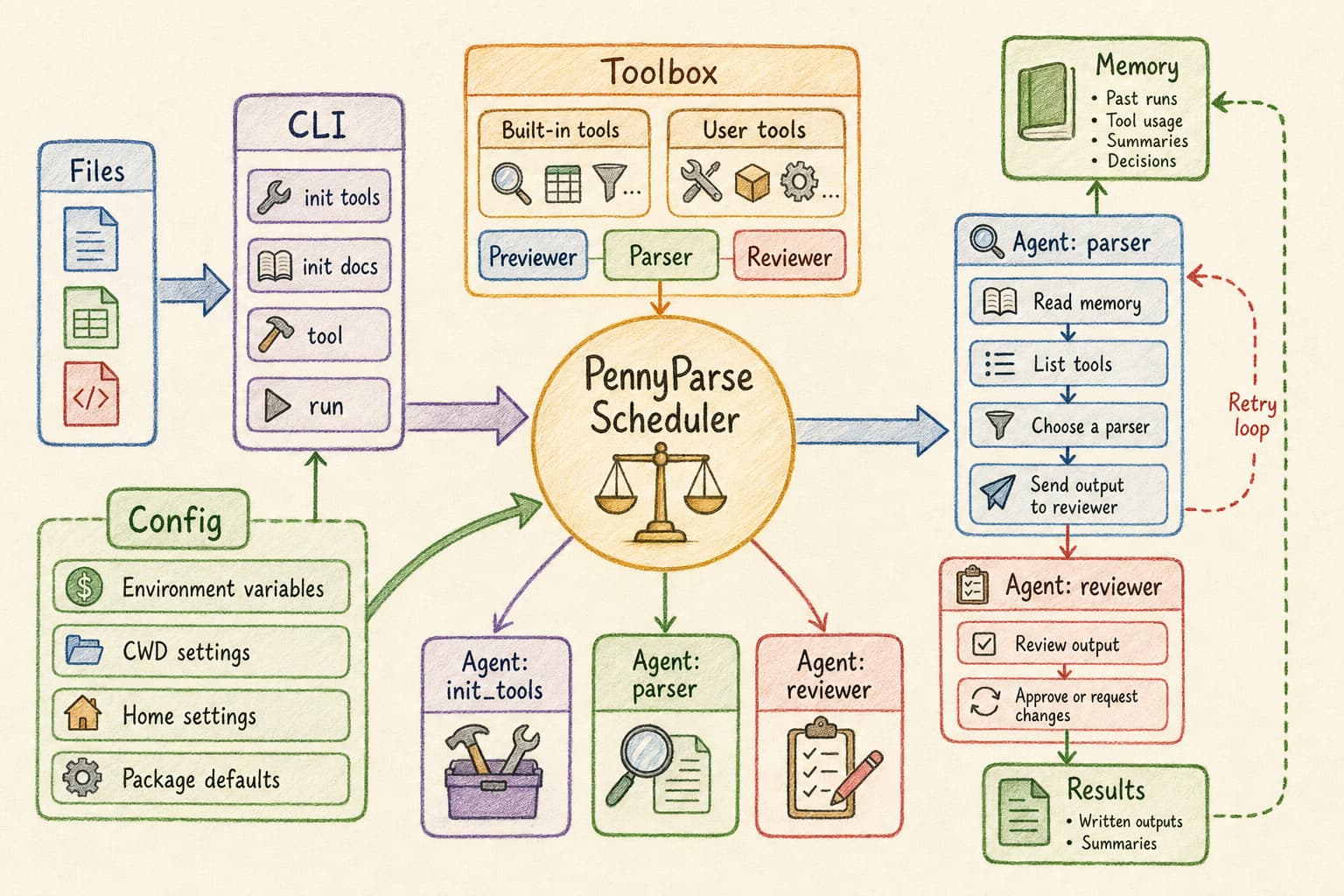
OCRAgent has three working planes:
| Plane | Owns | Examples |
|---|---|---|
| CLI and commands | Stable behavior | config, paths, logging, stdout and stderr contracts |
| Tool plane | Extraction capability | PDF text, image thumbnails, Pandoc, user OCR, VLM APIs |
| Agent plane | Judgment under uncertainty | grouping files, choosing tools, reviewing extracted text |
The parser never calls vendors directly. It asks the tool registry what is available, runs a parser through the same boundary as the CLI, and sends candidate text to review before writing output. When the review fails, the agent can retry with another tool or a higher-cost route, guided by folder memory and the last failure.
Configuration
Configuration priority:
- Environment variables.
./ocragent.settings.toml.~/.ocragent/ocragent.settings.toml.- Package defaults.
Common settings:
[aigc.api.chatcomp]
base = "http://localhost:8080/v1"
authkey = ""
model = ""
model_hasVision = true

[output]
dir = "ocragent_results"
ext = "auto"
parser_summary_batch = 5

[reviewer]
max_length = 1000
The complete default shape is in src/ocragent/ocragent.settings.default.toml.
Contributing
OCRAgent is beta, which makes it a good time to shape the core. Useful contributions are small and concrete:
- Add or improve builtin parser tools.
- Add demo assets that represent real document pain.
- Improve reviewer prompts and failure cases.
- Strengthen tests around CLI behavior, tool discovery, and generated user tools.
- Write adapters for common OCR, VLM, and document conversion backends.
- Improve docs for a workflow you actually tried.
Start with:
uv run python -m unittest discover -s tests
uv run --extra pdf python -m unittest discover -s tests
Useful code paths:
src/ocragent/cli.py: command boundary.src/ocragent/cmd/: command implementations.src/ocragent/cmd/tool.py: builtin and user tool contract.src/ocragent/agent/: model-facing loops.src/ocragent/config.py: layered settings.tests/: current test suite and CLI flow checks.
Documentation
Status
OCRAgent is beta. The command shape is usable, and breaking changes are still possible. The project is looking for contributors who care about document extraction, local-first tooling, and agent workflows with clear boundaries.
简体中文
English | 简体中文
为什么是 OCRAgent
并非 "Yet Another 图文识别工具",OCRAgent 是用来统筹调度多种图文识别工具的 Agentic Workflow。 把一窝鸡飞狗跳的文档,整理成干净的纯文本。
容易的页,先请便宜的工具去读;读不动了,再请更贵的OCR、VLM或云端API。算力如灯油,明处不必添灯,暗处才该多照一照。
Agent先品尝解析工具和文档的调性,再分派任务。 带上 Agent 的解析不再是一锤子买卖,而是有校对,有打回重做,有请大师傅出山。
快速开始
从 PyPI 安装 OCRAgent,并带上常用文档后端:
python -m pip install "ocragent[full]"
ocragent --help
偏好 uv?
uv tool install "ocragent[full]"
ocragent --help
需要 LLM 支持的命令时,配置兼容 OpenAI chat-completions 的端点:
export OCRAGENT_CHAT_BASE=http://localhost:8080/v1
export OCRAGENT_CHAT_MODEL=your-model
export OCRAGENT_CHAT_AUTHKEY=your-key
也可以使用 OPENAI_API_KEY。同样的配置可以写入 ~/.ocragent/ocragent.settings.toml、./ocragent.settings.toml 或 .env。配置格式可参考 src/ocragent/ocragent.settings.default.toml。
查看内建工具:
ocragent tool --list
如果要让 OCRAgent 调用你自己的 OCR、VLM、命令行工具或 API,先用普通文本描述它:
$HOME/ocragent.toolbox_user.txt
用户工具箱的写法可参考 src/ocragent/ocragent.toolbox_user.example.txt。各工具说明可以从对应官方文档摘取,再保留工具名、用途范围、成本、参数、限制和调用方式。API key 等机要内容放进环境变量,在工具箱说明中写环境变量名即可。
然后生成工具运行时:
ocragent init tools
OCRAgent 会启用 AI Agent 把 ocragent.toolbox_user.txt 转换成的可执行脚本写入 $HOME/.ocragent/user_toolbox.py。真实使用前,请先审阅这份文件。
然后解析一个目录:
cd /path/to/documents
ocragent init docs
ocragent run --out-dir ocragent_results
CLI 运行示例
$ ocragent tool --list --scope=parser
pdf2txt	scope: parser cost: low	Extract PDF text with PyMuPDF.
	--path /path/to/file.pdf

pdf_pages_to_images	scope: parser cost: medium	Render each PDF page to a PNG image with PyMuPDF.
	--path /path/to/file.pdf
	--out-dir /path/to/page-images

pandoc2txt	scope: parser cost: low	Convert office documents to plain text with Pandoc.
	--path /path/to/file

$ cd ~/cases/mixed_docs
$ ocragent init tools --from ./ocragent.toolbox_user.txt
{
  "ok": true,
  "usertools_valid": [
    "siliconflow_deepseekocr"
  ],
  "usertools_failed": [],
  "agent_turns": 1,
  "result_file": "/home/me/.ocragent/user_toolbox.py"
}

$ ocragent init docs
{
  "ok": true,
  "result_file": "/home/me/cases/mixed_docs/.ocragent_memory.txt",
  "groups": [
    {
      "name": "pdf_text",
      "...": "..."
    }
  ],
  "file_count": 18,
  "unmatched_count": 0
}

$ ocragent run invoice.pdf scans/ --out-dir ocragent_results
{
  "ok": true,
  "out_dir": "/home/me/cases/mixed_docs/ocragent_results",
  "parsed_count": 18,
  "failed_count": 0,
  "skipped_count": 0,
  "results": [
    {
      "source": "invoice.pdf",
      "output_file": "/home/me/cases/mixed_docs/ocragent_results/invoice.pdf.txt",
      "...": "..."
    }
  ],
  "failures": [],
  "skipped": [],
  "output_stats": {
    "file_count": 18,
    "...": "..."
  }
}
上面的 JSON 保留真实字段名,较长的数组用 "..." 缩短展示。
产出结果
OCRAgent 会在输出目录中保留相对路径:
docs/report.pdf -> ocragent_results/docs/report.pdf.txt
scans/page-01.jpg -> ocragent_results/scans/page-01.jpg.md
它还会维护一份目录记忆:
.ocragent_memory.txt
这份记忆是普通自然语言文本。后续解析会参考它选择合适的起始成本,但项目不会因此被锁进僵硬的数据表结构。
三层架构概览
命令行  (ocragent init / run / tool)
 │
AI Agents 智能体  (init_tools / parser / reviewer)
 │
工具链  (builtin tools + user_toolbox.py)
| 层次 | 负责 | 例子 |
|---|---|---|
| CLI 与命令 | 稳定行为 | 配置、路径、日志、stdout 和 stderr 边界 |
| 工具层 | 解析能力 | PDF 文本、图像缩略图、Pandoc、用户 OCR、VLM API |
| Agent 层 | 不确定场景下的判断 | 文件分组、工具选择、抽取结果审阅 |
解析 Agent 先问工具注册表:"咱们工具箱里都有啥?" 再选取工具执行。解析得到的候选文本,须经审阅才写入输出目录。审阅不过的,Agent 自会另择工具。
配置
配置优先级从高到低:
- 环境变量。
./ocragent.settings.toml。~/.ocragent/ocragent.settings.toml。- 包内默认配置。
常用配置:
[aigc.api.chatcomp]
base = "http://localhost:8080/v1"
authkey = ""
model = ""
model_hasVision = true

[output]
dir = "ocragent_results"
ext = "auto"
parser_summary_batch = 5

[reviewer]
max_length = 1000
完整默认配置见 src/ocragent/ocragent.settings.default.toml。
参与贡献
OCRAgent 处于 beta 阶段,现在很适合参与塑造。适合下手的贡献包括:
- 增加或改进内建解析工具。
- 增加能代表真实文档难题的 demo assets。
- 改进 reviewer prompt 和失败案例。
- 加强 CLI 行为、工具发现、用户工具生成相关测试。
- 为常见 OCR、VLM、文档转换后端编写适配器。
- 把你实际跑通过的流程写进文档。
开始前可先运行:
uv run python -m unittest discover -s tests
uv run --extra pdf python -m unittest discover -s tests
常用代码入口:
src/ocragent/cli.py:命令行入口。src/ocragent/cmd/:命令实现。src/ocragent/cmd/tool.py:内建和用户工具接口约定。src/ocragent/agent/:面向模型的循环。src/ocragent/config.py:分层配置。tests/:当前测试套件和 CLI 流程检查。
文档
项目状态
OCRAgent 处于 beta 阶段。命令形态已经可用,后续仍可能有破坏性变更。若你也关心文档解析、本地优先工具、边界清楚的 Agentic 工作流,此时加入,正好赶上。
Release history Release notifications | RSS feed


Download files
Download the file for your platform. If you're not sure which to choose, learn more about installing packages.
Source Distribution
Built Distribution
Filter files by name, interpreter, ABI, and platform.
If you're not sure about the file name format, learn more about wheel file names.
Copy a direct link to the current filters
File details
Details for the file ocragent-0.1.1.tar.gz.
File metadata
- Download URL: ocragent-0.1.1.tar.gz
- Upload date:
- Size: 48.1 kB
- Tags: Source
- Uploaded using Trusted Publishing? No
- Uploaded via: uv/0.11.15 {"installer":{"name":"uv","version":"0.11.15","subcommand":["publish"]},"python":null,"implementation":{"name":null,"version":null},"distro":{"name":"Ubuntu","version":"24.04","id":"noble","libc":null},"system":{"name":null,"release":null},"cpu":null,"openssl_version":null,"setuptools_version":null,"rustc_version":null,"ci":true}
File hashes
| Algorithm | Hash digest | |
|---|---|---|
| SHA256 |
a0f3d3783d7fae2a6c884494fad7d134fa5d2851538ef581686b579f500d1298
|
|
| MD5 |
766b629f7bf931c5bbe30b41cd53eb7f
|
|
| BLAKE2b-256 |
e0effd25d6d2ab4968f92d4f5d699498ad7cf0951edc8c8335c651d8d5400918
|
File details
Details for the file ocragent-0.1.1-py3-none-any.whl.
File metadata
- Download URL: ocragent-0.1.1-py3-none-any.whl
- Upload date:
- Size: 57.4 kB
- Tags: Python 3
- Uploaded using Trusted Publishing? No
- Uploaded via: uv/0.11.15 {"installer":{"name":"uv","version":"0.11.15","subcommand":["publish"]},"python":null,"implementation":{"name":null,"version":null},"distro":{"name":"Ubuntu","version":"24.04","id":"noble","libc":null},"system":{"name":null,"release":null},"cpu":null,"openssl_version":null,"setuptools_version":null,"rustc_version":null,"ci":true}
File hashes
| Algorithm | Hash digest | |
|---|---|---|
| SHA256 |
f2c79c03e2a40930a4a67620957e236f93e3e3664920c390e0bf5f08c3bb8755
|
|
| MD5 |
dc7c4c56c7465ecd3bf376586bd57754
|
|
| BLAKE2b-256 |
2bf588c034719a5e871a8109b144ed5ce0a2566d4915df11d89a44c2a290275e
|






