
OCR Context
Turn any PDF or image into clean text — or a typed Pydantic model — in three lines.
Decoupled, LLM-agnostic document OCR + structured extraction. No web server, no vendor lock-in.




Try it in 30 seconds — no Python script needed:
pip install 'ocrcontext[paddle,cli]'
ocrcontext extract invoice.pdf
ocrcontext extract receipt.jpg --output json
Or use the Python API:
from ocrcontext import Analyzer

result = Analyzer().analyze("invoice.pdf")
print(result.text)
ocrcontext is the extraction core of a production document-analysis platform, lifted out of its FastAPI/Next.js stack into a pure, pip-installable library. It handles OCR engine routing, fidelity-first LLM cleanup, and schema-based structured extraction — and gets out of your way.
Demo
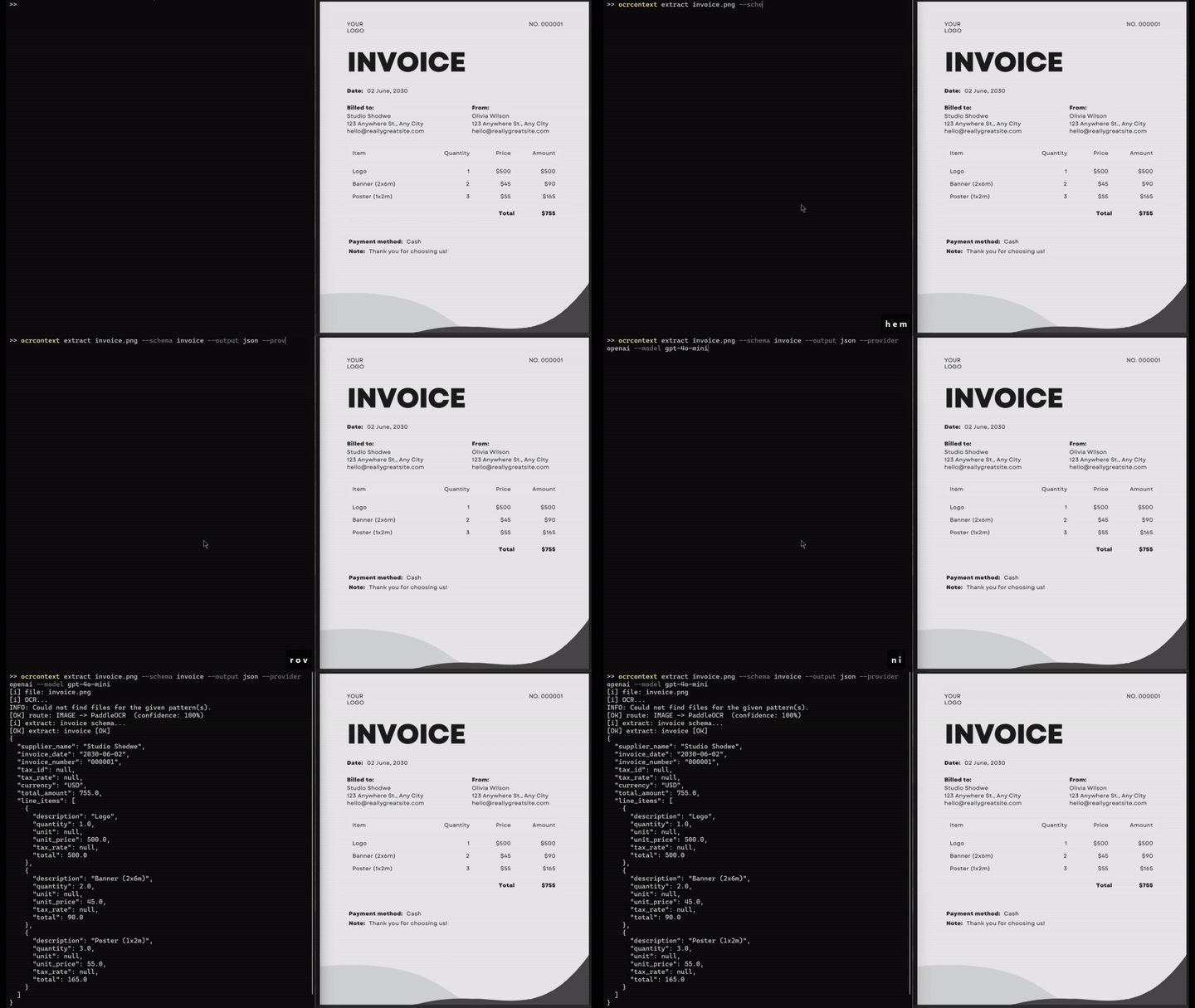
Structured invoice extraction from an image:
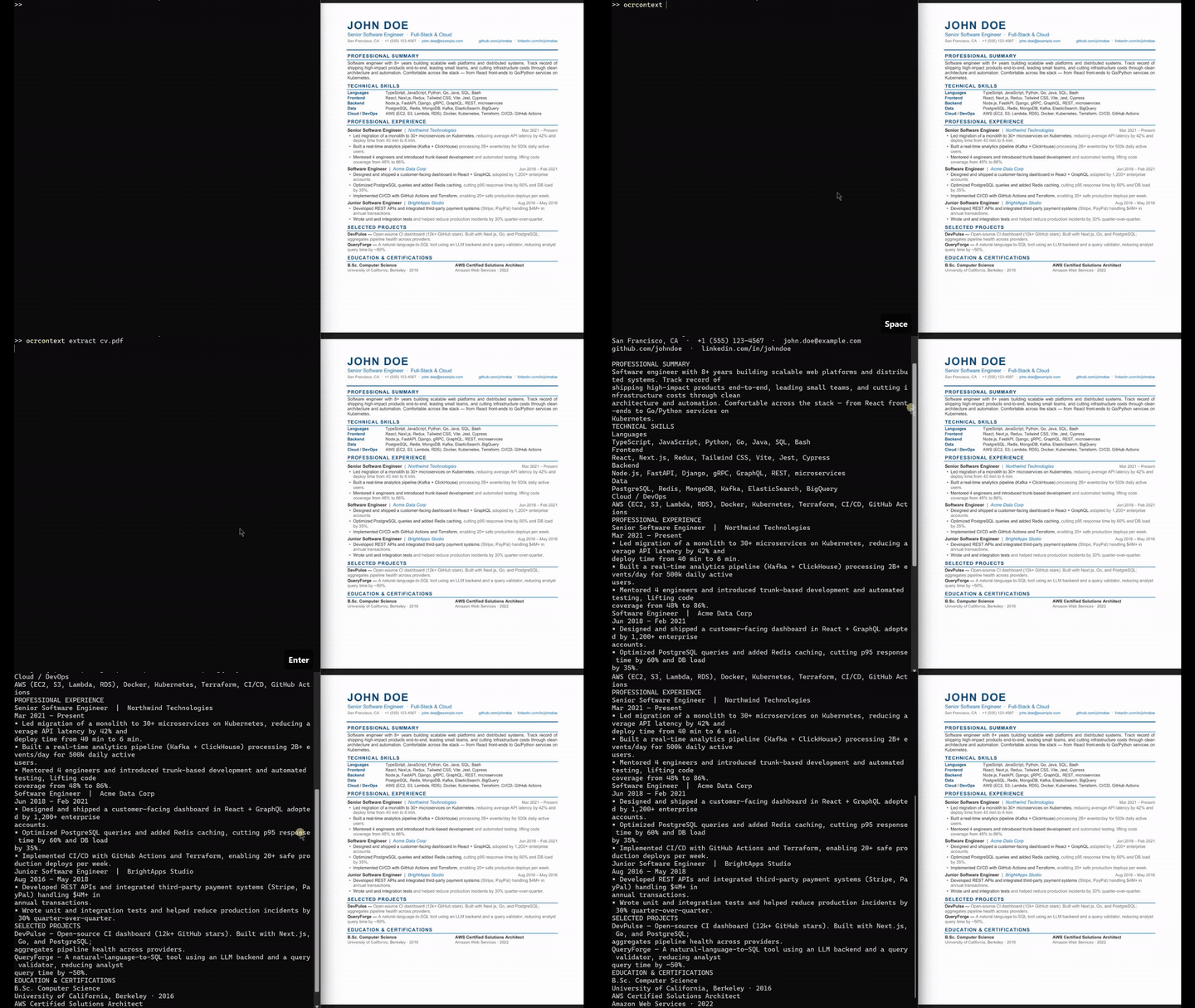
Digital PDF text extraction:
Contents
- Demo
- Install
- CLI
- Quick start (Python API)
- LangChain integration
- Built-in schemas
- How it routes a document
- Refinement modes
- Configuration
- Development
- License
Install
Engines are opt-in so your base install stays small:
| Command | What you get |
|---|---|
pip install ocrcontext |
Digital PDFs only (PyMuPDF text-layer — no OCR, no GPU, no API key) |
pip install 'ocrcontext[paddle]' |
+ printed images & scanned PDFs (PaddleOCR, CPU/GPU) |
pip install 'ocrcontext[vision]' |
+ handwriting (Google Cloud Vision) |
pip install 'ocrcontext[cli]' |
+ terminal CLI (ocrcontext extract) |
pip install 'ocrcontext[all]' |
everything above |
Add an LLM provider for refinement and structured extraction:
pip install langchain-openai # or langchain-anthropic, langchain-ollama, ...
Images and scanned PDFs require
[paddle]. Passing an image file to a barepip install ocrcontextraises anEngineErrorwith a clear install hint.
Google Cloud Vision ([vision])
- Enable the Cloud Vision API in Google Cloud Console
- Create a service account key (JSON) under IAM & Admin → Service Accounts → Keys
- Export the path:
export GOOGLE_APPLICATION_CREDENTIALS="/path/to/key.json"   # Linux/macOS
$env:GOOGLE_APPLICATION_CREDENTIALS = "C:\path\to\key.json" # PowerShell
CLI
Install the [cli] extra to use ocrcontext straight from the terminal — no Python script needed.
pip install 'ocrcontext[paddle,cli]'
Extract plain text:
ocrcontext extract invoice.pdf
ocrcontext extract scan.png --output json
Extract structured data with a built-in schema:
ocrcontext extract invoice.pdf    --schema invoice
ocrcontext extract receipt.jpg    --schema receipt
ocrcontext extract contract.pdf   --schema contract
ocrcontext extract passport.jpg   --schema idcard
ocrcontext extract lab_report.pdf --schema medical
Choose your LLM provider:
ocrcontext extract invoice.pdf --schema invoice \
  --provider openai --model gpt-4o-mini

ocrcontext extract invoice.pdf --schema invoice \
  --provider anthropic --model claude-haiku-4-5-20251001

ocrcontext extract invoice.pdf --schema invoice \
  --provider ollama --model llama3.1
All options:
ocrcontext extract FILE [OPTIONS]

  --schema    -s   invoice | receipt | contract | idcard | medical
  --lang      -l   Language code (default: en)
  --handwriting    Force handwriting engine
  --refine         auto (default) | yes | no
  --output    -o   text (default) | json
  --provider  -p   openai | anthropic | ollama | google
  --model     -m   Model name (default: gpt-4o-mini)
Quick start (Python API)
Digital PDF
from ocrcontext import Analyzer

result = Analyzer().analyze("document.pdf")
print(result.text)          # extracted text
print(result.pages)         # page count
print(result.text_source)   # "pdf_text_layer"
Image / scanned PDF
pip install 'ocrcontext[paddle]'
from ocrcontext import Analyzer

result = Analyzer().analyze("scan.png")
print(result.text, result.confidence)
GPU acceleration
If you have a CUDA-capable GPU, swap the CPU PaddlePaddle build for the GPU one and pass use_gpu=True:
pip install 'ocrcontext[paddle]'
pip install paddlepaddle-gpu   # replaces the CPU build; pick the wheel that matches your CUDA version
from ocrcontext import Analyzer

analyzer = Analyzer(use_gpu=True)
result = analyzer.analyze("scan.png")
print(result.text, result.confidence)
PaddleOCR is typically 5–10× faster on GPU for large documents or batch workloads. CPU (
use_gpu=False, the default) works out of the box with no extra steps.
LLM-refined OCR
Refinement fixes character-level OCR errors without paraphrasing, translating, or inventing. Emails, URLs, and IBANs are masked before the model sees them and restored verbatim after. Output that drifts too far from the source is rejected in favour of the raw OCR text.
pip install 'ocrcontext[paddle]' langchain-openai
export OPENAI_API_KEY="sk-..."
from langchain_openai import ChatOpenAI
from ocrcontext import Analyzer

analyzer = Analyzer(llm=ChatOpenAI(model="gpt-4o-mini"), lang="en")
result = analyzer.analyze("scan.jpg")

print(result.text)       # refined
print(result.raw_text)   # original OCR output
print(result.refined)    # True
Structured extraction
Hand the analyzer a Pydantic schema and get a populated instance back.
from langchain_openai import ChatOpenAI
from ocrcontext import Analyzer
from ocrcontext.schemas import Invoice

analyzer = Analyzer(llm=ChatOpenAI(model="gpt-4o-mini", temperature=0))
invoice = analyzer.extract("invoice.pdf", schema=Invoice)

print(invoice.supplier_name, invoice.total_amount, invoice.currency)
for item in invoice.line_items:
    print(item.description, item.quantity, item.unit_price)
Define your own schema — field descriptions are the prompt:
from pydantic import BaseModel, Field

class ShippingLabel(BaseModel):
    sender: str | None = Field(None, description="Sender full name and address")
    recipient: str | None = Field(None, description="Recipient full name and address")
    tracking_number: str | None = Field(None, description="Carrier tracking number")

label = analyzer.extract("label.jpg", schema=ShippingLabel)
No API key? Use a local model
from langchain_ollama import ChatOllama
from ocrcontext import Analyzer

analyzer = Analyzer(llm=ChatOllama(model="llama3.1"))
result = analyzer.analyze("scan.png")
print(result.text)
LangChain integration
OCRContextLoader is a drop-in LangChain BaseLoader. It slots into any LangChain pipeline — RAG, document Q&A, chain-of-thought — without glue code.
from ocrcontext.loaders import OCRContextLoader

# Plain OCR
loader = OCRContextLoader("contract.pdf")
docs = loader.load()  # -> [Document(page_content="...", metadata={...})]

# With LLM refinement
from langchain_openai import ChatOpenAI

loader = OCRContextLoader(
    "scan.pdf",
    llm=ChatOpenAI(model="gpt-4o-mini"),
    lang="en",
    refine="yes",
)
docs = loader.load()
print(docs[0].page_content)
print(docs[0].metadata)
# {
#   "source": "scan.pdf",
#   "text_source": "ocr",
#   "pages": 3,
#   "confidence": 0.94,
#   "refined": True,
#   "raw_text": "..."
# }
In a RAG pipeline:
from langchain_openai import ChatOpenAI, OpenAIEmbeddings
from langchain_community.vectorstores import FAISS
from langchain.text_splitter import RecursiveCharacterTextSplitter
from ocrcontext.loaders import OCRContextLoader

docs = OCRContextLoader("annual_report.pdf").load()
chunks = RecursiveCharacterTextSplitter(chunk_size=1000).split_documents(docs)
vectorstore = FAISS.from_documents(chunks, OpenAIEmbeddings())
Built-in schemas
Five ready-to-use Pydantic schemas with system prompts, importable from ocrcontext.schemas.
Pass them directly to analyzer.extract() or the CLI --schema flag.
Invoice
from ocrcontext.schemas import Invoice

invoice = analyzer.extract("invoice.pdf", schema=Invoice)
# invoice.supplier_name, .invoice_number, .invoice_date, .total_amount,
# .currency, .tax_id, .tax_rate, .line_items (list[LineItem])
Receipt
from ocrcontext.schemas import Receipt

receipt = analyzer.extract("receipt.jpg", schema=Receipt)
# receipt.store_name, .date, .time, .total_amount, .tax_amount,
# .subtotal, .payment_method, .currency, .items (list[ReceiptItem])
Contract
from ocrcontext.schemas import Contract

contract = analyzer.extract("agreement.pdf", schema=Contract)
# contract.title, .effective_date, .expiration_date, .contract_value,
# .currency, .governing_law, .key_obligations,
# .parties (list[ContractParty] with .name, .role)
IdCard
Supports national_id, passport, driver_license, residence_permit.
from ocrcontext.schemas import IdCard

card = analyzer.extract("passport.jpg", schema=IdCard)
# card.document_type, .full_name, .date_of_birth, .gender,
# .nationality, .document_number, .issue_date, .expiry_date,
# .issuing_authority, .address
MedicalReport
from ocrcontext.schemas import MedicalReport

report = analyzer.extract("lab_report.pdf", schema=MedicalReport)
# report.patient_name, .patient_dob, .report_date, .doctor_name,
# .institution, .diagnosis, .icd_codes (list[str]),
# .medications (list[Medication]), .notes
How it routes a document
              ┌─────────────┐
 document ───▶│   Analyzer  │
              └──────┬──────┘
                     ▼
      ┌──────────────────────────────────────┐
      │ 1. Digital PDF?                       │
      │    └─▶ PyMuPDF text layer             │
      │        LLM refine auto-skipped        │
      │                                       │
      │ 2. Image / scanned PDF?               │
      │    └─▶ PaddleOCR                      │
      │        (preprocess → coverage-first   │
      │         → line-band fallback)         │
      │                                       │
      │ 3. Handwriting (explicit or auto)?    │
      │    └─▶ Google Cloud Vision            │
      │        → PaddleOCR if Vision empty    │
      │                                       │
      │ 4. (optional) LLM refine              │
      │    fidelity-first · literal-safe      │
      │                                       │
      │ 5. (optional) extract(schema)         │
      │    └─▶ typed Pydantic model           │
      └──────────────────────────────────────┘
Multi-page documents are joined with --- Page N --- separators.
Handwriting step 3 is explicit-only by default; set auto_handwriting_fallback=True to enable automatic retry.
Refinement modes
| Mode | When it's used |
|---|---|
conservative |
Scanned images — minimal char-level correction only |
layout |
Digital PDFs — reconstruct clean structure |
handwriting_layout |
Handwritten notes / lists / diagrams |
handwriting_prose |
Handwritten poems / paragraphs / letters |
Modes are auto-selected based on the document type and text content. The handwriting mode choice is driven by whether the text looks like a DIKW/pyramid diagram. All prompts are ported verbatim from the production pipeline.
Override manually:
from ocrcontext import Analyzer, RefinementMode

result = analyzer.analyze("scan.png", mode=RefinementMode.CONSERVATIVE)
Configuration
from ocrcontext import Analyzer, AnalyzerConfig

cfg = AnalyzerConfig(
    lang="tr",                        # default document language
    prefer_pdf_text_layer=True,       # skip OCR when a text layer exists
    auto_handwriting_fallback=False,  # keep PaddleOCR as sole engine (default); set True to enable Vision fallback
    refine_by_default=True,           # auto-refine whenever an LLM is configured
)
analyzer = Analyzer(llm=..., config=cfg, use_gpu=False)  # set use_gpu=True for CUDA-capable devices
Development
git clone https://github.com/BahadirKarsli/OCRContext
cd OCRContext
pip install -e '.[dev]'
pytest            # runs without GPU or network — engines and LLM are faked
ruff check .
See examples/ for runnable smoke tests (image OCR, structured extraction, PDF routing).
License
MIT © Bahadır Karslı
1 maintainer

Metadata
1 maintainer
Release files for ocrcontext 0.1.5
For a detailed explanation of source distributions (sdists) and built distributions (wheels), please see the package formats documentation.
Source distribution (sdist)
| File | Size | Uploaded | |
|---|---|---|---|
| ocrcontext-0.1.5.tar.gz | 60.3 kB | Details |
Built distribution (wheel)
| File | Interpreter | ABI | Platform | Reset |
|---|---|---|---|---|
| ocrcontext-0.1.5-py3-none-any.whl | Python 3 | none | any | Details |
Total release size: 119.1 kB
Release files / ocrcontext-0.1.5.tar.gz
| Download URL | ocrcontext-0.1.5.tar.gz |
|---|---|
| Size | 60.3 kB |
| Tags | Source |
|
SHA-256 checksum How to use checksums |
40c46f4e1f21cae31f1eb8bb378b2f7309e186a87f065736680e2f467442a3e2
|
|
BLAKE2b-256 checksum How to use checksums |
9a32fb467ad5b0488568d2cac468c68957914e5f1666b966337a3257bb68fe7a
|
| Upload date | |
|
Uploaded using Trusted Publishing? What is trusted publishing? |
No |
| Uploaded via |
twine/6.2.0 CPython/3.13.12
|
Release files / ocrcontext-0.1.5-py3-none-any.whl
| Download URL | ocrcontext-0.1.5-py3-none-any.whl |
|---|---|
| Size | 58.8 kB |
| Tags | Python 3 |
|
SHA-256 checksum How to use checksums |
ef9a4ca785c181f953ed5f183fe04fab2ea66d0cb3fb710ad3f22afd375929ff
|
|
BLAKE2b-256 checksum How to use checksums |
471121393e7d8478d85167278eddceda97c065fa6b7bec1e458efa9f495b2372
|
| Upload date | |
|
Uploaded using Trusted Publishing? What is trusted publishing? |
No |
| Uploaded via |
twine/6.2.0 CPython/3.13.12
|














