
Tool for translating text from the screen and some more

Project description




EN | RU
Advanced Screen Assistant. OCRHelper is able to translate text from the selected area. It is also possible to search for the meaning of a word using ChatGPT, as well as simply copy it to the clipboard.
Main features
- High text recognition precision OCR Helper for text recognition uses EasyOCR, which handles most of the daily text reading requirements.
- Simple interface The main idea was to make tool, that does not require manual adjustments for each case and convenient for everyday use.
- Available translators: Google Translate, ChatGPT, ChatGPT with streaming display
- Available recognition and translation languages: English, Russian, Japanese
- Dictionary: mode for finding the meaning of a word using ChatGPT
- Recognition: mode for only text recognition, can be used with the option to copy text to the clipboard
System requirements
- Windows 10 build 19041 (20H1) / Windows 11
- DirectX11
- 1 GB free RAM
- 5 GB free storage space/ 1 GB for without_cuda version
- Nvidia GPU with CUDA SDK 11.8 support (GTX 750, 8xxM, 9xx series or later) (for mode using CUDA)
How to use
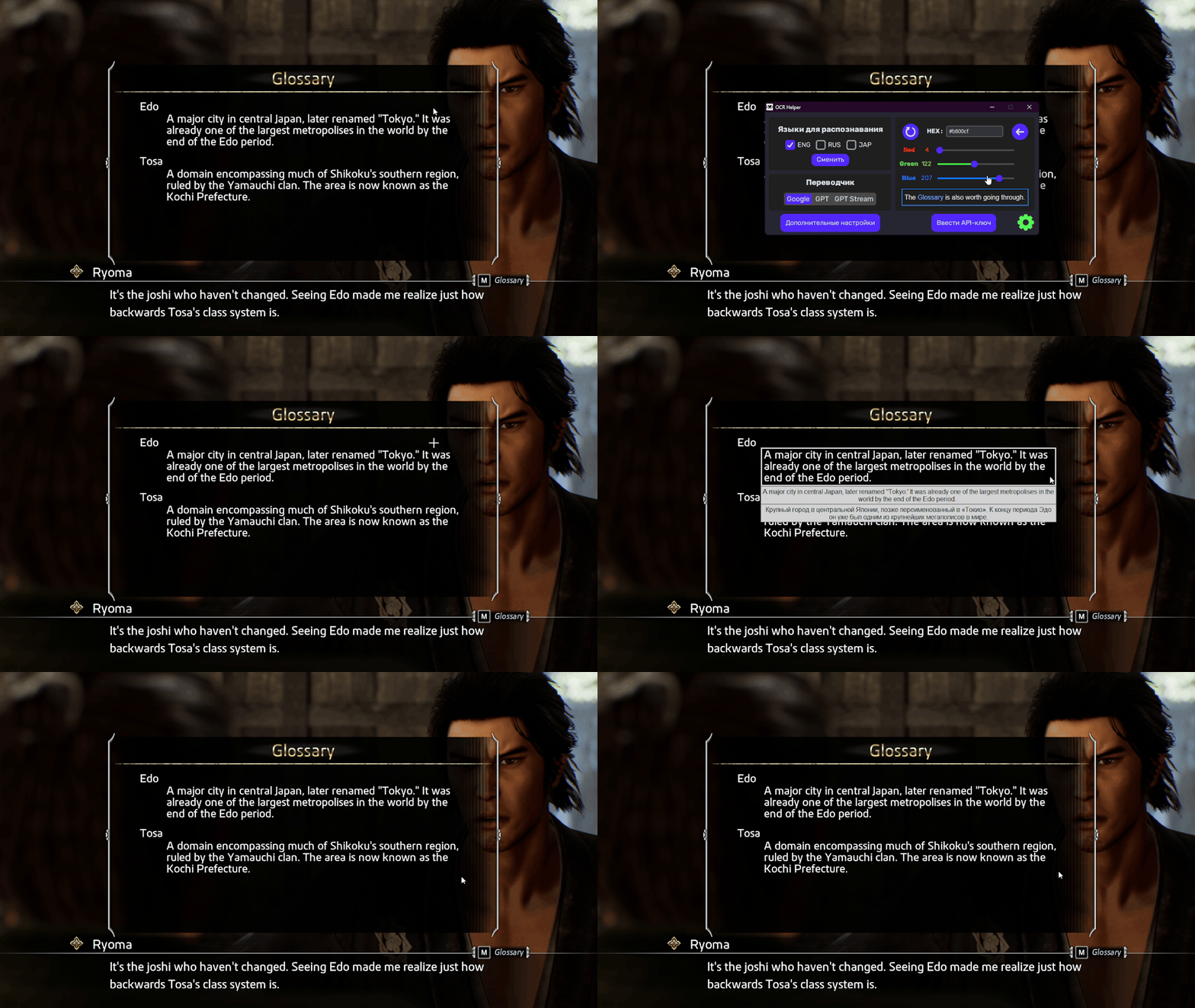
- Choose the version that suits you: the regular version weighs more and takes more time to start, but reads text faster, the without_cuda version is the opposite (you can download any of them here)
- Launch the application (The first launch will take much longer than the subsequent ones)
- Open the menu using CTRL + ALT + X or via the tray
- Open the settings
- Select the necessary languages for recognition (the fewer selected, the more accurate the recognition)
- Select a translator (you will need to enter an API-key to use GPT)
- (Optional) Change the color of the area selection in the palette
- Press CTRL + SHIFT + X to select an area and then translate
- Wait for the translation result
Usage Tips
Should install a non-standard font
This should be done to better display the application window
To do this, go to "ocrhelper/additional files", run "Rubik.ttf", click "install"
Use Borderless/Windowed modes in games (not Fullscreen)
It is necessary to display the translation window overlay correctly.
If the game doesn't have such mode, you can use external tools to make it borderless (e.g. Borderless Gaming)
Install the application on SSD
To reduce cold launch time with enabled EasyOCR engine (loading large EasyOCR model into RAM).
Error
If an error occurs while running the application, please create a new issue in the Issues tab. I will try to respond to the problem as soon as I see it.
TODO
- Move app on PyQT
- Add gamepad support for selecting area
For dev
- Clone repository
git clone https://github.com/ReYaNOW/OCRHelper.git
make install
or
make install_without_cuda
Dependencies
- Python 3.11+
- Poetry
- Python libraries
Release history Release notifications | RSS feed

Download files
Download the file for your platform. If you're not sure which to choose, learn more about installing packages.
Source Distribution
Built Distribution
Filter files by name, interpreter, ABI, and platform.
If you're not sure about the file name format, learn more about wheel file names.
Copy a direct link to the current filters
File details
Details for the file ocrhelper-1.2.1.tar.gz.
File metadata
- Download URL: ocrhelper-1.2.1.tar.gz
- Upload date:
- Size: 21.1 kB
- Tags: Source
- Uploaded using Trusted Publishing? No
- Uploaded via: poetry/1.7.1 CPython/3.11.4 Windows/10
File hashes
| Algorithm | Hash digest | |
|---|---|---|
| SHA256 |
460f31f5a2700a4a89b6f706210311d9a324a112ff30ce907ecdf805a17323d5
|
|
| MD5 |
f0ad25d1a26771ed10d331f2b62a4eb8
|
|
| BLAKE2b-256 |
92089d72d7f39ec0f7631c3f2d24034b0aa3843e06f19712bf61bcf201b95ae4
|
File details
Details for the file ocrhelper-1.2.1-py3-none-any.whl.
File metadata
- Download URL: ocrhelper-1.2.1-py3-none-any.whl
- Upload date:
- Size: 29.6 kB
- Tags: Python 3
- Uploaded using Trusted Publishing? No
- Uploaded via: poetry/1.7.1 CPython/3.11.4 Windows/10
File hashes
| Algorithm | Hash digest | |
|---|---|---|
| SHA256 |
8b1199a77fb39e50ace767a3913f8ad0f275bc73c8ab872489dc3f04388a1905
|
|
| MD5 |
6c9351baf37ec536de94ff7fdae084bb
|
|
| BLAKE2b-256 |
2a895443bcb9166db36ec50291c31d267eed08151c93837d0bfefe86410df570
|






