
A python wrapper to extract text from images on a mac system. Uses the vision framework from Apple.

Project description

ocrmac
A small Python wrapper to extract text from images on a Mac system. Uses the vision framework from Apple. Simply pass a path to an image or a PIL image directly and get lists of texts, their confidence, and bounding box.
This only works on macOS systems with newer macOS versions (10.15+).
Example and Quickstart
Install via pip:
pip install ocrmac
Basic Usage
    from ocrmac import ocrmac
    annotations = ocrmac.OCR('test.png').recognize()
    print(annotations)
Output (Text, Confidence, BoundingBox):
[("GitHub: Let's build from here - X", 0.5, [0.16, 0.91, 0.17, 0.01]),
('github.com', 0.5, [0.174, 0.87, 0.06, 0.01]),
('Qi &0 O M #O', 0.30, [0.65, 0.87, 0.23, 0.02]),
[...]
('P&G U TELUS', 0.5, [0.64, 0.16, 0.22, 0.03])]
(BoundingBox precision capped for readability reasons)
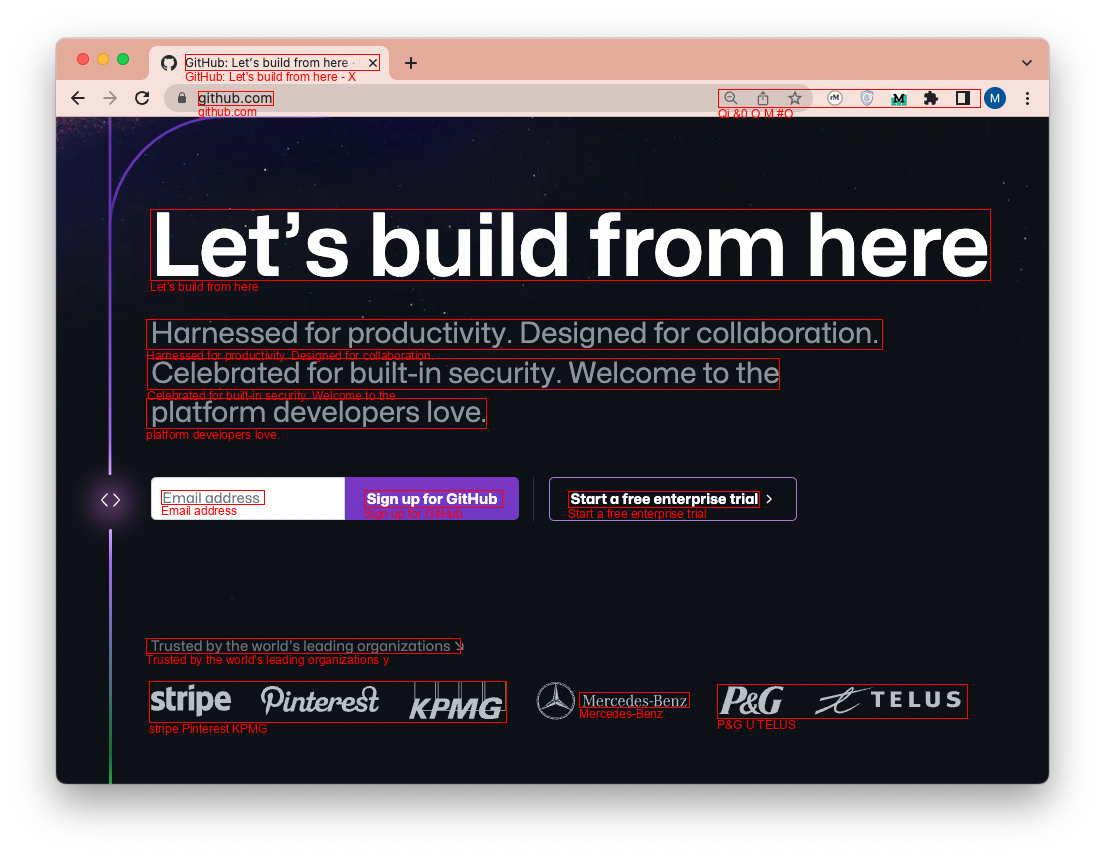
Create Annotated Images
    from ocrmac import ocrmac
    ocrmac.OCR('test.png').annotate_PIL()
Functionality
- You can pass the path to an image or a PIL image as an object
- You can use as a class (
ocrmac.OCR) or functionocrmac.text_from_image) - You can pass several arguments:
recognition_level:fastoraccuratelanguage_preference: A list with languages for post-processing, e.g.['en-US', 'zh-Hans', 'de-DE'].
- You can get an annotated output either as PIL image (
annotate_PIL) or matplotlib figure (annotate_matplotlib) - You can either use the
visionor thelivetextframework as backend.
Example: Select Language Preference
You can set a language preference like so:
ocrmac.OCR('test.png',language_preference=['en-US'])
What abbreviation should you use for your language of choice? Here is an overview of language codes, e.g.: Chinese (Simplified) -> zh-Hans, English -> en-US ..
If you set a wrong language you will see an error message showing the languages available. Note that the recognition_level will affect the languages available (fast has fewer)
See also this Example Notebook for implementation details.
Speed
Timings for the above recognize-statement: MacBook Pro (Apple M3 Max):
accurate: 207 ms ± 1.49 ms per loop (mean ± std. dev. of 7 runs, 1 loop each)fast: 131 ms ± 702 µs per loop (mean ± std. dev. of 7 runs, 10 loops each)livetext: 174 ms ± 4.12 ms per loop (mean ± std. dev. of 7 runs, 1 loop each)
About LiveText
Since MacOS Sonoma, LiveText is now supported, which is stronger than the VisionKit OCR. You can try this feature by:
# Use the OCR class
from ocrmac import ocrmac
annotations = ocrmac.OCR('test.png', framework="livetext").recognize()
print(annotations)

# Or use the helper directly
annotations = ocrmac.livetext_from_image('test.png')
Notice, when using this feature, the recognition_level and confidence_threshold are not available. The confidence output will always be 1. Additionally, LiveText supports an optional unit parameter for flat output: use unit='line' to return full-line items (instead of token-level).
Technical Background & Motivation
If you want to do Optical character recognition (OCR) with Python, widely used tools are pytesseract or EasyOCR. For me, tesseract never did give great results. EasyOCR did, but it is slow on CPU. While there is GPU acceleration with CUDA, this does not work for Mac. (Update from 9/2023: Apparently EasyOCR now has mps support for Mac.)
In any case, as a Mac user you might notice that you can, with newer versions, directly copy and paste from images. The built-in OCR functionality is quite good. The underlying functionality for this is VNRecognizeTextRequest from Apple's Vision Framework. Unfortunately it is in Swift; luckily, a wrapper for this exists. pyobjc-framework-Vision. ocrmac utilizes this wrapper and provides an easy interface to use this for OCR.
I found the following resources very helpful when implementing this:
I also did a small writeup about OCR on mac in this blogpost on medium.com.
Contributing
If you have a feature request or a bug report, please post it either as an idea in the discussions or as an issue on the GitHub issue tracker. If you want to contribute, put a PR for it. Thanks!
If you like the project, consider starring it!
History
1.0.1 (2026-01-08)
- Added GitHub Actions workflow for PyPI releases
- Fixed build configuration for proper package distribution
- Updated test image comparison threshold for cross-system compatibility
- Added notebook for regenerating test reference images
1.0.0 (2024)
- Added LiveText framework support via
framework='livetext' - Added output granularity options for LiveText
- Fixed language code documentation
- Updated test infrastructure
0.1.0 (2022-12-30)
- First release on PyPI.
- Basic functionality for PIL and matplotlib
Release history Release notifications | RSS feed


Download files
Download the file for your platform. If you're not sure which to choose, learn more about installing packages.
Source Distribution
Built Distribution
Filter files by name, interpreter, ABI, and platform.
If you're not sure about the file name format, learn more about wheel file names.
Copy a direct link to the current filters
File details
Details for the file ocrmac-1.0.1.tar.gz.
File metadata
- Download URL: ocrmac-1.0.1.tar.gz
- Upload date:
- Size: 1.5 MB
- Tags: Source
- Uploaded using Trusted Publishing? No
- Uploaded via: twine/6.2.0 CPython/3.12.12
File hashes
| Algorithm | Hash digest | |
|---|---|---|
| SHA256 |
507fe5e4cbd67b2d03f6729a52bbc11f9d0b58241134eb958a5daafd4b9d93d9
|
|
| MD5 |
df1f749f704857c619f3b0ff39326af9
|
|
| BLAKE2b-256 |
5e073e15ab404f75875c5e48c47163300eb90b7409044d8711fc3aaf52503f2e
|
File details
Details for the file ocrmac-1.0.1-py3-none-any.whl.
File metadata
- Download URL: ocrmac-1.0.1-py3-none-any.whl
- Upload date:
- Size: 10.0 kB
- Tags: Python 3
- Uploaded using Trusted Publishing? No
- Uploaded via: twine/6.2.0 CPython/3.12.12
File hashes
| Algorithm | Hash digest | |
|---|---|---|
| SHA256 |
1cef25426f7ae6bbd57fe3dc5553b25461ae8ad0d2b428a9bbadbf5907349024
|
|
| MD5 |
9b61c685dd7b7c4c4759620667511e50
|
|
| BLAKE2b-256 |
37157cc16507a2aca927abe395f1c545f17ae76b1f8ed44f43ebe4e8670ee203
|






