
Octavo
The quantitative social science starter pack

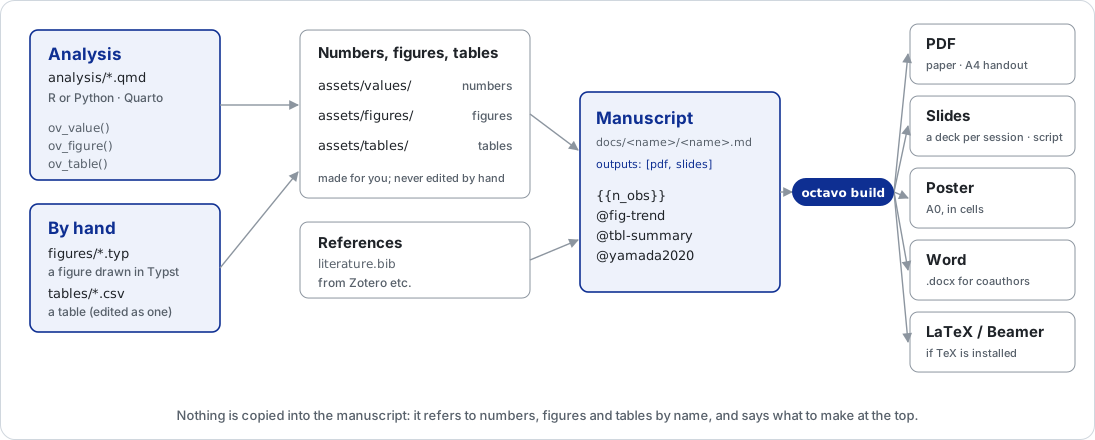
Write your papers, slides and lecture notes in Markdown, keep the analysis in
Quarto, and let Octavo place the analysis's numbers, figures and tables in every
document — then typeset them to PDF (with Typst) and Word, or LaTeX if you have
TeX. Citations come from one .bib file, in any CSL style.
What you get
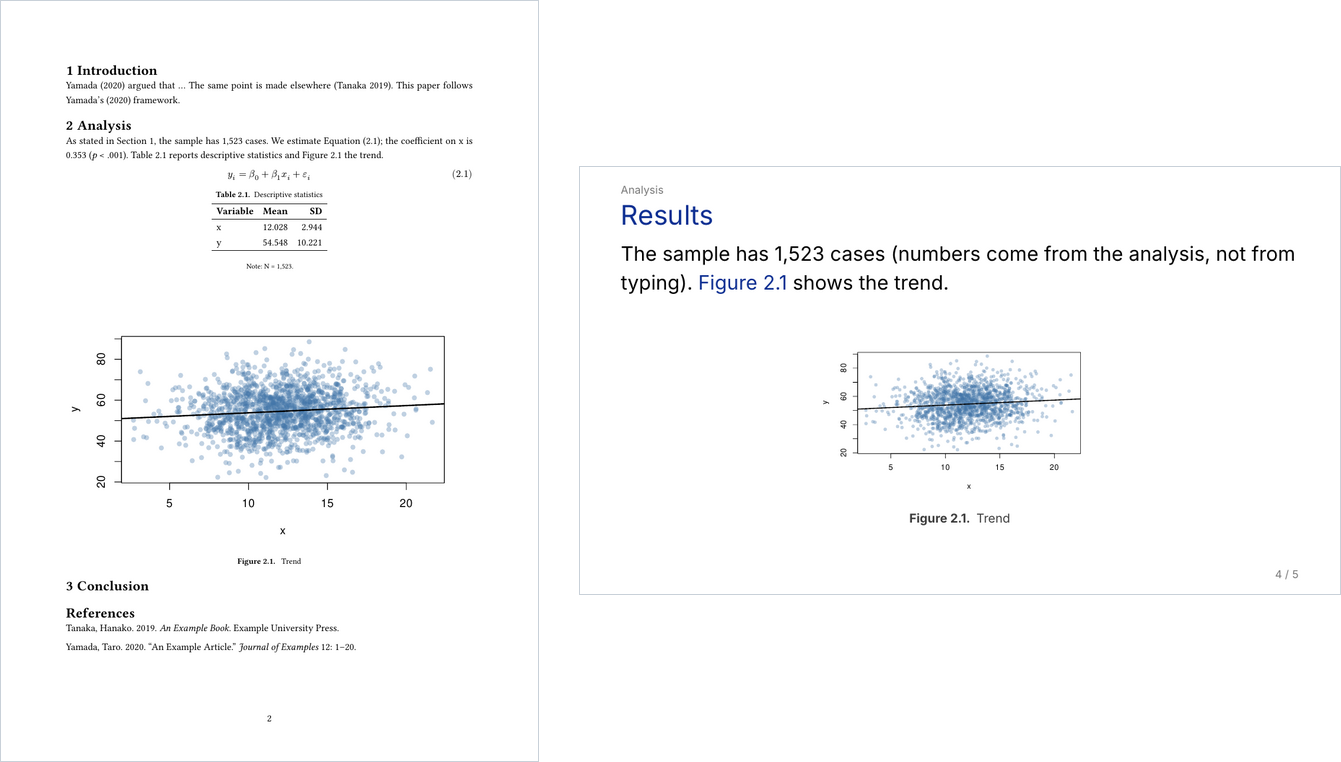
A page of a paper and a slide, both built from the example project
(octavo init demo --all --example). The coefficient, the table and the figure
come from the analysis; the equation, table and figure numbers and the
references are filled in when it is typeset.
- No number is typed by hand. The analysis registers it
(
ov_value("n_obs", nrow(d))) and the manuscript calls it by name ({{n_obs}}). Re-run the analysis and every document follows.octavo checkpoints out numbers typed into the prose, and values that are only placeholders. - One source, several documents. A paper in your journal's layout, a talk, and lecture notes that become an A4 handout plus one slide deck per session — with speaker scripts, and Word for coauthors.
- References by label:
@fig-trendbecomes "Figure 2.1", and stays right when you reorder sections. - Diagrams without TikZ:
octavo new figuregives you a Typst file to draw boxes and arrows in; it becomes a figure like any other. - Tables by hand, edited as tables:
octavo new tablegives you a CSV that the VS Code extension edits as a grid (Excel works too); it becomes a table like the analysis's. - Submission and beyond: word limits, blind review, a submission zip, reading a coauthor's tracked changes in Word, "what moved since I submitted", and a replication package.
- A VS Code extension with a live PDF preview, a sidebar for everything above, and one-click setup.
- Linux, macOS and Windows; English and Japanese.
Install
With VS Code, install the Octavo extension
and press Set up when it asks: it installs pandoc, Typst, Quarto, R, the
fonts and the octavo command.
From a terminal:
curl -LsSf https://astral.sh/uv/install.sh | sh   # uv, if you don't have it yet
uv tool install octavo-kit                        # the octavo command
octavo setup                                      # pandoc / Typst / Quarto / fonts / R
octavo doctor                                     # reports anything still missing
Getting started
Start with the example project — an analysis, a paper, slides and lecture notes:
octavo init demo --all --example
cd demo
octavo build --compile        # runs the analysis, then typesets everything to PDF
Then your own project, starting with the parts you need:
octavo init study --with analysis,paper
cd study
octavo env                    # the project's analysis environment (.venv and renv)
octavo build paper --compile  # after writing analysis/analysis.qmd and papers/paper/paper.md
octavo check                  # before you submit
In the analysis, register what the paper shows; in the manuscript, refer to it:
ov_value("n_obs", nrow(d))
ov_figure(p, "trend")
The sample has {{n_obs}} cases (@fig-trend).
{#fig-trend}
Documentation
The guide covers everything:
- Install — Linux, macOS and Windows, step by step
- Your first project —
octavo initandoctavo new, the analysis environment - Writing manuscripts — references, numbered blocks, math, figures, tables
- The analysis — numbers, figures and tables from Quarto
- Citations
- Papers — checking, blind review, submitting, revisions
- Slides and lecture notes — sessions, per-session handouts
- Making it yours — templates, Word styles, fonts
- Command reference
- VS Code
- What to check on your own machine
Contributing and license
Issues and pull requests are welcome — see CONTRIBUTING.md. MIT License.
1 maintainer

Metadata
1 maintainer
Release files for octavo-kit 0.5.0
For a detailed explanation of source distributions (sdists) and built distributions (wheels), please see the package formats documentation.
Source distribution (sdist)
| File | Size | Uploaded | |
|---|---|---|---|
| octavo_kit-0.5.0.tar.gz | 359.9 kB | Details |
Built distribution (wheel)
| File | Interpreter | ABI | Platform | Reset |
|---|---|---|---|---|
| octavo_kit-0.5.0-py3-none-any.whl | Python 3 | none | any | Details |
Total release size: 710.1 kB
Release files / octavo_kit-0.5.0.tar.gz
| Download URL | octavo_kit-0.5.0.tar.gz |
|---|---|
| Size | 359.9 kB |
| Tags | Source |
|
SHA-256 checksum How to use checksums |
e11fede6b0f915dd5eb3389678307c9c2c5c3903d41ea18ef38a7ce5d9c89de5
|
|
BLAKE2b-256 checksum How to use checksums |
b3b34d33d12a66e2a2b572b52c30e50de533958be78792ecbfaedc8d12c2d645
|
| Upload date | |
|
Uploaded using Trusted Publishing? What is trusted publishing? |
Yes |
| Uploaded via |
twine/7.0.0 CPython/3.13.14
|
Provenance
Provenance describes where a file came from. On PyPI, provenance is shared via attestations, which provide a verifiable record of the build or publishing details. View details, limitations and caveats.


PyPI Publish Attestation
PyPI verified that this artifact, at this checksum, originated from the publisher listed below.
Signed by GitHub Actions, verified by PyPI on Oct 1, 2026.
Transparency logRelease files / octavo_kit-0.5.0-py3-none-any.whl
| Download URL | octavo_kit-0.5.0-py3-none-any.whl |
|---|---|
| Size | 350.2 kB |
| Tags | Python 3 |
|
SHA-256 checksum How to use checksums |
5b7e8787095df2815612fd2570bf5a2b61d519188dc13794b33fd0d7eb782170
|
|
BLAKE2b-256 checksum How to use checksums |
986120dec7220b3ce49a63f127e03c6d789f945f28f6ce8d12602addd31ef048
|
| Upload date | |
|
Uploaded using Trusted Publishing? What is trusted publishing? |
Yes |
| Uploaded via |
twine/7.0.0 CPython/3.13.14
|
Provenance
Provenance describes where a file came from. On PyPI, provenance is shared via attestations, which provide a verifiable record of the build or publishing details. View details, limitations and caveats.
PyPI Publish Attestation
PyPI verified that this artifact, at this checksum, originated from the publisher listed below.
Signed by GitHub Actions, verified by PyPI on Oct 1, 2026.
Transparency log













