
OCTID: One-Class learning-based tool for Tumor Image Detection
OCTID is a one-class learning-based Python package for tile-level tumor detection. OCTID can capture patterns from the available normal whole slide images (WSIs) to identify and remove normal tiles from the training dataset. Using OCTID, researchers with limited pathology expertise can effectively classify and identify the tumor images based on the readily available tumor adjacent images. Leveraging the power of machine learning, OCTID can enable users to conduct image pre-processing easily on the large-scale histopathological image datasets. Example datasets can be downloaded here.
Getting started
Install OCTID from PyPI (You may need to creat a new environment before installing OCTID.)
$ pip install octid
to run your first example (A test.py file can be found here.)
from octid import octid
# initialize the classify model with the requiered parameters
classify_model = octid.octid(model = 'googlenet', customised_model = False, feature_dimension = 3, outlier_fraction_of_SVM = 0.03,
                              training_dataset = 'training_dataset_path', validation_dataset = 'validation_dataset_path', unlabelled_dataset='unlabelled_dataset_path')

# run the classify model
classify_model()
Parameters
-
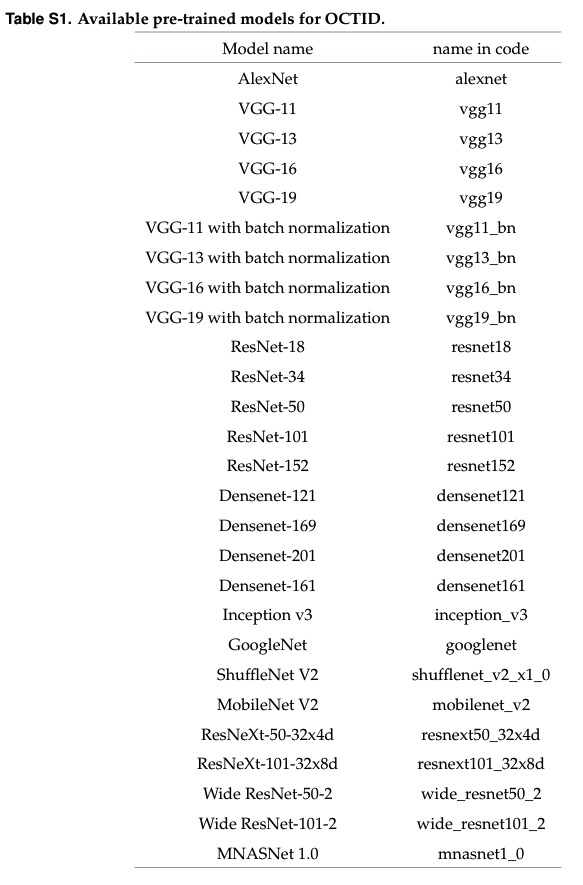
model (String or PyTorch model): The default value is "googlenet". The available models are listed below. The pre-defined models or customised models can be loaded when customised_model is set as "False" or "True".
-
customised_model (Boolean): The default value is False. If you want to use your own model, you can set this parameter as "Ture" and load and pass your model to the "model" parameter.
-
feature_dimension (Int): Feature dimension reduced by using UMAP, and the default value is 3.
-
outlier_fraction_of_SVM (Float) : The default value is 0.03. The rbf kernel is used in one-class SVM. This parameter is an upper bound on the fraction of training errors and a lower bound of the fraction of support vectors, which ranges from 0 to 1.
-
training_dataset (String): The path of your template dataset folder, which should only contain the positive or negative images.
-
validation_dataset (String): The path of your validation dataset folder, which should contain both positive and negative images.
-
unlabelled_dataset (String): The path of the dataset that you want to classify, which will be re-saved to two subfolders, corresponding to two classes.
** Dataset folders notes: since we use the torchvision.datasets.ImageFolder to label the image, please follow the instructions provided to create your image folders.
** Images processed here are small tiles rather than the whole slide images, which should be segmented into small images, with sizes such as 500 by 500.
Available pre-trained models for OCTID
1 maintainer

Metadata
1 maintainer
Release files for octid 1.1.6
For a detailed explanation of source distributions (sdists) and built distributions (wheels), please see the package formats documentation.
Source distribution (sdist)
| File | Size | Uploaded | |
|---|---|---|---|
| octid-1.1.6.tar.gz | 8.4 kB | Details |
Built distribution (wheel)
| File | Interpreter | ABI | Platform | Reset |
|---|---|---|---|---|
| octid-1.1.6-py3-none-any.whl | Python 3 | none | any | Details |
Total release size: 15.2 kB
Release files / octid-1.1.6.tar.gz
| Download URL | octid-1.1.6.tar.gz |
|---|---|
| Size | 8.4 kB |
| Tags | Source |
|
SHA-256 checksum How to use checksums |
dc6c4ffcdaba04b1a899c1a530ee423c8bd47124802713d325ff8beb362a7f43
|
|
BLAKE2b-256 checksum How to use checksums |
93b6b1a88d86a72060b27a7207821ab7d192fc819f6b5134a813c2bca55109ad
|
| Upload date | |
|
Uploaded using Trusted Publishing? What is trusted publishing? |
No |
| Uploaded via |
twine/3.3.0 pkginfo/1.6.1 requests/2.24.0 setuptools/51.3.3 requests-toolbelt/0.9.1 tqdm/4.50.2 CPython/3.8.5
|
Release files / octid-1.1.6-py3-none-any.whl
| Download URL | octid-1.1.6-py3-none-any.whl |
|---|---|
| Size | 6.8 kB |
| Tags | Python 3 |
|
SHA-256 checksum How to use checksums |
97157ecbba2d0978640a32c97de7c6e7377bddc876c96abd2817bd9a5989fe8b
|
|
BLAKE2b-256 checksum How to use checksums |
6a058ed653b854f9759d56eab7f5490e42a2eeaa80acd0fd57b579ffe3a5623d
|
| Upload date | |
|
Uploaded using Trusted Publishing? What is trusted publishing? |
No |
| Uploaded via |
twine/3.3.0 pkginfo/1.6.1 requests/2.24.0 setuptools/51.3.3 requests-toolbelt/0.9.1 tqdm/4.50.2 CPython/3.8.5
|














