
Backtesting framework of the OctoBot Ecosystem

Project description
OctoBot-Script 0.0.27




OctoBot-Script Community



OctoBot Script is the Quant framework by OctoBot
OctoBot Script is in alpha version
Documentation available at octobot.cloud/en/guides/octobot-script
Install OctoBot Script from pip
OctoBot Script requires Python 3.10
python3 -m pip install OctoBot wheel appdirs==1.4.4
python3 -m pip install octobot-script
Example of a backtesting script
Script
import asyncio
import tulipy    # Can be any TA library.
import octobot_script as obs


async def rsi_test():
    async def strategy(ctx):
        # Will be called at each candle.
        if run_data["entries"] is None:
            # Compute entries only once per backtest.
            closes = await obs.Close(ctx, max_history=True)
            times = await obs.Time(ctx, max_history=True, use_close_time=True)
            rsi_v = tulipy.rsi(closes, period=ctx.tentacle.trading_config["period"])
            delta = len(closes) - len(rsi_v)
            # Populate entries with timestamps of candles where RSI is
            # bellow the "rsi_value_buy_threshold" configuration.
            run_data["entries"] = {
                times[index + delta]
                for index, rsi_val in enumerate(rsi_v)
                if rsi_val < ctx.tentacle.trading_config["rsi_value_buy_threshold"]
            }
            await obs.plot_indicator(ctx, "RSI", times[delta:], rsi_v, run_data["entries"])
        if obs.current_live_time(ctx) in run_data["entries"]:
            # Uses pre-computed entries times to enter positions when relevant.
            # Also, instantly set take profits and stop losses.
            # Position exists could also be set separately.
            await obs.market(ctx, "buy", amount="10%", stop_loss_offset="-15%", take_profit_offset="25%")

    # Configuration that will be passed to each run.
    # It will be accessible under "ctx.tentacle.trading_config".
    config = {
        "period": 10,
        "rsi_value_buy_threshold": 28,
    }

    # Read and cache candle data to make subsequent backtesting runs faster.
    data = await obs.get_data("BTC/USDT", "1d", start_timestamp=1505606400)
    run_data = {
        "entries": None,
    }
    # Run a backtest using the above data, strategy and configuration.
    res = await obs.run(data, strategy, config)
    print(res.describe())
    # Generate and open report including indicators plots
    await res.plot(show=True)
    # Stop data to release local databases.
    await data.stop()


# Call the execution of the script inside "asyncio.run" as
# OctoBot-Script runs using the python asyncio framework.
asyncio.run(rsi_test())
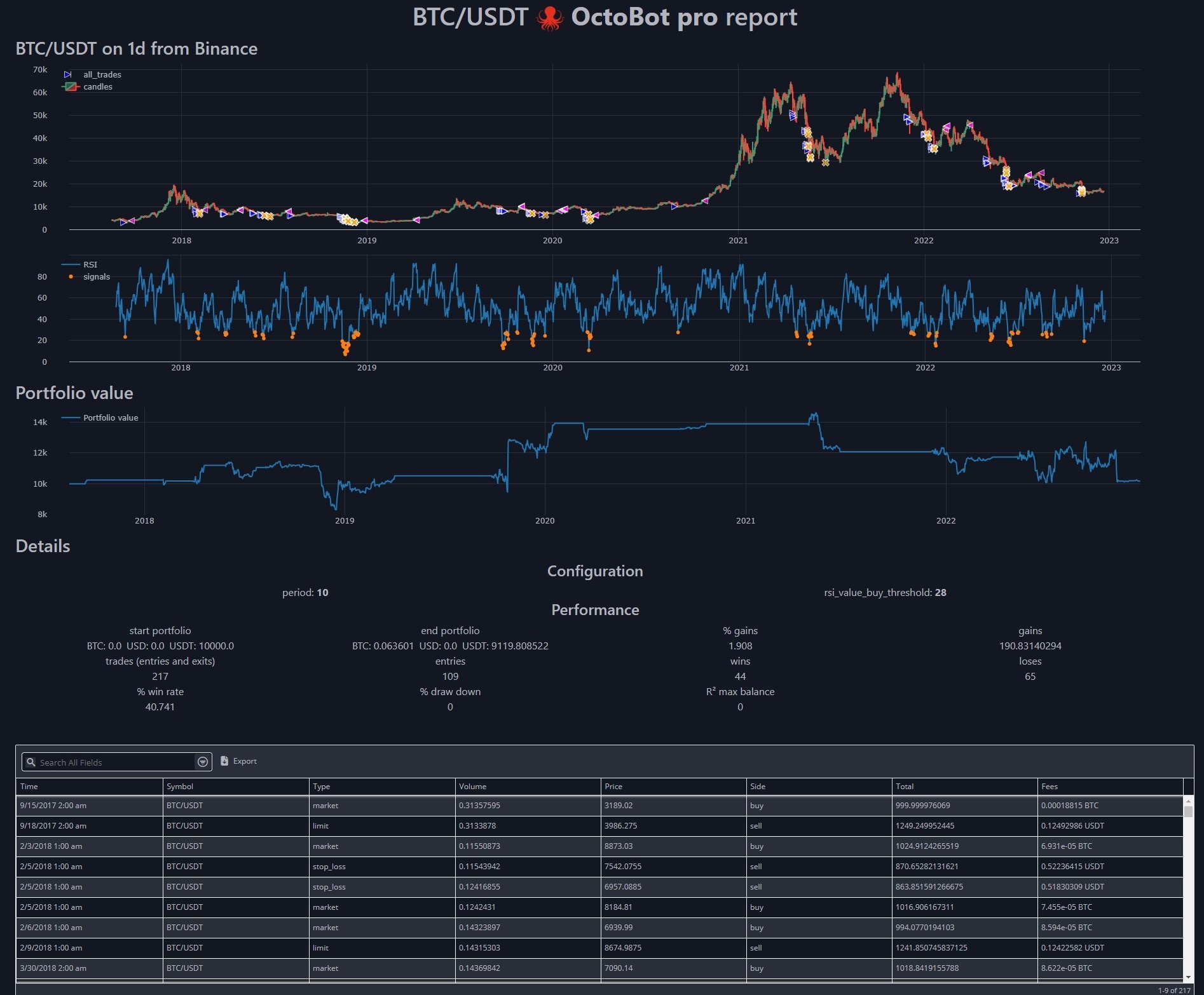
Generated report
Join the community
We recently created a telegram channel dedicated to OctoBot Script.

Release history Release notifications | RSS feed


Download files
Download the file for your platform. If you're not sure which to choose, learn more about installing packages.
Source Distribution
octobot_script-0.0.27.tar.gz
(36.6 kB
view details)
File details
Details for the file octobot_script-0.0.27.tar.gz.
File metadata
- Download URL: octobot_script-0.0.27.tar.gz
- Upload date:
- Size: 36.6 kB
- Tags: Source
- Uploaded using Trusted Publishing? No
- Uploaded via: twine/6.2.0 CPython/3.10.19
File hashes
| Algorithm | Hash digest | |
|---|---|---|
| SHA256 |
cf83cfe26b7e896fbdc9fad4624b954db204bca90892c160dee9dd5411cc33a6
|
|
| MD5 |
84777c327a9b83ae8149cf9b3d94cab5
|
|
| BLAKE2b-256 |
4a3d0300c4ae122d964d3caae361b392a1093ab00a179e799415fe8099a6cbfd
|






