
Live tail GitHub Actions runs on git push

Project description
octotail





Live tail GitHub Action runs on git push. It's cursed.
Motivation
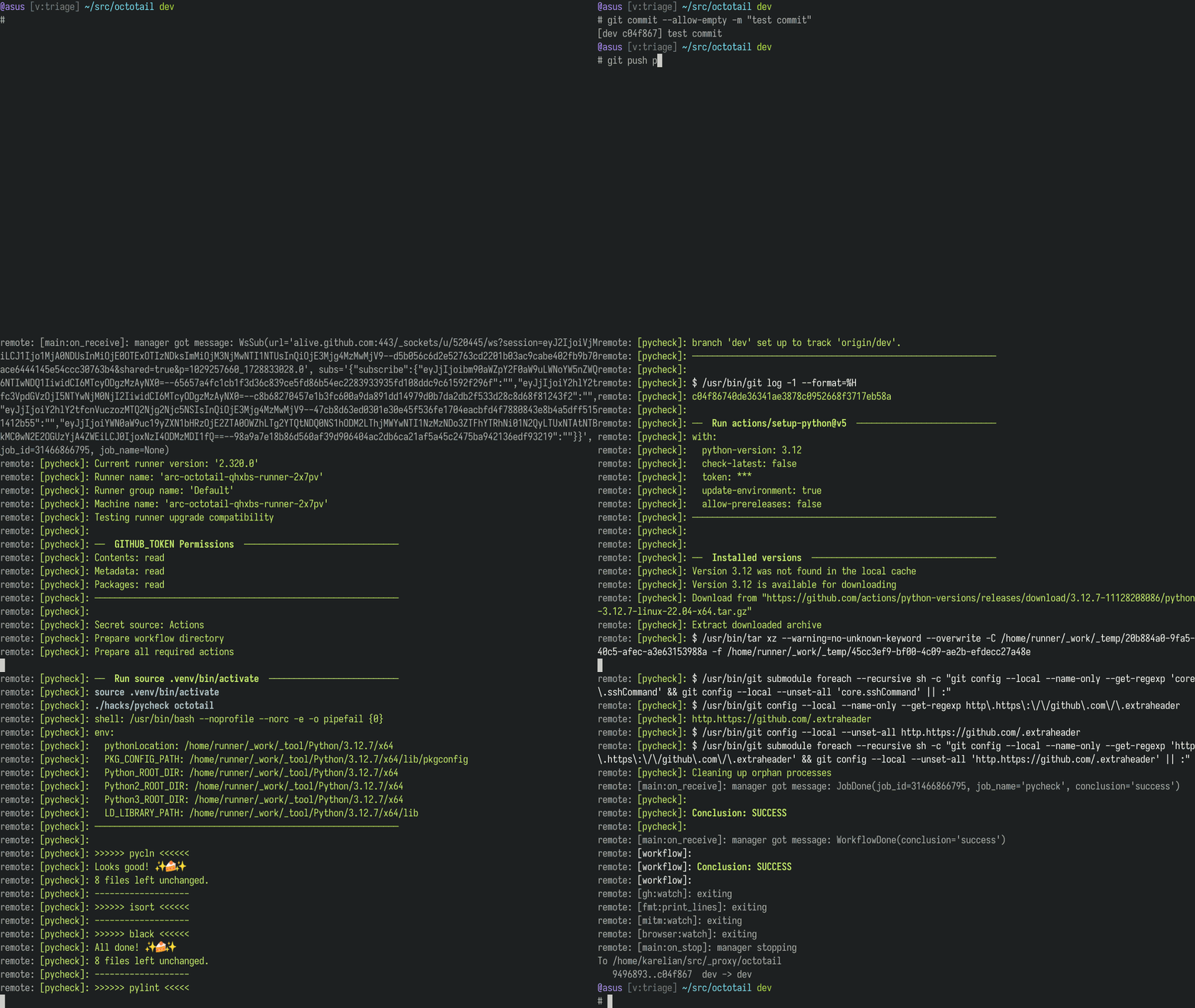
I really liked how Codecrafters test runs are mirrored back right in the
terminal when you git push, so I thought: "surely this is something the gh
CLI supports". It doesn't.
A couple of hours of messing with HTTPS mitm proxies, websockets, headless browsers, you-name-it, and octotail was born.
Wait, what?!
Invoked with a commit_sha (and optionally --workflow and/or --ref-name),
it polls the GitHub API for a matching, active run.
When a job associated with the run starts, it instructs a headless
chromium-based browser to visit the job's page.
The browser's traffic passes through a mitmproxy instance that it uses to extract the authenticated WebSocket subscriptions for live tailing.
The WebSocket address and subscribe messages are then passed to the tailing workers.
The headless browser tabs are cleaned up immediately after the WebSocket extraction, so the overhead is minimal. (well, it's still an empty browser)
Prerequisites
- python 3.12
- a working chromium-based browser under
/usr/bin/chromium
[!IMPORTANT] Make sure
/usr/bin/chromiumpoints to a working chromium-based browser.This is a good option for Arch Linux users:
paru ungoogled-chromium-bin
Installation
Via uvx
One can simply and hassle-free invoke octotail through uvx.
First, generate the proxy root certificate:
uvx --from=octotail octotailx generate-cert
Then, see Install the generated proxy root certificate for instructions on how to install the generated certificate on your platform.
Finally, simply invoke it via:
uvx --from=octotail octotail
Or alias it as octotail:
# change .zshrc to .bashrc, config.fish, etc. if needed
echo "alias octotail='uvx --from octotail octotail'" >> ~/.zshrc
Pypi package
mkdir octotail && cd octotail
python3 -mvenv .venv && source .venv/bin/activate
pip3 install octotail

# change .zshrc to .bashrc, config.fish, etc.
echo "alias octotail='$(pwd)/.venv/bin/python3 $(pwd)/.venv/bin/octotail'" >> ~/.zshrc
echo "alias octotailx='$(pwd)/.venv/bin/python3 $(pwd)/.venv/bin/octotailx'" >> ~/.zshrc
Via git and make
git clone https://github.com/getbettr/octotail.git
cd octotail
make
sudo make install
Post-install
[!IMPORTANT]
Run
octotailx generate-certonce to generate the proxy root certificate:octotailx generate-cert
Install the generated proxy root certificate
This step is highly platform-dependent.
On Arch Linux
sudo trust anchor ~/.local/share/octotail/mitmproxy/mitmproxy-ca-cert.cer
On macOS
sudo security add-trusted-cert -d -p ssl -p basic \
  -k /Library/Keychains/System.keychain \
  ~/local/.share/octotail/mitmproxy/mitmproxy-ca-cert.pem
Others
Please refer to the "Installing the mitmproxy CA certificate manually"
section of the mitmproxy documentation, changing ~/.mitmproxy with
~/.local/share/octotail/mitmproxy where appropriate.
Usage
# octotail --help

 Usage: octotail [OPTIONS] COMMIT_SHA

 Find an active workflow run for the given COMMIT_SHA (and optionally --workflow and/or --ref-name)
 and attempt to tail its logs.
 NOTE: the COMMIT_SHA has to be of the full 40 characters length.

-- Arguments ---------------------------------------------------------------------------------------
  *    commit_sha      TEXT  Full commit SHA that triggered the workflow.
                             [required]

-- Authentication ----------------------------------------------------------------------------------
  *  --gh-pat             TEXT  GitHub personal access token. (for API auth)
                                [env var: OCTOTAIL_GH_PAT]
                                [required]
  *  --gh-user            TEXT  GitHub username. (for web auth)
                                [env var: OCTOTAIL_GH_USER]
                                [required]
  *  --gh-pass            TEXT  GitHub password. (for web auth)
                                [env var: OCTOTAIL_GH_PASS]
                                [required]
     --gh-otp             TEXT  GitHub OTP. (for web auth, if 2FA is on)
                                [env var: OCTOTAIL_GH_OTP]
                                [default: None]
     --gh-otps-cmd        TEXT  Command for generating GitHub OTPs. Should generate at least 2
                                codes, one per line. (for web auth, if 2FA is on)
                                [env var: OCTOTAIL_GH_OTPS_CMD]
                                [default: None]

-- Workflow filters --------------------------------------------------------------------------------
  --workflow  -w      TEXT       Only consider workflows with this name.
  --ref-name  -r      TEXT       Only consider workflows triggered by this ref. Example:
                                 refs/heads/main
  --repo      -R      USER/REPO  Use this GitHub repo to look for workflow runs. If unspecified,
                                 will look for a remote matching 'git@github.com:user/repo.git' in
                                 the current directory. Examples: user/repo OR org_name/repo

-- Others ------------------------------------------------------------------------------------------
  --headless    --no-headless             Run browser in headless mode.
                                          [env var: OCTOTAIL_HEADLESS]
                                          [default: headless]
  --port                         INTEGER  Port the proxy will listen on.
                                          [env var: OCTOTAIL_PROXY_PORT]
                                          [default: (random in range 8100-8500)]
  --version                               Show the version and exit.
  --help                                  Show this message and exit.
Tail after push
A simple use case is tailing a workflow run right after git push:
If simply pushing the HEAD of the current branch:
git push
octotail $(git rev-parse HEAD)
Or if pushing to a different remote branch:
git push origin main
octotail $(git rev-parse origin/main) -r refs/heads/main
Or if pushing a tag:
git push origin v1.0.42
octotail $(git rev-parse v1.0.42^{commit}) -r refs/tags/v1.0.42
NEW: octotailx install-proxy-remote
[!TIP] If you're using
uvyou can now simply run:uvx --from=octotail octotailx install-proxy-remote..which will prompt you for setting up a proxy, post-receive-hook-enabled remote for your repository. Then you can simply
git push proxyand all the tailing should happen automatically!Alternatively, if you installed via one of the other methods, the script should be called with:
octotailx install-proxy-remote
As a post-receive hook
A slightly more advanced use case that allows streaming the run outputs on
git push without invoking octotail explicitly, similar to Codecrafters
test runs.
For this to work we'll need control over the remote's output, so we can't use
the GitHub remote directly. Instead, we'll use a bare repository as our proxy
remote and set up its post-receive hook to call octotail.
cd your-original-repo
export PROXY_REPO="/wherever/you/want/to/store/the/proxy-repo"

mkdir -p $PROXY_REPO
git clone --mirror "$(git remote get-url origin)" $PROXY_REPO
git remote add proxy $PROXY_REPO
# back to octotail
cd -

cp examples/post-receive.sample $PROXY_REPO/hooks/post-receive
Edit $PROXY_REPO/hooks/post-receive and change things according to
your setup:
- set
_GH_USERto your GitHub username - set
_GH_PASS_CMDto a command that outputs the GitHub password, e.g._GH_PASS_CMD="pass github.com" - if using 2FA - set
_GH_OTPS_CMDto a command that outputs at least two OTP tokens, one per line for the GitHub 2FA, e.g._GH_OTPS_CMD="oathtool -b --totp <<seed>> -w 1" - set
_GH_PAT_CMDto a command that outputs your GitHub personal access token, e.g._GH_PAT_CMD="pass github_pat"
[!NOTE] The hook assumes one is using
zsh. The shebang can be changed to any other shell, but it's best to invoke it with the right flags to get an interactive, login shell. Useful to get access to custom functions and aliases.
That's it! (phew) - now try pushing to the proxy remote and check
if the GitHub Actions workflow run logs are streaming right back:
cd your-original-repo
git commit --allow-empty -m 'test octotail'
git push proxy
Release history Release notifications | RSS feed


Download files
Download the file for your platform. If you're not sure which to choose, learn more about installing packages.
Source Distribution
Built Distribution
Filter files by name, interpreter, ABI, and platform.
If you're not sure about the file name format, learn more about wheel file names.
Copy a direct link to the current filters
File details
Details for the file octotail-1.0.17.tar.gz.
File metadata
- Download URL: octotail-1.0.17.tar.gz
- Upload date:
- Size: 22.0 kB
- Tags: Source
- Uploaded using Trusted Publishing? No
- Uploaded via: uv/0.4.24
File hashes
| Algorithm | Hash digest | |
|---|---|---|
| SHA256 |
8589d5b59e1525767bde85d36649116a4d7e7583f0189a515ded2d7b5bcc6ea6
|
|
| MD5 |
8fcf0c3256b9365bb6033053ac493ed3
|
|
| BLAKE2b-256 |
3b876c8cbdb2c5f7fe4509b761955dc60f1b86f2aad747f7127dd83ea05cf5f9
|
File details
Details for the file octotail-1.0.17-py3-none-any.whl.
File metadata
- Download URL: octotail-1.0.17-py3-none-any.whl
- Upload date:
- Size: 25.3 kB
- Tags: Python 3
- Uploaded using Trusted Publishing? No
- Uploaded via: uv/0.4.24
File hashes
| Algorithm | Hash digest | |
|---|---|---|
| SHA256 |
dd2d283e562e8f6899c694c7adfe5494e1387e4d1e40417275e677a92aa8b729
|
|
| MD5 |
01d81140c8a49f917ca55db0aa993c8a
|
|
| BLAKE2b-256 |
842e24bc00e2c8411a2d5c4cf86e3786ef48a90462b83f57f946c4b2701b3e9d
|






