
OctreeCity
A compact, adaptive 3D model of cities, for simulation, analysis and machine learning.
OctreeCity turns open city data into a voxel model that stays light enough for whole cities at 1 m resolution, adapts its cell sizes to what matters, and keeps every cell labelled (ground, building, tree, water, road or your own classes). It is meant as a common foundation: build the city once, then use the same model to store it, run simulations on it, analyse it, train models on it and show it.
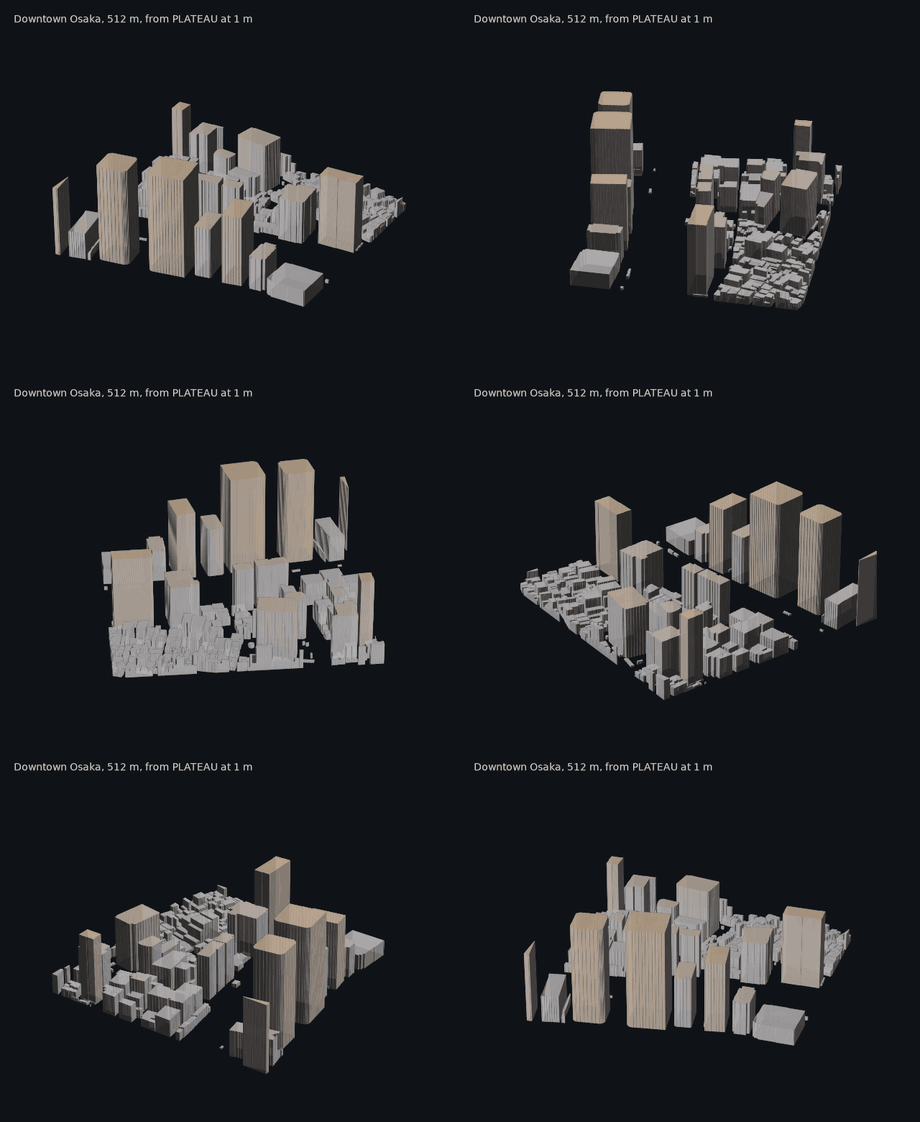
What it is for
City-scale 3D data. Whole cities are stored as tiles in one file, and any tile can be read on its own. All of Osaka (556,724 buildings, 228 km² at 1 m) builds in about half a minute into 37 MB. A column of cells can hold any number of layers, such as tree canopies with air beneath them, bridges or overhangs, and the model converts to and from ordinary voxel grids exactly.
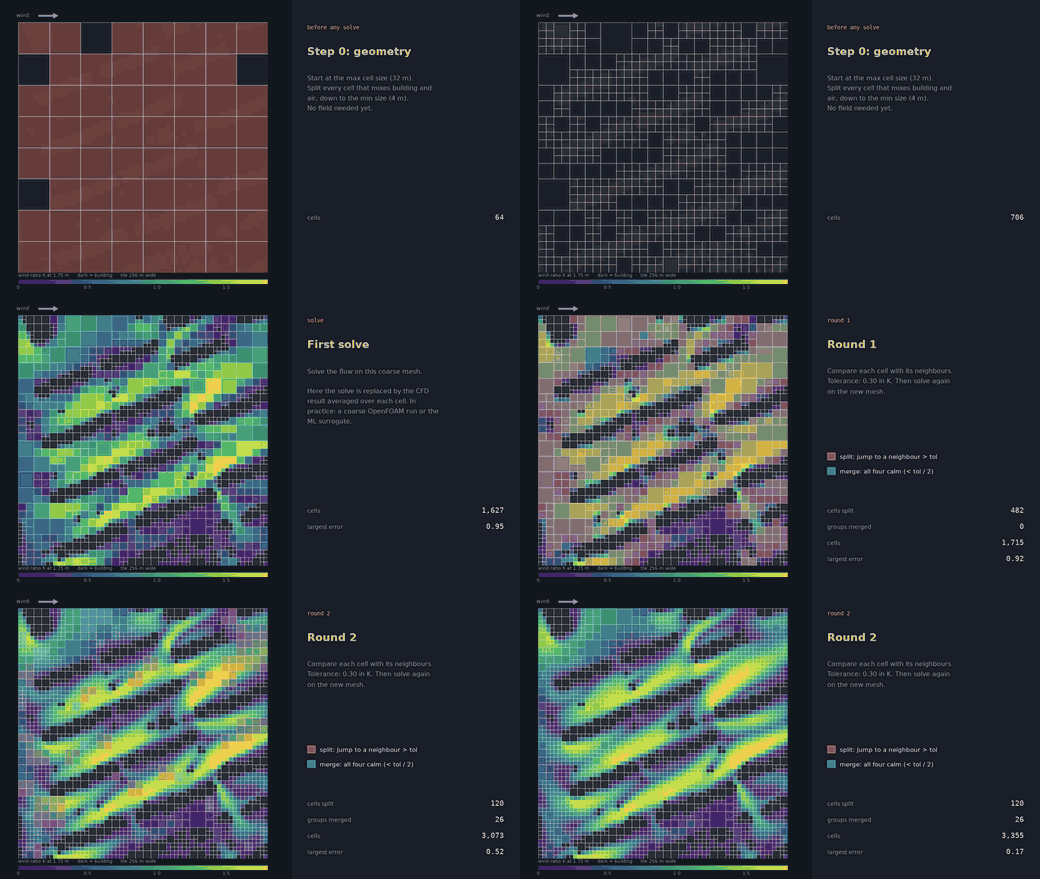
Simulation grids. Adaptive octree cells stay small where detail matters and grow in open air. They can follow geometry (walls, the ground) or any field you give them (wind, heat, sun, pollutant concentration, a model's output), with the smallest and largest cell sizes set by you. Values move between refined meshes, and an optional plugin writes OpenFOAM meshes for CFD.
Environmental analysis in 3D. Sky view factor, shadows and hours of direct sun for any place and date: at street level, on roofs, or at any point in the air. Light can pass through the space under tree canopies and bridges.
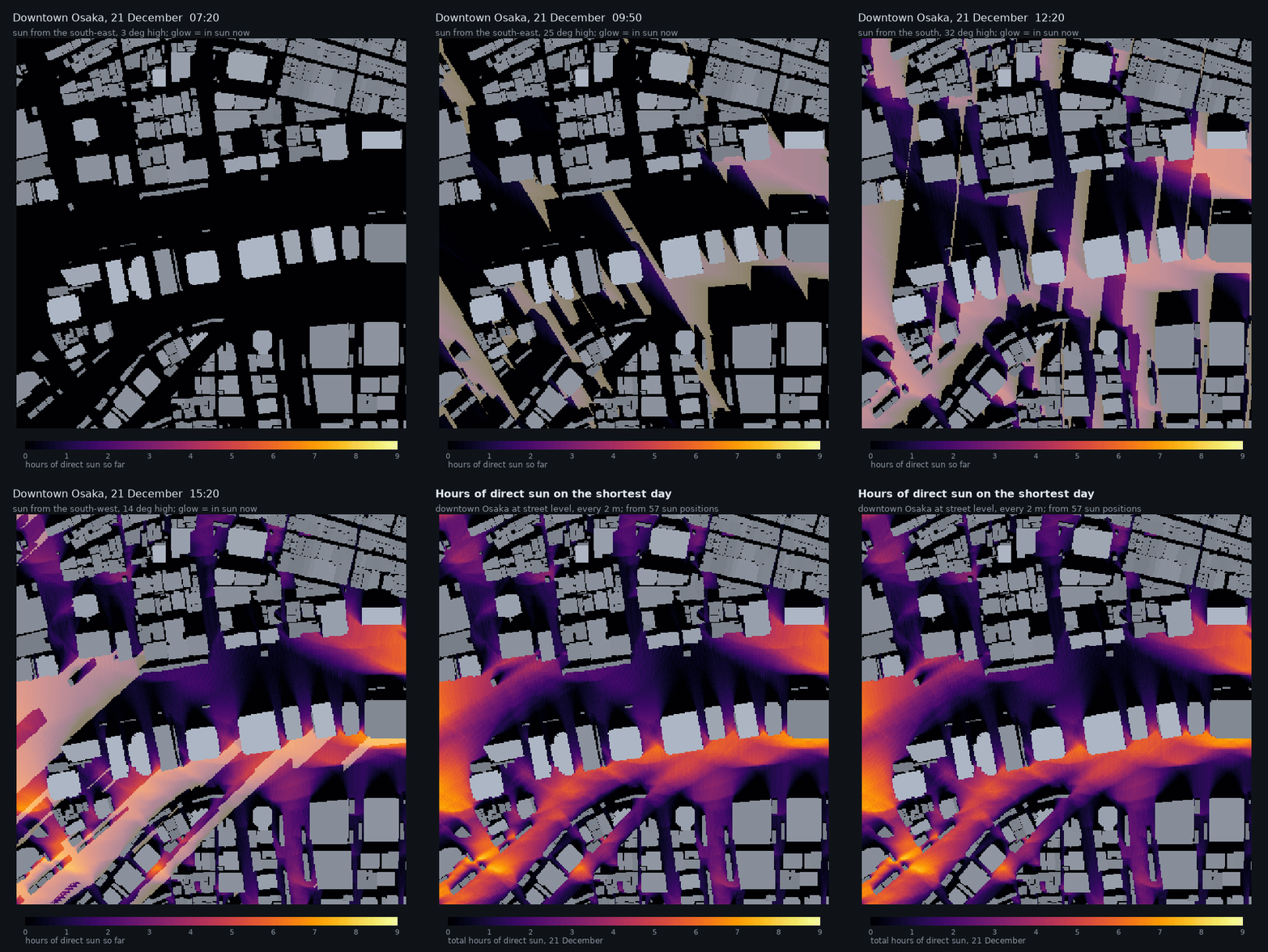
Downtown Osaka on the shortest day: the glow shows where the sun is at that moment, and the heatmap adds up the hours of direct sun.
Machine learning. Labelled cells become 2D or 3D arrays for image and volume models, and adaptive cells with their neighbour links form a natural graph. Use them as inputs for surrogate models of wind, heat or daylight, or to compare places.
Visualisation and sharing. Interactive 3D views in Jupyter and VS Code, 3D models (OBJ) for Blender, Rhino or Unity, shaded maps and sections.
Any data source. Build a city for any place from OpenStreetMap in one line, or from your own data: CityGML (PLATEAU, V-World and others), GeoJSON, building footprints, terrain rasters, land cover and trees.
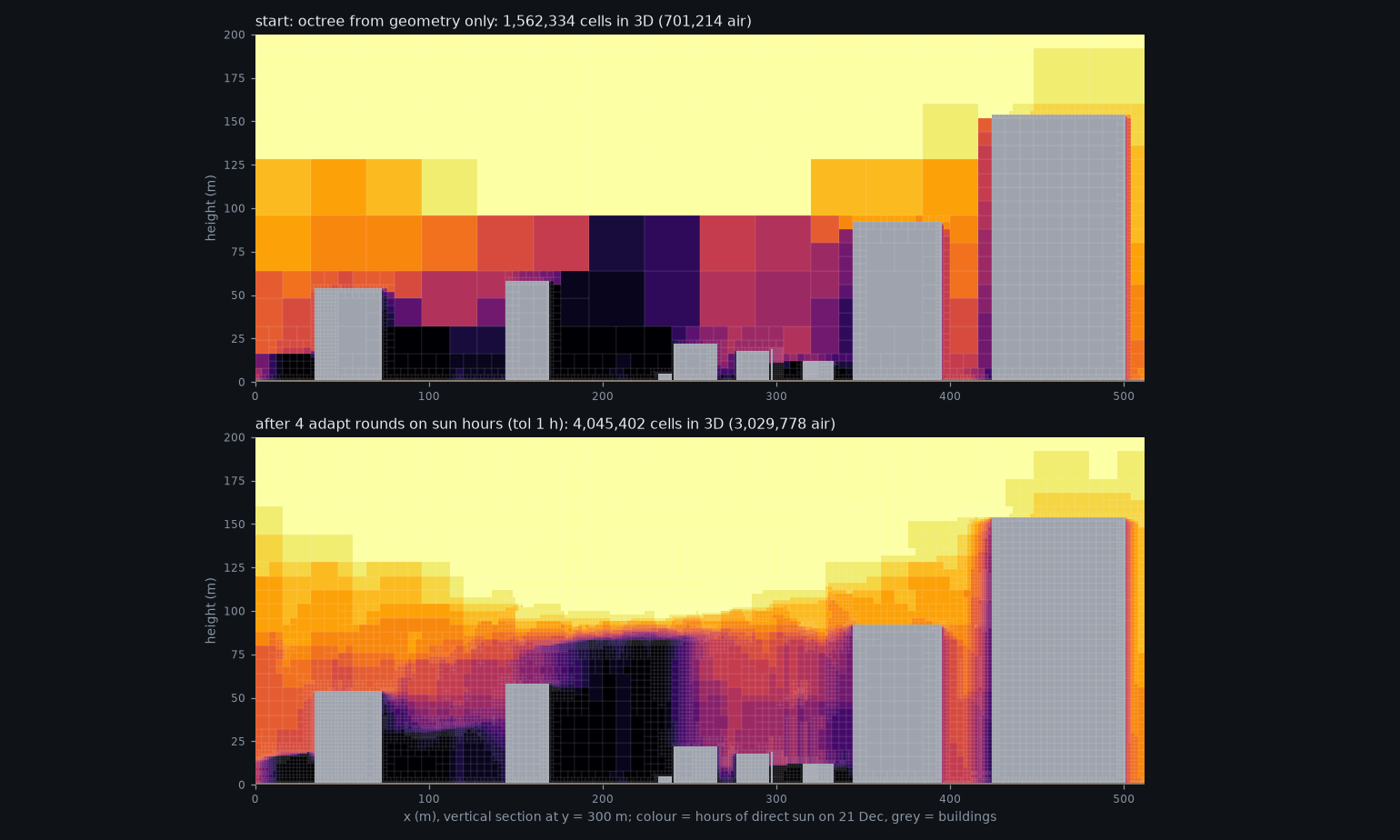
Adaptive cells following a 3D field: hours of winter sun in the air above downtown Osaka. Cells refine along the edges of shadow volumes and stay large in uniform sun or shade.
Install
pip install octreecity              # core
pip install "octreecity[viz]"       # with interactive 3D views and images
pip install "octreecity[notebook]"  # with JupyterLab for the tutorial notebook
Python 3.10 or newer. From source:
git clone https://github.com/MahmoudAbdelRahman/octreecity && cd octreecity && uv sync
Quick start
from octreecity.easy import city_from_osm
from octreecity.viz import show, show_values, street_map
from octreecity.analysis import street_points, sky_view_factor

city = city_from_osm(36.3700, 127.3625, size_m=1000,   # KAIST, Daejeon: any lat, lon works
                     city_cache="kaist_city.npz")       # saved after the first run, loaded after that
show(city)                                              # interactive 3D

pts, where = street_points(city, every=4)               # 1.5 m above the ground
svf = sky_view_factor(city, pts)
show_values(city, street_map(city, where, svf, 4), "Sky view factor", colorscale="Cividis")
The tutorial notebook goes through it step by step, with a 3D view after each
step: notebooks/octreecity_quickstart.ipynb.
Run it with ./demo.sh (see running the notebook).
Using your own data
from octreecity.sources import read_citygml
from octreecity.builder import CityBuilder

x0, y0 = 232031.0, 418662.0                 # south-west corner, in the data's coordinates (metres)
dem = lambda x, y: 0 * x                    # terrain: a raster or a function of (x, y); flat here
buildings = read_citygml("buildings.gml.gz").clip(x0, y0, x0 + 1000, y0 + 1000)
b = CityBuilder(x0, y0, width=1000, depth=1000, cell=1.0)   # metres, projected CRS
b.add_terrain(dem)                                           # raster or function of (x, y)
b.add_buildings(buildings)
city = b.build()
city.save("city.npz")
From the command line:
octreecity build --citygml buildings.gml.gz --cell 1 -o city.npz
octreecity svf city.npz -o svf.png
octreecity sun city.npz --lat 34.69 --lon 135.5 --tz 9 --date 2026-12-21 -o sun.png
octreecity obj city.npz -o city.obj
Why octrees instead of fixed-size voxels
A fixed voxel grid uses one cell size everywhere. To get 1 m detail at a wall, you also pay for 1 m cells in the empty air a hundred metres above the roofs and deep inside every building, which is most of a city's volume. The number of cells grows with the volume, so city-wide models are often forced to use coarse cells, and fine detail is lost where it matters most.
An octree starts from large cubes and splits a cube into eight smaller ones only where it contains something worth resolving: a wall, the ground, a change in the field you care about. Cells end up 1 m next to surfaces and up to 32 m in open air, with exactly the same detail where geometry is.
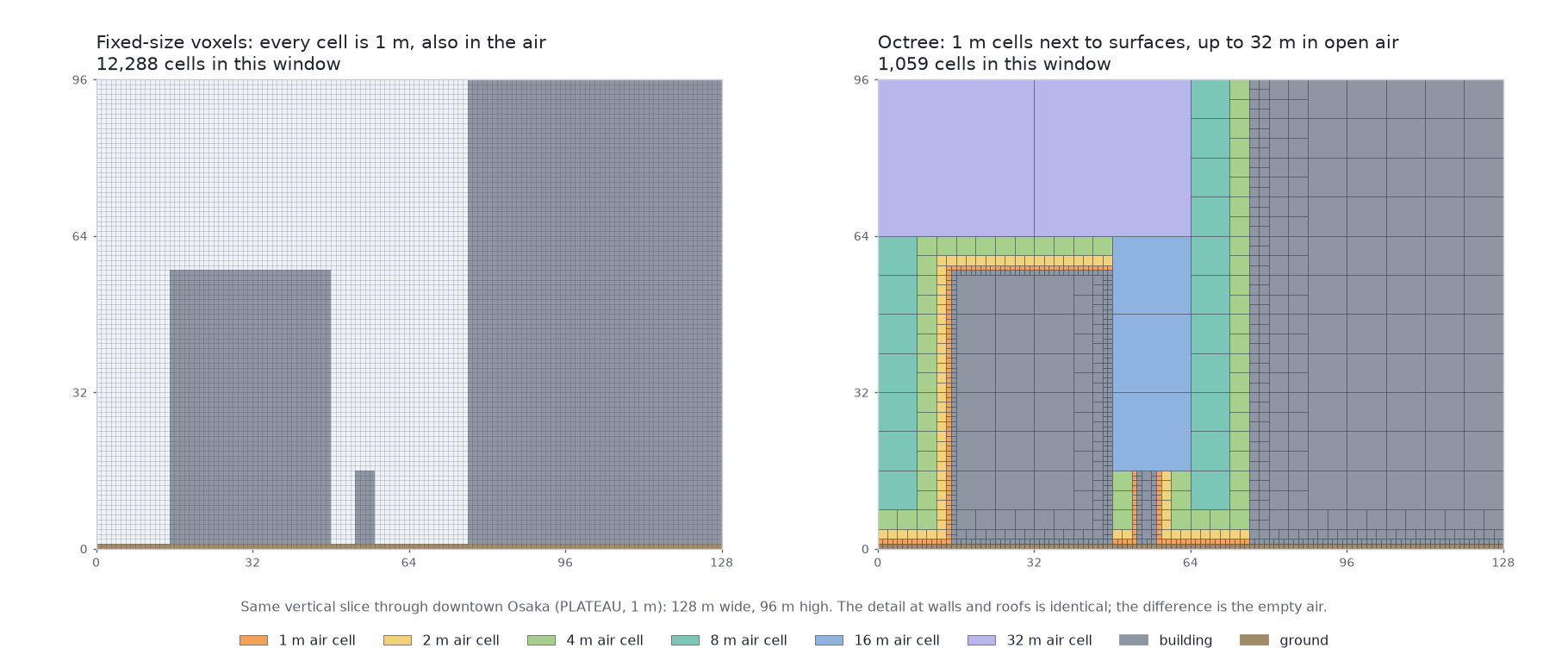
On this 256 m tile of downtown Osaka, 16.8 million fixed 1 m voxels become 391,000 octree cells (43 times fewer), with every wall and roof still at 1 m. Fewer cells mean less memory, faster analysis and smaller simulation meshes, and they make 1 m detail practical at city scale.
See the cells in 3D
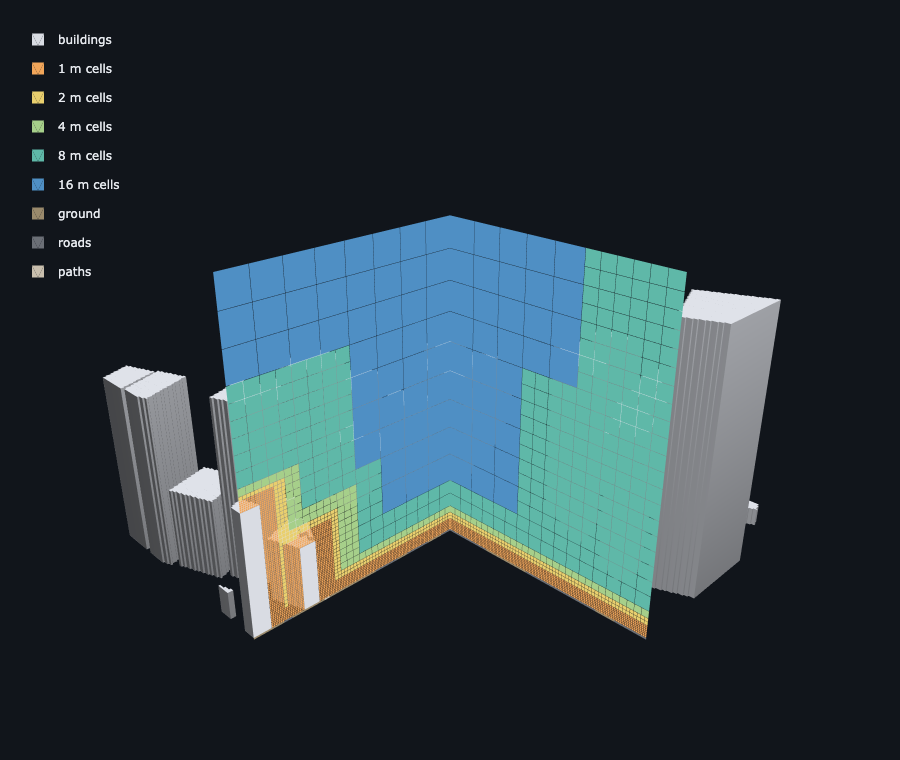
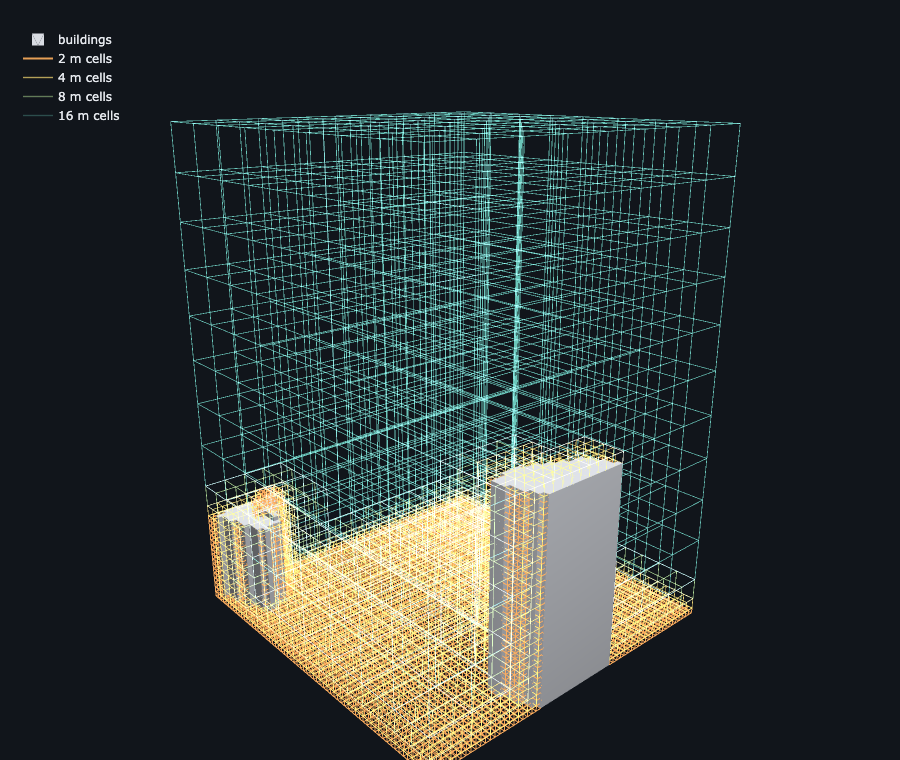
Left: a 256 m block of Gangnam, Seoul, with one corner cut away; the two cut faces show 1 m cells wrapping the ground and buildings, growing to 16 m in open air. Right: every air cell of a 128 m block as a wire cube, small near surfaces and large above.
Both views are interactive in a notebook, and a wireframe of the buildings themselves is one option away:
from octreecity.easy import city_from_osm
from octreecity.viz import show, show_octree

city = city_from_osm(36.3700, 127.3625, size_m=1000)   # KAIST, Daejeon
cells = city.to_octree(4)                              # octree with 1, 2, 4, 8 and 16 m cells (any city size)

show_octree(cells, style="cutaway")                    # or style="shells", or style="wire"
show(city.crop(300, 300, 160, 160), wireframe=True)    # the buildings as a wireframe
For a simulation-style mesh, keep cells small near every surface with
cells.limit_size_near([1, 2, 3, 5, 6, 7], distance=6, max_level=0) and
cells.balance(26) (more cells, and slower on a whole city).
On a whole city, style="wire" draws the larger cubes and lists the smallest
sizes it left out; on a block (city.crop(x, y, width, depth)) it draws them
all. See 3D views
and saving results.
The trade-offs: cells of different sizes need more bookkeeping than a plain array (finding a neighbour is a search rather than an index lookup), and some methods expect equal cells. That is why OctreeCity stores cities as columns and builds octrees only when an application wants adaptive cells, and why it converts to and from regular voxel grids exactly.
How it works
A city is mostly vertical walls, flat roofs and layers. OctreeCity uses two representations of the same voxels:
- Columns (for storage). Each vertical column keeps a short list of runs: ground up to 1 m, building up to 67 m, air above. A column can hold any number of layers, such as a tree canopy with air beneath it, or a bridge. The model's size then follows the outlines of buildings rather than their volume, so storing 1 m detail for a whole city becomes practical.
- Octrees (for computation). When an application needs cells of varying
size, an octree is built from the columns: cubes of 1, 2, 4 ... m that stay
small where detail matters. They can follow geometry (near surfaces) or any
field you provide (
adapt(), the split-and-merge idea used by adaptive CFD codes).
Every cell keeps a label (ground, building, tree, water, grass, road ... or your own classes), and any dense voxel grid can be converted in and out exactly.
The animation under "Simulation grids" shows the idea on a simulated wind field: start coarse, split where neighbouring values differ, merge where they agree, repeat.
Documentation
The documentation is organised by what you want to do:
- Tutorials: quickstart and the notebook
- How-to guides: your own data, 3D views, sky view and sun, whole cities, export, running the notebook
- Explanation: how it works, adaptive cells
- Reference: modules, command line, file formats
Related work
OctreeCity builds on ideas from a lively field and is meant to work alongside existing tools:
- VoxCity generates grid-based 3D
city models from global open data and runs urban simulations on them. Any
dense voxel grid, such as a VoxCity model with its classes mapped to
OctreeCity labels, can be loaded with
ColumnCity.from_dense. - OpenVDB and sparse voxel octrees in computer graphics, for sparse and hierarchical volumes.
- Adaptive mesh refinement in CFD (for example OpenFOAM and Basilisk), which
inspired
adapt(). - Open city data such as PLATEAU, V-World and OpenStreetMap.
Status
Version 0.1 (alpha). It is tested (56 tests, Python 3.10 to 3.13) with Osaka (PLATEAU) and Daejeon (V-World and OpenStreetMap). File formats may still change before 1.0. Known gaps:
- No elevation model (DEM) reader yet.
city_from_osmuses flat terrain. - The OpenFOAM export passes the package's own mesh checks but has not yet
been verified with OpenFOAM's
checkMesh. - Ray analyses cover direct sun and sky visibility (no reflections or diffuse light), and trees are treated as opaque.
- The parallel tiled builder handles buildings and land cover, not yet trees or terrain.
Questions, ideas and issues are welcome on GitHub; see CONTRIBUTING.md for how to propose changes.
Data credits
Images in this README use PLATEAU (MLIT, Japan) for Osaka, V-World (Korea) for Daejeon buildings, and © OpenStreetMap contributors (ODbL) for land cover, trees and roads. The data itself is not included in the repository.
License
MIT, see LICENSE.
1 maintainer

Metadata
1 maintainer
Release files for octreecity 0.1.2
For a detailed explanation of source distributions (sdists) and built distributions (wheels), please see the package formats documentation.
Source distribution (sdist)
| File | Size | Uploaded | |
|---|---|---|---|
| octreecity-0.1.2.tar.gz | 51.2 kB | Details |
Built distribution (wheel)
| File | Interpreter | ABI | Platform | Reset |
|---|---|---|---|---|
| octreecity-0.1.2-py3-none-any.whl | Python 3 | none | any | Details |
Total release size: 109.8 kB
Release files / octreecity-0.1.2.tar.gz
| Download URL | octreecity-0.1.2.tar.gz |
|---|---|
| Size | 51.2 kB |
| Tags | Source |
|
SHA-256 checksum How to use checksums |
f3c66ecc92d91ced65a1d81fd9234ad4b98573140910a4360da67bbfecd8991f
|
|
BLAKE2b-256 checksum How to use checksums |
883b01739422208a6b32948e3250e67fb4771608637fc680587304f9ea0e7ee0
|
| Upload date | |
|
Uploaded using Trusted Publishing? What is trusted publishing? |
No |
| Uploaded via |
uv/0.12.23 {"installer":{"name":"uv","version":"0.12.23","subcommand":["publish"]},"python":null,"implementation":{"name":null,"version":null},"distro":{"name":"macOS","version":null,"id":null,"libc":null},"system":{"name":null,"release":null},"cpu":null,"openssl_version":null,"setuptools_version":null,"rustc_version":null,"ci":null}
|
Release files / octreecity-0.1.2-py3-none-any.whl
| Download URL | octreecity-0.1.2-py3-none-any.whl |
|---|---|
| Size | 58.7 kB |
| Tags | Python 3 |
|
SHA-256 checksum How to use checksums |
1d78c1d0a7eea43d5f2802323d5c49c08375baf47a68c93d57314129e3d6f60d
|
|
BLAKE2b-256 checksum How to use checksums |
2146cd86c805472ccc74e3fe298687f5e8048ef6cf41a2cf913a68f4b4a0e916
|
| Upload date | |
|
Uploaded using Trusted Publishing? What is trusted publishing? |
No |
| Uploaded via |
uv/0.12.23 {"installer":{"name":"uv","version":"0.12.23","subcommand":["publish"]},"python":null,"implementation":{"name":null,"version":null},"distro":{"name":"macOS","version":null,"id":null,"libc":null},"system":{"name":null,"release":null},"cpu":null,"openssl_version":null,"setuptools_version":null,"rustc_version":null,"ci":null}
|














