





Quickstart · How it works · Results · Models · Commands · Layout · Android · llms.txt
Español · English
AI agents / LLMs: read llms.txt: it sums up the project, the commands and where everything lives.
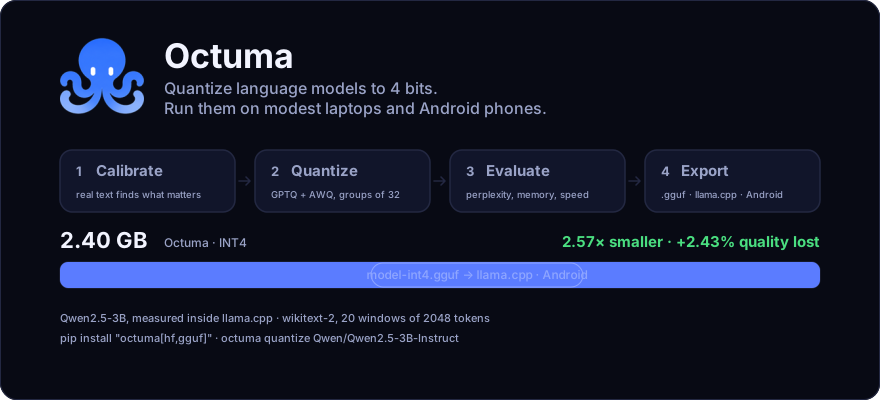
Octuma is a Python library that quantizes language models to 4 and 8 bits so they run on modest laptops, small servers and Android phones. A 3B Qwen2.5 goes from 6.18 GB to 2.40 GB while losing 2.4% of quality, and the resulting file runs in llama.cpp, which is what any machine without a GPU uses.
Everything runs on your machine. Octuma only goes online to download, from Hugging Face, the model and the calibration text you ask for.
What it does
- Quantizes to INT4 or INT8 with GPTQ and AWQ, in groups of 32 weights.
- Compares the quantized model with the original in one table: perplexity, memory and speed.
- Lets you try it in the terminal, or with the same ten questions for the original and the quantized model.
- Exports to GGUF for llama.cpp and Android, and to its own
.tqformat for PyTorch. - Finds the layers that suffer most and builds a mixed-precision plan (some at 8 bits, the rest at 4).
- Warns before downloading if the model will not fit in your memory.
How it works
 Hugging Face model or local folder  (Qwen, Llama, Mistral…)
        │
        ▼
 ┌─────────────────────────────────────────────────────────────────┐
 │  Octuma   (runs on your machine, with a GPU or CPU only)        │
 │  ─────────────────────────────────────────────────────────────  │
 │  1. Calibrate   128 windows of real text → H = 2·XXᵀ per layer  │
 │  2. Quantize    AWQ scales the channels  →  GPTQ rounds and     │
 │                 spreads the error, block by block               │
 │  3. Evaluate    perplexity, memory and tokens per second        │
 │  4. Export      .tq (PyTorch)  and  .gguf in Q4_1 (llama.cpp)   │
 └─────────────────────────────────────────────────────────────────┘
        │
        ▼
 .tq folder  +  model-int4.gguf  →  llama.cpp · Android · PyTorch
| Step | What it does | Where it lives |
|---|---|---|
| Calibrate | Takes random windows from a real corpus (wikitext-2, C4 or your own .txt files) and runs them through the model. That gives, layer by layer, which input directions matter: H = 2·XXᵀ. |
calibrate.py |
| Quantize | Groups the weights 32 at a time per row, with one scale and one zero point per group, and takes them to 4 bits. The rounding is not blind: AWQ gives more resolution to the channels that receive large activations, and GPTQ spreads each column's error over the columns still to come, using H. It goes block by block, and each block receives the already quantized output of the previous one. |
quantizer.py, quant/ |
| Evaluate | Perplexity on wikitext-2 with non-overlapping windows, memory per layer type and tokens per second. | evaluate.py |
| Export | Saves the .tq folder (safetensors with packed bits) and writes GGUF with the weights in Q4_1. |
export/ |
Why groups, and why asymmetric
A single scale for the whole tensor is ruined by one outlier weight. With groups of 32 the damage stays inside its group. And since weights are almost never centered on zero, also storing a zero point (asymmetric) uses all 16 levels instead of wasting part of the range.
The cost: each group stores a scale in FP16 and a one-byte zero point. In the
.tq folder that is 4.75 bits per weight with groups of 32, not 4. In GGUF
the Q4_1 block takes 5 bits per weight.
Data-driven mixed precision
Not every layer suffers the same. octuma analyze measures, layer by layer,
how much its output changes when quantized, not how much its weights change:
||ΔW·X||² = tr(ΔW · H · ΔWᵀ)
With that it ranks the layers by real damage and builds a plan: the most sensitive ones go up to 8 bits and the rest stay at 4, without going over the average number of bits you ask for.
octuma analyze Qwen/Qwen2.5-0.5B-Instruct --target-bits 4.5 -o plan.json
octuma quantize Qwen/Qwen2.5-0.5B-Instruct --out qwen-mixed --plan plan.json
Up to version 0.1.4,
--planraised the chosen layer to 8 bits in every block, not only in the one the plan named, and the average went over the target. This is fixed in 0.1.5. A mixed-precision model cannot be exported to GGUF: the exporter only writes Q4_1.
Get started in a minute
pip install "octuma[hf,gguf]"

octuma quantize Qwen/Qwen2.5-3B-Instruct    # quantize, no choices to make
octuma compare qwen2.5-3b-instruct-int4     # did it come out well?
octuma try qwen2.5-3b-instruct-int4         # does it still talk well?
octuma export qwen2.5-3b-instruct-int4 --out qwen3b-int4.gguf
There is no method, bit width or folder to choose. The defaults are the configuration that wins in our own measurements (GPTQ + AWQ, groups of 32, 128 windows of 2048 tokens), the GPU is detected automatically and Octuma warns you before downloading anything if the model will not fit in your memory.
It also works without a GPU, but quantizing a large model is slow. To try it on CPU, use the 0.5B with the short calibration from Try it on your PC.
How good is the result
Against llama.cpp's formats, inside llama.cpp
This is the comparison that matters for running locally: Octuma's .gguf
measured with the same engine, the same corpus and the same windows as its
rivals.
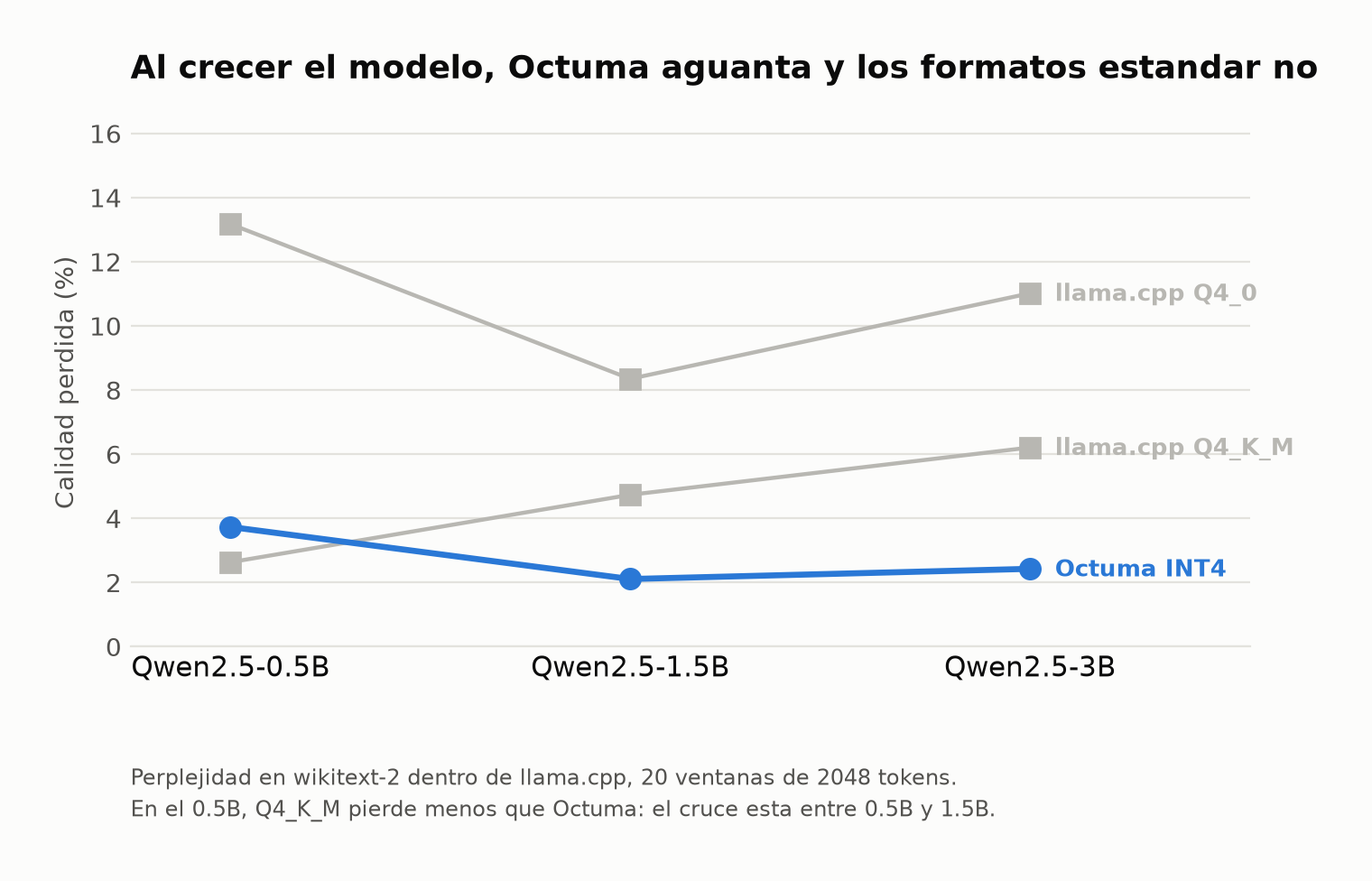
Quality lost against the same original in F16, and file size. Lower is better for both; in bold, the smallest loss in each row.
| Model | Octuma INT4 | Q4_K_M | Q4_0 |
|---|---|---|---|
| Qwen2.5-0.5B | +3.73% · 0.52 GB | +2.63% · 0.40 GB | +13.17% · 0.35 GB |
| Qwen2.5-1.5B | +2.11% · 1.32 GB | +4.74% · 0.99 GB | +8.35% · 0.93 GB |
| Qwen2.5-3B | +2.43% · 2.40 GB | +6.21% · 1.93 GB | +11.02% · 1.82 GB |
As the model grows, Q4_K_M degrades more and more (2.63% → 4.74% → 6.21%) while Octuma stays flat (3.73% → 2.11% → 2.43%). On the 3B, Octuma loses 2.6 times less quality than Q4_K_M, the most used format for running models locally.
Octuma's file is larger in all three: between 24% and 33% larger than Q4_K_M. That is the price of a scale and a zero point for every 32 weights. What that space buys is quality.
On the 0.5B, Q4_K_M wins on both counts: it loses less and takes less space. The crossover is between 0.5B and 1.5B. If your model is tiny, use Q4_K_M.
Per-model detail, with chart and full table, in
runs/COMPARATIVA_GGUF.md (in Spanish).
Against bitsandbytes, inside PyTorch
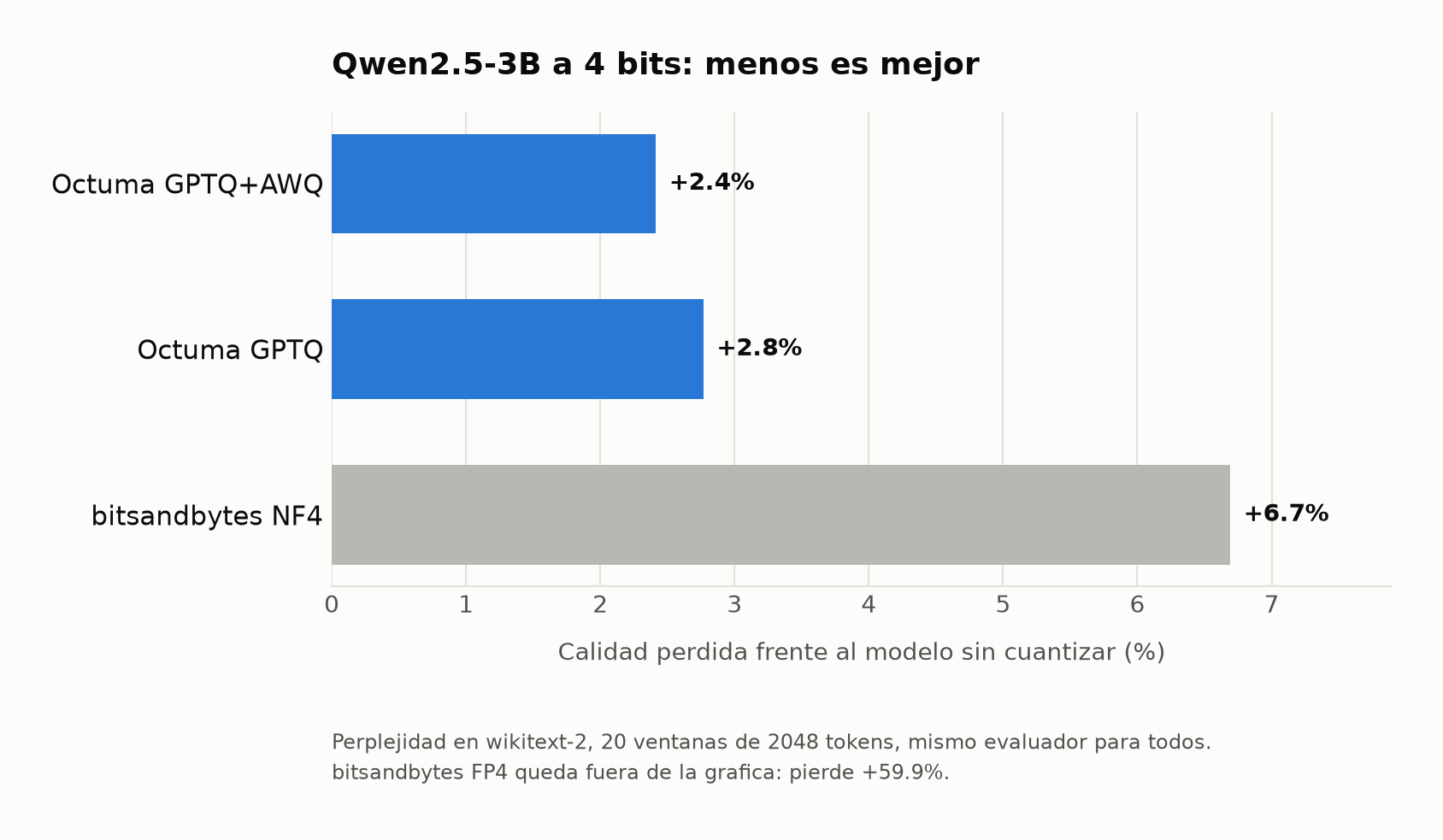
On the same Qwen2.5-3B, with the same evaluator and the same windows, Octuma loses less than half of what bitsandbytes NF4 loses (NF4 is Hugging Face's default quantizer and the one QLoRA uses), for 5% more memory:
| Tool | Perplexity | Memory | Loss |
|---|---|---|---|
| FP16 (not quantized) | 8.347 | 6.79 GB | — |
| Octuma GPTQ+AWQ | 8.549 | 2.76 GB | +2.4% |
| Octuma GPTQ | 8.578 | 2.76 GB | +2.8% |
| bitsandbytes NF4 | 8.906 | 2.63 GB | +6.7% |
| bitsandbytes FP4 | 13.343 | 2.63 GB | +59.9% |
The perplexities in this table and in the previous one cannot be compared with each other: each engine splits and averages differently, and the same original gives 8.347 here and 7.334 in llama.cpp. What is comparable is always the loss within one engine. This table was also measured with groups of 64; the llama.cpp one, with 32.
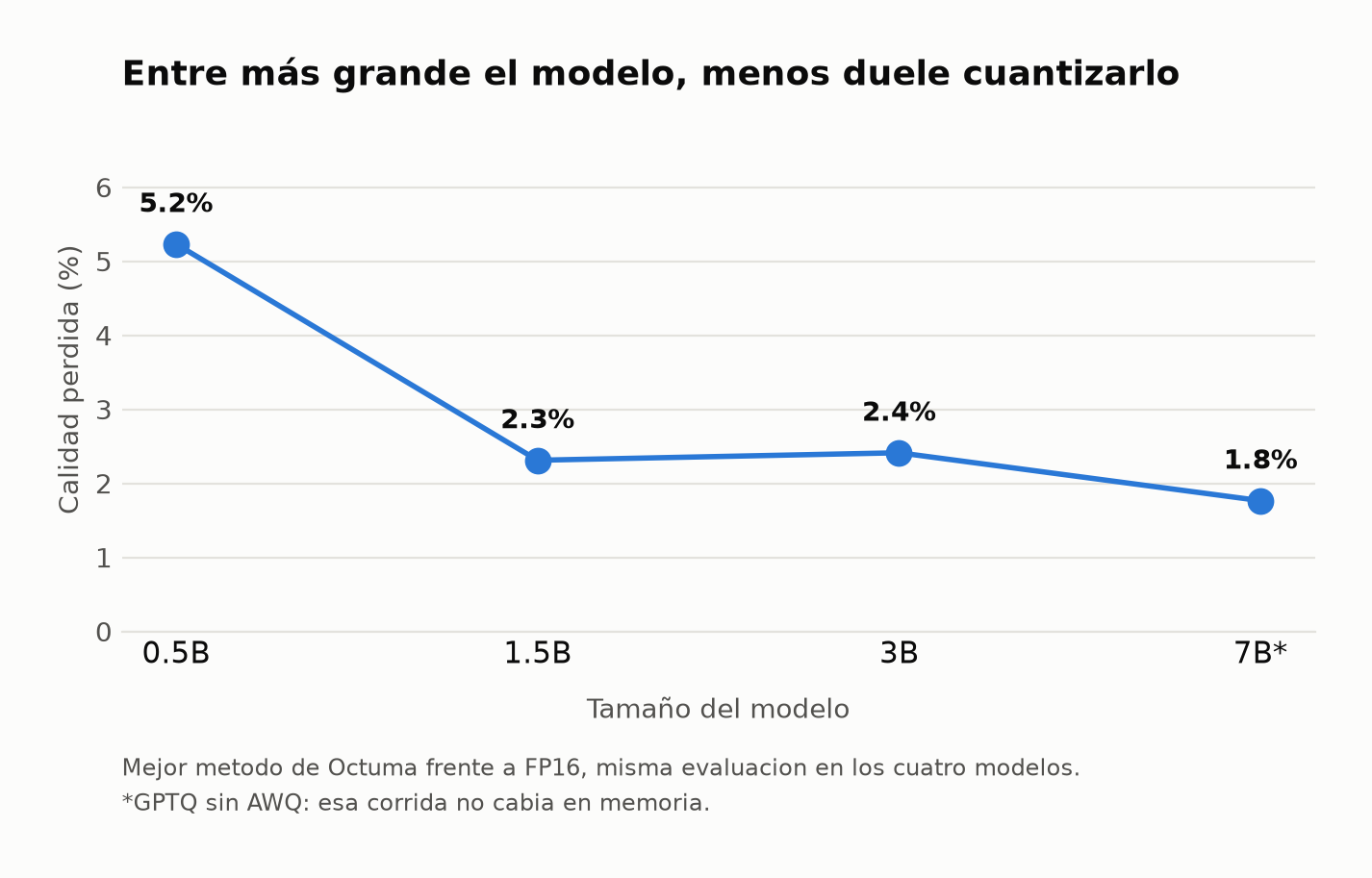
And the loss shrinks as the model grows, in PyTorch too:
The numbers come from runs/*.json and the charts are regenerated with
python scripts/grafica_comparativa.py and python scripts/grafica_gguf.py.
The detail is in runs/COMPARATIVA.md (in Spanish).
What Octuma does not do
- It does not speed things up in PyTorch. The quantized model generates
slower: 4.2 tokens/s against 14.4 for the original on Qwen 3B with a GPU.
QuantLinearunpacks the 4 bits on every multiplication, without a dedicated kernel. Octuma's case is memory and quality; to run fast, export to GGUF and use llama.cpp. - It is not compared against AutoGPTQ or GPTQModel, its closest technical rivals. When it was tried (September 2026) they would not install with modern setuptools.
- The GGUF exporter only knows four architectures:
llama,qwen2,mistralandgemma. Only the Qwen2.5 family is measured end to end.
Ready-to-use models
Three models from the Qwen2.5 family, already quantized and public. Each repo
has the .tq folder (PyTorch) and the .gguf (llama.cpp and Android):
| Model | GGUF file | Perplexity | vs. original | Original's license |
|---|---|---|---|---|
| qwen0.5b-int4-Octuma | 0.52 GB | 12.710 | +3.73% | Apache 2.0 |
| qwen1.5b-int4-Octuma | 1.32 GB | 8.486 | +2.11% | Apache 2.0 |
| qwen3b-int4-Octuma | 2.40 GB | 7.512 | +2.43% | Qwen Research (non-commercial) |
hf download Imanol11/qwen1.5b-int4-Octuma --local-dir qwen1.5b
llama-cli -m qwen1.5b/qwen1.5b-int4.gguf -p "Hello"
The 3B cannot be used commercially. Unlike the rest of the family,
Qwen2.5-3B-Instructis not Apache 2.0 but Qwen Research License: research and evaluation only. The quantized model inherits that condition. For commercial use, the 0.5B and the 1.5B are Apache 2.0, and so is the original 7B.
Two things worth knowing about those three files, published when the project was called TinyQ:
- Their metadata file is named
tinyq.json. Octuma opens it all the same from 0.1.5 on; earlier versions answered that the folder was not an Octuma one. - The
.ggufannounces itself asF16in llama.cpp and in the Hugging Face viewer, although its weights are Q4_1, and it has no chat template. The quality is the one in the table; llama.cpp falls back to ChatML when the template is missing, which is Qwen's. Both get fixed when they are re-exported with 0.1.5.
Installation
# the usual: quantize Hugging Face models and export to GGUF
pip install "octuma[hf,gguf]"

# the development version
pip install "octuma[hf,gguf] @ git+https://github.com/1mano1/octuma.git"
It needs Python 3.10 or newer and PyTorch.
Install the extras. A bare pip install octuma leaves out transformers,
and without it only octuma --version and octuma info work. They are called
optional because of how pip names them, not because they can be skipped.
| Extra | What for | Without it |
|---|---|---|
hf |
transformers and datasets |
no quantize, compare, try, evaluate, analyze or export |
gguf |
Export to GGUF for llama.cpp and Android | no export |
dev |
pytest and ruff, for development |
— |
With an NVIDIA GPU
PyTorch with CUDA is not on PyPI: it has to be installed first from its own
index. If you skip this step, octuma quantize runs on CPU and only says so
with a yellow warning.
pip install torch --index-url https://download.pytorch.org/whl/cu126
pip install "octuma[hf,gguf]"     # keeps the torch that is already there
cu126 has PyTorch for Python 3.10 to 3.14. The error No matching
distribution found for torch almost always means the index does not have your
Python version; cu121, for example, only goes up to 3.12.
Try it on your PC
Everything stays inside one folder that you delete at the end. The commands are
for PowerShell; on Linux or macOS the environment is activated with
source .venv/bin/activate. You do not need to download a model first:
quantize fetches Qwen2.5 0.5B from Hugging Face (about 1 GB, no account).
CPU only
Calibration and comparison are cut short so they finish in minutes, not hours.
mkdir C:\octuma-test
cd C:\octuma-test
Set-ExecutionPolicy -Scope Process Bypass   # allows activating the environment, in this terminal only
py -m venv .venv                            # with several versions: py -3.11 -m venv .venv
.\.venv\Scripts\Activate.ps1

pip install "octuma[hf,gguf]"
octuma --version

octuma quantize Qwen/Qwen2.5-0.5B-Instruct --samples 32 --seqlen 512 --out qwen05b
octuma compare qwen05b --windows 5 --seqlen 512
octuma try qwen05b -p "What is the capital of Australia?"
octuma export qwen05b --out qwen05b.gguf
compare spends several minutes printing nothing while it measures; it is not
stuck.
With an NVIDIA GPU
With the full configuration, the same one as the tables above.
mkdir C:\octuma-test
cd C:\octuma-test
Set-ExecutionPolicy -Scope Process Bypass
py -m venv .venv
.\.venv\Scripts\Activate.ps1

pip install torch --index-url https://download.pytorch.org/whl/cu126
pip install "octuma[hf,gguf]"
python -c "import torch; print(torch.cuda.is_available())"   # must say True
octuma --version

octuma quantize Qwen/Qwen2.5-0.5B-Instruct --out qwen05b
octuma compare qwen05b
octuma try qwen05b -p "What is the capital of Australia?"
octuma export qwen05b --out qwen05b.gguf
The numbers from the CPU test are not comparable with the tables, which use 128 windows of 2048 tokens; the GPU ones are.
To delete everything
deactivate
cd C:\
Remove-Item -Recurse -Force C:\octuma-test
Remove-Item -Recurse -Force "$env:USERPROFILE\.cache\huggingface\hub\models--Qwen--Qwen2.5-0.5B-Instruct"
Remove-Item -Recurse -Force "$env:APPDATA\octuma"   # record of the last version used
The wikitext data stays in .cache\huggingface\hub\datasets--*.
Commands
The first three are the everyday ones. octuma <command> --help shows every
option.
| Command | What it does | Most used options |
|---|---|---|
octuma quantize <model> |
Calibrates, quantizes and saves the .tq folder. <model> is a Hugging Face id or a local folder. |
--out, --bits (2, 3, 4 or 8), --samples, --seqlen, --calib (wikitext2, c4 or a path to .txt files), --no-awq, --method rtn, --plan |
octuma compare <folder> |
Measures the quantized model and the original and puts them in one table, with the line that sums it up: "2.46x smaller for +2.4% perplexity". | --windows, --seqlen, --no-speed, --original |
octuma try <folder> |
Chat in the terminal with the quantized model. | -p "question" for a single one, --side-by-side for the ten questions against the original, --out to save them as Markdown |
octuma export <folder> --out <file.gguf> |
Converts the .tq folder to GGUF. It requires 4 bits and groups of 32, which are the defaults. |
--name |
octuma info <folder> |
Shows what is inside: source model, calibration, layers and bits. It does not load the weights. | — |
octuma evaluate <model> |
Measures perplexity and memory of a model, quantized or not. | --windows, --seqlen, --speed, --out to save the report as JSON |
octuma analyze <model> |
Ranks the layers by how much they suffer at 4 bits and proposes a mixed-precision plan. | --target-bits, --group, --out |
octuma --version |
The installed version. | — |
All of them take --device auto, cpu or cuda where it makes sense.
quantize, compare and try pick the GPU by themselves; evaluate and
analyze use the CPU unless told otherwise.
Use from Python
from transformers import AutoModelForCausalLM, AutoTokenizer
from octuma.calibrate import load_wikitext2
from octuma.quantizer import QuantConfig, quantize_model
from octuma.export.tq import save_quantized

model = AutoModelForCausalLM.from_pretrained("Qwen/Qwen2.5-0.5B-Instruct")
tok = AutoTokenizer.from_pretrained("Qwen/Qwen2.5-0.5B-Instruct")

calib = load_wikitext2(tok, n_samples=64, seq_len=512)
report = quantize_model(model, calib, QuantConfig())

print(report.summary())
save_quantized(model, "out/qwen-int4")
A bare QuantConfig() does the same as octuma quantize: 4 bits, groups of
32, GPTQ and AWQ. Up to 0.1.4 it did not: it came with groups of 64 and AWQ
off, and the result could not be exported to GGUF.
Loading an already quantized one:
from transformers import AutoConfig, AutoModelForCausalLM
from octuma.export.tq import load_quantized

cfg = AutoConfig.from_pretrained("out/qwen-int4")
model = load_quantized(AutoModelForCausalLM.from_config(cfg), "out/qwen-int4")
Mixed precision by hand: by layer type across all blocks, or one specific layer with its block number.
cfg = QuantConfig(bits=4, group_size=32, bits_overrides={"mlp.down_proj": 8})
cfg = QuantConfig(bits=4, group_size=32, bits_overrides={"3.mlp.down_proj": 8})
Project layout
octuma/
├── src/octuma/            the package that gets installed
│   ├── cli.py             the terminal commands
│   ├── calibrate.py       builds the calibration text windows
│   ├── quantizer.py       walks the model block by block and quantizes it
│   ├── quant/
│   │   ├── core.py        the math: groups, scales and bit packing
│   │   ├── gptq.py        rounding with error compensation (GPTQ)
│   │   ├── awq.py         channel scaling driven by activations (AWQ)
│   │   ├── search.py      search for the scale that leaves the least error per group
│   │   └── qlinear.py     QuantLinear, the layer that replaces nn.Linear
│   ├── sensitivity.py     which layers suffer most, and the mixed-precision plan
│   ├── evaluate.py        perplexity, memory and speed
│   ├── export/
│   │   ├── tq.py          save and load the .tq folder
│   │   └── gguf_export.py write GGUF in Q4_1 for llama.cpp
│   └── logo.py            the octopus shown in the terminal
├── tests/                 tests: no network, no GPU and no real models
├── scripts/               experiment scaffolding; not installed by pip
├── experiments/           the sweep matrices (YAML)
├── runs/                  measured results (JSON) and the comparisons
├── docs/                  README images and the CLI plan
├── llms.txt               project summary for AI agents
├── CHANGELOG.md           what changed in each version
└── CONTRIBUTING.md        how to install, test and propose changes
Code comments, CHANGELOG.md, CONTRIBUTING.md and the notes under runs/
are written in Spanish. Everything the terminal prints is in English.
What each piece does, in the order it is used:
| Piece | What it does |
|---|---|
cli.py |
Turns each command into calls to the pieces below. The defaults and the memory warnings live here. |
calibrate.py |
Gathers the corpus, tokenizes it and cuts random windows with a fixed seed. Returns a CalibrationSet. |
quantizer.py |
quantize_model finds the transformer blocks, captures the input of the first one and moves forward one at a time: it applies AWQ, estimates H, quantizes each linear layer and replaces it with a QuantLinear. QuantConfig is the configuration. |
quant/core.py |
Quantizes a tensor by groups (quantize_tensor), rebuilds it and packs the values: two 4-bit values per byte. |
quant/gptq.py |
Quantizes a matrix column by column and spreads each column's error over the remaining ones, with the damped inverse of H. |
quant/awq.py |
Searches, per group of layers, the factor s = mean|x|^α that leaves the least output error, and folds it into the previous layer so it costs nothing at inference. |
quant/search.py |
Instead of taking the group's minimum and maximum, it tries several clippings of the range and keeps the one with the least error. |
quant/qlinear.py |
QuantLinear stores the packed weights and rebuilds them on every forward pass. That is why it saves memory and not time. |
sensitivity.py |
Measures each layer's output error at 4 and at 8 bits and chooses which ones to raise without going over the requested average. |
evaluate.py |
Perplexity over non-overlapping windows, bytes per layer type and tokens per second when generating. |
export/tq.py |
Writes model.tq.safetensors and octuma.json, and rebuilds the model on top of a Hugging Face skeleton. |
export/gguf_export.py |
Turns each group of 32 into a Q4_1 block and writes the metadata and vocabulary llama.cpp needs. |
The .tq format
A .tq folder is what octuma quantize leaves behind:
| File | What it holds |
|---|---|
model.tq.safetensors |
For each quantized layer: qweight (packed bits, uint8), scales (FP16) and zeros (uint8). Everything else, embeddings and norms, in FP16. |
octuma.json |
Format version, bits and group size of each layer, the configuration used, the source model and the calibration. |
config.json, tokenizer.json and friends |
The original model's, unchanged. |
.tq keeps its name from when the project was called TinyQ, because it lives
inside the models already published.
Android and llama.cpp
The exporter writes GGUF with the weights in Q4_1, which is exactly the same format as an asymmetric group of 32 in Octuma:
Octuma: w = (q - z)·s Q4_1: w = d·q + m d = s, m = -z·s
That is why the exporter requires groups of 32, which is already the default:
octuma quantize <model>
octuma export <int4-folder> --out model-int4.gguf
python scripts/verify_gguf.py <int4-folder> model-int4.gguf
Always verify before publishing a GGUF. The weights can be perfect and the
file still come out broken because of its metadata: a wrong rope_theta
doubles the perplexity without touching a single weight, and the model
keeps answering short sentences normally, so you cannot tell at a glance. It
happened to us, and the three published models were degraded until
verify_gguf.py learned to check the metadata as well as the weights. It
returns an error code, so it can go in CI. The script lives in the repository,
not in the pip package.
Qwen2.5-0.5B quantized with Octuma, exported to GGUF and run in llama.cpp:
$ llama-cli -m qwen05b-int4.gguf -p "La capital de Francia es" --temp 0 -n 32 -st -ngl 0
La capital de Francia es París.

prompt: 229 tok/s · generation: 64 tok/s   (CPU only, 6 threads, a desktop PC)
It has to be llama-cli and not llama-completion: these are Instruct
models and llama-cli applies their chat template. With raw completion, the
0.5B at --temp 0 just keeps repeating the question.
On a phone, inside Octuma App (the Android app that runs these models; in testing, not published yet), on a Xiaomi 14T Pro with Android 16:
| Model | Generation |
|---|---|
| Qwen2.5-0.5B INT4 | 28.4 tok/s |
| Qwen2.5-1.5B INT4 | 9.9 tok/s |
Median of five answers each, release build, two threads. It is a high-end
phone: a modest one will be slower. Full conditions in
runs/NOTA_telefono_2026-10-07.md (in
Spanish).
Sweep results
33 runs on Qwen2.5 (0.5B, 1.5B, 3B and 7B), in runs/*.json. The order of the
methods is identical across the four models, which is the best sign that
the implementation does what it says:
GPTQ+AWQ > GPTQ > AWQ-RTN > RTN
Loss of the best method against FP16: 5.2% (0.5B), 2.3% (1.5B), 2.4% (3B) and 1.8% (7B with GPTQ alone: its AWQ runs did not fit in memory). INT8 is practically free (+0.03%) but only compresses 1.91x; INT4 compresses 3.66x, counting only the quantized weights: the whole model shrinks 59% on the 3B, because the embeddings stay in FP16.
The sweep was run with groups of 64, the default at the time. Today the terminal uses 32, which is what the GGUF exporter requires and what the three published models contain. Smaller groups store more scales and so compress less: 3.66x with 64 against 3.37x with 32. The llama.cpp tables above are with 32; what has not been measured is how much perplexity changes between one group size and the other.
How much calibration is needed
GPTQ estimates H = 2·XXᵀ per layer. With fewer tokens than the layer has
dimensions, that matrix is singular and the error compensation becomes noise:
the result comes out worse than not using GPTQ. Measured on the 0.5B:
| Calibration tokens | GPTQ | GPTQ + AWQ |
|---|---|---|
| 512 (fewer than the 896 dimensions) | worse than RTN | much worse than RTN |
| 8192 | +7.5% | +4.2% |
That is why quantize_model warns when the calibration falls short. Rule of
thumb: at least 10 times the dimension of the widest layer.
A negative result worth keeping
Scale search (--search-scale), measured on RTN, helps on 0.5B and 3B and
hurts on 1.5B and 7B. On the 7B it reduces the weight reconstruction error
(0.09503 → 0.09152) but makes perplexity worse (7.4386 → 7.5189).
Minimizing the weight error is not the same as preserving model quality.
Detail in runs/NOTA_rtn_search.md (in Spanish).
Status
- Group-wise quantization INT2/INT3/INT4/INT8, symmetric and asymmetric
- Real bit packing (INT4 = half a byte)
- GPTQ with error compensation and damped Hessian
- AWQ with a search for the exponent per group of layers
- Sequential quantization block by block (the error propagates as it does in real use)
-
QuantLinearlayer that rebuilds the weights on the fly - Per-layer mixed precision (
bits_overrides) and automatic plan (octuma analyze) - Save and load
.tq - Perplexity, memory and speed
- Export to GGUF Q4_1 (llama.cpp and Android), validated and measured against its formats
- Octuma App for Android published (in testing today)
- Fast kernel for INT4 (today the weights are rebuilt on the fly)
- KV cache quantization
Development
git clone https://github.com/1mano1/octuma.git
cd octuma
pip install -e ".[hf,gguf,dev]"
pytest -q          # 131 tests, under a minute on CPU
ruff check .
The tests use tiny Llama models built on the fly, with nothing downloaded. They run the terminal end to end and check that the commands, options and imports this README shows really exist. CI runs them on Linux and Windows with Python 3.10, 3.11 and 3.12.
The two rules that already cost us dearly are in
CONTRIBUTING.md (in Spanish): a default never hides a
failure, and the defaults are whatever measured best.
License
Octuma's code is MIT (see LICENSE).
The models are a different matter. A quantized model is a derivative work: it keeps the license of the original, and Octuma's does not loosen it. That is why each published repo carries the license of its base model:
| Base | License | Commercial use |
|---|---|---|
| Qwen2.5-0.5B / 1.5B / 7B-Instruct | Apache 2.0 | yes |
| Qwen2.5-3B-Instruct | Qwen Research | no |
If you quantize another model with Octuma, check its license before publishing it: several popular families (Llama, Gemma) come with their own conditions that travel with the derived weights.
The project was called TinyQ until September 22, 2026. Old GitHub and Hugging Face links redirect automatically.
Built with Qwen.
1 maintainer

Metadata
1 maintainer
Release files for octuma 0.1.5
For a detailed explanation of source distributions (sdists) and built distributions (wheels), please see the package formats documentation.
Source distribution (sdist)
| File | Size | Uploaded | |
|---|---|---|---|
| octuma-0.1.5.tar.gz | 96.5 kB | Details |
Built distribution (wheel)
| File | Interpreter | ABI | Platform | Reset |
|---|---|---|---|---|
| octuma-0.1.5-py3-none-any.whl | Python 3 | none | any | Details |
Total release size: 146.9 kB
Release files / octuma-0.1.5.tar.gz
| Download URL | octuma-0.1.5.tar.gz |
|---|---|
| Size | 96.5 kB |
| Tags | Source |
|
SHA-256 checksum How to use checksums |
497ebb9f7c5685d62f033bc77e496c5a57692586a14ec8e48faaac8203bcd5a1
|
|
BLAKE2b-256 checksum How to use checksums |
b15c83a71233c5cc80c34c194625e22017ee3cdff4f23c30c969ff95a37655fa
|
| Upload date | |
|
Uploaded using Trusted Publishing? What is trusted publishing? |
No |
| Uploaded via |
twine/7.0.0 CPython/3.11.0
|
Release files / octuma-0.1.5-py3-none-any.whl
| Download URL | octuma-0.1.5-py3-none-any.whl |
|---|---|
| Size | 50.4 kB |
| Tags | Python 3 |
|
SHA-256 checksum How to use checksums |
00e4711e350d202cd4b852e3f972215bff917589a765da3eea1598c469d66042
|
|
BLAKE2b-256 checksum How to use checksums |
c48a58422cfa4a03afe54b7fcc84bb4c0d1d88de54d82f375ab476d98265a32b
|
| Upload date | |
|
Uploaded using Trusted Publishing? What is trusted publishing? |
No |
| Uploaded via |
twine/7.0.0 CPython/3.11.0
|














