
Open Data Stack




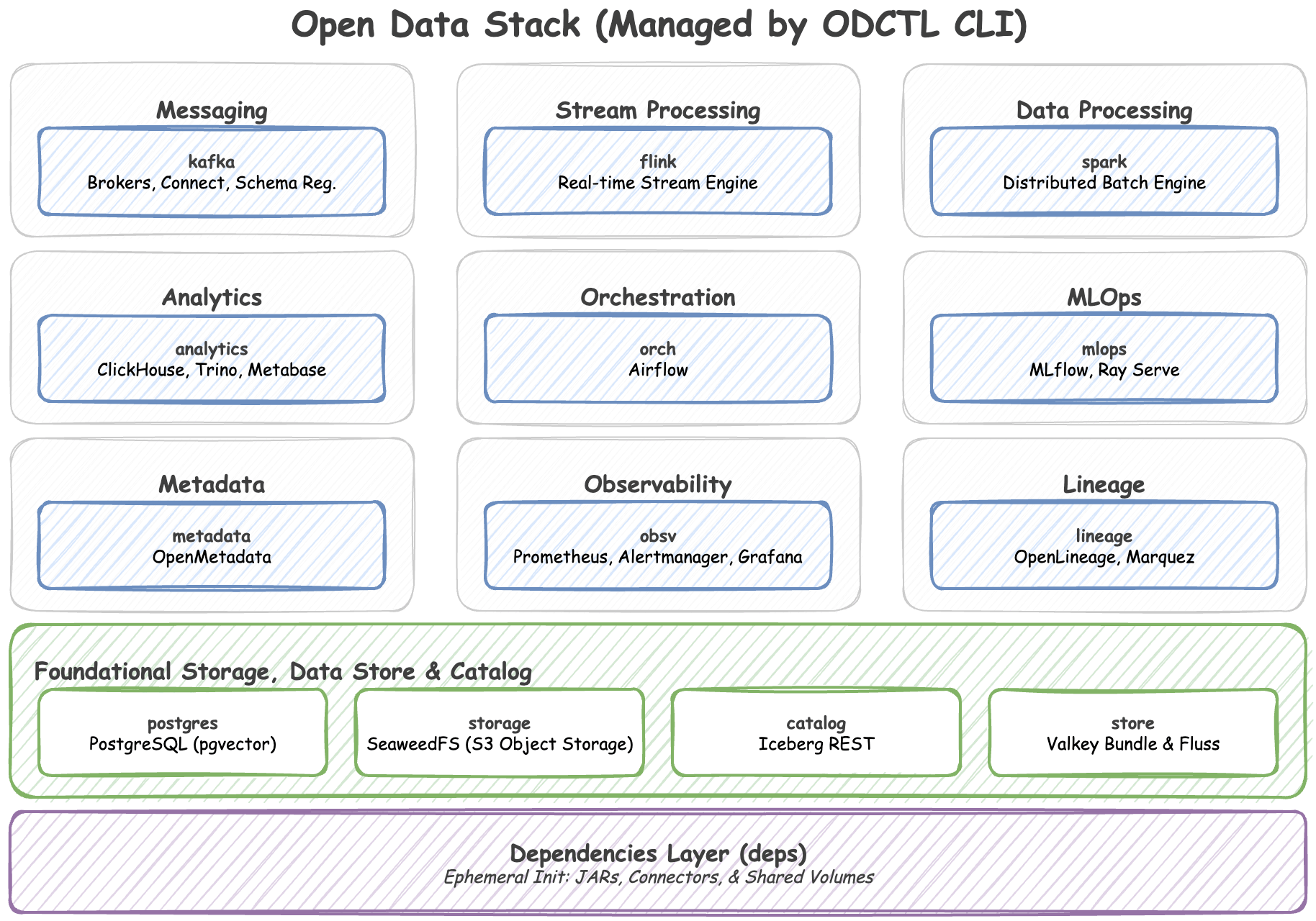
A curated collection of open-source technologies and an accompanying CLI (odctl) for experimenting with modern data architecture and MLOps locally.
Provisioning a local data environment with distributed systems can be highly complex. The Open Data Stack streamlines this process by resolving dependency conflicts, network routing configurations, and integration challenges across tools like Kafka, Spark, Flink, Iceberg, and Airflow. It provides a cohesive, Docker-based blueprint that operates seamlessly out of the box.
Bundled Technologies
The stack is organized into distinct profiles that can be launched independently or together:
- Messaging: Real-time event streaming, schema validation, and robust data ingestion.
- Stack: Kafka (KRaft), Schema Registry (Karapace), Kafka Connect
- Stream Processing: Stateful stream processing and continuous real-time data transformations.
- Stack: Apache Flink
- Data Processing: Distributed batch processing and large-scale ETL pipelines.
- Stack: Apache Spark
- Analytics: Real-time OLAP querying, federated SQL execution, and interactive BI dashboards.
- Stack: ClickHouse, Trino, Metabase
- Orchestration: Workflow scheduling, DAG execution, and complex pipeline automation.
- Stack: Apache Airflow
- MLOps: Machine learning experiment tracking, model registry, and HTTP model serving.
- Stack: MLflow
- Metadata: Centralized data catalog, data discovery, and enterprise governance.
- Stack: OpenMetadata
- Observability: Metrics collection, intelligent alerting, and system telemetry visualization.
- Stack: Prometheus, Alertmanager, Grafana
- Lineage: Data provenance, pipeline dependency tracking, and troubleshooting.
- Stack: OpenLineage, Marquez
- Foundational Storage, Data Store, & Catalog: Persistent state, S3-compatible object storage, unified table metadata, high-performance caching/vector search, and unified stream storage.
- Stack: PostgreSQL (pgvector), SeaweedFS (S3), Iceberg REST Catalog, Valkey Bundle, Apache Fluss
Prerequisites & Installation
Requirements
- Docker: Docker Engine or Docker Desktop must be running. We highly recommend allocating at least 8GB to 16GB of RAM to Docker, as data processing engines are resource-heavy.
- Python: Version 3.10 or higher.
Installation
Since odctl is a CLI tool, it is highly recommended to install it in an isolated environment using uv tool or pipx.
Using uv (Recommended):
uv tool install odctl
Using pipx:
pipx install odctl
Using pip:
pip install odctl
Quick Start
Get your local cluster up and running in three simple steps.
1. Initialize your workspace
This command copies the default Docker Compose files and configurations into a hidden .odctl folder in your current directory.
odctl init
2. Explore available profiles See a full list of technologies you can launch.
odctl list
3. Launch the streaming and batch processing engines Bring up a robust data engineering environment.
odctl up kafka-lite flink-lite spark-lite
Note: You do not need to memorize dependencies. The CLI will automatically detect that these profiles require foundational infrastructure and will launch PostgreSQL, SeaweedFS (S3), and the Iceberg REST Catalog for you before starting the target compute engines.
CLI Command Reference
The odctl CLI orchestrates the Open Data Stack and is logically grouped by functionality. You can append --help to any command for deeper parameter details.
Global Options
--verbose: Enable debug-level logging across all commands.-w, --workspace PATH: Path to the ODCTL workspace directory (default:./.odctl).
Inspection & Info
odctl list: List all available profiles and their capabilities.odctl explain <profile>: Explain the details, services, images, and dependencies of a profile.odctl ps: List Docker containers managed by the Open Data Stack.odctl info: View package and system-wide Docker daemon health status.
Workspace
odctl init: Initialize a local.odctlworkspace for custom configurations.
Cluster Lifecycle
odctl pull: Pre-fetch Docker images without starting the containers.odctl up: Launch Open Data profiles (automatically resolves upstream dependencies).odctl down: Stop and remove profile containers and networks.
Management
odctl logs: Fetch the logs of containers managed by specific profiles.odctl restart: Restart one or more specific profiles, keeping their containers.odctl recreate: Replace one or more profiles' containers, which is what applies an edited compose file. Add--pullto refresh the images too.
restart and recreate differ in one way that matters: a restart bounces the process inside the existing container, so a new memory limit, port, image tag or environment variable never reaches it, while a recreate replaces the container from its current definition. Recreating therefore discards whatever that container held. Both act only on the profiles you name, unlike up, which stops the ones you leave out.
Examples
# View all profiles and exposed ports
$ odctl list -d

# See exactly what the kafka profile provisions
$ odctl explain kafka-lite

# Launch specific profiles
$ odctl up flink-lite kafka-lite spark-lite

# Complete teardown and wipe all data
$ odctl down --all --volumes
Workspace Customization (.odctl)
The Open Data Stack is designed to be fully hackable. When you run odctl init, a local ./.odctl/ workspace is generated in your current working directory.
This folder contains all the underlying configurations that power the stack:
compose-*.yml: The actual Docker Compose definitions. You can edit these to change exposed ports, adjust memory limits, or inject new environment variables.registry.yml: The internal dependency graph..env: The environment variables used across the stack (e.g., default credentials or timezones).trino/rules.json: Trino's file-based access control. The shipped policy is deliberately generic: it grants every identity full table privileges and deniesanalystschema ownership, and it names no catalog, schema or table, because those belong to your project rather than to this tool. Add your own table rules here for row filtering and column masking, and restart Trino afterwards, since the file is read at startup.
The CLI will always prioritize the files in your local ./.odctl/ directory. If you make a mistake, you can always revert to the pristine default state by running odctl init --force.
Local Development & Contributing
If you want to contribute to the CLI itself, we welcome pull requests!
- Clone the repository.
- Install uv for dependency management.
- Sync the dependencies and install the project in development mode:
uv sync - Install the pre-commit hooks to ensure formatting checks pass:
uv run pre-commit install
- Run the test suite:
uv run pytest tests/
License
This project is licensed under the Apache License 2.0. See the LICENSE file for details.
1 maintainer

Download files
Download the file for your platform. If you're not sure which to choose, learn more about installing packages.
Source Distribution
Built Distribution
Filter files by name, interpreter, ABI, and platform.
If you're not sure about the file name format, learn more about wheel file names.
Copy a direct link to the current filters
File details
Details for the file odctl-0.6.0.tar.gz.
File metadata
- Download URL: odctl-0.6.0.tar.gz
- Upload date:
- Size: 572.3 kB
- Tags: Source
- Uploaded using Trusted Publishing? Yes
- Uploaded via:
twine/7.0.0 CPython/3.13.14
File hashes
| Algorithm | Hash digest | |
|---|---|---|
| SHA256 |
006057494c14774718dc1248991040867e98fbd1dc128c412e991ac11511e93b
|
|
| MD5 |
7ac063fcba47549853b01b8dcaf26136
|
|
| BLAKE2b-256 |
0ed549e397139e80278e7fd9d9024029c9d8f7c408fcd084104ebf7d2869798f
|
Provenance
The following attestation bundles were made for odctl-0.6.0.tar.gz:
Publisher:
publish.yml on jaehyeon-kim/odctl
-
Statement:
-
Statement type:
https://in-toto.io/Statement/v1 -
Predicate type:
https://docs.pypi.org/attestations/publish/v1 -
Subject name:
odctl-0.6.0.tar.gz -
Subject digest:
006057494c14774718dc1248991040867e98fbd1dc128c412e991ac11511e93b - Sigstore transparency entry: 2842465519
- Sigstore integration time:
-
Permalink:
jaehyeon-kim/odctl@88f63de2eeab0153f2821bb9ff96b216d0175e91 -
Branch / Tag:
refs/tags/v0.6.0 - Owner: https://github.com/jaehyeon-kim
-
Access:
public
-
Token Issuer:
https://token.actions.githubusercontent.com -
Runner Environment:
github-hosted -
Publication workflow:
publish.yml@88f63de2eeab0153f2821bb9ff96b216d0175e91 -
Trigger Event:
release
-
Statement type:
File details
Details for the file odctl-0.6.0-py3-none-any.whl.
File metadata
- Download URL: odctl-0.6.0-py3-none-any.whl
- Upload date:
- Size: 81.6 kB
- Tags: Python 3
- Uploaded using Trusted Publishing? Yes
- Uploaded via:
twine/7.0.0 CPython/3.13.14
File hashes
| Algorithm | Hash digest | |
|---|---|---|
| SHA256 |
eda287a75819c1ecee343bd92f2965f4acbfc05b105edbe4b26e83447bf5793f
|
|
| MD5 |
eb92534a31ba25707709ce86cd2f4e99
|
|
| BLAKE2b-256 |
775553ed2b19cd405f77ca34833583f4dee665f1cf76cf61dbae2e5bc8dc7307
|
Provenance
The following attestation bundles were made for odctl-0.6.0-py3-none-any.whl:
Publisher:
publish.yml on jaehyeon-kim/odctl
-
Statement:
-
Statement type:
https://in-toto.io/Statement/v1 -
Predicate type:
https://docs.pypi.org/attestations/publish/v1 -
Subject name:
odctl-0.6.0-py3-none-any.whl -
Subject digest:
eda287a75819c1ecee343bd92f2965f4acbfc05b105edbe4b26e83447bf5793f - Sigstore transparency entry: 2842465697
- Sigstore integration time:
-
Permalink:
jaehyeon-kim/odctl@88f63de2eeab0153f2821bb9ff96b216d0175e91 -
Branch / Tag:
refs/tags/v0.6.0 - Owner: https://github.com/jaehyeon-kim
-
Access:
public
-
Token Issuer:
https://token.actions.githubusercontent.com -
Runner Environment:
github-hosted -
Publication workflow:
publish.yml@88f63de2eeab0153f2821bb9ff96b216d0175e91 -
Trigger Event:
release
-
Statement type:














