
ODLabel
ODLabel (Open Dictionary Labeler) is a powerful tool for zero-shot object detection, labeling and visualization. It provides an intuitive graphical user interface for labeling objects in images using the YOLO-World model and supports various output formats such as YOLO, COCO, CSV, and XML.
Features
- Select a YOLO-World model for object detection
- Choose an images folder for labeling
- Specify output directory for annotated data
- Define object categories for detection
- Use Slicing Adaptive Inference (SAHI) for improved detection for small objects
- Select device type (CPU or GPU) for inference
- Customize train/validation split ratio
- Adjust confidence level and non-maximum suppression (IoU) threshold
- Visualize input image statistics and output detection results
Installation
PyTorch Version
To install the PyTorch version of ODLabel, run the following command:
pip install odlabel
ONNX Version
To install the ONNX version of ODLabel, run the following command:
pip install odlabel-onnx
Usage
To launch the PyTorch version of ODLabel application, run the following command:
odlabel
To launch the ONNX version of ODLabel application, run the following command:
odlabel-onnx
- Select a YOLO-World model file based on your installation for object detection.
- Choose the folder containing the images you want to label.
- Specify the output directory where the labeled data will be saved.
- Enter the object categories you want to detect, separated by commas.
- Configure additional options such as SAHI, device type, output format, train/validation split, confidence level, and NMS threshold.
- Click the "Start" button to begin the labeling process.
- Monitor the progress and view the detection results in the application.
Pytroch Model
| Model Type | mAP | mAP50 | mAP75 | Model |
|---|---|---|---|---|
| yolov8s-worldv2 | 37.7 | 52.2 | 41.0 | Download |
| yolov8m-worldv2 | 43.0 | 58.4 | 46.8 | Download |
| yolov8l-worldv2 | 45.8 | 61.3 | 49.8 | Download |
| yolov8x-worldv2 | 47.1 | 62.8 | 51.4 | Download |
ONNX Models
| Model Type | mAP | mAP50 | mAP75 | Model |
|---|---|---|---|---|
| yolov8s-worldv2 | 37.7 | 52.2 | 41.0 | Download |
| yolov8m-worldv2 | 43.0 | 58.4 | 46.8 | Download |
| yolov8l-worldv2 | 45.8 | 61.3 | 49.8 | Download |
| yolov8x-worldv2 | 47.1 | 62.8 | 51.4 | Download |
GUI Figures and Dashboard
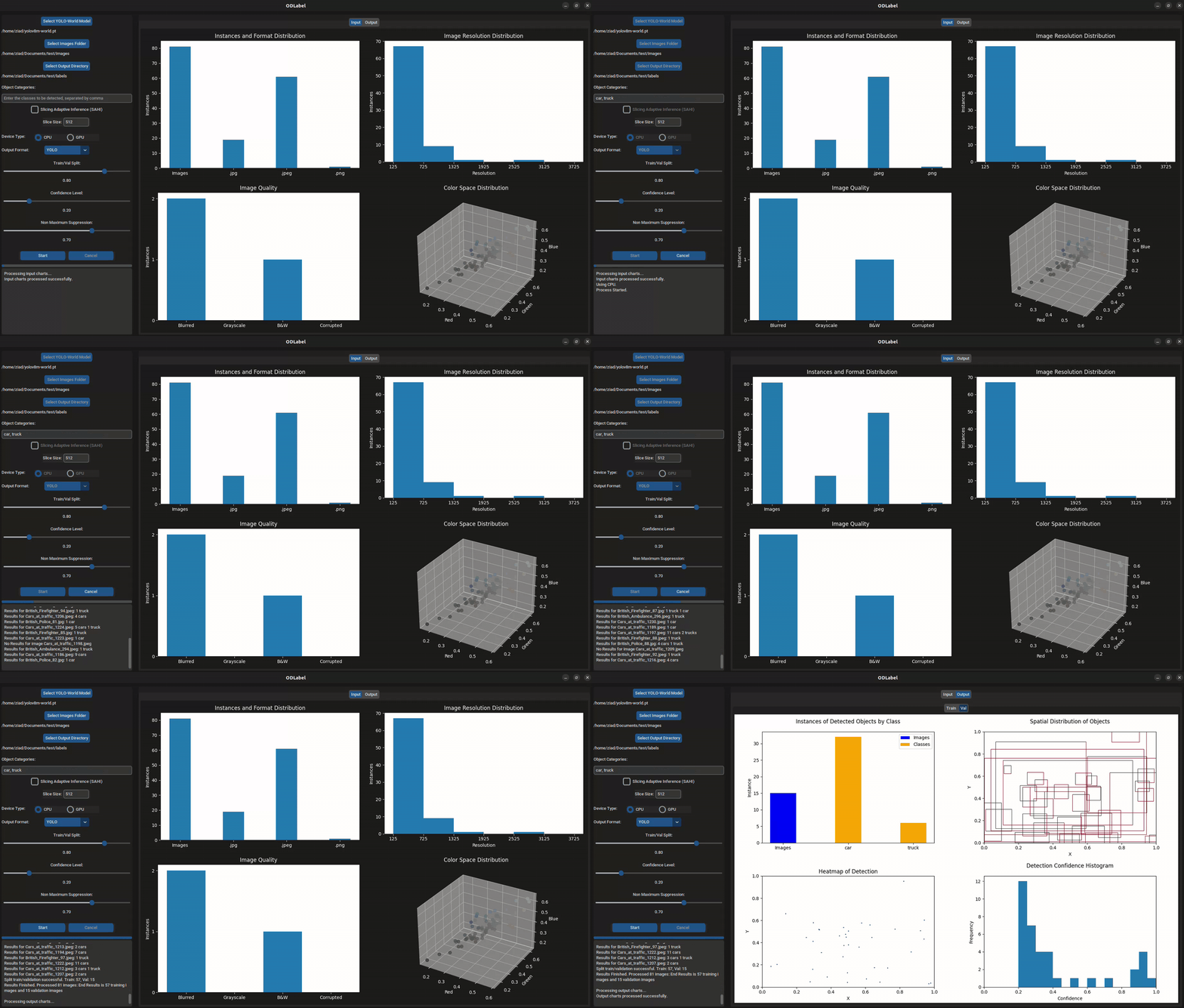
ODLabel provides a comprehensive dashboard with various figures and visualizations to assist in analyzing the input image data and object detection results. The dashboard is displayed within the graphical user interface (GUI) of the application, allowing for interactive exploration and understanding of the data.
The following figures are available in the dashboard:
-
Format and Instances Chart: This chart combines two visualizations in one figure:
- A bar chart displaying the total number of input images.
- A bar chart showing the distribution of image file formats (e.g., .jpg, .jpeg, .png, jfif).
-
Image Resolution Distribution: A histogram that illustrates the distribution of image resolutions across the input dataset. The x-axis represents the image width, and the bars show the frequency of images within each resolution bin.
-
Image Quality: A bar chart depicting the number of images falling into different quality categories:
- Blurred images
- Grayscale images
- Black and white images
- Corrupted or invalid images
-
Color Space Distribution: A 3D scatter plot that visualizes the color space distribution of the input images. Each point in the plot represents a unique color space, with its position determined by the mean values of the red, green, and blue channels. The size of the points indicates the frequency of that particular color space in the dataset.
-
Detected Object Count: A bar chart displaying the count of detected objects for each class. The first bar represents the total number of input images, while the subsequent bars show the number of instances for each object class detected across the dataset.
-
Detection Confidence Histogram: A histogram that illustrates the distribution of detection confidence scores. The x-axis represents the confidence level, and the bars show the frequency of detections within each confidence bin.
-
Spatial Distribution of Objects: A chart that visualizes the bounding boxes of detected objects. Each bounding box is represented by a rectangle, with the color intensity indicating the degree of overlap with other bounding boxes. Areas with darker colors signify a higher concentration of overlapping bounding boxes.
-
Heatmap of Detection: A heatmap visualization that showcases the spatial distribution of detected objects within the image space. The heatmap uses different colors to indicate the density of detections at various locations, with brighter colors representing higher concentrations.
These figures provide valuable insights into the input image data and the object detection results, enabling users to identify potential issues, patterns, and areas for further analysis or improvement. The dashboard serves as a powerful tool for exploring and understanding the data, facilitating informed decision-making and enhancing the overall object detection and labeling workflow.
Upgrade
You can upgrade PyTorch version of ODLabel using pip:
pip install --upgrade odlabel
You can upgrade ONNX version of ODLabel using pip:
pip install --upgrade odlabel-onnx
License
This project is licensed under the GNU Affero General Public License v3.0 (AGPL-3.0). See the LICENSE file for details.
Contributing
We welcome contributions! Please read our Code of Conduct and follow the contribution guidelines when submitting issues or pull requests.
Acknowledgements
ODLabel is built using the following open-source libraries:
-
ODLabel runs locally on your machine and does not collect or send any data externally. Your data remains private and secure within your local environment.
-
We extend our gratitude to AILab-CVC for generously open-sourcing their model.
Contact
For any questions or inquiries, please contact the maintainer at - ZiadAlgrafi@gmail.com.
1 maintainer

Metadata
1 maintainer
Release files for odlabel-onnx 0.7.26.9
For a detailed explanation of source distributions (sdists) and built distributions (wheels), please see the package formats documentation.
Source distribution (sdist)
| File | Size | Uploaded | |
|---|---|---|---|
| odlabel_onnx-0.7.26.9.tar.gz | 22.5 kB | Details |
Built distribution (wheel)
| File | Interpreter | ABI | Platform | Reset |
|---|---|---|---|---|
| odlabel_onnx-0.7.26.9-py3-none-any.whl | Python 3 | none | any | Details |
Total release size: 45.0 kB
Release files / odlabel_onnx-0.7.26.9.tar.gz
| Download URL | odlabel_onnx-0.7.26.9.tar.gz |
|---|---|
| Size | 22.5 kB |
| Tags | Source |
|
SHA-256 checksum How to use checksums |
a05ec3b8acaab4b4fa17cce104ec7eebc70fca0c7e07b0c5002d92b7530efcd9
|
|
BLAKE2b-256 checksum How to use checksums |
a4c62c2b767ddd3485bf0a349b795b00368ba68c865e90fdb4dd9b70e19d0198
|
| Upload date | |
|
Uploaded using Trusted Publishing? What is trusted publishing? |
No |
| Uploaded via |
twine/5.0.0 CPython/3.10.12
|
Release files / odlabel_onnx-0.7.26.9-py3-none-any.whl
| Download URL | odlabel_onnx-0.7.26.9-py3-none-any.whl |
|---|---|
| Size | 22.5 kB |
| Tags | Python 3 |
|
SHA-256 checksum How to use checksums |
41a62f9135453f3c9a2cf390b227e3c68dc2e34e1ee3453d0be53c024e4e240f
|
|
BLAKE2b-256 checksum How to use checksums |
40f5bb510b8c9bbdf42997a84c0ed2ff0fec23eb7524e745f307340b397fa0fe
|
| Upload date | |
|
Uploaded using Trusted Publishing? What is trusted publishing? |
No |
| Uploaded via |
twine/5.0.0 CPython/3.10.12
|














