

Account Dashboard Banner





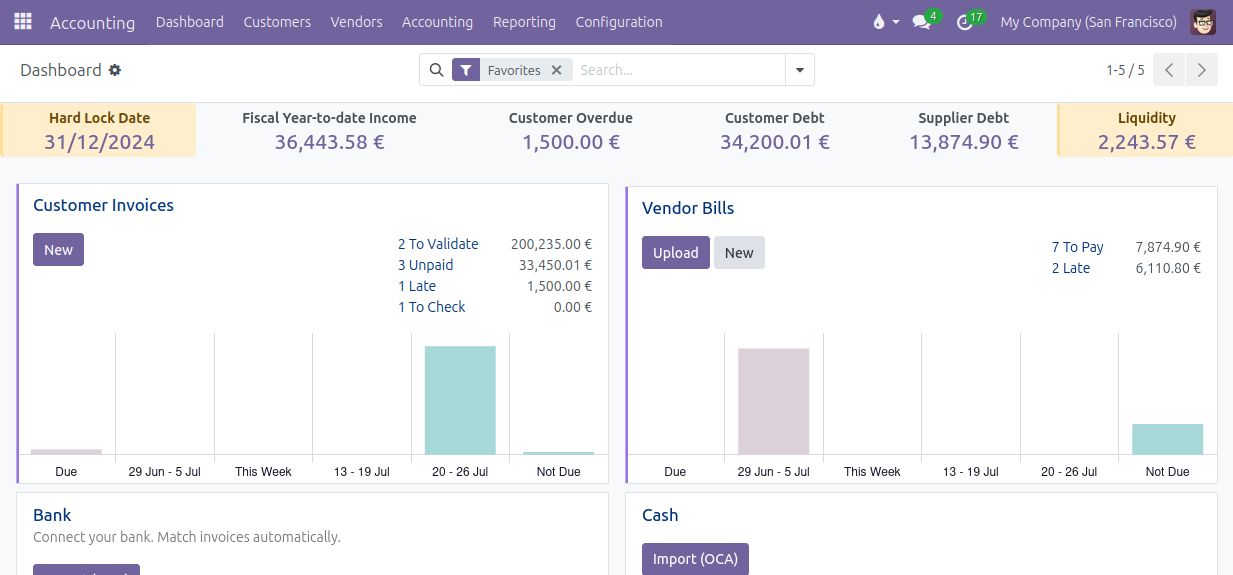
The development of this module started with a simple analysis: accountants tend to forget to update the lock dates. Part of the problem lies in the fact that the lock dates can be seen in the wizard to update the lock dates, but accountants have no incentive to start this wizard regularly to check the lock dates. The idea was to display the lock dates in a banner at the top of the accounting dashboard, so that accountants have the value of the lock dates in front of their eyes.
With such a banner in the accounting dashboard to display the lock dates, there was a great temptation to display other interesting information in that banner, such as some key figures of the accounting: liquidity, turnover, customer overdue, etc. It gave birth to the idea to have a configurable banner in the accounting dashboard!
Table of contents
Configuration
Go to the menu Invoicing > Configuration > Dashboard > Dashboard Banner Cells: in this menu, you can add or remove cells from the banner, change the cell type, modify the order via drag-and-drop, customize the labels if necessary.
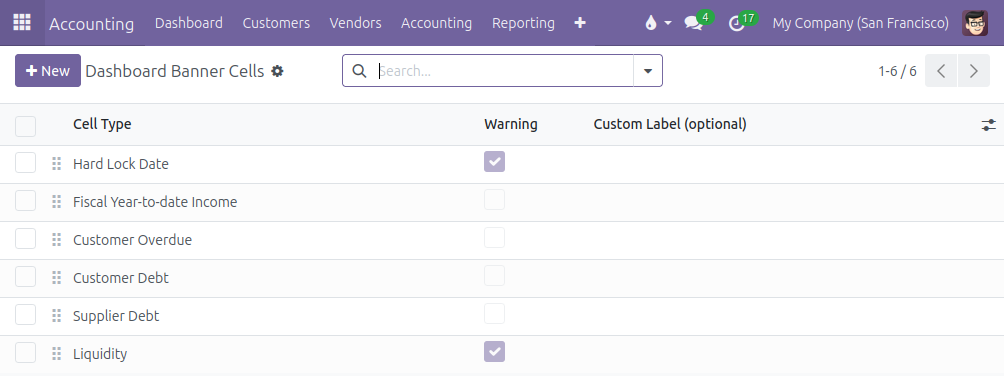
Many cell types are available:
Income with 4 options: Fiscal Year-to-date Income, Year-to-date Income, Quarter-to-date Income and Month-to-date Income. It displays the period balance of the accounts with type Income and Other Income.
Liquidity: it display the ending balance of the accounts linked to a bank or cash or credit journal.
Customer Debt: it displays the ending balance of the default Account Receivable and, if the point of sale is installed, the intermediary account used for unidentified customers.
Customer Overdue: same as the Customer Debt, but limited to journal items with a due date in the past.
Supplier Debt: it displays the ending balance of the default Account Payable.
Lock dates: all the lock dates are available: Tax Return Lock Date, Sales Lock Date, Purchase Lock Date, Global Lock Date and Hard Lock Date.
The module is designed to allow the modification of the computation of the different cell types by inheriting the method _prepare_cell_data_<cell_type>() or _prepare_cell_data(). It is also easy for a developper to add more cell types.
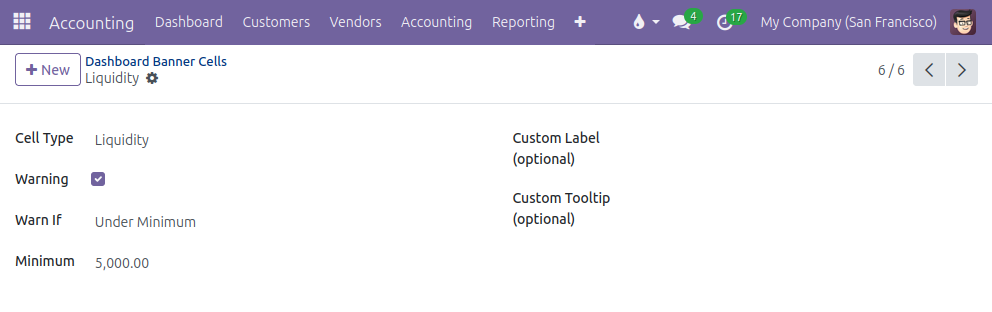
It is possible to display a cell as a warning cell (yellow background color instead of light grey): click on the Warning option and customize the conditions to trigger the warning.
Usage
Enjoy the accounting dashboard with the banner at the top:
Bug Tracker
Bugs are tracked on GitHub Issues. In case of trouble, please check there if your issue has already been reported. If you spotted it first, help us to smash it by providing a detailed and welcomed feedback.
Do not contact contributors directly about support or help with technical issues.
Credits
Contributors
Alexis de Lattre <alexis.delattre@akretion.com>
Maintainers
This module is maintained by the OCA.

OCA, or the Odoo Community Association, is a nonprofit organization whose mission is to support the collaborative development of Odoo features and promote its widespread use.
Current maintainer:

This module is part of the OCA/account-financial-tools project on GitHub.
You are welcome to contribute. To learn how please visit https://odoo-community.org/page/Contribute.
1 maintainer

Metadata
1 maintainer
Release files for odoo-addon-account-dashboard-banner 18.0.2.1.0
For a detailed explanation of source distributions (sdists) and built distributions (wheels), please see the package formats documentation.
Built distribution (wheel)
| File | Interpreter | ABI | Platform | Actions Reset |
|---|---|---|---|---|
| odoo_addon_account_dashboard_banner-18.0.2.1.0-py3-none-any.whl | Python 3 | none | any | Details for odoo_addon_account_dashboard_banner-18.0.2.1.0-py3-none-any.whl |
Security for odoo-addon-account-dashboard-banner 18.0.2.1.0
Provenance
Provenance describes where a file came from. On PyPI, provenance is shared via attestations, which provide a verifiable record of the build or publishing details. View details, limitations and caveats.
No provenance found
None of the files in this release were uploaded with provenance metadata.
A note on package security
PyPI is a repository for distributing packages, not a service for auditing them. While third-party security researchers and our staff do their best to detect and remove malicious packages, PyPI cannot guarantee the quality, security or suitability of any given package.
To learn more about protecting yourself from malicious actors, visit our package security documentation.














