

Account Financial Risk





Adds a new page in partner to manage its Financial Risk. (Only visible for User or Manager Financial Risk groups)
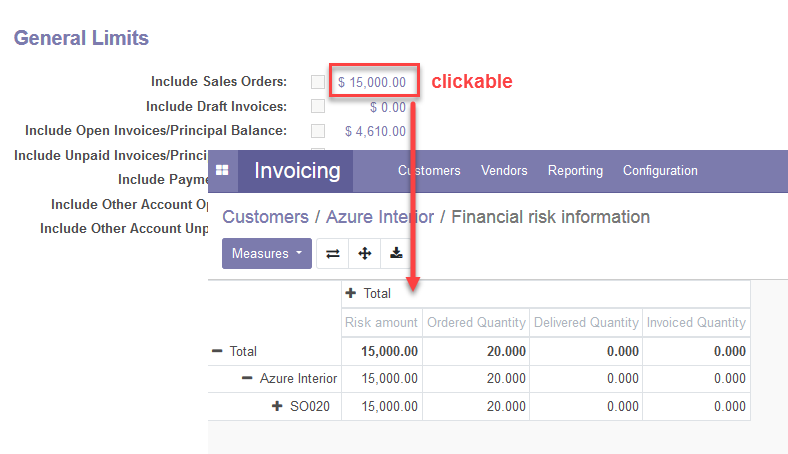
If any limit is exceeded, you won’t be able to confirm any of its invoices unless you are authorized (Financial Risk Manager group). You can click in risk amount to view amount origin.
When a non-zero credit limit is set, the last modification date is saved and displayed next to the credit limit.
Optionally, the credit information can be shown in the portal view for the customer, if configured accordingly.
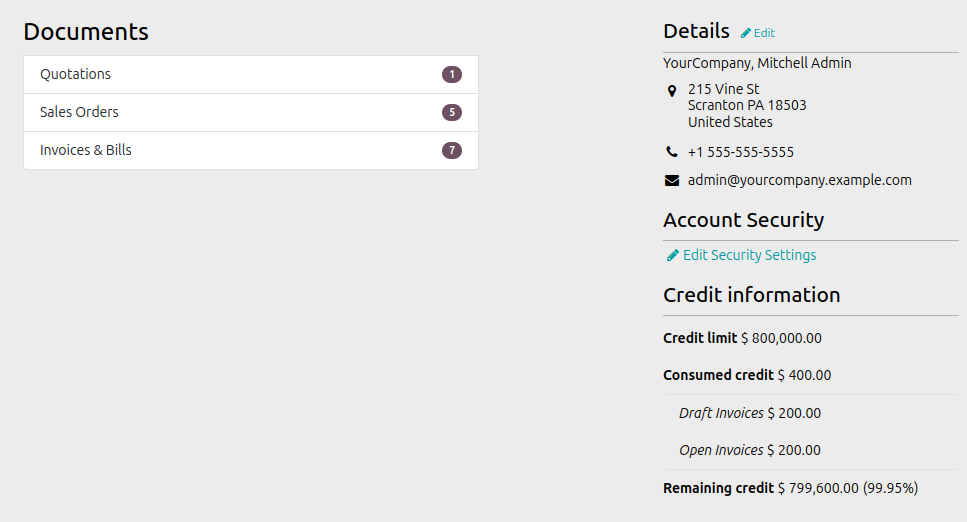
Table of contents
Configuration
To configure this module, you need to:
Go to User and set group User or Manager Financial Risk
Go to Invoicing/Accounting > Configuration > Settings > Accounting
In the Customer Payments section, fill Maturity Margin for setting the number of days to last after the due date to consider an invoice as unpaid.
(Optional) To display credit information in the customer portal, go to Invoicing > Configuration > Settings > Financial Risk and activate Show credit information in portal.
Credit information can be displayed on the portal if it is enabled globally, and can be disabled individually for certain contacts.
Usage
To use this module, you need to:
Go to Invoicing/Accounting > Customers > Customers.
Select an existing customer or create a new one.
Open the Financial Risk tab.
Set limits and choose options to compute in credit limit.
Go to Invoicing/Accounting > Customers > Invoices and create new customer invoices.
Test the restriction trying to create an invoice for the partner for an amount higher of the limit you have set.
Return to Customer Financial Risk tab and click in amount to view origin.
Bug Tracker
Bugs are tracked on GitHub Issues. In case of trouble, please check there if your issue has already been reported. If you spotted it first, help us to smash it by providing a detailed and welcomed feedback.
Do not contact contributors directly about support or help with technical issues.
Credits
Contributors
-
Carlos Dauden
Pedro M. Baeza
Ernesto Tejeda
Agathe Mollé <agathe.molle@savoirfairelinux.com>
Ugne Sinkeviciene <ugne@versada.eu>
-
Ilyas <irazor147@gmail.com>
Maintainers
This module is maintained by the OCA.

OCA, or the Odoo Community Association, is a nonprofit organization whose mission is to support the collaborative development of Odoo features and promote its widespread use.
Current maintainer:

This module is part of the OCA/credit-control project on GitHub.
You are welcome to contribute. To learn how please visit https://odoo-community.org/page/Contribute.
1 maintainer

Metadata
1 maintainer
Release files for odoo-addon-account-financial-risk 18.0.1.2.1
For a detailed explanation of source distributions (sdists) and built distributions (wheels), please see the package formats documentation.
Built distribution (wheel)
| File | Interpreter | ABI | Platform | Reset |
|---|---|---|---|---|
| odoo_addon_account_financial_risk-18.0.1.2.1-py3-none-any.whl | Python 3 | none | any | Details |
Release files / odoo_addon_account_financial_risk-18.0.1.2.1-py3-none-any.whl
| Download URL | odoo_addon_account_financial_risk-18.0.1.2.1-py3-none-any.whl |
|---|---|
| Size | 382.3 kB |
| Tags | Python 3 |
|
SHA-256 checksum How to use checksums |
674b216b5dee0f76bada227e2a9217b5074ba2257ef5dc498b53180a8e42d00e
|
|
BLAKE2b-256 checksum How to use checksums |
d1e7efe598d13b53957a9d7836d1cce7981eeab844f12eb98bd795619c86ec87
|
| Upload date | |
|
Uploaded using Trusted Publishing? What is trusted publishing? |
No |
| Uploaded via |
twine/7.0.0 CPython/3.14.4
|














