

Account Journal Dashboard Statement Button





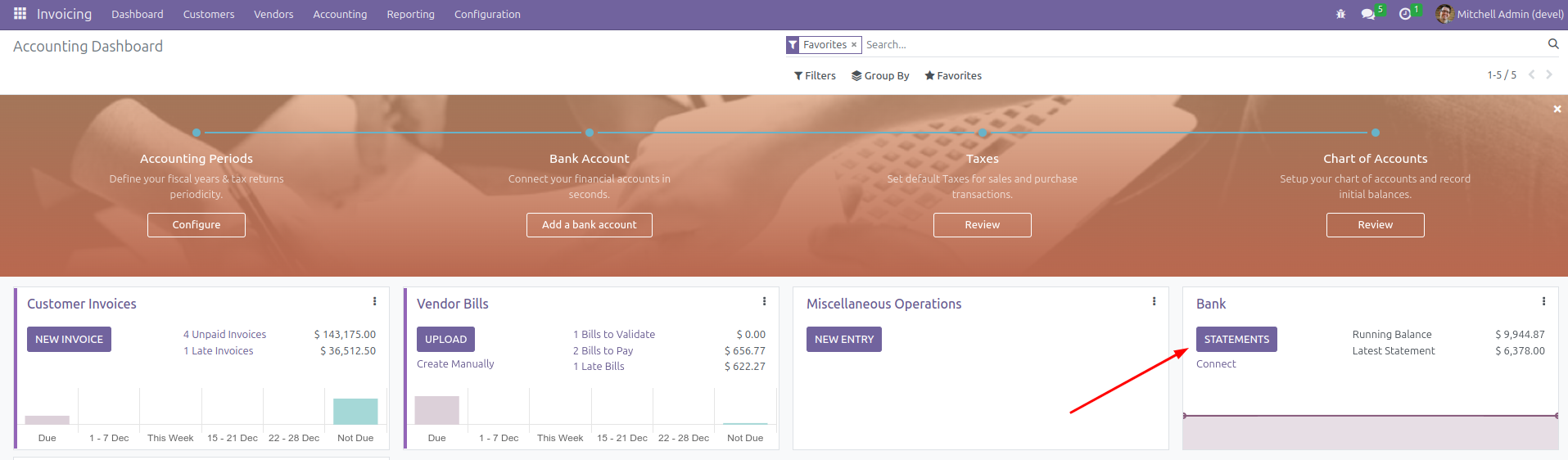
This module enhances the Account Journal Dashboard by introducing a shortcut button for Bank and Cash journals. The button provides a direct link to the Bank Statements view, streamlining access to statement management.
Table of contents
Use Cases / Context
In the default (vanilla) behavior of Odoo CE, when a user clicks on the name of a Bank or Cash journal in the Accounting dashboard, they are redirected to the Statements view. However, this behavior changes when installing the OCA Reconcile add-ons or using Odoo EE.
This module offers an alternative by adding a Statements button directly into the journal card, providing users with a one-click option to access the Statements view. This approach ensures that users can maintain the familiar workflow of quickly accessing the Statements view, even when other customizations or versions are in place, without altering the default functionality.
Usage
The Statement button will only appear once there are records linked to the corresponding journal.
Bug Tracker
Bugs are tracked on GitHub Issues. In case of trouble, please check there if your issue has already been reported. If you spotted it first, help us to smash it by providing a detailed and welcomed feedback.
Do not contact contributors directly about support or help with technical issues.
Credits
Contributors
Binhex (https://binhex.cloud) - Rolando Pérez Rebollo <r.perez@binhex.cloud>
Maintainers
This module is maintained by the OCA.

OCA, or the Odoo Community Association, is a nonprofit organization whose mission is to support the collaborative development of Odoo features and promote its widespread use.
This module is part of the OCA/bank-statement-import project on GitHub.
You are welcome to contribute. To learn how please visit https://odoo-community.org/page/Contribute.
1 maintainer

Release files for odoo-addon-account-journal-dashboard-statement-button 16.0.1.0.0.4
For a detailed explanation of source distributions (sdists) and built distributions (wheels), please see the package formats documentation.
Built distribution (wheel)
| File | Interpreter | ABI | Platform | Reset |
|---|---|---|---|---|
| odoo_addon_account_journal_dashboard_statement_button-16.0.1.0.0.4-py3-none-any.whl | Python 3 | none | any | Details |














