
Cost-Revenue Spread





Allows to spread costs or revenues over a customizable periods, to even out cost or invoice spikes.
Table of contents
Configuration
To be able to access the full spreading features, the user must belong to Show Full Accounting Features group.
On the form view of the company, in the Account Spread tab, you can configure the journals in which the spread journal items will be generated by default:
the Default Spread Journal for Revenues,
the Default Spread Journal for Expenses.
In the same Account Spread tab, you can also configure the Spread Balance Sheet Accounts used by default:
the Default Spread Account for Revenues,
the Default Spread Account for Expenses.
This module by default allows the spreading even before the receipt of the invoice or when the invoice is still draft, so that it is possible to work on the plan of the cost/revenue spreading. To disable this feature, on the form view of the company disable the Allow Spread Planning option.
In Spread Template, there is also option to Auto assign template on invoice validate, based on the preset invoice line criteria.
On the form view of the company, the Auto-post spread lines option forces the account moves created during the cost/revenue spreading to be automatically posted. When this option is false, the user can enable/disable the automatic posting by the flag Auto-post lines present in the spread board.
On the form view of the company, enable the Auto-archive spread option if you want the cron job to automatically archive the spreads when all lines are posted.
Usage
Define Spread Costs/Revenues Board
Under Invoicing -> Accounting -> Journals -> Spread Costs/Revenues, create a new spread board.
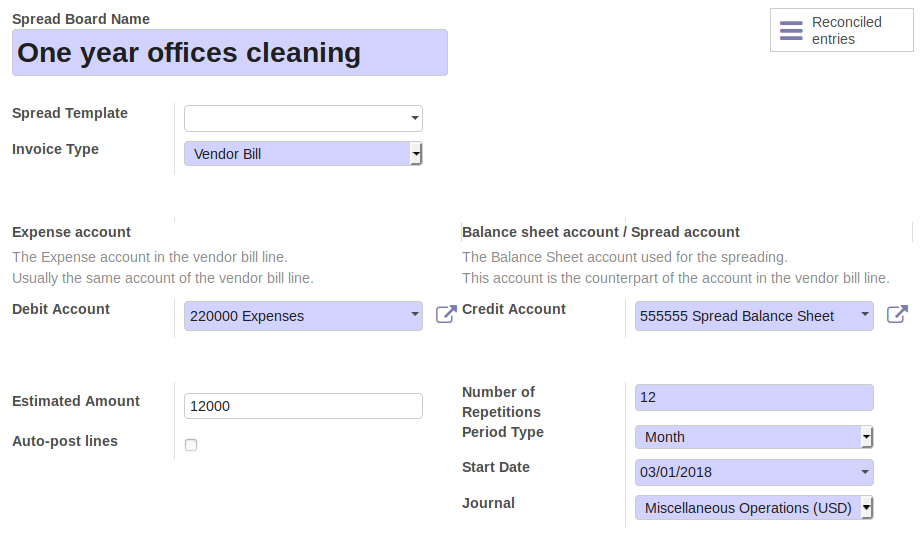
Complete the definition of the spreading criteria, by setting the the fields:
Debit Account
Credit Account
Estimated Amount (The total amount to spread)
Number of Repetitions
Period Type (Duration of each period)
Start date
Journal
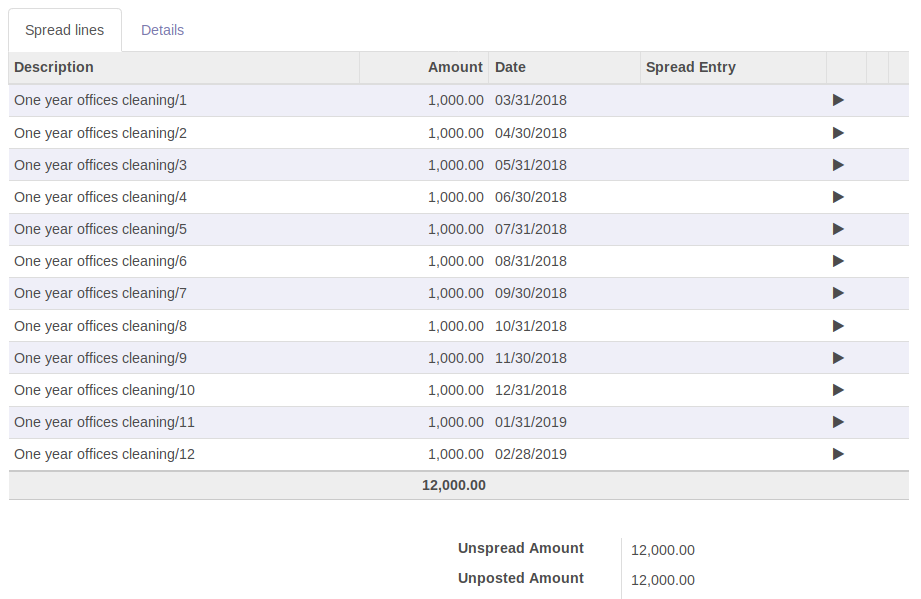
Click on the “Recalculate unposted lines” button on the top-left to calculate the spread lines.
A cron job will automatically create the accounting moves for all the lines having date previous that the current day (today).
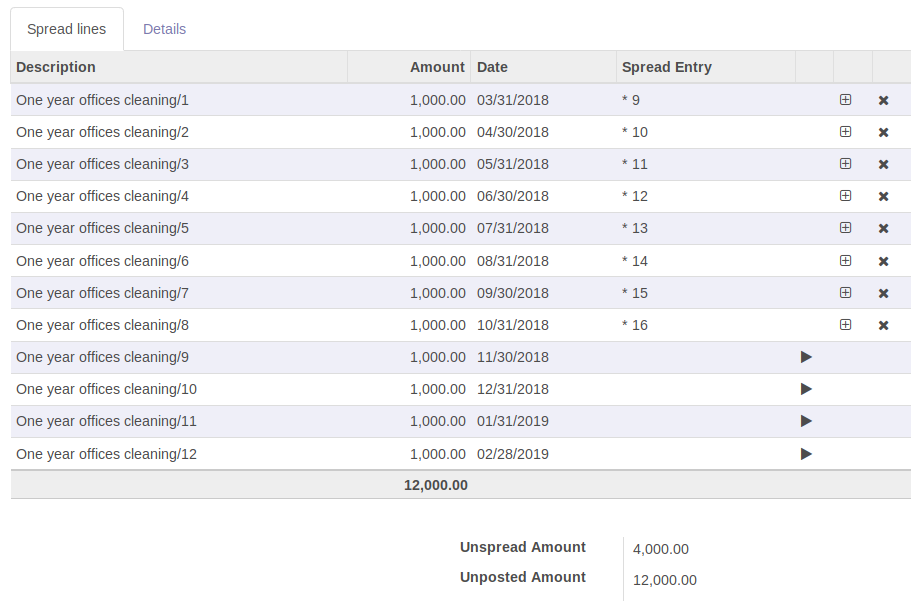
By default, the status of the created accounting moves is posted. To disable the automatic posting of the accounting moves, set the flag Auto-post lines to False. This flag is only available when the Auto-post spread lines option, present on the form view of the company, is disabled.
Click on button Recalculate entire spread button in the spread board to force the recalculation of the spread lines: this will also reset all the journal entries previously created.
Link Invoice to Spread Costs/Revenues Board
Create an invoice or vendor bill in draft. On its lines, the spreading right-arrow icon are displayed in dark-grey color.

Click on the spreading right-arrow icon. A wizard prompts to enter a Spread Action Type:
Link to existing spread board
Create from spread template
Create new spread board
Select Link to existing spread board and enter the previously generated Spread Board. Click on Confirm button: the selected Spread Board will be automatically displayed.
Go back to the draft invoice/bill. The spreading functionality is now enabled on the invoice line: the spreading right-arrow icon is now displayed in green color.

Validate the invoice/bill. Click on the spreading (green) right-arrow icon to open the spread board, then click on the smart button Posted entries to see the moves of the spread lines together with the move of the invoice line.
In case the Subtotal Price of the invoice line is different than the Estimated Amount of the spread board, the spread lines (not yet posted) will be recalculated when validating the invoice/bill.
Define Spread Costs/Revenues Template
Under Invoicing -> Configuration -> Accounting -> Spread Templates, create a new spread template.
Spread Type
Spread Balance Sheet Account
Expense/Revenue Account This option visible if invoice line account is balance sheet account, user need to specify this too.
Journal
Auto assign template on invoice validate
When creating a new Spread Costs/Revenues Board, select the right template. This way the above fields will be copied to the Spread Board.
If Auto assign template on invoice validate is checked, this template will be used to auto create spread, if the underlining invoice match the preset product/account/analytic criteria.
Changelog
13.0.1.0.0
[MIG] Port account_spread_cost_revenue to V13.
12.0.2.0.0
[ENH] In spread template, add option to auto create spread on invoice validation
12.0.1.1.0
[ENH] Add optional Expense/Revenue Account in Chart Template, which can be used in place of account from invoice line to set Expense/Revenue account in the spread
12.0.1.0.0
[MIG] Port account_spread_cost_revenue to V12.
11.0.1.0.0
[ADD] Module account_spread_cost_revenue. (#715)
Bug Tracker
Bugs are tracked on GitHub Issues. In case of trouble, please check there if your issue has already been reported. If you spotted it first, help us to smash it by providing a detailed and welcomed feedback.
Do not contact contributors directly about support or help with technical issues.
Credits
Contributors
Andrea Stirpe <a.stirpe@onestein.nl>
Kitti U. <kittiu@ecosoft.co.th>
Saran Lim. <saranl@ecosoft.co.th>
Other credits
Part of the code in this module (in particular the computation of the spread lines) is highly inspired by the Assets Management module from the standard Odoo 11.0 Community developed by Odoo SA.
Maintainers
This module is maintained by the OCA.

OCA, or the Odoo Community Association, is a nonprofit organization whose mission is to support the collaborative development of Odoo features and promote its widespread use.
This module is part of the OCA/account-financial-tools project on GitHub.
You are welcome to contribute. To learn how please visit https://odoo-community.org/page/Contribute.
1 maintainer

Release files for odoo-addon-account-spread-cost-revenue 16.0.1.0.1.7
For a detailed explanation of source distributions (sdists) and built distributions (wheels), please see the package formats documentation.
Built distribution (wheel)
| File | Interpreter | ABI | Platform | Reset |
|---|---|---|---|---|
| odoo_addon_account_spread_cost_revenue-16.0.1.0.1.7-py3-none-any.whl | Python 3 | none | any | Details |
Release files / odoo_addon_account_spread_cost_revenue-16.0.1.0.1.7-py3-none-any.whl
| Download URL | odoo_addon_account_spread_cost_revenue-16.0.1.0.1.7-py3-none-any.whl |
|---|---|
| Size | 299.6 kB |
| Tags | Python 3 |
|
SHA-256 checksum How to use checksums |
3ae7b090f19447fddb5d08e4e33b53479103c4b3b5cd8425f162996d13677eb1
|
|
BLAKE2b-256 checksum How to use checksums |
37c5d5a40a8d432e54e19473831a58cf0b0a3f1f5c0aa5237a11e58284ef3402
|
| Upload date | |
|
Uploaded using Trusted Publishing? What is trusted publishing? |
No |
| Uploaded via |
twine/7.0.0 CPython/3.14.4
|














