

Automation Oca





This module allows to automate several process according to some rules.
This is useful for creating automated actions on your database like:
Send a welcome email to all new partners (or filtered according to some rules)
Remember to online customers that they forgot their basket with some items
Send documents to sign to all new employees
Table of contents
Usage
Configure your processes
Access the Automation menu.
Create a new Automation Configuration.
Set the model and domains.
Go to Configuration -> Filters to create filters as a preconfigured domains. Filters can be established in the proper field in the Automation Configuration record.
Create the different steps by clicking the “ADD” button inside the automation configuration form.
Create child steps by clicking the “Add child activity” at the bottom of a created step.
Select the kind of configuration you create. You can choose between:
Periodic configurations: every 6 hours, a process will check if new records need to be created.
On demand configurations: user need to execute manually the job.
Press Start.
Inside the process, you can check all the created items.
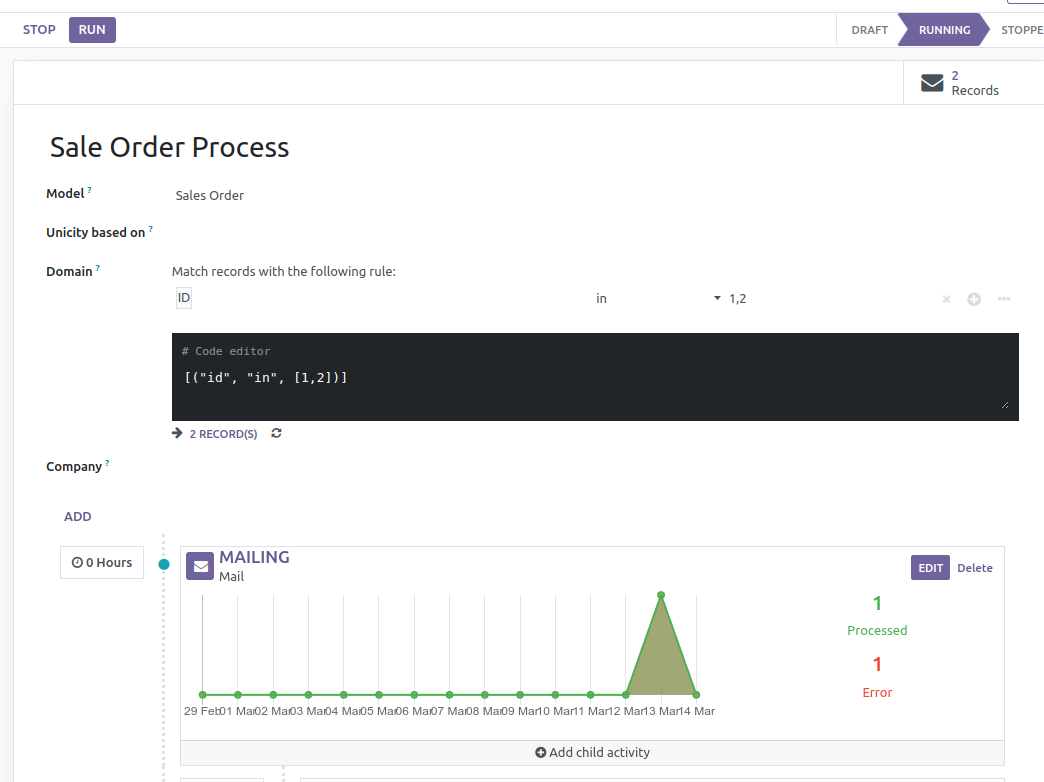
Configuration of steps
Steps can trigger one of the following options:
Mail: Sends an email using a template.
Server Action: Executes a server action.
Activity: Creates an activity to the related record.
All the steps need to specify the moment of execution. We will set the number of hours/days and a trigger type:
Start of workflow: It will be executed at the previously-configured time after we create the record.
Execution of another step: It will be executed at the previously-configured time after the previous step is finished properly.
Mail opened: It will be executed at the previously-configured time after the mail from the previous step is opened.
Mail not opened: It will be executed at the previously-configured time after the mail from the previous step is sent if it is not opened before this time.
Mail replied: It will be executed at the previously-configured time after the mail from the previous step is replied.
Mail not replied: It will be executed at the previously-configured time after the mail from the previous step is opened if it has not been replied.
Mail clicked: It will be executed at the previously-configured time after the links of the mail from the previous step are clicked.
Mail not clicked: It will be executed at the previously-configured time after the mail from the previous step is opened and no links are clicked.
Mail bounced: It will be executed at the previously-configured time after the mail from the previous step is bounced back for any reason.
Activity has been finished: It will be executed at the previously-configured time after the activity from the previous action is done.
Activity has not been finished: It will be executed at the previously-configured time after the previous action is executed if the related activity is not done.
Important to remember to define a proper template when sending the email. It will the template without using a notification template. Also, it is important to define correctly the text partner or email to field on the template
Records creation
Records are created using a cron action. This action is executed every 6 hours by default.
Step execution
Steps are executed using a cron action. This action is executed every hour by default. On the record view, you can execute manually an action.
There is a way to enforce step execution when finalize the previous one. If we set a negative value on the period, the execution will be immediate without a cron.
Bug Tracker
Bugs are tracked on GitHub Issues. In case of trouble, please check there if your issue has already been reported. If you spotted it first, help us to smash it by providing a detailed and welcomed feedback.
Do not contact contributors directly about support or help with technical issues.
Credits
Contributors
Enric Tobella (Dixmit)
Other credits
The development of this module has been financially supported by:
Associacion Española de Odoo (AEODOO)
Maintainers
This module is maintained by the OCA.

OCA, or the Odoo Community Association, is a nonprofit organization whose mission is to support the collaborative development of Odoo features and promote its widespread use.
This module is part of the OCA/automation project on GitHub.
You are welcome to contribute. To learn how please visit https://odoo-community.org/page/Contribute.
1 maintainer

Metadata
1 maintainer
Release files for odoo-addon-automation-oca 17.0.1.1.1.1
For a detailed explanation of source distributions (sdists) and built distributions (wheels), please see the package formats documentation.
Built distribution (wheel)
| File | Interpreter | ABI | Platform | Actions Reset |
|---|---|---|---|---|
| odoo_addon_automation_oca-17.0.1.1.1.1-py3-none-any.whl | Python 3 | none | any | Details for odoo_addon_automation_oca-17.0.1.1.1.1-py3-none-any.whl |
Release files / odoo_addon_automation_oca-17.0.1.1.1.1-py3-none-any.whl
| Download URL | odoo_addon_automation_oca-17.0.1.1.1.1-py3-none-any.whl |
|---|---|
| Size | 198.3 kB |
| Tags | Python 3 |
|
SHA-256 checksum How to use checksums |
ccbb83319f4678f4de637d1622c47e995db4815bd106752bc5a6dbc73db7e819
|
|
BLAKE2b-256 checksum How to use checksums |
8a24191814168e59ea7d51f315a116e62fbdc12874411bbb0c8c50fb9729608b
|
| Upload date | |
|
Uploaded using Trusted Publishing? What is trusted publishing? |
No |
| Uploaded via |
twine/7.0.0 CPython/3.14.4
|
Security for odoo-addon-automation-oca 17.0.1.1.1.1
Provenance
Provenance describes where a file came from. On PyPI, provenance is shared via attestations, which provide a verifiable record of the build or publishing details. View details, limitations and caveats.
No provenance found
None of the files in this release were uploaded with provenance metadata.
A note on package security
PyPI is a repository for distributing packages, not a service for auditing them. While third-party security researchers and our staff do their best to detect and remove malicious packages, PyPI cannot guarantee the quality, security or suitability of any given package.
To learn more about protecting yourself from malicious actors, visit our package security documentation.














