
Generate Barcodes for Any Models

Project description

Generate Barcodes (Abstract)





This module extends Odoo functionality, allowing user to generate barcode depending on a given barcode rule for any Model.
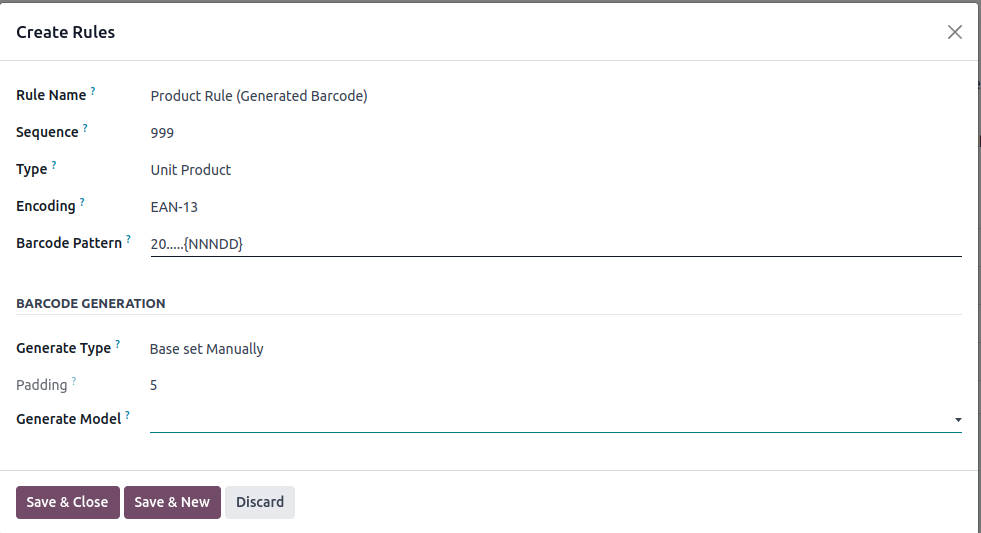
For example, if the barcode pattern is “20…..{NNNDD}”:
the EAN13 code will begin with ‘20’,
followed by 5 digits (named Barcode Base in this module),
followed by 5 others digits to define the variable price with 2 decimals,
the last digit (the 13rd digit) is the control digit (i.e. the checksum).
With this module, it is possible to:
Affect a pattern (barcode.rule) to a model
Define a Barcode base:
manually, if the base of the barcode must be set by a user (typically an internal code defined in your company).
automatically by a sequence, if you want to let Odoo increment a sequence (typical case of a customer number incrementation).
Generate a barcode, based on the defined pattern and the barcode base
Table of contents
Installation
This module use an extra python library named ‘python-barcode’ you should install to make barcode generation works properly.
sudo pip install python-barcode
Configuration
To configure this module, you need to:
Go to Settings / Technical / Sequences & Identifiers / Barcode Nomenclatures
Select a Nomenclature
Create or select a rule
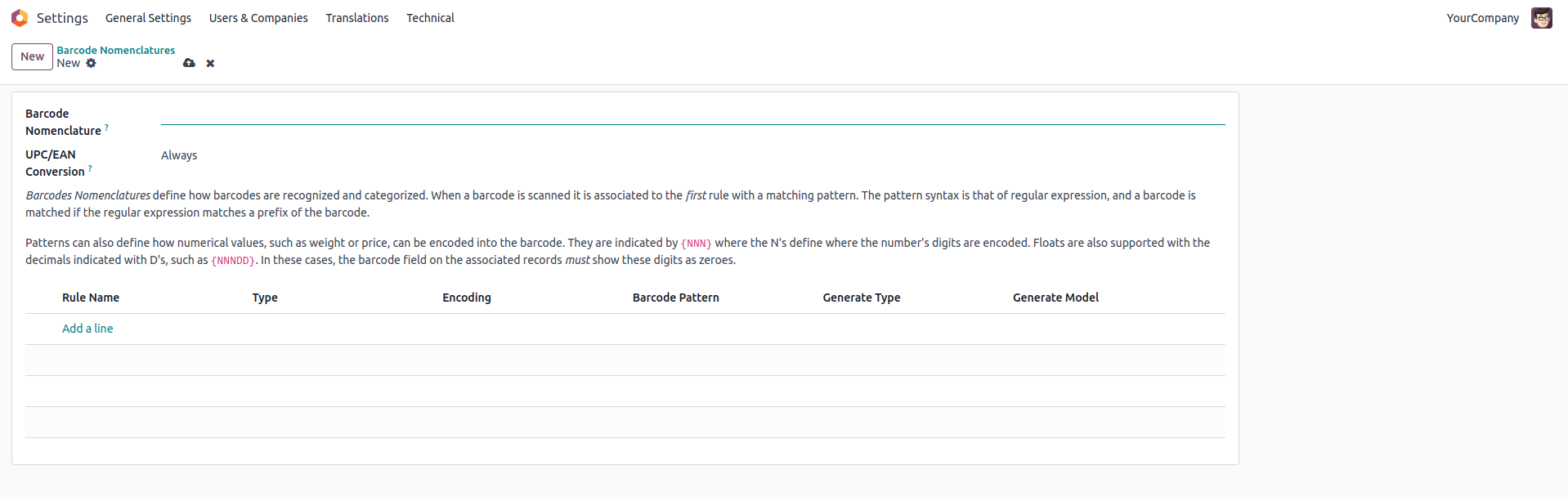
For manual generation, set:
‘Base set Manually’ in ‘Generate Type’
Set the model
For automatic generation, set:
‘Base managed by Sequence’ in ‘Generate Type’
Set the model
Generate a new sequence by button, or affect a existing one
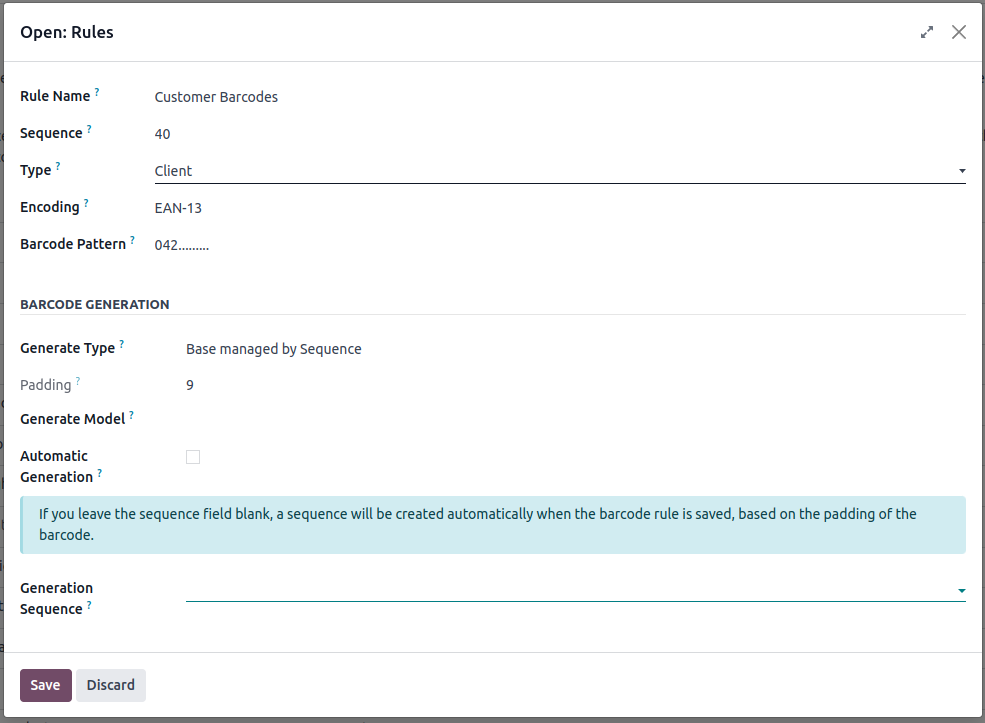
In all cases, padding will be computed automaticaly, based on the number of ‘.’ in the Barcode Pattern field.
Usage
This module is an abstract module. You can configure Barcode Rule, but to enable this feature, you need to install an extra module for a given model. This repository provide ‘barcodes_generator_product’ and ‘barcodes_generator_partner’ module to generate barcode for product or partner model.
Alternatively, you can develop a custom module for a custom model. See ‘Inheritance’ parts.
If you want to generate barcode for another model, you can create a custom module that depend on ‘barcodes_generator_abstract’ and inherit your model like that:
class MyModel(models.Model):
    _name = 'my.model'
    _inherit = ['my.model', 'barcode.generate.mixin']

class barcode_rule(models.Model):
    _inherit = 'barcode.rule'

    generate_model = fields.Selection(selection_add=[('my.model', 'My Model')])
Eventually, you should inherit your model view adding buttons and fields.
Note
Your model should have a field ‘barcode’ defined.
Known issues / Roadmap
On barcode.rule model, constraint and domain system could be set between ‘type’ and ‘generate_model’ fields.
Cache is being cleared in a constraint in barcode.rule. Mutating in a constraint is bad practice & should be moved somewhere.
Bug Tracker
Bugs are tracked on GitHub Issues. In case of trouble, please check there if your issue has already been reported. If you spotted it first, help us to smash it by providing a detailed and welcomed feedback.
Do not contact contributors directly about support or help with technical issues.
Credits
Contributors
Sylvain LE GAL (https://twitter.com/legalsylvain)
Dave Lasley <dave@laslabs.com>
-
Carlos Roca
-
Ilyas <irazor147@gmail.com>
-
Khoi (Kien Kim) <khoikk@trobz.com>
Other credits
Images
Icon of the module is based on the Oxygen Team work and is under LGPL licence: http://www.iconarchive.com/show/oxygen-icons-by-oxygen-icons.org.html
The migration of this module from 17.0 to 18.0 was financially supported by:
Camptocamp
Maintainers
This module is maintained by the OCA.

OCA, or the Odoo Community Association, is a nonprofit organization whose mission is to support the collaborative development of Odoo features and promote its widespread use.
Current maintainer:

This module is part of the OCA/stock-logistics-barcode project on GitHub.
You are welcome to contribute. To learn how please visit https://odoo-community.org/page/Contribute.
Release history Release notifications | RSS feed


Download files
Download the file for your platform. If you're not sure which to choose, learn more about installing packages.
Source Distributions
Built Distribution
Filter files by name, interpreter, ABI, and platform.
If you're not sure about the file name format, learn more about wheel file names.
Copy a direct link to the current filters
File details
Details for the file odoo_addon_barcodes_generator_abstract-19.0.1.0.0.8-py3-none-any.whl.
File metadata
- Download URL: odoo_addon_barcodes_generator_abstract-19.0.1.0.0.8-py3-none-any.whl
- Upload date:
- Size: 234.6 kB
- Tags: Python 3
- Uploaded using Trusted Publishing? No
- Uploaded via: twine/6.2.0 CPython/3.12.3
File hashes
| Algorithm | Hash digest | |
|---|---|---|
| SHA256 |
63dedb8a7c00a876d617bff83fcc21bce63af934a6f24a87b5065194b515a353
|
|
| MD5 |
a3707a09549d613cede0638efa5e9457
|
|
| BLAKE2b-256 |
f4ca50727f84795e43a822924a6b1998a9a24265b28a5f9cf294a2214bc249f9
|






