
Auto-assign CRM teams to partners based on ZIP code patterns

Project description

CRM Team ZIP Assignment





Auto-assign CRM teams to partners based on ZIP code patterns using regular expressions.
Features
Auto-assign CRM teams to partners based on ZIP code patterns
Support for Python regular expressions with validation constraints
Multi-company support
Geographic filtering by countries and states
Priority-based assignment when multiple teams match
Exclusion flag for partners who should not be auto-assigned
Real-time regex pattern validation prevents invalid patterns
Contextual action for manual assignment from partner views
Conditional assignment using pre-zip match conditions: teams can specify a domain expression (Odoo domain syntax) that must be satisfied by the partner before ZIP regex matching is performed. This allows for advanced filtering, e.g., only assign if the partner is a company or meets other criteria.
Assignment Logic
The assignment is triggered on partner create/write when ZIP, company, country, state, or exclusion flag changes. A contextual action is also available from partner views for manual assignment. The system:
Finds all active teams with ZIP assignment enabled in the partner’s company
Filters teams by matching countries and states (if specified)
For each eligible team, evaluates the optional pre-zip match condition (Odoo domain expression). If the partner does not satisfy the condition, the team is skipped.
Tests each remaining team’s regex patterns against the partner’s ZIP code
Selects the team with highest priority if multiple matches exist
Logs assignment activity for audit purposes
Assignment Rules
Only active teams with “Active ZIP Assignment” enabled are considered
Only teams in the same company as the partner are considered
Teams must have matching countries (partner’s country must be in team’s countries)
Teams must have matching states (partner’s state must be in team’s states, if team has states defined)
If a team has a pre-zip match condition, the partner must satisfy the condition (Odoo domain) before ZIP regex matching is performed. If not set, all partners are considered.
Partners without a company, ZIP code, country, or state are not assigned
Partners with “Exclude from ZIP Assignment” checked are not assigned
When multiple teams match, the team with highest priority is selected
Invalid regex patterns are prevented by validation constraints at input time
Table of contents
Usage
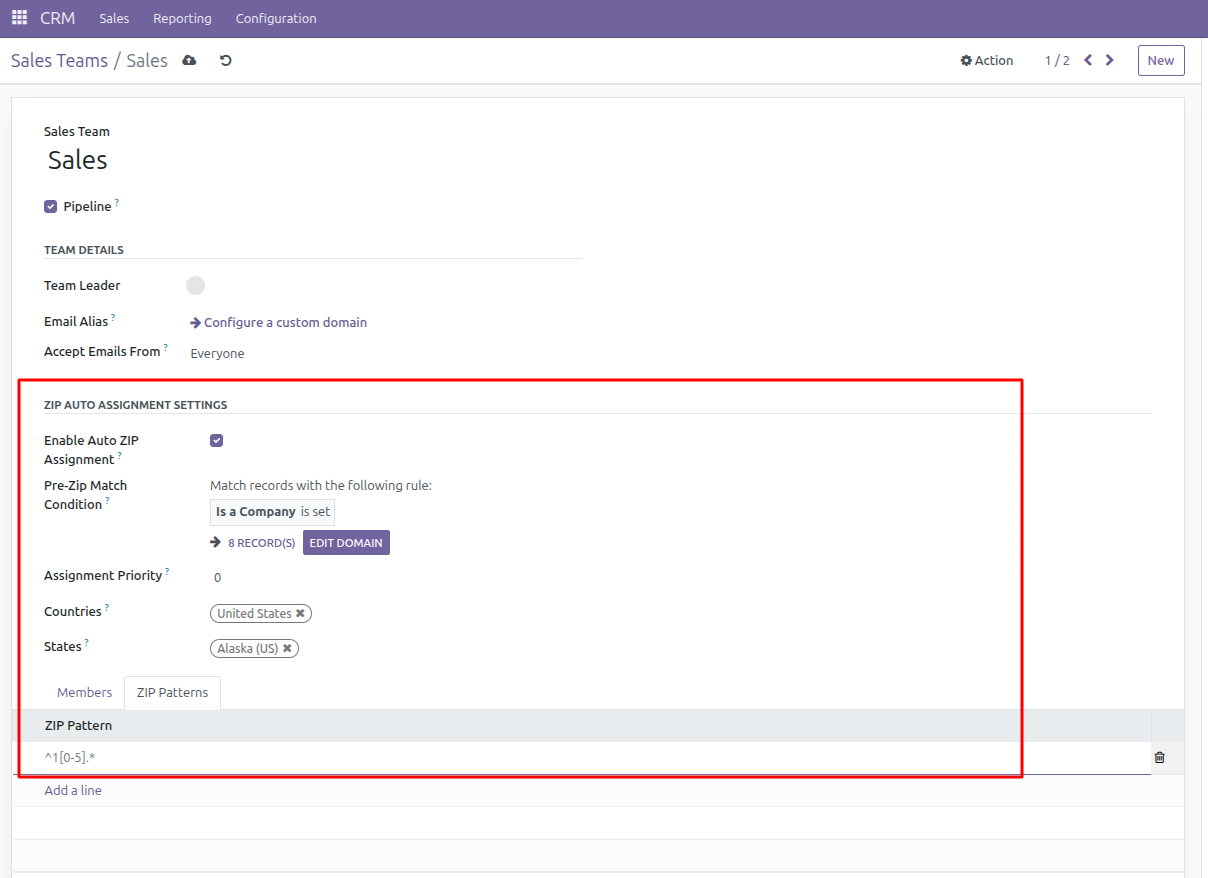
Setting up CRM Teams
Go to CRM → Configuration → Sales Teams
Edit or create a CRM team
Enable “Active ZIP Assignment” checkbox
Set “ZIP Assignment Priority” (higher number = higher priority)
Configure geographic coverage: - Select “Countries” where this team operates (required) - Select “States” within those countries (required)
Add ZIP patterns in the “ZIP Patterns” tab
(Optional) Set a “Pre-Zip Match Condition” using Odoo domain syntax to restrict assignment to partners matching specific criteria (e.g., only companies, only certain types, etc.)
Geographic Coverage
Countries: Teams will only be considered for partners located in the selected countries
States: Teams will only be considered for partners in the selected states
Domain Filtering: State selection is automatically filtered based on selected countries
Pre-Zip Match Condition
You can further restrict team assignment by specifying a domain condition in the “Pre-Zip Match Condition” field. This uses Odoo’s domain syntax (e.g., [(‘is_company’, ‘=’, True)]). Only partners matching this condition will be considered for ZIP pattern matching for this team.
Pre-Zip Match Condition Examples
Some example domain conditions:
[(‘is_company’, ‘=’, True)] — Only assign to partners that are companies
[(‘type’, ‘=’, ‘contact’)] — Only assign to contacts
[(‘industry_id’, ‘!=’, False)] — Only assign to partners with an industry set
You can combine multiple conditions, e.g. [(‘is_company’, ‘=’, True), (‘country_id’, ‘=’, ref(‘base.us’))]
ZIP Pattern Examples
All patterns are validated in real-time to ensure they are valid Python regular expressions:
^1[0-5].* - ZIP codes starting with 10-15
^2[0-9].* - ZIP codes starting with 20-29
^751.* - ZIP codes starting with 751
.*123$ - ZIP codes ending with 123
^[1-3].* - ZIP codes starting with 1, 2, or 3
^(10|20|30).* - ZIP codes starting with 10, 20, or 30
Pattern Validation
The system validates regex patterns when they are entered:
Invalid patterns will show an error message immediately
Error messages include the specific regex error for debugging
Only valid patterns can be saved to the database
Partner Configuration
Partners have an “Exclude from ZIP Assignment” checkbox to prevent automatic assignment.
Teams can have a “Pre-Zip Match Condition” to restrict assignment to partners matching specific criteria before ZIP pattern matching is performed.
Usage
Automatic Assignment
Partners are automatically assigned to CRM teams when:
A partner is created with complete geographic information (ZIP, country, state)
A partner’s ZIP code is modified
A partner’s country or state is changed
A partner’s company is changed
The exclusion flag is modified
For each team, if a “Pre-Zip Match Condition” is set, the partner must match this condition before ZIP pattern matching is performed. If not set, all partners are considered for ZIP matching.
Manual Assignment
You can also trigger assignment manually:
Use the contextual action available in partner views
This is useful for reassigning existing partners after updating team configurations or after addon installation
Assignment Requirements
For automatic assignment to work, partners must have:
A ZIP code
A country
A state
A company
“Exclude from ZIP Assignment” must be unchecked
Bug Tracker
Bugs are tracked on GitHub Issues. In case of trouble, please check there if your issue has already been reported. If you spotted it first, help us to smash it by providing a detailed and welcomed feedback.
Do not contact contributors directly about support or help with technical issues.
Credits
Contributors
Adasat Torres de León <a.torres@binhex.cloud>
Rolando Pérez Rebollo <r.perez@binhex.cloud>
Maintainers
This module is maintained by the OCA.

OCA, or the Odoo Community Association, is a nonprofit organization whose mission is to support the collaborative development of Odoo features and promote its widespread use.
This module is part of the OCA/crm project on GitHub.
You are welcome to contribute. To learn how please visit https://odoo-community.org/page/Contribute.
Release history Release notifications | RSS feed


Download files
Download the file for your platform. If you're not sure which to choose, learn more about installing packages.
Source Distributions
Built Distribution
Filter files by name, interpreter, ABI, and platform.
If you're not sure about the file name format, learn more about wheel file names.
Copy a direct link to the current filters
File details
Details for the file odoo_addon_crm_team_zip_assign-16.0.1.0.0.4-py3-none-any.whl.
File metadata
- Download URL: odoo_addon_crm_team_zip_assign-16.0.1.0.0.4-py3-none-any.whl
- Upload date:
- Size: 106.6 kB
- Tags: Python 3
- Uploaded using Trusted Publishing? No
- Uploaded via: twine/6.2.0 CPython/3.12.3
File hashes
| Algorithm | Hash digest | |
|---|---|---|
| SHA256 |
dd46fe315bd18e942d8c3340144bc67d84924b1a3d0b8206b5f211e3c7b5dcbc
|
|
| MD5 |
5fe10842714ce92339ff15587fc38a60
|
|
| BLAKE2b-256 |
5af8d6b57a8fc597d6e0efd1d01a2586e7f5d2fe2d7125f4fed65bccfa8d6bc7
|






