
Import account moves generated by external software

Project description

Account Move CSV Import DTVF





DATEV Format .csv Import
The module “datev_import_csv_dtvf” enables the import of DATEV journal entries into Odoo. Possible use cases include:
DATEV journal entries from payroll and salary accounting
DATEV journal entries in the context of annual financial statements
DATEV journal entries in the context of reallocations by the tax consultant
DATEV journal entries in the context of depreciation (AfA) bookings by the tax consultant
DATEV journal entries in the context of loans
Currently, the following limitations exist:
DATEV journal entries containing tax-related booking keys require adjustments in Odoo
Under certain circumstances, DATEV journal entries on creditor and debtor accounts may also be affected.
Table of contents
Usage
Import from DATEV into Odoo
Requirements
Make sure your user has group ‘Full accounting features’
Check if the file you want to import into Odoo is DATEV format .csv (move lines start is line 3)
Check the description in order to check if your use case is supported
Take care of the limitation to import account moves with taxes
DATEV Import
Go to Accounting/Actions/DATEV Import
Upload your DATEV format .csv file from your tax advisor
Take care the file format is “DATEV Format .csv” (old version: Generic CSV)
Take care your file encoding fits to the provided file (usually “Western (Windows-1252)”), if it is the original file from your tax advisor
Optionally you may activate “Post Journal Entry” in order to immidiately confirm the created Journal Entry
Select the mandatory journal (f.e. “Payroll Account Moves”), usually the journal type will be “Miscellaneous”
Enter optionally the “Force Date” field ((will be the field “Date” in your Journal Entry)
Enter the mandatory field “Reference” (will be the field “Reference” in your Journal Entry)
Enter optionally the field “Force Label” (will be the field “Name” in your Journal Items)
Finally click on “Run Import”
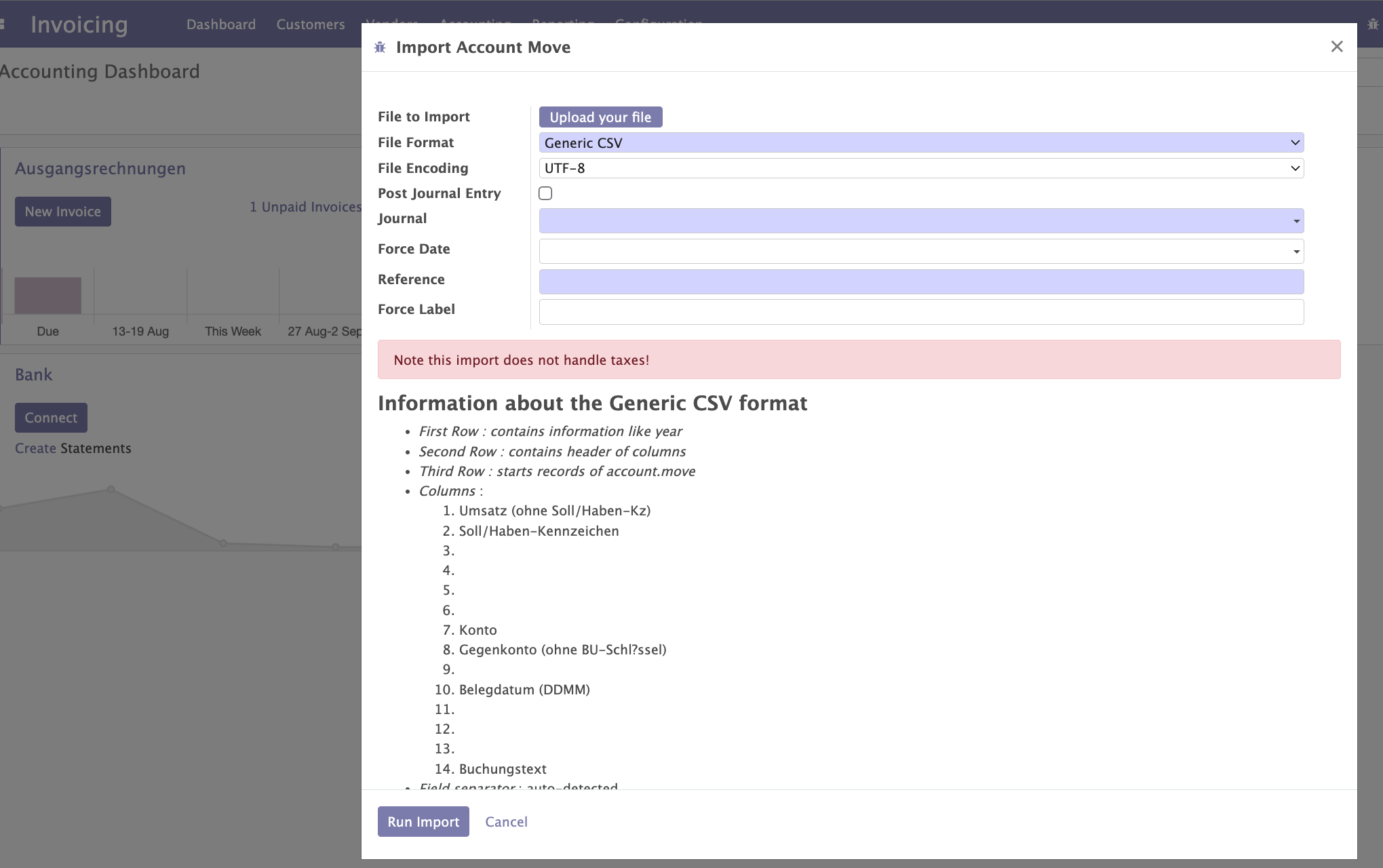
If everyting works fine, you should now see your created Journal Entry in draft (execept you activated “Post Journal Entry”)
Typical issue
If accounts doesen’t exist in Odoo the wizard may interrupt and show you potential missing accounts.
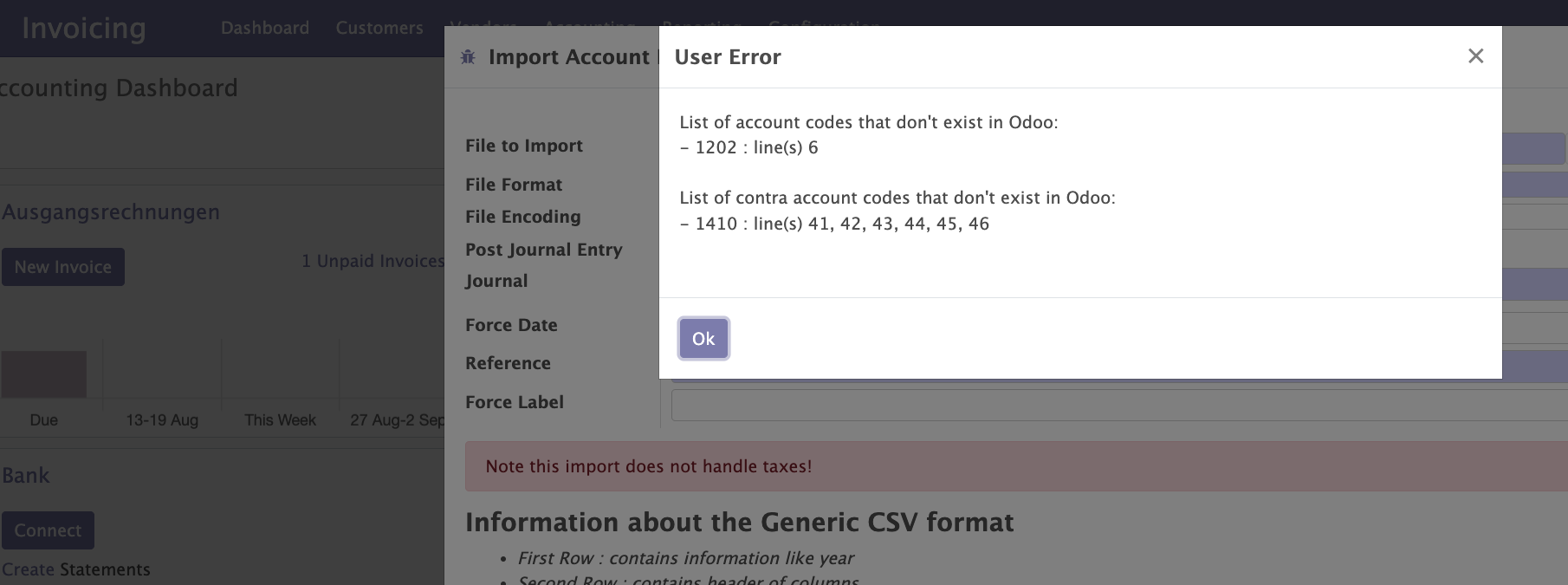
In this case you have to ensure to create the missing accounts in Odoo.
Bug Tracker
Bugs are tracked on GitHub Issues. In case of trouble, please check there if your issue has already been reported. If you spotted it first, help us to smash it by providing a detailed and welcomed feedback.
Do not contact contributors directly about support or help with technical issues.
Credits
Contributors
Holger Brunn <mail@hunki-enterprises.com> (https://hunki-enterprises.com)
Maintainers
This module is maintained by the OCA.

OCA, or the Odoo Community Association, is a nonprofit organization whose mission is to support the collaborative development of Odoo features and promote its widespread use.
This module is part of the OCA/l10n-germany project on GitHub.
You are welcome to contribute. To learn how please visit https://odoo-community.org/page/Contribute.
Release history Release notifications | RSS feed


Download files
Download the file for your platform. If you're not sure which to choose, learn more about installing packages.
Source Distributions
Built Distribution
Filter files by name, interpreter, ABI, and platform.
If you're not sure about the file name format, learn more about wheel file names.
Copy a direct link to the current filters
File details
Details for the file odoo_addon_datev_import_csv_dtvf-18.0.1.1.0-py3-none-any.whl.
File metadata
- Download URL: odoo_addon_datev_import_csv_dtvf-18.0.1.1.0-py3-none-any.whl
- Upload date:
- Size: 306.7 kB
- Tags: Python 3
- Uploaded using Trusted Publishing? No
- Uploaded via: twine/5.1.1 CPython/3.12.3
File hashes
| Algorithm | Hash digest | |
|---|---|---|
| SHA256 |
43716b90a7a795cc5cbf686b5b9bfeda55b794b4b1e64d9cb0d012202b665ae2
|
|
| MD5 |
c874d527fad6a29467462d545c42e720
|
|
| BLAKE2b-256 |
e08b84a531ed1a745cd346c80950ec2c5bbb7f7a3c869a260fab64dab5c2cce8
|






