

Helpdesk Management Activity





The module adds the following features:
Link a ticket to an Odoo model record
Set the list of available models for a Helpdesk team
Pre-configure ticket description template based on it’s category
Create an activity for the linked record right from the Ticket
Change the Ticket’s stage based on the activity state
Table of contents
Use Cases / Context
To streamline your helpdesk operations you can set activities to the pre-configured odoo modules records right from the Helpdesk.
The ticket will be moved to the pre-defined stage when the activity is marked as done.
For instance:
A customer reaches the support team regarding a delayed shipment. - Assign Activity: The helpdesk support team user opens a ticket for the relevant Inventory picking record with specific instructions to check the shipment status and actions that must be taken. - Warehouse Action: The assigned warehouse user sees the new activity in their Odoo dashboard, follows the prescribed steps to investigate, and updates the activity status accordingly. - Automated Updates: Once the warehouse user marks the activity as done, the ticket automatically moves to the “Awaiting” stage to be checked by the support team user.
Configuration
To Configure Available Odoo Models
Go to Helpdesk–>Configuration–>Settings
In the Available Models field add models available for a Helpdesk
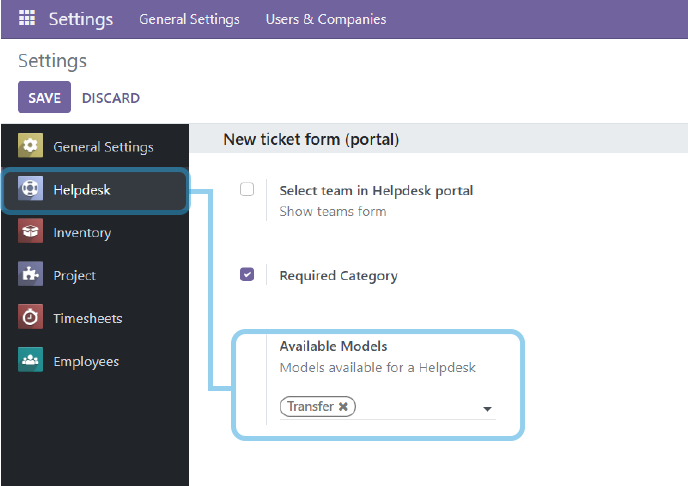
To Configure Ticket’s Stage on Activity State**
Go to Helpdesk–>Configuration–>Teams
Create a new team or select an existing record
Enable the “Set Activities” checkbox to enable the feature
Select the “Done Activity Stage” to move the ticket when the activity is done
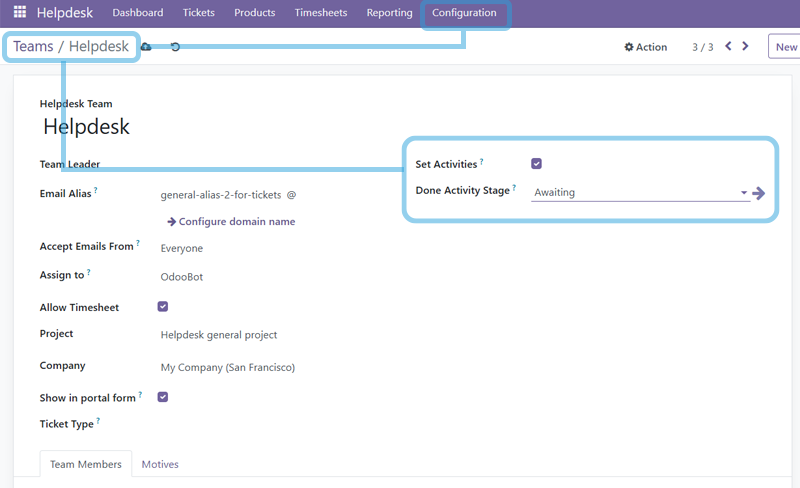
Usage
Go to Helpdesk module
Select a Team
Open a Ticket
Create a new Ticket
In the “Assign Activity” group
Select a related model and record in the Source field
Select Activity type and due date
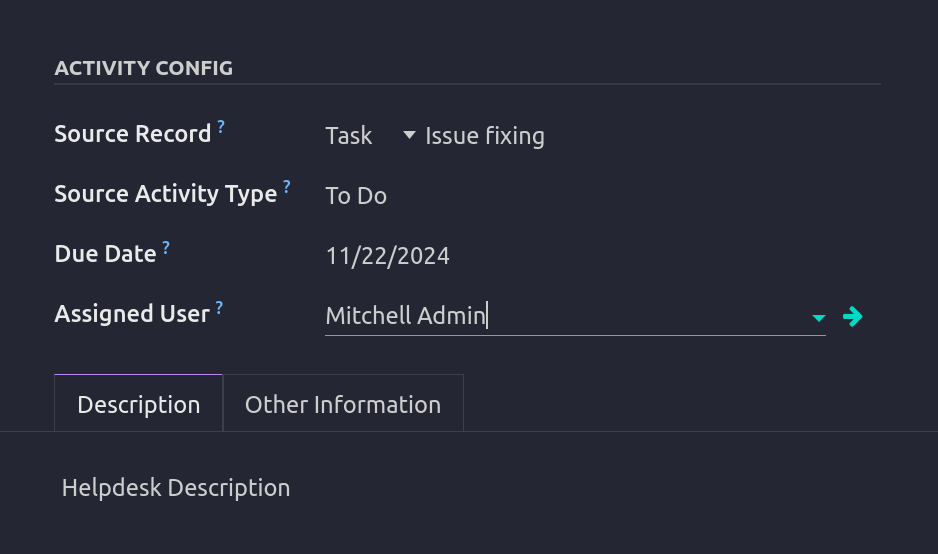
Enter the Description
Click the “Perform Action” button
Ticket will be moved to the next preset state and activity will be created in the related model
If an activity is Done, the Ticket moves to the pre-defined stage
Bug Tracker
Bugs are tracked on GitHub Issues. In case of trouble, please check there if your issue has already been reported. If you spotted it first, help us to smash it by providing a detailed and welcomed feedback.
Do not contact contributors directly about support or help with technical issues.
Credits
Contributors
-
Ivan Sokolov
Mikhail Lapin
Dessan Hemrayev
Maksim Shurupov
Maintainers
This module is maintained by the OCA.

OCA, or the Odoo Community Association, is a nonprofit organization whose mission is to support the collaborative development of Odoo features and promote its widespread use.
This module is part of the OCA/helpdesk project on GitHub.
You are welcome to contribute. To learn how please visit https://odoo-community.org/page/Contribute.
1 maintainer

Release files for odoo-addon-helpdesk-mgmt-activity 19.0.1.0.0.6
For a detailed explanation of source distributions (sdists) and built distributions (wheels), please see the package formats documentation.
Built distribution (wheel)
| File | Interpreter | ABI | Platform | Reset |
|---|---|---|---|---|
| odoo_addon_helpdesk_mgmt_activity-19.0.1.0.0.6-py3-none-any.whl | Python 3 | none | any | Details |
Release files / odoo_addon_helpdesk_mgmt_activity-19.0.1.0.0.6-py3-none-any.whl
| Download URL | odoo_addon_helpdesk_mgmt_activity-19.0.1.0.0.6-py3-none-any.whl |
|---|---|
| Size | 184.8 kB |
| Tags | Python 3 |
|
SHA-256 checksum How to use checksums |
fb3447f50af966f5a3af48f61a8eaf82b81277cb872b1534ff93b9380d608c2a
|
|
BLAKE2b-256 checksum How to use checksums |
fefa2944a4913edf294ec362708f4f794337111736e083935546f8af05e81ee8
|
| Upload date | |
|
Uploaded using Trusted Publishing? What is trusted publishing? |
No |
| Uploaded via |
twine/6.2.0 CPython/3.12.3
|














