

VAT Teletransmission via Teledec.fr





This module adds support for EDI teletransmission of the VAT return via Teledec.fr. As explained on this page of impots.gouv.fr, you have to select an EDI partner if you want to teletransmit your VAT return (there is no open/public API). Teledec is listed on the official list of active EDI partners under their legal name LPI Conseil with their official EDI partner reference 7500201.
This module supports EDI teletransmission of: - 3310-CA3 monthly and quarterly, - 3310-A (Appendix), - 3514 (Credit VAT reimbursement).
The price of this EDI service for VAT returns is written on the page TELEDEC : la solution pour vos déclarations fiscales in the drop-down section Déclarer et payer la TVA at the bottom of the page.
Table of contents
Configuration
Under the menu Invoicing > Configuration > Settings, in the France VAT section, you must configure:
the company bank account that will be used as the default bank account to pay VAT,
the email (login) corresponding to your account in Teledec.fr
select the legal representative of your company. This person must have a name, an email, a function and a title (mister or madam).
the Company Legal Form (select in the list),
Teledec Test Mode: if enable, the VAT returns will be sent to the Teledec staging server and the VAT returns will not relayed to DGFiP.
In the Odoo Server configuration file, add an entry teledec_private_key with the private key that was sent to your by Teledec.
Usage
On a VAT return in Odoo, when you reach the step Automatic Lines, you will see a button Send via Gateway and a field Send Gateway to select the gateway. Make sure the field Send Gateway is set to Teledec.fr and then click on the button Send via Gateway to teletransmit the VAT return to DGFiP via Teledec.
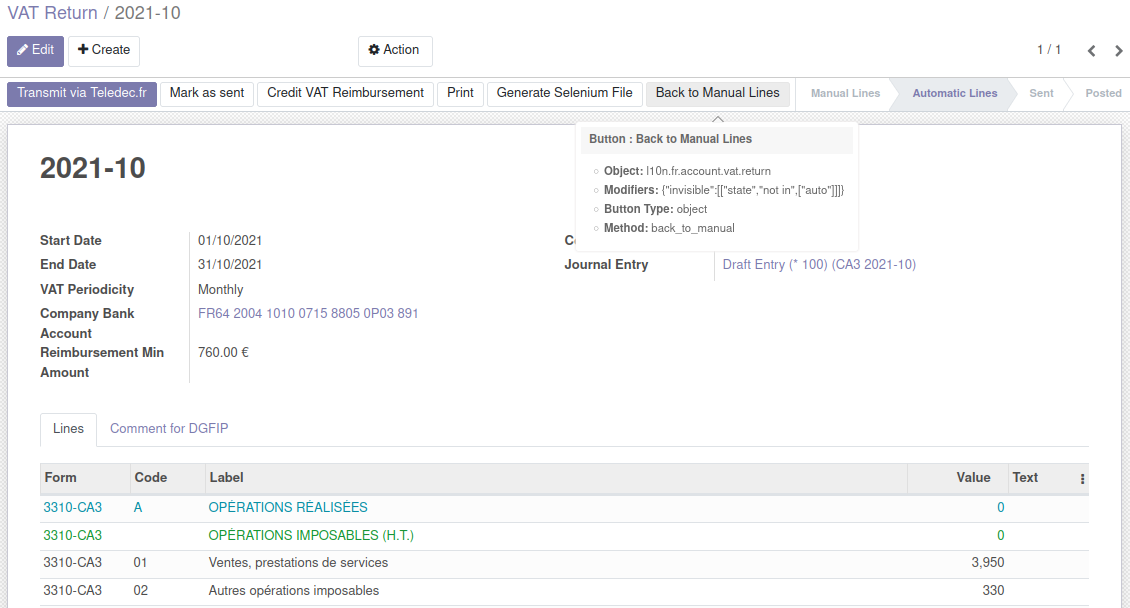
Teledec will send you an email once they have successfully transmitted your VAT return to DGFiP.
Bug Tracker
Bugs are tracked on GitHub Issues. In case of trouble, please check there if your issue has already been reported. If you spotted it first, help us to smash it by providing a detailed and welcomed feedback.
Do not contact contributors directly about support or help with technical issues.
Credits
Contributors
Alexis de Lattre <alexis.delattre@akretion.com>
Maintainers
This module is maintained by the OCA.

OCA, or the Odoo Community Association, is a nonprofit organization whose mission is to support the collaborative development of Odoo features and promote its widespread use.
Current maintainer:

This module is part of the OCA/l10n-france project on GitHub.
You are welcome to contribute. To learn how please visit https://odoo-community.org/page/Contribute.
1 maintainer

Metadata
1 maintainer
Release files for odoo-addon-l10n-fr-account-vat-return-teledec 16.0.3.0.0.4
For a detailed explanation of source distributions (sdists) and built distributions (wheels), please see the package formats documentation.
Built distribution (wheel)
| File | Interpreter | ABI | Platform | Actions Reset |
|---|---|---|---|---|
| odoo_addon_l10n_fr_account_vat_return_teledec-16.0.3.0.0.4-py3-none-any.whl | Python 3 | none | any | Details for odoo_addon_l10n_fr_account_vat_return_teledec-16.0.3.0.0.4-py3-none-any.whl |
Release files / odoo_addon_l10n_fr_account_vat_return_teledec-16.0.3.0.0.4-py3-none-any.whl
| Download URL | odoo_addon_l10n_fr_account_vat_return_teledec-16.0.3.0.0.4-py3-none-any.whl |
|---|---|
| Size | 148.7 kB |
| Tags | Python 3 |
|
SHA-256 checksum How to use checksums |
87ba14742fa835df544537db4c2f2e2fd16d7617dad07c80fabc35294bc7e793
|
|
BLAKE2b-256 checksum How to use checksums |
18a1a934a1ea1cfbcb462e079fdb4ddcab6a4ebe7dd1bbe6cf17c8705e790a9d
|
| Upload date | |
|
Uploaded using Trusted Publishing? What is trusted publishing? |
No |
| Uploaded via |
twine/6.2.0 CPython/3.12.3
|
Security for odoo-addon-l10n-fr-account-vat-return-teledec 16.0.3.0.0.4
Provenance
Provenance describes where a file came from. On PyPI, provenance is shared via attestations, which provide a verifiable record of the build or publishing details. View details, limitations and caveats.
No provenance found
None of the files in this release were uploaded with provenance metadata.
A note on package security
PyPI is a repository for distributing packages, not a service for auditing them. While third-party security researchers and our staff do their best to detect and remove malicious packages, PyPI cannot guarantee the quality, security or suitability of any given package.
To learn more about protecting yourself from malicious actors, visit our package security documentation.














