





Italiano
Per quanto riguarda la configurazione o l’utilizzo delle ritenute seguire le istruzioni indicate nel modulo l10n_it_withholding_tax.
Questo modulo permette di tenere traccia del pagamento della ritenuta d’acconto.
English
Regarding the configuration or use of withholding taxes, follow the instructions in the module l10n_it_withholding_tax.
This module allows to keep track of the withholding tax payment.
Table of contents
Usage
Italiano
Per generare il pagamento di una ritenuta d’acconto:
Aprire Fatturazione > Contabilità > Ritenuta d’acconto > Movimenti RdA.
Selezionare i movimenti di cui si vuole fare il pagamento
Cliccare su Azione > Crea movimento di pagamento
Nel popup, cliccare su Genera
Verrà quindi visualizzato un ‘Movimento di pagamento RdA’ che rappresenta il pagamento delle ritenute selezionate al punto 2.
Confermare il Movimento di pagamento RdA e compilare i campi in Impostazioni conto:
Data pagamento: la data in cui è stato effettuato il pagamento.
Registro: il registro in cui verrà salvata la registrazione contabile.
Conto: il conto della banca tramite il quale si farà il pagamento.
Ad esempio:
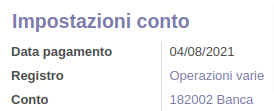
Creare la registrazione contabile cliccando su ‘Crea movimento contabile’: la registrazione creata sarà accessibile tramite il campo “Movimento contabile”.
English
In order to generate a withholding tax payment:
Open Accounting > Accounting > Withholding tax > WT Moves.
Select the transactions you want to pay for
Click Action > Create Payment Move
In the pop-up, click Generate
A ‘WT Payment Move’ will then be displayed representing the payment of the withholding taxes selected in step 2.
Confirm the RdA Payment Movement and fill in the fields in Account Setting:
Payment Date: The date the payment was made.
Register: the journal where the journal entry will be saved.
Account: the bank account through which the payment will be made.
Eg:
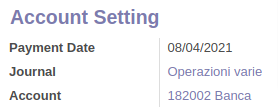
Create the journal entry by clicking on ‘Create Account Move’: the created journal entry will be accessible through the “Account Move” field.
Bug Tracker
Bugs are tracked on GitHub Issues. In case of trouble, please check there if your issue has already been reported. If you spotted it first, help us to smash it by providing a detailed and welcomed feedback.
Do not contact contributors directly about support or help with technical issues.
Credits
Contributors
Alessandro Camilli <alessandrocamilli@openforce.it>
Lorenzo Battistini <lorenzo.battistini@agilebg.com>
Matteo Bilotta <mbilotta@linkgroup.it>
Nextev <web@nextev.it>
-
Simone Rubino <simone.rubino@aion-tech.it>
Other credits
The development of this module has been financially supported by:
Maintainers
This module is maintained by the OCA.

OCA, or the Odoo Community Association, is a nonprofit organization whose mission is to support the collaborative development of Odoo features and promote its widespread use.
This module is part of the OCA/l10n-italy project on GitHub.
You are welcome to contribute. To learn how please visit https://odoo-community.org/page/Contribute.
1 maintainer

Metadata
1 maintainer
Release files for odoo-addon-l10n-it-withholding-tax-payment 16.0.1.1.0.2
For a detailed explanation of source distributions (sdists) and built distributions (wheels), please see the package formats documentation.
Built distribution (wheel)
| File | Interpreter | ABI | Platform | Reset |
|---|---|---|---|---|
| odoo_addon_l10n_it_withholding_tax_payment-16.0.1.1.0.2-py3-none-any.whl | Python 3 | none | any | Details |
Release files / odoo_addon_l10n_it_withholding_tax_payment-16.0.1.1.0.2-py3-none-any.whl
| Download URL | odoo_addon_l10n_it_withholding_tax_payment-16.0.1.1.0.2-py3-none-any.whl |
|---|---|
| Size | 178.2 kB |
| Tags | Python 3 |
|
SHA-256 checksum How to use checksums |
13495a926ba5b05e79b7042ba7fe23239c6db6e9be7155a739db09f94b6ac33f
|
|
BLAKE2b-256 checksum How to use checksums |
2eddd789cddd070e556c0deb229404e760106ba6949eb2a70e00e86eaf2cda0e
|
| Upload date | |
|
Uploaded using Trusted Publishing? What is trusted publishing? |
No |
| Uploaded via |
twine/5.1.1 CPython/3.12.3
|














