
Compute weight based on barcodes with prices

Project description

Point of Sale - Price to Weight





This module extends Odoo Point Of Sale features, to allow to scan barcode with price and to compute according quantity.
In Odoo by default, there are three types of barcode rules for products.
‘Unit Product’ (type=product). Scanning a product will add a unit of this product to the current order.
‘Priced product’ (type=price). A price is extracted from the barcode, and a new line with the given price and a quantity = 1 is added to the current order.
‘Weighted product’ (type=weight). A weight is extracted from the barcode, and a new line with the given weight, and a computed price (quantity * Unit price) is added to the current order.
This module add a new option:
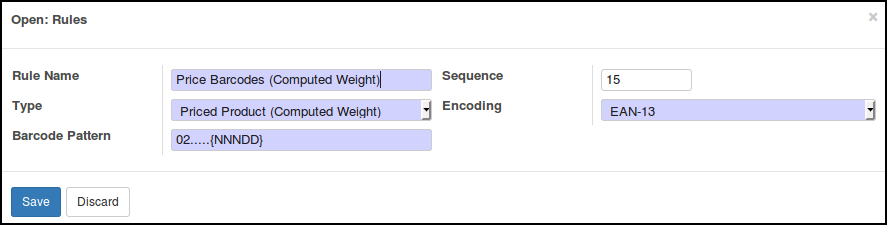
‘Priced Product (Computed Weight)’ (type=price_to_weight). A price is extracted from the barcode, and a new line with the given price, and a computed quantity (Price / Unit Price) is added to the current order.
This module is usefull in shops with products scaled, to manage correctly stock quantities.
Samples
Given a product with a unit price of 1,50€ / kg
- The barcode is 0212345{NNNDD}x where:
02 is the prefix of the barcode rule
12345 is the product number
{NNNDD} is the price of the scaled product
x is the control digit
On the product we so set ‘0212345000007’ in the barcode field.
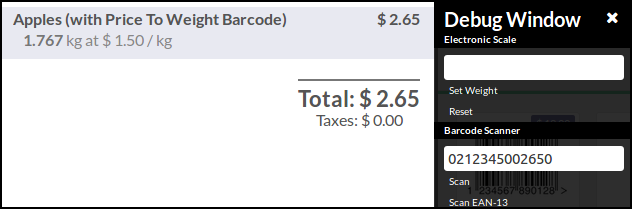
- if the scanned barcode is 0212345002650:
{NNNDD} is 00265, the price is so 2,65€
the according quantity is 2,65€ / 1,5 €/kg = 1,767 kg
- if the scanned barcode is 0212345008102:
{NNNDD} is 00810, the price is so 8,10€
the according quantity is 8,10€ / 1,5 €/kg = 5,400 kg
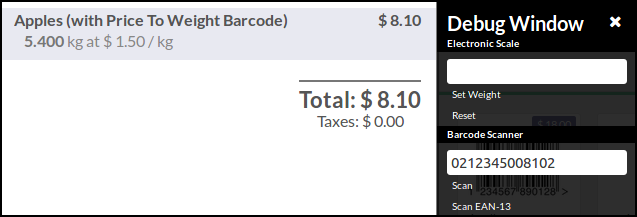
Table of contents
Configuration
Go to Settings > Point of Sale > Inventory.
Open the Barcode Nomenclature list and edit your barcode rules, according to your barcodes settings.
Ensure that the “Price (Computed Weight) Barcodes Include Taxes” checkbox is checked or not depending on whether the prices encoded in your barcodes include taxes or not.
Bug Tracker
Bugs are tracked on GitHub Issues. In case of trouble, please check there if your issue has already been reported. If you spotted it first, help us to smash it by providing a detailed and welcomed feedback.
Do not contact contributors directly about support or help with technical issues.
Credits
Contributors
Sylvain LE GAL <https://twitter.com/legalsylvain>
Other credits
Icon parts come from http://icons8.com
Maintainers
This module is maintained by the OCA.

OCA, or the Odoo Community Association, is a nonprofit organization whose mission is to support the collaborative development of Odoo features and promote its widespread use.
This module is part of the OCA/pos project on GitHub.
You are welcome to contribute. To learn how please visit https://odoo-community.org/page/Contribute.
Release history Release notifications | RSS feed


Download files
Download the file for your platform. If you're not sure which to choose, learn more about installing packages.
Source Distributions
Built Distribution
Filter files by name, interpreter, ABI, and platform.
If you're not sure about the file name format, learn more about wheel file names.
Copy a direct link to the current filters
File details
Details for the file odoo_addon_pos_price_to_weight-16.0.1.1.0-py3-none-any.whl.
File metadata
- Download URL: odoo_addon_pos_price_to_weight-16.0.1.1.0-py3-none-any.whl
- Upload date:
- Size: 103.6 kB
- Tags: Python 3
- Uploaded using Trusted Publishing? No
- Uploaded via: twine/6.2.0 CPython/3.12.3
File hashes
| Algorithm | Hash digest | |
|---|---|---|
| SHA256 |
c04deb807ae4cee8357b830d8e51843ee35e2b91a74d9eb10df8e5df4d3ab038
|
|
| MD5 |
289cb2a28e931c7f56c9ec00c4913e88
|
|
| BLAKE2b-256 |
1ec7be4da0162924d11269ca169f94e1820953fc5c784771a3ae65dd8e78f0e9
|






