

Product - Print Categories





This module is designed to extend product printing features. It allows user to create new print categories of products depending of the data that are on the labels of the products variants.
When a field has changed, the product will be set as ‘To print’ automatically.
This module requires to install custom modules to have pricetags templates, or alternatively to create pricetag reports templates by UI.
Table of contents
Configuration
Group setting
Add yourself to the ‘Print Category Manager’ group in the ‘Pricetags’ category.
Create Print Categories
Go to ‘Sales’ > ‘Products’ > ‘Print Categories’
Find or create new print categories of products
Set the fields that will trigger to print again the product label (e.g : name, sale price etc.)
Set the qweb view that will be used for this category
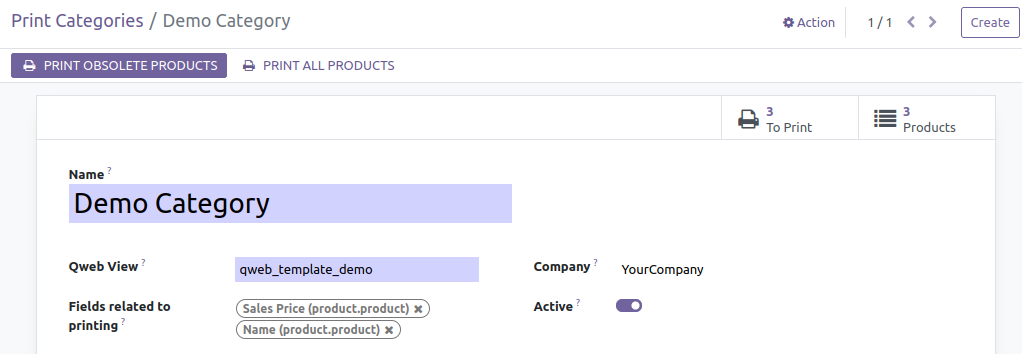
Alternatively, you can create product print categories and qweb in a custom module.
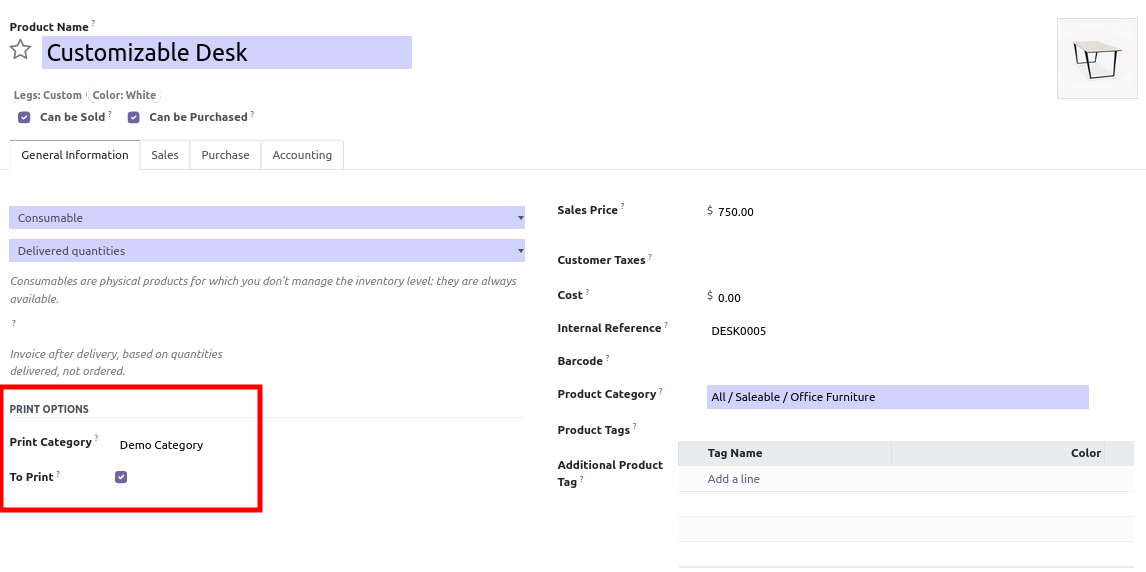
Affect products to the categories
Go to “Sales” > “Products” > “Product variants” (or “Products” if variants are not activated).
Go to your product in General Information tab
Set a print category
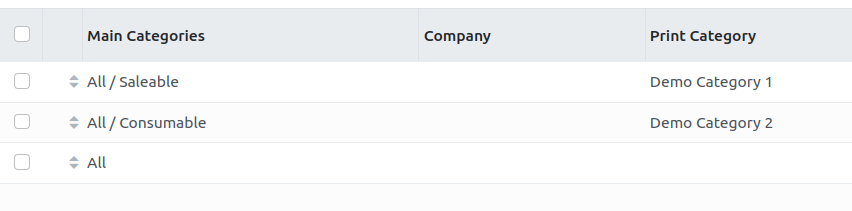
Create Print Category Rules
Go to ‘Sales’ > ‘Products’ > ‘Print Category Rules’
Create various ordered rules depending on product category and company.
This system allow to automatically set / remove print category to a product, when changing its company or its category.
Usage
Go to “Sales” > “Products” > “Print Categories”
Choose between “Print Obsolete Products” or “Print All Products”
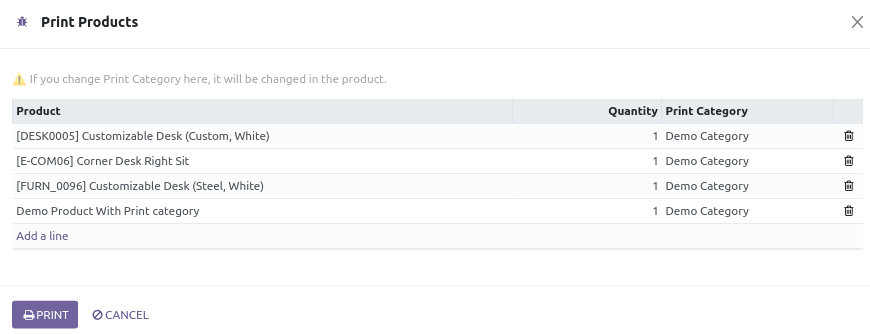
Alternatively you can select product in product or variants list view and click on “Action” > “Print Products”
Bug Tracker
Bugs are tracked on GitHub Issues. In case of trouble, please check there if your issue has already been reported. If you spotted it first, help us to smash it by providing a detailed and welcomed feedback.
Do not contact contributors directly about support or help with technical issues.
Credits
Contributors
Sylvain LE GAL <https://twitter.com/legalsylvain>
Quentin DUPONT <https://twitter.com/pondupont>
-
Mario Luis <m.luis@binhex.cloud>
Heliconia Solutions Pvt. Ltd. <https://www.heliconia.io>
Maintainers
This module is maintained by the OCA.

OCA, or the Odoo Community Association, is a nonprofit organization whose mission is to support the collaborative development of Odoo features and promote its widespread use.
Current maintainer:

This module is part of the OCA/product-attribute project on GitHub.
You are welcome to contribute. To learn how please visit https://odoo-community.org/page/Contribute.
1 maintainer

Release files for odoo-addon-product-print-category 18.0.1.0.1
For a detailed explanation of source distributions (sdists) and built distributions (wheels), please see the package formats documentation.
Built distribution (wheel)
| File | Interpreter | ABI | Platform | Reset |
|---|---|---|---|---|
| odoo_addon_product_print_category-18.0.1.0.1-py3-none-any.whl | Python 3 | none | any | Details |
Release files / odoo_addon_product_print_category-18.0.1.0.1-py3-none-any.whl
| Download URL | odoo_addon_product_print_category-18.0.1.0.1-py3-none-any.whl |
|---|---|
| Size | 218.4 kB |
| Tags | Python 3 |
|
SHA-256 checksum How to use checksums |
49baae467f44e11dd0ff288f7ad43b03ed3ec5d1d5b0ca911b9c5aa1d659c7b2
|
|
BLAKE2b-256 checksum How to use checksums |
ceb6c3a41c8cb11e97131751cacf7d0b1bacaa0e0a631b3876a743ee5c465334
|
| Upload date | |
|
Uploaded using Trusted Publishing? What is trusted publishing? |
No |
| Uploaded via |
twine/6.2.0 CPython/3.12.3
|














